


IridiumIO/CompactGUI
Reduce the space taken up by games and programs on disk by using native Windows APIs
 Iridium-IO·2mo ago·April 15, 2026
📋 Changes
- Add multi-language support thanks to @XTsat.
- Chinese by @XTsat
- Russian by @Blueberryy
- Spanish by @ShadowLoveElysia
- Added a button in the `Settings` page to open the settings folder (`AppData/Local/IridiumIO/CompactGUI`), in case anything goes wrong - config files for settings and the watcher database are located there.
🐛 Fixes
- (Hopefully) fixes a crash when the internet connection is slow / disconnected #528
- -----
📦 Installation
- ````yml
- CompactGUI.exe (9MB): Smaller size, but requires .NET 9 Runtime to be installed
- CompactGUI.mono.exe (64MB): Fully self-contained and embeds the necessary .NET 9 libraries
- ````
- ```ahk
- winget install CompactGUI
- ```
- >[!NOTE]
- + 9 more
📦 Like this project?
- Please consider leaving a tip on Ko-Fi :)
- Full Changelog: https://github.com/IridiumIO/CompactGUI/compare/v4.0.0-beta.6...v4.0.0-beta.7
Iridium-IO·11mo ago·July 16, 2025📋 Changes
- `NEW` Added Scheduler
- Adds the ability to schedule background compression of watched folders, with the following choices:
- When system is idle (existing functionality)
- On Schedule
- On Schedule *if* system is also idle (for example you want to run it at 6pm every day, but only if you're not actively using the computer)
- If the Scheduler is running and you wish to cancel it, you can do so from the `Watcher` tab as below
- Note: Scheduler will only run if the computer is already on and CompactGUI is running.
- <img width="600" height="720" alt="image" src="https://github.com/user-attachments/assets/3aaad7cb-a4d2-498c-b821-a2456ffab6a4" />
- + 14 more
🐛 Fixes
- Fixed several memory leaks
- Major performance improvements in several areas and reduced overall memory usage
- Fixed a crash that could occur when opening the skiplist
- Fixed the watcher list nuking itself if a monitored folder is deleted #546
- Fixed instances where the background watcher simply doesn't do anything
- Fixed the compression buttons showing the wrong estimates #543
- Fixed spamming disk writes when the user changes settings (previously every change in the settings menu would immediately write the new settings file to disk - now this is debounced)
- -----
📦 Installation
- ````yml
- CompactGUI.exe (10MB): Smaller size, but requires .NET 9 Runtime to be installed
- CompactGUI.mono.exe (64MB): Fully self-contained and embeds the necessary .NET 9 libraries
- ````
- ```ahk
- winget install CompactGUI
- ```
- >[!NOTE]
- + 9 more
📦 Like this project?
- Please consider leaving a tip on Ko-Fi :)
- Full Changelog: https://github.com/IridiumIO/CompactGUI/compare/v4.0.0-beta.5...v4.0.0-beta.6
Iridium-IO·1y ago·June 18, 2025🐛 Tweaks + Bugfixes
- You can once again drag-and-drop folders into the main window to be compressed #533
- Adds an error message when attempting to compress folders that have been compressed by the old Windows LZNT1 method (using the "Compress contents to save disk space" option) as this is unsupported. #316
- Adds a warning when attempting to compress games that use `DirectStorage` #423
- Window state, position and size is now saved between application launches #537
- Compression options are now saved between application launches, and when adding new folders to the queue any modifications made to the configuration options will carry across #536
- No longer travels down symbolic links or directory junctions when scanning folders. This may have been the cause of some crashes and incorrect file size reporting #532
📦 Known Issues
- Adding an extension to the Settings skiplist will not update the `XXX files will be skipped` counter unless you remove the folder and re-add it to the queue
- -----
📦 Installation
- ````yml
- CompactGUI.exe (10MB): Smaller size, but requires .NET 9 Runtime to be installed
- CompactGUI.mono.exe (64MB): Fully self-contained and embeds the necessary .NET 9 libraries
- ````
- ```ahk
- winget install CompactGUI
- ```
- >[!NOTE]
- + 9 more
📦 Like this project?
- Please consider leaving a tip on Ko-Fi :)
- Full Changelog: https://github.com/IridiumIO/CompactGUI/compare/v4.0.0-beta.4...v4.0.0-beta.5
Iridium-IO·1y ago·June 11, 2025📋 Changes
- `NEW` Added Results Database Viewer
- Let's you see and search compression results from user-submitted data
- It uses the same database that is already used to show the `estimated compression` when working on a Steam game
- `Note`: I've added a filter in the generation of the database to get rid of extremely old submissions that are likely to be inaccurate. This means that any game that has more than 4000 results (1000 per compression level) will have the oldest submissions stripped out. "Ark: Survival Evolved" is a good example of this.
- Rewrote core logic in C# (time to start saying goodbye, VB.NET my old friend)
- Improved analyser performance
- 
🐛 Fixes
- Fixes crash when the program can't download an updated results database on launch #528
- Fixes adding watched folders to the compression queue not auto-selecting the correct compression level #530
📦 Known Issues
- Adding an extension to the Settings skiplist will not update the `XXX files will be skipped` counter unless you remove the folder and re-add it to the queue
- -----
📦 Installation
- ````yml
- CompactGUI.exe (10MB): Smaller size, but requires .NET 9 Runtime to be installed
- CompactGUI.mono.exe (64MB): Fully self-contained and embeds the necessary .NET 9 libraries
- ````
- ```ahk
- winget install CompactGUI
- ```
- >[!NOTE]
- + 9 more
📦 Like this project?
- Please consider leaving a tip on Ko-Fi :)
- Full Changelog: https://github.com/IridiumIO/CompactGUI/compare/v4.0.0-beta.3...v4.0.0-beta.4
Iridium-IO·1y ago·June 5, 2025📋 Changes
- `NEW` Added Compression Estimator
- Estimations now show up for non-Steam games as well, and are generally accurate to ±5% of the `XPRESS4K` compressability
- Scans tiny fragments of each file when analysing to guess how compressible it is by using in-memory compression
- These estimates can be used to skip files that may not compress well in the selected folder
- The UI and checkboxes in the `Configuration` list have been updated to reflect this, along with tooltips to improve clarity
- These estimations can be disabled in the Settings
- > [!NOTE]
- >
- + 3 more
📦 Known Issues
- Adding an extension to the Settings skiplist will not update the `XXX files will be skipped` counter unless you remove the folder and re-add it to the queue
- -----
📦 Installation
- ````yml
- CompactGUI.exe (10MB): Smaller size, but requires .NET 9 Runtime to be installed
- CompactGUI.mono.exe (64MB): Fully self-contained and embeds the necessary .NET 9 libraries
- ````
- ```ahk
- winget install CompactGUI
- ```
- >[!NOTE]
- + 9 more
📦 Like this project?
- Please consider leaving a tip on Ko-Fi :)
- Full Changelog: https://github.com/IridiumIO/CompactGUI/compare/v4.0.0-beta.2...v4.0.0-beta.3
Iridium-IO·1y ago·June 2, 2025📋 Changes
- Watcher
- You can now rename watched folders by double-clicking their display name #487
- Added a button to re-analyze individual folders #452
- The PC now stays awake while a folder is being compressed (sleep prevention is lifted when compression finishes or CompactGUI is closed) #110
- Added an `Admin` icon to the UI when running CompactGUI as administrator
- 
🐛 Fixes
- Fixed several crashes related to the Watcher #519
- Removed an unused registry entry that also caused a crash #517
- Fixed unreadable `Skiplist` window on Windows 10 #516
- CompactGUI no longer appears as "MainWindow" in the taskbar #515
- Fixed issue where a paused folder could get stuck after clicking "Apply to All" from another folder #521
- Minor Watcher UI fixes:
- Fixed missing analysis indicator next to folders
- `Last Compressed` date now updates correctly after compression #522
- + 1 more
📦 Installation
- ````yml
- CompactGUI.exe (10MB): Smaller size, but requires .NET 9 Runtime to be installed
- CompactGUI.mono.exe (64MB): Fully self-contained and embeds the necessary .NET 9 libraries
- ````
- ```ahk
- winget install CompactGUI
- ```
- >[!NOTE]
- + 9 more
📦 Like this project?
- Please consider leaving a tip on Ko-Fi :)
- Full Changelog: https://github.com/IridiumIO/CompactGUI/compare/v4.0.0-beta.1...v4.0.0-beta.2
Iridium-IO·1y ago·May 22, 2025📋 Changes
- UI overhaul - The existing UI with the animated transitions was getting really hard to manage, and I couldn't figure out how to squeeze some new features into it. So I've rewritten it entirely. It's less unique, and I'm not entirely a fan of the new design (in progress), but at least it's more functional. If you have suggestions on changes, please let me know
- Switched to `WPFUI` and uses a more standard navigation layout
- Window can now be resized properly
- Folder Queue - Multiple folders can be selected for compression at a time
- Each folder can have different compression options
- Improved background watcher logic and environment checks
🐛 Fixes
- Watcher:
- Fixed a crash when adding an unsupported folder to the Watcher page
- Fixed details not updating in some situations
📦 Known Issues
- If CompactGUI is run from the root of a directory, it will crash on launch. >> I have overwritten this release with a fixed version (version number unchanged), redownload if you have this issue
- 
- 
- 
- 
- -----
📦 Installation
- ````yml
- CompactGUI.exe (10MB): Smaller size, but requires .NET 9 Runtime to be installed
- CompactGUI.mono.exe (64MB): Fully self-contained and embeds the necessary .NET 9 libraries
- ````
- ```ahk
- winget install CompactGUI
- ```
- >[!NOTE]
- + 9 more
📦 Like this project?
- Please consider leaving a tip on Ko-Fi :)
Iridium-IO·1y ago·February 24, 2025📋 Changes
- Navigation Bar is now always visible (to switch between `Compactor` and `Folder Watcher` views)
- Quality Of Life:
- Added tooltips to buttons in the Folder Watcher view. #487
- Holding `Shift` + clicking on the exit button now closes CompactGUI without minimising to tray.
🐛 Fixes
- Fixed program hang when attempting to compress folders on RAMDisks or SSHDs #488 #489
- ---
📦 Installation Options
- ````yml
- CompactGUI.exe (2.8MB): Smaller size, but requires .NET 9 Runtime to be installed
- CompactGUI.mono.exe (72MB): Fully self-contained and embeds the necessary .NET 9 libraries
- ````
- ```ahk
- winget install CompactGUI
- ```
- > Automatically installs .NET 9 if required, however it can often take a few days for new releases to become available.
- + 6 more
📦 Like this project?
- Please consider leaving a tip on Ko-Fi :)
Iridium-IO·1y ago·January 25, 2025📋 Changes:
- Upgraded to .NET 9.0
- For some reason this fixes the Windows Defender false positives from version 3.6. 🤷 No other changes have been made
- ---
📦 Important!
- Because this application uses .NET 9, you have two choices of downloads:
- 
- 2.8 MB: If you don't have the .NET 9 runtime installed when you try to run this, it will prompt you to download it from Microsoft.
- 
- 70 MB: Includes all libraries required to run it completely standalone, however it's nearly 25x the size. I do recommend installing the .NET 9 runtime instead.
- ````yml
- MD5: E70BC6335A7BDCF86E0AEF56D378AE7E
- SHA-256: DF7E46413A613F5EF918561984BB9C6FF9000AA613DC33B0F7B2CA26CB8FF77B
- + 2 more
📦 Like this project?
- Please consider leaving a tip on Ko-Fi :)
- Full Changelog: https://github.com/IridiumIO/CompactGUI/compare/v3.6.0-...v3.7.0
Iridium-IO·1y ago·January 24, 2025✨ New Changes:
- Added option to choose how many threads are used when compressing (and decompressing). Setting this option to `0` will fallback to default settings (max threads = processor core count)
- Additional option to always force HDDs to use a single thread (this can actually speed up performance significantly due to minimising seek times, and might reduce fragmentation)
- All background compression now only uses a single thread to minimise use of system resources.
🐛 Fixes:
- Fixes #469 - Thanks @AndrisBorbas!
- ---
📦 Important!
- Because this application uses .NET 8, you have two choices of downloads:
- 
- 2.8 MB: If you don't have the .NET 8 runtime installed when you try to run this, it will prompt you to download it from Microsoft.
- 
- 70 MB: Includes all libraries required to run it completely standalone, however it's nearly 25x the size. I do recommend installing the .NET 8 runtime instead.
- ````yml
- MD5: 0871F1FAAE67F9818CAFCCE8F3428DED
- SHA-256: 90B2B43E429FF4C235EF1B89655A8B7258EA5E92E634D5FA8B139B6227345219
- + 2 more
📦 Like this project?
- Please consider leaving a tip on Ko-Fi :)
- Full Changelog: https://github.com/IridiumIO/CompactGUI/compare/v3.5.1...v3.6.0
Iridium-IO·1y ago·August 10, 2024🐛 Bug Fixes:
- Fixed issues with launching CompactGUI if `Start In System Tray` was enabled #451
- Fixed memory leak in the Analyser #450
📦 Other:
- Code refactoring
- Minor UI tweaks
- Steam background images are now cached instead of downloading them every time
- ---
📦 Important!
- Because this application uses .NET 8, you have two choices of downloads:
- 
- 2.8 MB: If you don't have the .NET 8 runtime installed when you try to run this, it will prompt you to download it from Microsoft.
- 
- 70 MB: Includes all libraries required to run it completely standalone, however it's nearly 25x the size. I do recommend installing the .NET 8 runtime instead.
- ````yml
- MD5: C168BED82910A33A3CC53E1D7191E91C
- SHA-256: 77C023870286DD06AA30B1C40903702F377BF7264559564329C8C456DE0120AF
- + 2 more
📦 Like this project?
- Please consider leaving a tip on Ko-Fi :)
- Full Changelog: https://github.com/IridiumIO/CompactGUI/compare/v3.5.0...v3.5.1
Iridium-IO·1y ago·July 8, 2024✨ New Features:
- Update to .NET 8
- Add progress indicators for analysing/compressing tasks in the Watchlist (watch that progress ring spin!)
- Add option to enable/disable checking for pre-release updates #301
- Add option to add to Start menu
- Allow closing the program with Alt+F4 #407
- Minor UI tweaks
🐛 Bug Fixes:
- Fixed context menu failing to open CompactGUI in some instances
- Fixed context menu not showing if you right-click on a folder background rather than on the folder itself
- Make startup functions asynchronous to prevent hanging for a few seconds on program load
📦 Other:
- Lots of code refactoring
- Updated internal packages
- Optimised building of packages to reduce size of monolithic exe.
- ---
📦 Important!
- Because this application uses .NET 8, you have two choices of downloads:
- 
- 2.79 MB: If you don't have the .NET 8 runtime installed when you try to run this, it will prompt you to download it from Microsoft.
- 
- 70 MB: Includes all libraries required to run it completely standalone, however it's nearly 25x the size. I do recommend installing the .NET 8 runtime instead.
- ````yml
- MD5: DE59932E50D8C21B815AACFDA31FEDA8
- SHA-256: 4391E088BA4C99FB24908DB5A9C2A5EDB31582AFC771666015715C9D7A67AE17
- + 2 more
📦 Like this project?
- Please consider leaving a tip on Ko-Fi :)
- Full Changelog: https://github.com/IridiumIO/CompactGUI/compare/v3.4.0...v3.5.0
Iridium-IO·1y ago·July 6, 2024✨ New Features:
- Added Background Compactor: CompactGUI will now try to keep watched folders compressed in the background by running when the system is idle, under the following conditions:
- The system has been idle (i.e. no user mouse/keyboard input) and the monitored folder has also not been modified (e.g. by Steam updates, user copying files, etc) within the last 5 minutes.
- The background compressor will pause itself when user activity is detected, or if a manual compression/uncompression/analysing task is being run. It will then resume from where it left off after 5 minutes have elapsed, but it may skip any changes that were made to the folder in the time the compressor was paused. Before pausing, it will finish compressing the current *file* it is working on, to prevent corruption. If it unfortunately has to pause on a massive file on disk, this can take a minute.
- The compressor will not run on any folder that has been totally uncompressed, as it uses the existing compression algorithms of the contained files to decide what compression to use. Totally uncompressed folders will still remain in the Watched list, but will need to be manually compressed again before the background compressor will take over again.
- The background compressor ignores any skipped file settings for now.
- New Settings Options:
- Added settings options to enable/disable background monitoring and compression
- Added settings option to start CompactGUI in system tray #371
- + 5 more
📦 Optimisations:
- Change progress bar calculation to use file size rather than file count #65
- Speed up `GetPoorlyCompressedExtensions` by up to 10x
- Reuse `FileInfo` instances to make `Core.Compactor.BuildWorkingFilesList()` about 90x faster (from ~900ms to 10ms overall on a folder with 100,000 files)
- Smaller optimisations to Watcher and Analyser classes
🐛 Bug Fixes:
- Fix crash when a file is deleted after analysis starts but before it is completed
- Fix duplicating entries in the Wiki Results tooltip
- Fix Watcher continuously trying to update the `WatchedFolders.json` file on disk while idle.
📦 Important!
- You *will* need to make sure you have [.NET Desktop Runtime 6.0](https://dotnet.microsoft.com/en-us/download/dotnet/6.0) installed.
- ````yml
- MD5: 3645F6DDACBB6AE7C2F1A40D9FD137D7
- SHA-256: 2DD4039E5339A7CAAB6E51BAE99094D20BD907559CB9CDEC2D6FB6BDFC2855B5
- ````
- -----
📦 Like this project?
- Please consider leaving a tip on Ko-Fi :)
- Full Changelog: https://github.com/IridiumIO/CompactGUI/compare/v3.3.0...v3.4.0
Iridium-IO·1y ago·July 3, 2024✨ New Features:
- Added settings options to enable/disable background monitoring and compression
- Added settings option to start CompactGUI in system tray #371
- Progress is now indicated on the taskbar icon #71
📦 Optimisations:
- Change progress bar calculation to use file size rather than file count #65
📦 Important!
- You *will* need to install .NET 6 for the prerelease version of this.
- 
- 2.76 MB: If you don't have the .NET 6 runtime installed when you try to run this, it will prompt you to download it from Microsoft
- ````yml
- MD5: F7BC0B63826572A715EE5E3E45F49C43
- SHA-256: 29669EA50D48F862F079861C71E80C9F4430C5BC79A57A8988CC81B2B3064E6A
- ````
- -----
📦 Like this project?
- Please consider leaving a tip on Ko-Fi :)
- Full Changelog: https://github.com/IridiumIO/CompactGUI/compare/v3.4.0-alpha.1...v3.4.0-alpha.2
Iridium-IO·1y ago·July 1, 2024✨ New Features:
- Added Background Compactor: CompactGUI will now try to keep watched folders compressed in the background by running when the system is idle, under the following conditions:
- The system has been idle (i.e. no user mouse/keyboard input) and the monitored folder has also not been modified (e.g. by Steam updates, user copying files, etc) within the last 5 minutes.
- The background compressor will pause itself when user activity is detected, or if a manual compression/uncompression/analysing task is being run. It will then resume from where it left off after 5 minutes have elapsed, but it may skip any changes that were made to the folder in the time the compressor was paused. Before pausing, it will finish compressing the current *file* it is working on, to prevent corruption. If it unfortunately has to pause on a massive file on disk, this can take a minute.
- The compressor will not run on any folder that has been totally uncompressed, as it uses the existing compression algorithms of the contained files to decide what compression to use. Totally uncompressed folders will still remain in the Watched list, but will need to be manually compressed again before the background compressor will take over again.
- The background compressor ignores any skipped file settings for now.
📦 Optimisations:
- Speed up `GetPoorlyCompressedExtensions` by up to 10x
- Reuse `FileInfo` instances to make `Core.Compactor.BuildWorkingFilesList()` about 90x faster (from ~900ms to 10ms overall on a folder with 100,000 files)
- Smaller optimisations to Watcher and Analyser classes
🐛 Bug Fixes:
- Fix crash when a file is deleted after analysis starts but before it is completed
- Fix duplicating entries in the Wiki Results tooltip
- Fix Watcher continuously trying to update the `WatchedFolders.json` file on disk while idle.
- ---
📦 Important!
- Because this application uses .NET 6, you *will* need to install .NET 6 for the prerelease version of this.
- 
- 2.76 MB: If you don't have the .NET 6 runtime installed when you try to run this, it will prompt you to download it from Microsoft
- ````yml
- MD5: 8E11179B8A4D35AD1AB948F9612C808A
- SHA-256: A1002CBDACC27264AA0CE7B94F7DE9FB5EDB57E182314FC1182308BC6895C8CB
- ````
- -----
📦 Like this project?
- Please consider leaving a tip on Ko-Fi :)
- Full Changelog: https://github.com/IridiumIO/CompactGUI/compare/v3.3.0...v3.4.0-alpha.1
Iridium-IO·2y ago·June 28, 2024✨ New Features:
- Adds a small indicator for total disk space saved on the Watched Folders tab #406
🐛 Bug Fixes:
- Fix a few synchronization-related crashes by @Eta0 in https://github.com/IridiumIO/CompactGUI/pull/415
- Tried to fix SID related crashes when analyzing folders, though I cannot replicate these crashes in the first place. Hopefully fixes #356 #405 #395 #430
- Rewrite of the `HasDirectoryWritePermission` function should also fix #434
- A warning now shows up and prevents you from trying to compress OneDrive folders as they cannot be compressed anyway #411
- Fixes a crash when trying to submit compression results and a UID cannot be generated #424
- Fixes visual bug where the last entry in the Watched Folders list gets stuck between two animations #429
- ---
📦 Important!
- Because this application uses .NET 6, you have two choices of downloads:
- 
- 2.76 MB: If you don't have the .NET 6 runtime installed when you try to run this, it will prompt you to download it from Microsoft
- 
- 150 MB: Includes all libraries required to run it completely standalone, however it's nearly 50x the size. I do recommend installing the .NET 6 runtime instead (which is itself only a 50MB download).
- ````yml
- MD5: B0C6BD0EDC25E8A83DED7E6E44790CC1
- SHA-256: 17F408BDAD9F2EFF23AD015ACE616F1BF35B4C0AB4030C26E1A0669E3582C5FD
- + 2 more
📦 Like this project?
- Please consider leaving a tip on Ko-Fi :)
Iridium-IO·2y ago·March 9, 2024🐛 Bug Fixes:
- Fixes the program crashing on launch for new installations due to the program attempting to create the settings file twice. #405 #410 #409
- ----
📦 Note
- Either of two things may happen in an upcoming release (I haven't decided yet)
- Upgrade to `.NET 8` and continue to provide two separate binaries (one normal, and one monolithic)
- Continue on `.NET 6` and stop providing the monolithic version.
- ---
📦 Important!
- Because this application uses .NET 6, you have two choices of downloads:
- 
- 2.76 MB: If you don't have the .NET 6 runtime installed when you try to run this, it will prompt you to download it from Microsoft
- 
- 150 MB: Includes all libraries required to run it completely standalone, however it's nearly 50x the size. I do recommend installing the .NET 6 runtime instead (which is itself only a 50MB download).
- ````yml
- MD5: 1CC3D0DB1C470B5B4017AB8EFE5ACD0A
- SHA-256: 6580E1D460586AB97EEF0A105EEA6898A161C02926E8F07B0351530B7931621F
- + 2 more
📦 Like this project?
- Please consider leaving a tip on Ko-Fi :)
Iridium-IO·2y ago·February 29, 2024🐛 Bug Fixes:
- Fixes the program crashing when a selected folder contains subdirectories/files you don't have permission to access. #395 #401
✨ New Features:
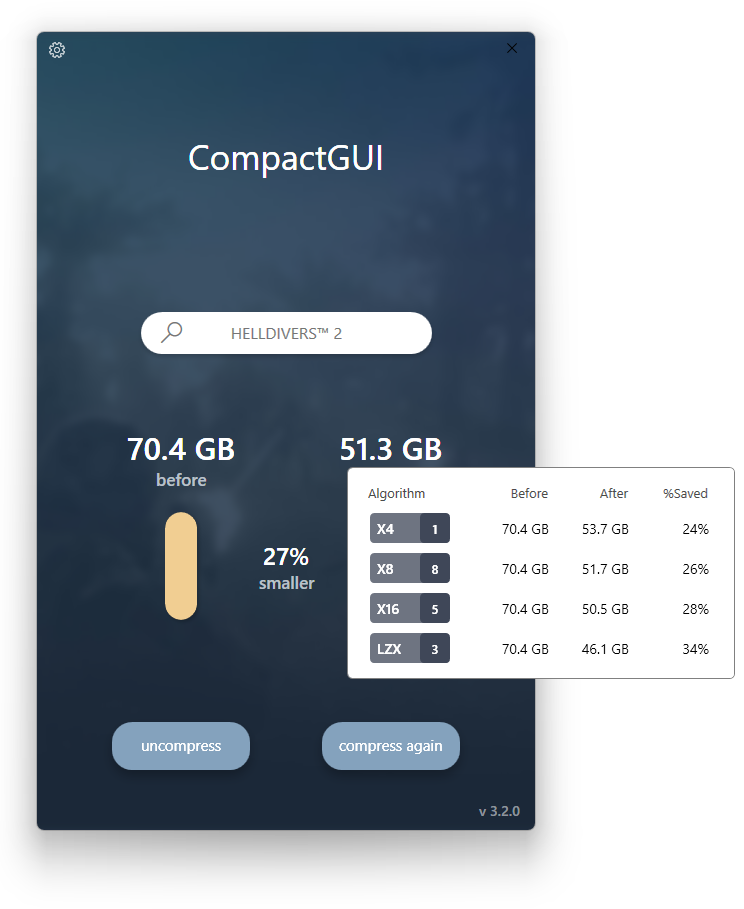
- Hovering over the `Estimated Size` region will now show an overview of all compression modes (and total number of user submissions) that contribute to the estimate. This way you can see exactly which compression mode is worth using for a given folder.
- 
- -----
📦 Known issues
- Watched folders will not play nice if you added a folder to the watchlist while in admin mode, and then went back to normal mode afterwards. It will still technically work, but the analysis will not be accurate (as it will skip over files it doesn't have permission to check)
- Clicking the `Analyse` button to check all the watched folders won't show any visual indication that it's doing anything until it is finished. It is actually working, but you just can't see anything. Feel free to spam click the button if it makes you feel better.
- -----
📦 Note
- Either of two things may happen in an upcoming release (I haven't decided yet)
- Upgrade to `.NET 8` and continue to provide two separate binaries (one normal, and one monolithic)
- Continue on `.NET 6` and stop providing the monolithic version.
- ---
📦 Important!
- Because this application uses .NET 6, you have two choices of downloads:
- 
- 2.76 MB: If you don't have the .NET 6 runtime installed when you try to run this, it will prompt you to download it from Microsoft
- 
- 150 MB: Includes all libraries required to run it completely standalone, however it's nearly 50x the size. I do recommend installing the .NET 6 runtime instead (which is itself only a 50MB download).
- ````yml
- MD5: 0C9191710D6640BDEC4E68A2CD6D3B56
- SHA-256: 64D26D29766E58A7F7C45158AE809BF62D9D266265A9F4D62B35B591E9D66E4A
- + 2 more
📦 Like this project?
- Please consider leaving a tip on Ko-Fi :)
Iridium-IO·2y ago·February 29, 2024🐛 Bug Fixes:
- Partial fix for CompactGUI crashing on start (or failing to start) due to corrupted `settings.json` or `watcher.json` files
- I still don't know what causes the corruption to happen in the first place, but now if it detects a corrupted file, it will get rebuilt rather than crashing. Should fix #372 #342 #334
- Fixes the main window starting up with the title bar hidden on low resolution displays. #382
- Additionally, if the program detects that it cannot fit on screen, it will scale itself down to do so.
- -----
📦 Known issues
- Watched folders will not play nice if you added a folder to the watchlist while in admin mode, and then went back to normal mode afterwards. It will still technically work, but the analysis will not be accurate (as it will skip over files it doesn't have permission to check)
- Clicking the `Analyse` button to check all the watched folders won't show any visual indication that it's doing anything until it is finished. It is actually working, but you just can't see anything. Feel free to spam click the button if it makes you feel better.
- -----
📦 Note
- Either of two things may happen in an upcoming release (I haven't decided yet)
- Upgrade to `.NET 8` and continue to provide two separate binaries (one normal, and one monolithic)
- Continue on `.NET 6` and stop providing the monolithic version.
- ---
📦 Important!
- Because this application uses .NET 6, you have two choices of downloads:
- 
- 2.76 MB: If you don't have the .NET 6 runtime installed when you try to run this, it will prompt you to download it from Microsoft
- 
- 150 MB: Includes all libraries required to run it completely standalone, however it's nearly 50x the size. I do recommend installing the .NET 6 runtime instead (which is itself only a 50MB download).
- ````yml
- MD5: 9A7F392AC2FC307FA2155B7DB41E91FF
- SHA-256: E580109CB40ECFF6E57B70B069E27AF12CDC51645D4796FA1DC1D4818D50E425
- + 2 more
📦 Like this project?
- Please consider leaving a tip on Ko-Fi :)
Iridium-IO·2y ago·February 13, 2024✨ New Features:
- Pause, Resume and Cancel functions have been added
- Because compression/decompression is parallelised for speed (multiple files are compressed at the same time), there will be a delay after pressing these buttons _to make sure all files being processed are safely written first_.
- Cancelling a compression will _not_ undo already compressed files, but if you come back later to compress the same folder again, it will skip files that are already compressed.
- -----
📦 Known issues
- Watched folders will not play nice if you added a folder to the watchlist while in admin mode, and then went back to normal mode afterwards. It will still technically work, but the analysis will not be accurate (as it will skip over files it doesn't have permission to check)
- Clicking the `Analyse` button to check all the watched folders won't show any visual indication that it's doing anything until it is finished. It is actually working, but you just can't see anything. Feel free to spam click the button if it makes you feel better.
- -----
📦 Note
- Either of two things may happen in an upcoming release (I haven't decided yet)
- Upgrade to `.NET 8` and continue to provide two separate binaries (one normal, and one monolithic)
- Continue on `.NET 6` and stop providing the monolithic version.
- ---
📦 Important!
- Because this application uses .NET 6, you have two choices of downloads:
- 
- 2.76 MB: If you don't have the .NET 6 runtime installed when you try to run this, it will prompt you to download it from Microsoft
- 
- 150 MB: Includes all libraries required to run it completely standalone, however it's nearly 50x the size. I do recommend installing the .NET 6 runtime instead (which is itself only a 50MB download).
- ````yml
- MD5: 64B783EDCA6C08D8D9558C3FC0D2F740
- SHA-256: 01BDCA3C8EA3ADA6232991BD4DD6EF356AB62FBA9F779540FFF21740F7776EDB
- + 2 more
📦 Like this project?
- Please consider leaving a tip on Ko-Fi :)
Iridium-IO·2y ago·February 5, 2024📦 Note
- Either of two things may happen in an upcoming release (I haven't decided yet)
- Upgrade to `.NET 8` and continue to provide two separate binaries (one normal, and one monolithic)
- Continue on `.NET 6` and stop providing the monolithic version.
- ---
✨ New Features:
- Compression options now persist between runs rather than resetting to defaults (Selected compression mode, Skip filetypes, Add to watchlist) #392
🐛 Bug Fixes
- Incorrect folder size result when compressing broken folders #361 #336
- Thanks to @yyjdelete for figuring out the cause and fixing it #379
- Fixed issue where it was possible to select and compress empty folders which would then crash the Watcher.
- Fixed glitchy bottom toolbar animation when moving the mouse in/out of it too quickly
- Moved Update banner from the bottom to the top so that the bottom toolbar can still be used.
- -----
📦 Known issues
- Watched folders will not play nice if you added a folder to the watchlist while in admin mode, and then went back to normal mode afterwards. It will still technically work, but the analysis will not be accurate (as it will skip over files it doesn't have permission to check)
- Clicking the `Analyse` button to check all the watched folders won't show any visual indication that it's doing anything until it is finished. It is actually working, but you just can't see anything. Feel free to spam click the button if it makes you feel better.
- -----
📦 Important!
- Because this application uses .NET 6, you have two choices of downloads:
- 
- 2.76 MB: If you don't have the .NET 6 runtime installed when you try to run this, it will prompt you to download it from Microsoft
- 
- 150 MB: Includes all libraries required to run it completely standalone, however it's nearly 50x the size. I do recommend installing the .NET 6 runtime instead (which is itself only a 50MB download).
- ````yml
- MD5: 672E3A1D36A5F31D4D7694E2701CB6B7
- SHA-256: 1F0379777C5466C63A3E4A2A13BA490E20305F7E43A0DD91E07C708C270701DB
- + 2 more
📦 Like this project?
- Please consider leaving a tip on Ko-Fi :)
Iridium-IO·2y ago·January 29, 2024📦 Note
- Either of two things may happen in an upcoming release (I haven't decided yet)
- Upgrade to `.NET 8` and continue to provide two separate binaries (one normal, and one monolithic)
- Continue on `.NET 6` and stop providing the monolithic version.
🐛 Bug Fixes
- UI Scaling
- Partial fix for Window scaling breaking at random (still not sure what's causing it though) - when you restart the application, it will check if the window size is too small and reset it if that's the case #384 #374
- System Tray
- Added an actual hover label to the system tray icon that shows how many folders are being monitored #390
- A notification shows up when the program is minimised to tray
- Fixed the program being minimised after trying to open it from the tray
- Fixed CompactGUI showing up in the `Alt-Tab` view even when minimised to the system tray #389
- Explorer context menu
- + 2 more
📦 Known issues for v3.0.x
- Watched folders will not play nice if you added a folder to the watchlist while in admin mode, and then went back to normal mode afterwards. It will still technically work, but the analysis will not be accurate (as it will skip over files it doesn't have permission to check)
- Clicking the `Analyse` button to check all the watched folders won't show any visual indication that it's doing anything until it is finished. It is actually working, but you just can't see anything. Feel free to spam click the button if it makes you feel better.
- The fading in/out bottom bar is a bit glitchy.
- -----
📦 Important!
- Because this application uses .NET 6, you have two choices of downloads:
- 
- 2.77 MB: If you don't have the .NET 6 runtime installed when you try to run this, it will prompt you to download it from Microsoft
- 
- 150 MB: Includes all libraries required to run it completely standalone, however it's nearly 50x the size. I do recommend installing the .NET 6 runtime instead (which is itself only a 50MB download).
- ````yml
- MD5: 0AE545037D951115337A0752D15131E8
- SHA-256: A4B308EBFA264CC99FC4701500083B385305693FFA8F3266CD7A28D0B187A81A
- + 2 more
📦 Like this project?
- Please consider leaving a tip on Ko-Fi :)
Iridium-IO·2y ago·January 7, 2024🐛 Bug Fixes
- UI Scaling
- Fixed UI scaling not applying to `Options` dialog and glitching the window. #374
- Fixed window no longer opening in the correct screen position #375
- -----
📦 Known issues for v3.0.x
- Watched folders will not play nice if you added a folder to the watchlist while in admin mode, and then went back to normal mode afterwards. It will still technically work, but the analysis will not be accurate (as it will skip over files it doesn't have permission to check)
- Clicking the `Analyse` button to check all the watched folders won't show any visual indication that it's doing anything until it is finished. It is actually working, but you just can't see anything. Feel free to spam click the button if it makes you feel better.
- The fading in/out bottom bar is a bit glitchy.
- The right-click context menu no longer works and gives an error that CompactGUI is already running, if you're using the Watched list.
- -----
📦 Important!
- Because this application uses .NET 6, you have two choices of downloads:
- 
- 2.77 MB: If you don't have the .NET 6 runtime installed when you try to run this, it will prompt you to download it from Microsoft
- 
- 150 MB: Includes all libraries required to run it completely standalone, however it's nearly 50x the size. I do recommend installing the .NET 6 runtime instead (which is itself only a 50MB download).
- ````yml
- MD5: CC9416A05408303D60629E801CD3872E
- SHA-256: 75C945B100022065F933F371367743AB0487C38FBE27BED38E30E7245DDDD9A0
- + 2 more
📦 Like this project?
- Please consider leaving a tip on Ko-Fi :)
Iridium-IO·2y ago·January 2, 2024📋 Changes
- UI Scaling
- Added ability to set the scaling of the entire UI in the settings - this will help those with monitors <800px tall (lots of laptops) or people who use very high DPI scaling on 1440p or 4K monitors. It's not exactly true HiDPI awareness, but it's better than nothing #269 #337
📋 Changes (Minor)

- Added Version indicator to bottom corner of main view
- UI updates and tweaks
- Mainly added a smooooooth blur animation to the background loading :)
- Added link buttons in the options menu (this was actually how I tested the UI scaling by scaling canvas SVGs first)
- Tweaked colours a bit
- 
📦 Known issues
- Watched folders will not play nice if you added a folder to the watchlist while in admin mode, and then went back to normal mode afterwards. It will still technically work, but the analysis will not be accurate (as it will skip over files it doesn't have permission to check)
- Clicking the `Analyse` button to check all the watched folders won't show any visual indication that it's doing anything until it is finished. It is actually working, but you just can't see anything. Feel free to spam click the button if it makes you feel better.
- The fading in/out bottom bar is a bit glitchy.
- The right-click context menu no longer works and gives an error that CompactGUI is already running, if you're using the Watched list.
- -----
📦 Important!
- Because this application uses .NET 6, you have two choices of downloads:
- 
- 2.77 MB: If you don't have the .NET 6 runtime installed when you try to run this, it will prompt you to download it from Microsoft
- 
- 150 MB: Includes all libraries required to run it completely standalone, however it's nearly 50x the size. I do recommend installing the .NET 6 runtime instead (which is itself only a 50MB download).
- ````yml
- MD5: EB4EC8B2023882F97B468A69238A39DA
- SHA-256: 934D3BBF20538574C4455C188958CD96996D6E7709D56045D07D78E0680AC712
- + 2 more
📦 Like this project?
- Please consider leaving a tip on Ko-Fi :)
Iridium-IO·2y ago·January 1, 2024📋 Changes
- Skip Poorly Compressed Filetypes #365
- Added more default filetypes: `.tar, .gz, .dmg, .bz2, .tgz, .lz, .txz, .xz`
- Extensions can now also be separated using `;` or `,`. Trying to use `Enter` or `Tab` still doesn't work.
- Estimated compression size confidence
- You now see a bar representing the confidence that the estimated compression size is accurate. This is based on user submitted results. Note that it aggregates the confidence based on _all_ the compression types, so if everyone else is using `XPRESS16K` and you're using `XPRESS4K` the confidence can still be high, but your compression ratio will still be lower.
- Tooltips
- Added tooltips to the compression options. #339
- :-------------------------:|:-------------------------:
📦 Known issues
- Watched folders will not play nice if you added a folder to the watchlist while in admin mode, and then went back to normal mode afterwards. It will still technically work, but the analysis will not be accurate (as it will skip over files it doesn't have permission to check)
- Clicking the `Analyse` button to check all the watched folders won't show any visual indication that it's doing anything until it is finished. It is actually working, but you just can't see anything. Feel free to spam click the button if it makes you feel better.
- The fading in/out bottom bar is a bit glitchy.
- The right-click context menu no longer works and gives an error that CompactGUI is already running, if you're using the Watched list.
- -----
📦 Important!
- Because this application now uses .NET 6, you have two choices of downloads:
- 
- 2.74 MB: If you don't have the .NET 6 runtime installed when you try to run this, it will prompt you to download it from Microsoft
- 
- 150 MB: Includes all libraries required to run it completely standalone, however it's nearly 50x the size. I do recommend installing the .NET 6 runtime instead (which is itself only a 50MB download).
- ````yml
- MD5: DBDB702D8FA4D8FFEDF43F85DD9BCC6D
- SHA-256: 8A83EB6CE92F37E9621C953A0D4A0D3E1589A245C0A21E85F0B8B5A5F4CA5E6C
- + 2 more
📦 Like this project?
- Please consider leaving a tip on Ko-Fi :)
Iridium-IO·3y ago·November 6, 2022📋 Changes
- Skip Poorly Compressed Filetypes
- Has been enabled - selecting these options will now actually skip filetypes. You _cannot_ submit results if you have these options enabled (that's to ensure that future results aren't compromised). For the `User Submitted Filetypes` option, in future this will be adjusted to only skip files with a certain confidence level (e.g. if only 1 person says it should be skipped that's not good enough, but if 40 do then it can be skipped)
- In theory, compression should be at least equal or only slightly worse than without skipping filetypes, and the speed should be faster (in some cases _much_ faster). Please submit an issue if the compression is much worse for a particular game/folder
- Added Notifications - shows a Toast notification when compression is completed (this can be enabled/disabled in the settings)
- Added Drag-and-Drop - Folders can now be dragged into CompactGUI to compress them. One folder at a time only.
- Updated Games Database - ~7400 new submissions since the last version (these are generally updated in the background but I haven't pushed a new database since July)
🐛 Bug Fixes
- Safely blocks System Windows directory from being selected without affecting other root folders that contain `Windows` #281
- Fixed crash when a watched folder is deleted or renamed and CompactGUI cannot locate it - deleted/renamed folders are now automatically removed from the watchlist
- Added checks to prevent non-NTFS folders from being compressed. #305
📦 Known issues
- Watched folders will not play nice if you added a folder to the watchlist while in admin mode, and then went back to normal mode afterwards. It will still technically work, but the analysis will not be accurate (as it will skip over files it doesn't have permission to check)
- Clicking the `Analyse` button to check all the watched folders won't show any visual indication that it's doing anything until it is finished. It is actually working, but you just can't see anything. Feel free to spam click the button if it makes you feel better.
- The fading in/out bottom bar is a bit glitchy.
- The right-click context menu no longer works and gives an error that CompactGUI is already running, if you're using the Watched list.
- -----
📦 Important!
- Because this application now uses .NET 6, you have two choices of downloads:
- 
- 2.71 MB: If you don't have the .NET 6 runtime installed when you try to run this, it will prompt you to download it from Microsoft
- 
- 152 MB: Includes all libraries required to run it completely standalone, however it's nearly 50x the size. I do recommend installing the .NET 6 runtime instead (which is itself only a 50MB download).
- ````yml
- MD5: D5F3B0AB6A1A82AE1178B2647A9B9A4F
- SHA-256: 4D5BC15A1D8D1EB03DF5C710FF23BD5F214A4D1F089C36D16AFF54BE241F2192
- + 1 more
Iridium-IO·3y ago·July 2, 2022📋 Changes
- Added Watchers to monitor selected folders in the background for changes over time and keep track of decaying compression `(Be careful with this; bugs undoubtedly lie ahead)` #207
- Includes details on when the folder was last compressed, when the folder was last modified, what compression level is predominant and also how much compression decay has occurred.
- Watchers are lightweight and listen for Windows' firing of file changed events. Only when the system has been idle for >5 minutes does it run an analysis on folders that are flagged as changed. If none were flagged, nothing happens.
- Watched folders can be accessed by a new page in the UI by hovering near the bottom of the program window.
- Recompressing a folder now skips files that have already been compressed with the selected compression level
- Slightly improved speed of pre-compression file checking
- Added system tray icon and notification support (no notifications yet; let me know which notifications would be handy to have. Maybe notify if a watched folder decays to <50% of its compression?)
- CompactGUI now automatically keeps running in the system tray and on startup if you have folders you want to monitor. (Planned: add option to disable this)
- + 1 more
📦 Known issues
- Watched folders will not play nice if you added a folder to the watchlist while in admin mode, and then went back to normal mode afterwards. It will still technically work, but the analysis will not be accurate (as it will skip over files it doesn't have permission to check)
- Clicking the `Analyse` button to check all the watched folders won't show any visual indication that it's doing anything until it is finished. It is actually working, but you just can't see anything. Feel free to spam click the button if it makes you feel better.
- The fading in/out bottom bar is a bit glitchy.
- -----
📦 Important!
- Because this application now uses .NET 6, you have two choices of downloads:
- 
- 2.72 MB: If you don't have the .NET 6 runtime installed when you try to run this, it will prompt you to download it from Microsoft
- 
- 150 MB: Includes all libraries required to run it completely standalone, however it's nearly 50x the size. I do recommend installing the .NET 6 runtime instead (which is itself only a 50MB download).
- ````yml
- MD5: 2DD4F0B810BE81433FCCE33493F44C26
- SHA-256: 9E0138F3330F524851C0EAE6DC24499BBACD3EAEE9FDD1418DAC1C714E8BFCB7
- + 1 more
Iridium-IO·4y ago·June 22, 2022📋 Changes
- Analysis now commences immediately after selecting a folder (one less click)
- Added ability to cancel analysis if it takes >5 seconds
- Added detection to check if you are trying to compress a folder you don't have permission for (usually Program Files) and will prompt to restart in admin mode (a badge will show beneath the title if you're in admin mode)
- Settings are now independently versioned to (hopefully) avoid future breaking
- UI Tweaks:
- Added more transition animations to make the application look smoother during operation
- If you select a Steam game, now show the game's name in the search bar rather than the folder name
- Updated icon
- + 1 more
🐛 Fixes
- Fixed crash if on first compression you selected "skip user submitted files" #256
- Fixed databinding errors that resulted in analysis showing _slightly_ different folder sizes on every run
📦 Known issues
- The options to skip files are still not implemented
- -----
📦 Important!
- Because this application now uses .NET 6, you have two choices of downloads:
- 
- 2.54 MB: If you don't have the .NET 6 runtime installed when you try to run this, it will prompt you to download it from Microsoft
- 
- 150 MB: Includes all libraries required to run it completely standalone, however it's nearly 50x the size. I do recommend installing the .NET 6 runtime instead (which is itself only a 50MB download).
- ````yml
- MD5: A85AB7106514F9BCD80CE17BE3FDF6AA
- SHA-256: 82236B345C91ACE9BDED40E74BE8C410F5AEF1C68ECAE31B6073AC9925AF825A
- + 1 more
Iridium-IO·4y ago·June 16, 2022📋 Changes
- Updated Settings menu
- You can now edit the list of poorly compressed filetypes
- Added checkboxes and 90% of the background code to enable skipping poorly compressed files both from local list (in options menu) as well as from user-submitted results.
- these options don't do anything yet but will show a preview of how many files could be skipped
- currently there are not enough user submissions for most games to build a skip list.
- This option will be enabled once I work out how to properly handle user submissions in the setting of files being skipped
- Right now, if a file extension is skipped then that file is considered poorly compressible and would be included when submitted; which would mean if someone skipped all their files, it would mark everything as poorly compressed which would harm the accuracy of the crowdsourced results significantly
- I could disable user submissions if it detects skipped files, but that would seriously stunt the number of results submitted
- + 1 more
🐛 Fixes
- Fixed crash on startup when no internet connection is available #252
- Fixed crash when trying to compress files that are in use or inaccessible #250
📦 Known issues
- If you've used the old Windows "Compress this folder" option in a folder's properties menu, CompactGUI cannot undo that yet. Disable that to make it work
- -----
📦 Important!
- Because this application now uses .NET 6, you have two choices of downloads:
- `CompactGUI.exe` (3.1MB) RECOMMENDED
- If you don't have the .NET 6 runtime installed when you try to run this, it will prompt you to download it from Microsoft
- `CompactGUI-Integrated.zip` (150MB extracted) NOT RECOMMENDED
- Includes all libraries required to run it completely standalone, however it's nearly 50x the size. I do recommend installing the .NET 6 runtime instead (which is itself only a 50MB download).
- ````yml
- MD5: D0C1A2DB8B830ECDE02536A76C16E539
- SHA-256: 6B6613C49FFC15A6A832507F414D565B975E16756C4482931CE1E4A14FD35ED0
- + 1 more
Iridium-IO·4y ago·June 8, 2022📋 Changes
- Added ability to recompress a previously compressed folder
- this will force compress all files again with the newly selected algorithm (skipping already compressed files is planned)
- Add CompactGUI to explorer right-click menu
- (not the fancy new Windows 11 one unfortunately. That is _much_ more work for some reason)
- Added options menu (most options do nothing yet)
- Improved analysing, now identifies what type of compression files have (for future use)
🐛 Fixes
- Fixed progress bar sometimes momentarily starting at 100% if a folder was recently uncompressed
📦 Known issues
- If you've used the old Windows "Compress this folder" option in a folder's properties menu, CompactGUI cannot undo that yet. Disable that to make it work
- Compressing folders where files are actively in use will cause CompactGUI to crash.
- -----
📦 Important!
- Because this application now uses .NET 6, you have two choices of downloads:
- `CompactGUI.exe` (3.1MB) RECOMMENDED
- If you don't have the .NET 6 runtime installed when you try to run this, it will prompt you to download it from Microsoft
- `CompactGUI-Integrated.zip` (150MB extracted) NOT RECOMMENDED
- Includes all libraries required to run it completely standalone, however it's nearly 50x the size. I do recommend installing the .NET 6 runtime instead (which is itself only a 50MB download).
- ````yml
- MD5: 39DF368DDC7136455C395364C170DD58
- SHA-256: E67D69AA795582C1FEF2B38E4FA2730316C64858D6EDF5B0FA3C9A7343FF6BCF
- + 2 more