


jamesbrindle/YTMusicUploader
Automatically upload your music library and playlists to YouTube Music .Net Application. Upload songs to YouTube Music and bulk delete music and playlists from YouTube Music. C#.
jamesbrindle·4y ago·September 13, 2021✨ Connect to YTM - Feature Change
- Had to remove the embedded browser for the 'Connect to YTM' as google recently prevented sign-in via embedded browsers. Therefore, as a workaround, I've opted to simply allow users to paste their authentication cookie value to get the app working. A video tutorial link is found within the 'Connect To YTM' Form.
- One benefit I suppose... The installer is now only 10 MB!
-
- 
jamesbrindle·4y ago·July 6, 2021📋 Changes
- Removed 'send diagnostic data' and all logic - Some virus scanners don't like it
- Instead of the 'send diagnostic data' - There's now a button in the 'Application Logs' form to download the log as a text file (actually an XML file) - Which can be used for troubleshooting on request.
jamesbrindle·5y ago·May 10, 2021🐛 Bug Fixes
- Fixed status label on 'Adding to existing playlists' - Not showing count
- Tinkered with FileSystemWatcher - Sometimes it's not grabbing file system changes
- Hopefully fixed object reference not set to an instance of an object in Playlist Processor
jamesbrindle·5y ago·May 9, 2021📋 No Changes
- No improvements, just trying to trouble shoot the playlist upload issue.
jamesbrindle·5y ago·May 8, 2021🐛 Bug Fixes
- Fixed issue where main processes continually runs when not all playlists have been processes
- Added additional logging for playlists processing - Attempting to troubleshoot 'object instance not set to an instance of an object' a few people are getting trying to upload their playlists
jamesbrindle·5y ago·May 7, 2021🐛 Bug Fixes
- Handle playlist without subtitle
- UI now works (more or less) properly with Windows increased dpi scaling (125%, 150%)
📋 Changes
- Don't bother sending diagnostic data if application out of date - No point reporting already fixed issues
jamesbrindle·5y ago·May 1, 2021📋 Minor Change
- Multi-thread count (max) now based on system CPU cores for better resource optimisation.
jamesbrindle·5y ago·April 11, 2021📋 Changes
- Deprioritised log messages for playlists issues where either playlist file is empty (no paths included), YTM playlist quota reached, or invalid paths in playlists (as not YTM Uploader issues). They're now warnings not errors.
- Added logo to banner of installers
🐛 Bug fixes
- Where there's an invalid path in the playlists, it was stopping uploading the entire playlist, not just the problematic file. I.e:
- 
jamesbrindle·5y ago·April 10, 2021📋 Changes
- Changed playlist schedule upload to 24 hours from 12 - Was still getting errors when exceeding playlist creation quota - Can be configured in app.config
📦 Enhancements
- Added 'reset all' button to issues log form
🐛 Bugs
- Reset individual issues button not always working after gridview refresh due to changing column index of the button. This has been rectified.
✨ Additional
- Regenerated Doxygen XMLdoc source code documentation.
jamesbrindle·5y ago·March 14, 2021📋 Changes
- YTM Playlist creation policy is set to 10 if new playlists are created in rapid succession (i.e. automated / API), and 25 still when waiting between 30 - 60 seconds between creating each playlists, after which, YTM with block playlist creation for what seems to be 12 hours (this includes trying to create playlists manually on the site)... I'm still not entirely sure why, it seems to be YTM / Googles playlist creation policy and I wouldn't want to abuse it.
- Therefore, this application won't create any more than 25 playlists within the 12 hour period and will wait between 30 and 60 seconds before creating each playlist. This seems to also allow you to still create playlists manually on the site. If the application is left running for longer than 12 hours, it will continue on uploading the next set of playlists.
- It may therefore take some times / days / weeks for those with a large number of playlists, but it least they'll be uploaded eventually... Despite many attempts and many days (as in testing, I'm often then blocked from uploading playlists, so have to wait until the next day), I'm unable to implement a workaround for this policy.
- There is also a new option in the UI to completely disable the uploading of playlists if desired (or it's causing issue with manual playlists creation on the site).
📦 Some Further Reading on the Matter:
- https://www.reddit.com/r/YoutubeMusic/comments/cnduq1/playlist_creation_limit/
- https://www.quora.com/Is-there-a-limit-to-the-number-of-YouTube-playlists-created-per-day-I-created-25-and-it-wont-let-me-create-more
- https://github.com/sigma67/ytmusicapi/issues/62
📦 UI
- File progress now displays artists, album, track and playlist name.
- Included option in 'Options' section to disable playlist uploading.
🐛 Bug Fixes
- Fixed: Playlist progress and file upload progress threads were sometimes preventing main process 'restarts' - Which would happen when pausing and resuming, displaying the YTM manger and closing it, or when watch folder file / folder changes occur after file processing has complete.
- Fixed: Playlist processor wasn't taking into account 'paused' status, so would just continue.
- Fixed: Many songs missing from YTM playlists after upload - Once a track has been uploaded to YTM we don't immediately get the videoId or entityId - We have to wait for YTM to process it, then after a delay we can get it... There is a background process in place to fetches missing video and entity IDs however, if not enough time has passed between track upload and playlist upload, tracks would be missed. Therefore the playlist processor will first attempt to retrieve the missing video and entity Ids before creating a new playlist or adding to an existing one. It takes a little longer but the gains appear to be worth it.
jamesbrindle·5y ago·February 18, 2021🐛 Bug Fix
- Fetching playlists fetches the initial list and the first continuation lists then stop, so only ever fetching a max playlist amount of 48. The continuation bug has now been fixed.
jamesbrindle·5y ago·February 12, 2021🐛 Playlist Fetch Bug Fix
- 'Manage YT Music' form should now show all playlists on YTM not just the first 24.
jamesbrindle·5y ago·January 11, 2021🐛 Playlist Creation Bug Fix
- Manged to find the culprit as to why YTM with giving a 400 error when trying to create some playlists... The application has a few 'caches' to reduce requests to YTM, one process prefetches artists and playlists, to later be 'searched' for checking if a song has already been uploaded. It was in here that I found I was setting the 'videoId' to be the 'entityId' of the track.
- Unfortunately, while trying to submit this release as 'pre-release', the YT Music Uploader app didn't (until now) recognise 'pre-releases', so will offer to update regardless, therefore it's going to perform a full rescan of your library just to be aware.
jamesbrindle·5y ago·January 8, 2021### Enhancement For some random reason, some versions of VLC don't save .m3u playlists correctly. In fact you then try and open the playlist in VLC it doesn't even load... None-the-less, the file paths are present in the file, so the playlist can still be parsed. The parser is present in this version. ### Bug Analysis - Auto Upload of Playlists A lot of people are getting 400 - Bad Request when the application tries to create a YTM playlist. I've no idea why this is and can't replicate it, and have been trying to figure it out. This version will provide additional diagnostic data when that error is encountered so I can troubleshoot the issue.
jamesbrindle·5y ago·January 3, 2021🐛 Bug Fixes
- Exception when user doesn't have an online playlist (massive oversight) - Object not set to an instance of an object.
- Not sure on this one - People getting '400' - Bad request error... I 'think' it's because I try to extract the 'Title' of the playlist from the content of the playlist for certain files (.wpl, .zpl). However sometimes this will be empty (YTM playlist requires a title) - Therefore now fall-back to filename of playlist.
jamesbrindle·5y ago·January 2, 2021🐛 Bug Fixes
- System folder watcher (for detecting folder changes, file changes etc) wasn't working for file 'content' changes - This was particularly noticable when editing playlists, and the app doesn't then process the changes. This has been rectified.
- After a set time, the app will re-process all files, in case they're not on YTM. The process for detecting if a music file is already present online has been optimised in the case where the file has already been uploaded and is present in the database, since we already have the entity ID of the track at this point.
📦 Enhancements
- Playlist creation - track location - I've found that some of my tracks within some playlists have the network location (i.e. //jamie-pc/music/...) rather than the actual local path. Not sure why, but this is an issue seen as though the app cross-references the 'path' within a 'watch folder' only - to then get the tracks video ID from the database in order to then create the playlist (or add to it) on YTM... To work around this: if on first path check, if the file exists but the path isn't present in the database, I cross reference using the hash of the file (since this is also stored in the database)... Which seem to work quite nicely.
jamesbrindle·5y ago·December 31, 2020✨ New Feature - Playlist Upload
-
- [](https://github.com/jamesbrindle/YTMusicUploader)
-
✨ New Feature Includes
- After file scan and standard music upload, playlist processing will take place which involves gathering a list of music file paths contained within your local playlist files, ensuring the paths within the playlist actually exist, and can be cross-referenced then with the already uploaded music files via the YTM's video (entity) ID. Then the application will create a new playlist on YTM (or add to it, if it already exists).
- The local playlists file's 'last write / modified' date-time is taken into account, therefore if you update the playlist (add new music tracks), the application should pick this up and re-process the playlist file.
- If you have a YTM playlist that you've created seperately, but you also have a local playlist with the same title (same file name for .m3u and .pls files, 'Title' property within the content of the playlist file for .wpl and .zpl files), the application will assume this to be the same playlist and will update it.
- Supported playlist file types include: .m3u, .m3u8, .wpl, .pls, zpl
- YTM only allows a maximum playlist size of 5,000 tracks. If the playlist exeeds this limit, only the first 5,000 tracks will be taken from the playlist.
- You can also use the 'Manage YT Music' form (screenshot above) to check YTM playlists and optionally delete tracks from them or delete the playlist entirely.
-
- IMPORTANT NOTE
- + 4 more
jamesbrindle·5y ago·December 28, 2020✨ Added Feature
- Added new project; a standalone updater mini application that will (if user initiates) download and install the new version available on GitHub in an automated manner.
jamesbrindle·5y ago·December 28, 2020✨ Added Feature
- Added new project; a standalone updater mini application that will (if user initiates) download and install the new version available on GitHub in an automated manner.
- Don't install this version, as another version will be uploaded immediately after this to test the auto install feature - Download that one instead
jamesbrindle·5y ago·December 27, 2020📦 Enhancements
- Implemented DB integrity checker, which executes at application startup. If error then gives option to reset the database.
🐛 Bug Fixes
- Music file DB repo issue when LastUploadError is null (Dapper mapper)
jamesbrindle·5y ago·November 23, 2020🐛 Fixed a couple of issues surrounding main process restart after altering monitoring scenarios
- Making a change in the Manage YT Music (gear icon)
- Making a change in the Issues log
- Resetting the database
jamesbrindle·5y ago·November 22, 2020📦 Enhancements
- Added option to 'reset' a failed upload in the 'Issues Log', which would force the application to retry uploading the problematic file.
📦 Retry on MainProcess When Issues Are Present
- When there are issues when uploading and the 'Issue' counter increments, then when all the uploads have finished, the application will once again try to upload the file it had an issue with previously in an attempt to work around YT Music's mysterious '500' error.
- Unfortunately this ends up looping for quite some time if not forever, and the application never ends up in an 'idle' state. Therefore a limit of '1' has been put in place for how many times the application will loop through its issues on in the main application process (not to be confused with the n/5 attempts to upload while uploading is taking place which will remain the same).
- We do however want to retry the the failed upload at some point, for the following reasons:
- YT Music may fix an issue at their end for 500'd-ing certain files
- We may re-encode or compress the file and want to retry it
- Therefore, the file will once again attempt to upload in 30 days, or if the 'Issue' state of the file is reset via the 'Issues' report form.
📦 Gathering Uploads From YT Music Forever
- I'm unable to replicate this issue as of yet. In the meantime I've put a time limit on how long the application will attempt to gather the Uploads collection from YT Music to 6 minutes. After which time a message will appear informing you of the issue, and the Application will then resume checking and uploading files, however checking will then be performed at a reduced rate on account of the fact that there is then no cache to refer to.
🐛 Other Bugs
- Thread continuation on Watch folder add / remove... Caused double upload checking.. Fixed
- Issue / Uploaded / Discovered counter not updating immediately with correct values when add / remove of watch folders... Fixed
- 'Sort' on Application log throwing exception... Fixed
- Removal of watch folder caused uploaded states to be reset! This isn't the indended action... Fixed
jamesbrindle·5y ago·November 21, 2020📦 Enhancement
- Added log filter to Application Log
- Made overzealous logs more concise
- Added new version detector via GitHub, with notification icon next to version in the application
- More informational tooltips on options and buttons
🐛 Bug Fixes
- Application Log dialogue distort on resize fixed
- Deletion of database (start from scratch) bug of not recreating the database fixed
- Enabled DB shared cache for enhancing update concurrency in SQLite
📦 Other
- Source code XML doc update
- General refactoring
jamesbrindle·5y ago·November 20, 2020📦 Enhancements
- Updated layout style
- Added application logger (local and remote diagnostics)
🐛 Bugs
- Fixed bug with application stalling with .flac files larger than 300 MB
- Updated XML/HTML source code documentation
- Bumped minor version
jamesbrindle·5y ago·October 17, 2020📋 Changes
- A major bug was introduced in versionn 1.4.7 that would crash the application when it encountered a 500 error from YouTube Music due to a bug in some new code indended to prevent / minimise upload issues.
jamesbrindle·5y ago·October 11, 2020📋 Changes
- Added post upload issues checker and retry
- When application was starting minimised it had an odd bar at the bottom left of the screen near the start menu for some reason. This has now been rectified
- Bug fix in 'remove restore' not checking with YT Music to see if the file exists
- Bug fix to 'reset database' - Not always working from a different thread
- Added 300 MB limit check on files as YTM Music max file size limit is 300 MB
jamesbrindle·5y ago·October 10, 2020✨ Features
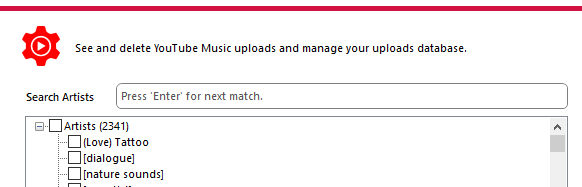
- Added 'artist' search feature to Manage YTM form - UI Enhancement.
- [](https://github.com/jamesbrindle/YTMusicUploader)
📦 Enhancements
- Added YTM '500 error' auto retry on track upload (up to 4 times currently - Can tweak this in app.config)
- Tweaked upload match - Should account for different versions (i.e. languages) of the same album so it doesn't report false duplicates (or at least greatly reduce).
🐛 Fixes
- Bug: YT Music Uploader application no longer shows in current tasks (ALT+TAB) when hidden /closed to system tray.
- Smoothed UI hide / show / restore transition.
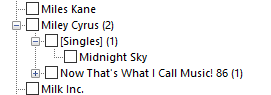
- Oversight correction: The 'Uploaded' Manage YTM tree view wasn't showing uploaded 'Singles' due to unhandled exception when parsing artist json list response from YTM. Singles should now show directly under artist as '[Singles]'.
- [](https://github.com/jamesbrindle/YTMusicUploader)
✨ Additional
- XML - HTML source code documentation update.
jamesbrindle·5y ago·October 5, 2020📋 Changes
- Bug fix: delete_context json file wasn't included in x64 installer package, so you couldn't actually delete anything. Now fixed.
jamesbrindle·5y ago·September 20, 2020📋 Changes
- Some alterations to parallel methods: Improved stability.
jamesbrindle·5y ago·September 14, 2020📋 Changes
- Decided not to bother loading the albums and tracks from cache in the ManageYTMusic form OnLoad - It can take too long to the extent the app looks to have crashed... Now, only artists are loaded on form opening and selecting an artist will then call to get the albums and tracks.