

Q.js
Quantum computing in your browser.
Quantum JavaScript (Q.js) ======================================================================== The project is written primarily in JavaScript, distributed under the Other license, first published in 2019. Key topics include: algebra, braket, javascript, matrix, q.

Quantum JavaScript (Q.js)
Quantum, made easy.
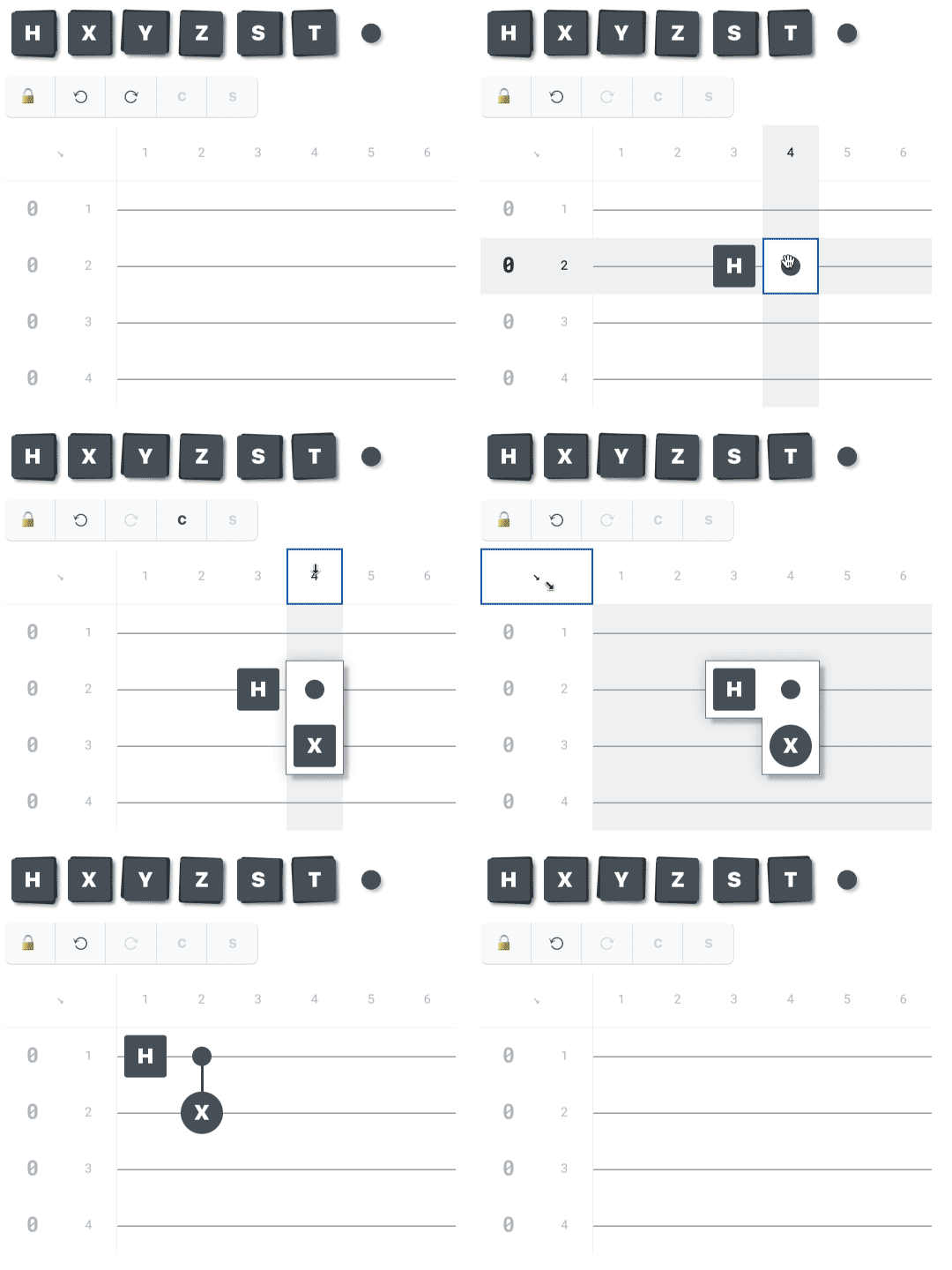
Q is a quantum circuit simulator, drag-and-drop circuit editor, and
powerful JavaScript library that runs right here in your web browser.
There’s nothing to install and nothing to configure, so jump right in
and experiment! Fire up the Q editor,
then tap and drag the pieces around to get a feel for how it works.
It’s easy to use on both desktop and mobile devices. Made a mistake?
Just tap the Undo button.
Free and open-source
Q is free to use, our code is open-source, and our API is heavily
documented. Still a quantum novice? Each page of API documentation
includes simple explanations of basic quantum concepts to get you up to
speed quickly. This makes Q ideal for the classroom as well as
autodidacts at home. Q just might be the most accessible quantum
circuit suite in the world. Join our project on GitHub at
https://github.com/stewdio/q.js
and drop a link to Q’s website
https://quantumjavascript.app
on social media with the hashtag
#Qjs.
Let’s make quantum computing accessible!
Quantum JavaScript
What does coding a quantum circuit look like? Let’s recreate the above
Bell state using three
separate circuit authoring styles to demonstrate Q’s flexibility. For
each of the three examples we’ll create a circuit that uses 2 qubit
registers for 2 moments of time. We’ll place a
Hadamard
gate at moment 1 on register 1. Then we’ll place a
Controlled-Not
gate at moment 2, with its control component on register 1 and its
target component on register 2.
1. Text as input
Q’s
text-as-input
feature directly converts your text into a functioning quantum circuit.
Just type your operations out as if creating a text-only circuit diagram
(using “I” for
identity gates
in the spots where no operations occur) and enclose your text block in
backticks (instead of
quotation marks). Note that parentheses are not required to invoke the
function call when using backticks.
javascriptQ` H X#0 I X#1 `
2. Python-inspired
Folks coming to Q from Python-based quantum suites may find this syntax
more familiar. Here the Q
function expects the number of qubit registers to use, followed by the
number of moments to use. Afterward, each single-letter quantum gate
label is also a function name. For these functions the first argument
is a moment index and the second is a qubit register index or array of
qubit register indices.
javascriptQ( 2, 2 ) .h( 1, 1 ) .x( 2, [ 1, 2 ])
3. Verbose for clarity
Under the hood, Q is making more verbose declarations. You can also
make direct declarations like so. (And
what are those dollar signs about?)
javascriptnew Q.Circuit( 2, 2 ) .set$( Q.Gate.HADAMARD, 1, 1 ) .set$( Q.Gate.PAULI_X, 2, [ 1, 2 ])
More variations
There are many ways to build a quantum circuit with Q. What feels right
for you? To learn more about
Q’s text syntax
and other convenience tricks, see
“Writing quantum circuits.”
Clear, legible output
Whether you use Q’s drag-and-drop circuit editor interface,
text syntax,
Python-inspired syntax, or prefer to type out every
set$ command
yourself, Q makes inspecting and evaluating your circuits easy.
Let’s add two commands which could directly follow any of the three
examples above. Hey—deciding what to name a circuit can sometimes be
difficult, so we’ll let Q choose a random name for us. Then we’ll
generate an outcome probabilities report. Just add the following two
lines to any of the above examples:
javascript.setName$( Q.getRandomName$ ) .evaluate$()
And that combination will yield
something like the following:
Beginning evaluation for “Red kangaroo”

         m1    m2
        ┌───┐╭─────╮
r1  |0⟩─┤ H ├┤ X#0 │
        └───┘╰──┬──╯
             ╭──┴──╮
r2  |0⟩───○──┤ X#1 │
             ╰─────╯

██████████░░░░░░░░░░  50%   1 of 2
████████████████████ 100%   2 of 2


Evaluation completed for “Red kangaroo”
with these results:

1  |00⟩  ██████████░░░░░░░░░░  50% chance
2  |01⟩  ░░░░░░░░░░░░░░░░░░░░   0% chance
3  |10⟩  ░░░░░░░░░░░░░░░░░░░░   0% chance
4  |11⟩  ██████████░░░░░░░░░░  50% chance
Import and export
Q plays well with everyone. Export your circuits as
plain text,
ASCII diagrams,
interactive graphic-user-interfaces,
LaTeX code,
and more!
Visit the Q playground
to experiment with converting circuits between various formats.
As always, new features are in the works.
Join our project on GitHub
and help us build bridges to everywhere.
Give Q a try right now at
https://quantumjavascript.app.
Contributors
Showing top 7 contributors by commit count.


Related Repositories

dimforge/nalgebra
Linear algebra library for Rust.

markrogoyski/math-php
Powerful modern math library for PHP: Features descriptive statistics and regressions; Continuous and discrete probability distributions; Linear algebra with matrices and vectors, Numerical analysis; special mathematical functions; Algebra

functionaljava/functionaljava
Functional programming in Java

nicolewhite/algebra.js
Build, display, and solve algebraic equations.

witchcrafters/witchcraft
Monads and other dark magic for Elixir

davidedc/Algebrite
Computer Algebra System in Javascript (Typescript)