

ComfyUI RMBG
A ComfyUI custom node designed for advanced image background removal and object, face, clothes, and fashion segmentation, utilizing multiple models including RMBG-2.0, INSPYRENET, BEN, BEN2, BiRefNet, SDMatte, SAM, SAM2, SAM3 and GroundingDINO.
A sophisticated ComfyUI custom node engineered for advanced image background removal and precise segmentation of objects, faces, clothing, and fashion elements. This tool leverages a diverse array of models, including RMBG-2.0, INSPYRENET, BEN, BEN2, BiRefNet, SDMatte models, SAM, SAM2 and GroundingDINO, while also incorporating a new feature for real-time background replacement and enhanced edge detection for improved accuracy. The project is written primarily in Python, distributed under the GNU General Public License v3.0 license, first published in 2024. It has gained significant community traction with 2,006 stars and 124 forks on GitHub. Key topics include: comfyui, comfyui-nodes, image, mask, remove-background.
ComfyUI-RMBG
A sophisticated ComfyUI custom node engineered for advanced image background removal and precise segmentation of objects, faces, clothing, and fashion elements. This tool leverages a diverse array of models, including RMBG-2.0, INSPYRENET, BEN, BEN2, BiRefNet, SDMatte models, SAM, SAM2 and GroundingDINO, while also incorporating a new feature for real-time background replacement and enhanced edge detection for improved accuracy.
News & Updates
-
2026/01/01: Update ComfyUI-RMBG to v3.0.0 ( update.md )
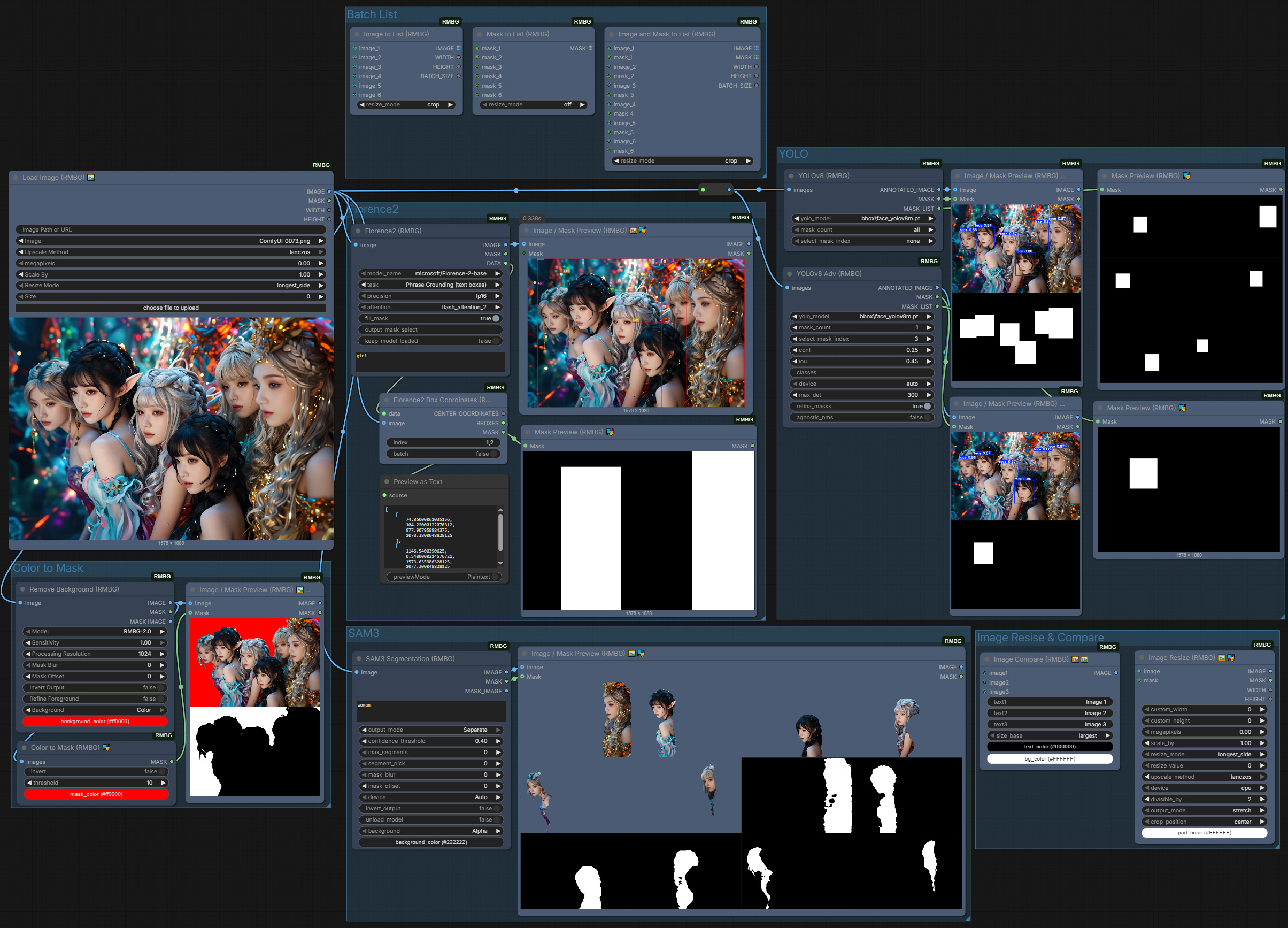
-
2025/12/09: Update ComfyUI-RMBG to v2.9.6 ( update.md )
-
2025/11/25: Update ComfyUI-RMBG to v2.9.5 SAM3 Segmentaion bug fixed( update.md )
-
2025/11/24: Update ComfyUI-RMBG to v2.9.4 SAM3 Segmentaion ( update.md )
-
2025/10/05: Update ComfyUI-RMBG to v2.9.3 ( update.md )
-
2025/09/30: Update ComfyUI-RMBG to v2.9.2 ( update.md )
-
Add new BiRefNet_toonOut Model
-
Updated Imagestitch
-
2025/09/12: Update ComfyUI-RMBG to v2.9.1 ( update.md )
-
2025/08/18: Update ComfyUI-RMBG to v2.9.0 ( update.md )
- Added
SDMatte Mattingnode
- Added
-
2025/08/11: Update ComfyUI-RMBG to v2.8.0 ( update.md )
- Added
SAM2Segmentnode for text-prompted segmentation with the latest Facebook Research SAM2 technology. - Enhanced color widget support across all nodes
- Added
-
2025/08/06: Update ComfyUI-RMBG to v2.7.1 ( update.md )
- Enhanced LoadImage into three distinct nodes to meet different needs, all supporting direct image loading from local paths or URLs
- Completely redesigned ImageStitch node compatible with ComfyUI's native functionality
- Fixed background color handling issues reported by users
-
2025/07/15: Update ComfyUI-RMBG to v2.6.0 ( update.md )
-
Added
Kontext Refence latent Masknode, Which uses a reference latent and mask for precise region conditioning. -
2025/07/11: Update ComfyUI-RMBG to v2.5.2 ( update.md )
-
2025/07/07: Update ComfyUI-RMBG to v2.5.1 ( update.md )
-
2025/07/01: Update ComfyUI-RMBG to v2.5.0 ( update.md )
-
Added
MaskOverlay,ObjectRemover,ImageMaskResizenew nodes. -
Added 2 BiRefNet models:
BiRefNet_lite-mattingandBiRefNet_dynamic -
Added batch image support for
Segment_v1andSegment_V2nodes -
2025/06/01: Update ComfyUI-RMBG to v2.4.0 ( update.md )
- Added
CropObject,ImageCompare,ColorInputnodes and new Segment V2 (see update.md for details)
- Added
-
2025/05/15: Update ComfyUI-RMBG to v2.3.2 ( update.md )
-
2025/05/02: Update ComfyUI-RMBG to v2.3.1 ( update.md )
-
2025/05/01: Update ComfyUI-RMBG to v2.3.0 ( update.md )
- Added new nodes: IC-LoRA Concat, Image Crop
- Added resizing options for Load Image: Longest Side, Shortest Side, Width, and Height, enhancing flexibility.
-
2025/04/05: Update ComfyUI-RMBG to v2.2.1 ( update.md )
-
2025/04/05: Update ComfyUI-RMBG to v2.2.0 ( update.md )
- Added new nodes: Image Combiner, Image Stitch, Image/Mask Converter, Mask Enhancer, Mask Combiner, and Mask Extractor
- Fixed compatibility issues with transformers v4.49+
- Fixed i18n translation errors
- Added mask image output to segment nodes
-
2025/03/21: Update ComfyUI-RMBG to v2.1.1 ( update.md )
- Enhanced compatibility with Transformers
-
2025/03/19: Update ComfyUI-RMBG to v2.1.0 ( update.md )
- Integrated internationalization (i18n) support for multiple languages.
- Improved user interface for dynamic language switching.
- Enhanced accessibility for non-English speaking users with fully translatable features.
https://github.com/user-attachments/assets/7faa00d3-bbe2-42b8-95ed-2c830a1ff04f
-
2025/03/13: Update ComfyUI-RMBG to v2.0.0 ( update.md )
- Added Image and Mask Tools improved functionality.
- Enhanced code structure and documentation for better usability.
- Introduced a new category path:
🧪AILab/🛠️UTIL/🖼️IMAGE.
-
2025/02/24: Update ComfyUI-RMBG to v1.9.3 Clean up the code and fix the issue ( update.md )
-
2025/02/21: Update ComfyUI-RMBG to v1.9.2 with Fast Foreground Color Estimation ( update.md )
- Added new foreground refinement feature for better transparency handling
- Improved edge quality and detail preservation
- Enhanced memory optimization
-
2025/02/20: Update ComfyUI-RMBG to v1.9.1 ( update.md )
- Changed repository for model management to the new repository and Reorganized models files structure for better maintainability.
-
2025/02/19: Update ComfyUI-RMBG to v1.9.0 with BiRefNet model improvements ( update.md )
- Enhanced BiRefNet model performance and stability
- Improved memory management for large images
-
2025/02/07: Update ComfyUI-RMBG to v1.8.0 with new BiRefNet-HR model ( update.md )
- Added a new custom node for BiRefNet-HR model.
- Support high resolution image processing (up to 2048x2048)
-
2025/02/04: Update ComfyUI-RMBG to v1.7.0 with new BEN2 model ( update.md )
- Added a new custom node for BEN2 model.
-
2025/01/22: Update ComfyUI-RMBG to v1.6.0 with new Face Segment custom node ( update.md )
- Added a new custom node for face parsing and segmentation
- Support for 19 facial feature categories (Skin, Nose, Eyes, Eyebrows, etc.)
- Precise facial feature extraction and segmentation
- Multiple feature selection for combined segmentation
- Same parameter controls as other RMBG nodes
-
2025/01/05: Update ComfyUI-RMBG to v1.5.0 with new Fashion and accessories Segment custom node ( update.md )
- Added a new custom node for fashion segmentation.
-
2025/01/02: Update ComfyUI-RMBG to v1.4.0 with new Clothes Segment node ( update.md )
- Added intelligent clothes segmentation with 18 different categories
- Support multiple item selection and combined segmentation
- Same parameter controls as other RMBG nodes
-
2024/12/29: Update ComfyUI-RMBG to v1.3.2 with background handling ( update.md )
- Enhanced background handling to support RGBA output when "Alpha" is selected.
- Ensured RGB output for all other background color selections.
-
2024/12/25: Update ComfyUI-RMBG to v1.3.1 with bug fixes ( update.md )
- Fixed an issue with mask processing when the model returns a list of masks.
- Improved handling of image formats to prevent processing errors.
-
2024/12/23: Update ComfyUI-RMBG to v1.3.0 with new Segment node ( update.md )
- Added text-prompted object segmentation
- Support both tag-style ("cat, dog") and natural language ("a person wearing red jacket") prompts
- Multiple models: SAM (vit_h/l/b) and GroundingDINO (SwinT/B) (as always model file will be downloaded automatically when first time using the specific model)
- This update requires install requirements.txt
-
2024/12/12: Update Comfyui-RMBG ComfyUI Custom Node to v1.2.2 ( update.md )
-
2024/12/02: Update Comfyui-RMBG ComfyUI Custom Node to v1.2.1 ( update.md )
-
2024/11/29: Update Comfyui-RMBG ComfyUI Custom Node to v1.2.0 ( update.md )
-
2024/11/21: Update Comfyui-RMBG ComfyUI Custom Node to v1.1.0 ( update.md )
Features
-
Background Removal (RMBG Node)
- Multiple models: RMBG-2.0, INSPYRENET, BEN, BEN2
- Various background options
- Batch processing support
-
Object Segmentation (Segment Node)
- Text-prompted object detection
- Support both tag-style and natural language inputs
- High-precision segmentation with SAM
- Flexible parameter controls
-
SAM2 Segmentation
- Text-prompted segmentation with the latest SAM2 models (Tiny/Small/Base+/Large)
- Automatic model download on first use, with manual download option
Installation
Method 1. install on ComfyUI-Manager, search Comfyui-RMBG and install
install requirment.txt in the ComfyUI-RMBG folder
bash./ComfyUI/python_embeded/python -m pip install -r requirements.txt
[!NOTE]
Windows desktop app: if the app crashes after install, setPYTHONUTF8=1before installing requirements, then retry.
[!NOTE]
YOLO nodes require the optionalultralyticspackage. Install it only if you need YOLO to avoid dependency conflicts:./ComfyUI/python_embeded/python -m pip install ultralytics --no-deps.
[!TIP]
Note: If your environment cannot install dependencies with the system Python, you can use ComfyUI's embedded Python instead.
Example (embedded Python):./ComfyUI/python_embeded/python.exe -m pip install --no-user --no-cache-dir -r requirements.txt
Method 2. Clone this repository to your ComfyUI custom_nodes folder:
bashcd ComfyUI/custom_nodes git clone https://github.com/1038lab/ComfyUI-RMBG
install requirment.txt in the ComfyUI-RMBG folder
bash./ComfyUI/python_embeded/python -m pip install -r requirements.txt
Method 3: Install via Comfy CLI
Ensure pip install comfy-cli is installed.
Installing ComfyUI comfy install (if you don't have ComfyUI Installed)
install the ComfyUI-RMBG, use the following command:
bashcomfy node install ComfyUI-RMBG
install requirment.txt in the ComfyUI-RMBG folder
bash./ComfyUI/python_embeded/python -m pip install -r requirements.txt
4. Manually download the models:
- The model will be automatically downloaded to
ComfyUI/models/RMBG/when first time using the custom node. - Manually download the RMBG-2.0 model by visiting this link, then download the files and place them in the
/ComfyUI/models/RMBG/RMBG-2.0folder. - Manually download the INSPYRENET models by visiting the link, then download the files and place them in the
/ComfyUI/models/RMBG/INSPYRENETfolder. - Manually download the BEN model by visiting the link, then download the files and place them in the
/ComfyUI/models/RMBG/BENfolder. - Manually download the BEN2 model by visiting the link, then download the files and place them in the
/ComfyUI/models/RMBG/BEN2folder. - Manually download the BiRefNet-HR by visiting the link, then download the files and place them in the
/ComfyUI/models/RMBG/BiRefNet-HRfolder. - Manually download the SAM models by visiting the link, then download the files and place them in the
/ComfyUI/models/SAMfolder. - Manually download the SAM2 models by visiting the link, then download the files (e.g.,
sam2.1_hiera_tiny.safetensors,sam2.1_hiera_small.safetensors,sam2.1_hiera_base_plus.safetensors,sam2.1_hiera_large.safetensors) and place them in the/ComfyUI/models/sam2folder. - Manually download the GroundingDINO models by visiting the link, then download the files and place them in the
/ComfyUI/models/grounding-dinofolder. - Manually download the Clothes Segment model by visiting the link, then download the files and place them in the
/ComfyUI/models/RMBG/segformer_clothesfolder. - Manually download the Fashion Segment model by visiting the link, then download the files and place them in the
/ComfyUI/models/RMBG/segformer_fashionfolder. - Manually download BiRefNet models by visiting the link, then download the files and place them in the
/ComfyUI/models/RMBG/BiRefNetfolder. - Manually download SDMatte safetensors models by visiting the link, then download the files and place them in the
/ComfyUI/models/RMBG/SDMattefolder.
Usage
RMBG Node
Optional Settings :bulb: Tips
| Optional Settings | :memo: Description | :bulb: Tips |
|---|---|---|
| Sensitivity | Adjusts the strength of mask detection. Higher values result in stricter detection. | Default value is 0.5. Adjust based on image complexity; more complex images may require higher sensitivity. |
| Processing Resolution | Controls the processing resolution of the input image, affecting detail and memory usage. | Choose a value between 256 and 2048, with a default of 1024. Higher resolutions provide better detail but increase memory consumption. |
| Mask Blur | Controls the amount of blur applied to the mask edges, reducing jaggedness. | Default value is 0. Try setting it between 1 and 5 for smoother edge effects. |
| Mask Offset | Allows for expanding or shrinking the mask boundary. Positive values expand the boundary, while negative values shrink it. | Default value is 0. Adjust based on the specific image, typically fine-tuning between -10 and 10. |
| Background | Choose output background color | Alpha (transparent background) Black, White, Green, Blue, Red |
| Invert Output | Flip mask and image output | Invert both image and mask output |
| Refine Foreground | Use Fast Foreground Color Estimation to optimize transparent background | Enable for better edge quality and transparency handling |
| Performance Optimization | Properly setting options can enhance performance when processing multiple images. | If memory allows, consider increasing process_res and mask_blur values for better results, but be mindful of memory usage. |
Basic Usage
- Load
RMBG (Remove Background)node from the🧪AILab/🧽RMBGcategory - Connect an image to the input
- Select a model from the dropdown menu
- select the parameters as needed (optional)
- Get two outputs:
- IMAGE: Processed image with transparent, black, white, green, blue, or red background
- MASK: Binary mask of the foreground
Parameters
sensitivity: Controls the background removal sensitivity (0.0-1.0)process_res: Processing resolution (512-2048, step 128)mask_blur: Blur amount for the mask (0-64)mask_offset: Adjust mask edges (-20 to 20)background: Choose output background colorinvert_output: Flip mask and image outputoptimize: Toggle model optimization
Segment Node
- Load
Segment (RMBG)node from the🧪AILab/🧽RMBGcategory - Connect an image to the input
- Enter text prompt (tag-style or natural language)
- Select SAM and GroundingDINO models
- Adjust parameters as needed:
- Threshold: 0.25-0.35 for broad detection, 0.45-0.55 for precision
- Mask blur and offset for edge refinement
- Background color options
RMBG-2.0
RMBG-2.0 is is developed by BRIA AI and uses the BiRefNet architecture which includes:
- High accuracy in complex environments
- Precise edge detection and preservation
- Excellent handling of fine details
- Support for multiple objects in a single image
- Output Comparison
- Output with background
- Batch output for video
The model is trained on a diverse dataset of over 15,000 high-quality images, ensuring: - Balanced representation across different image types
- High accuracy in various scenarios
- Robust performance with complex backgrounds
INSPYRENET
INSPYRENET is specialized in human portrait segmentation, offering:
- Fast processing speed
- Good edge detection capability
- Ideal for portrait photos and human subjects
BEN
BEN is robust on various image types, offering:
- Good balance between speed and accuracy
- Effective on both simple and complex scenes
- Suitable for batch processing
BEN2
BEN2 is a more advanced version of BEN, offering:
- Improved accuracy and speed
- Better handling of complex scenes
- Support for more image types
- Suitable for batch processing
BIREFNET MODELS
BIREFNET is a powerful model for image segmentation, offering:
- BiRefNet-general purpose model (balanced performance)
- BiRefNet_512x512 model (optimized for 512x512 resolution)
- BiRefNet-portrait model (optimized for portrait/human matting)
- BiRefNet-matting model (general purpose matting)
- BiRefNet-HR model (high resolution up to 2560x2560)
- BiRefNet-HR-matting model (high resolution matting)
- BiRefNet_lite model (lightweight version for faster processing)
- BiRefNet_lite-2K model (lightweight version for 2K resolution)
SAM
SAM is a powerful model for object detection and segmentation, offering:
- High accuracy in complex environments
- Precise edge detection and preservation
- Excellent handling of fine details
- Support for multiple objects in a single image
- Output Comparison
- Output with background
- Batch output for video
SAM2
SAM2 is the latest segmentation model family designed for efficient, high-quality text-prompted segmentation:
- Multiple sizes: Tiny, Small, Base+, Large
- Optimized inference with strong accuracy
- Automatic download on first use; manual placement supported in
ComfyUI/models/sam2
GroundingDINO
GroundingDINO is a model for text-prompted object detection and segmentation, offering:
- High accuracy in complex environments
- Precise edge detection and preservation
- Excellent handling of fine details
- Support for multiple objects in a single image
- Output Comparison
- Output with background
- Batch output for video
BiRefNet Models
- BiRefNet-general purpose model (balanced performance)
- BiRefNet_512x512 model (optimized for 512x512 resolution)
- BiRefNet-portrait model (optimized for portrait/human matting)
- BiRefNet-matting model (general purpose matting)
- BiRefNet-HR model (high resolution up to 2560x2560)
- BiRefNet-HR-matting model (high resolution matting)
- BiRefNet_lite model (lightweight version for faster processing)
- BiRefNet_lite-2K model (lightweight version for 2K resolution)
Requirements
- ComfyUI
- Python 3.10+
- Required packages (automatically installed):
- huggingface-hub>=0.19.0
- transparent-background>=1.1.2
- segment-anything>=1.0
- groundingdino-py>=0.4.0
- opencv-python>=4.7.0
- onnxruntime>=1.15.0
- onnxruntime-gpu>=1.15.0
- protobuf>=3.20.2,<6.0.0
- hydra-core>=1.3.0
- omegaconf>=2.3.0
- iopath>=0.1.9
SDMatte models (manual download)
- Auto-download on first run to
models/RMBG/SDMatte/ - If network restricted, place weights manually:
models/RMBG/SDMatte/SDMatte.safetensors(standard) orSDMatte_plus.safetensors(plus)- Components (config files) are auto-downloaded; if needed, mirror the structure from the Hugging Face repo to
models/RMBG/SDMatte/(scheduler/,text_encoder/,tokenizer/,unet/,vae/)
Troubleshooting (short)
- 401 error when initializing GroundingDINO / missing
models/sam2:- Delete
%USERPROFILE%\.cache\huggingface\token(and%USERPROFILE%\.huggingface\tokenif present) - Ensure no
HF_TOKEN/HUGGINGFACE_TOKENenv vars are set - Re-run; public repos download anonymously (no login required)
- Delete
- Preview shows "Required input is missing: images":
- Ensure image outputs are connected and upstream nodes ran successfully
Credits
-
RMBG-2.0: https://huggingface.co/briaai/RMBG-2.0
-
INSPYRENET: https://github.com/plemeri/InSPyReNet
-
BiRefNet: https://huggingface.co/ZhengPeng7
-
GroundingDINO: https://github.com/IDEA-Research/GroundingDINO
-
Clothes Segment: https://huggingface.co/mattmdjaga/segformer_b2_clothes
-
Created by: AILab
Star History
<a href="https://www.star-history.com/#1038lab/comfyui-rmbg&Date"> <picture> <source media="(prefers-color-scheme: dark)" srcset="https://api.star-history.com/svg?repos=1038lab/comfyui-rmbg&type=Date&theme=dark" /> <source media="(prefers-color-scheme: light)" srcset="https://api.star-history.com/svg?repos=1038lab/comfyui-rmbg&type=Date" /> <img alt="Star History Chart" src="https://api.star-history.com/svg?repos=1038lab/comfyui-rmbg&type=Date" /> </picture> </a>If this custom node helps you or you like my work, please give me ⭐ on this repo! It's a great encouragement for my efforts!
License
GPL-3.0 License
Contributors
Showing top 1 contributor by commit count.
