

E paper weather display
Raspberry Pi weather display using Waveshare e-paper display and Open Weather Map API
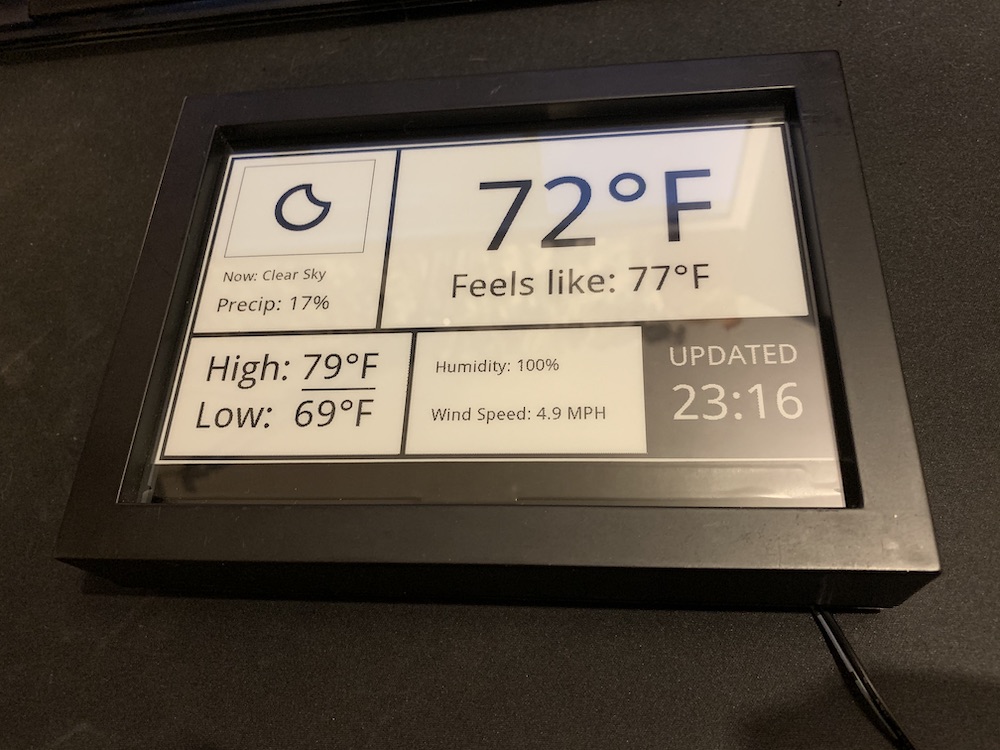
This project uses a Raspberry Pi to show weather updates and trash reminders on a Waveshare 7.5-inch e-paper display. It fetches weather data from OpenWeatherMap and refreshes the display at set intervals. Minimal energy consumption makes this setup ideal for continuous display without frequent updates. The project is written primarily in Python, distributed under the MIT License license, first published in 2020. Key topics include: e-ink, e-paper, eink, epaper, python.
E-paper Weather Display
This project uses a Raspberry Pi to show weather updates and trash reminders on a Waveshare 7.5-inch e-paper display. It fetches weather data from OpenWeatherMap and refreshes the display at set intervals. Minimal energy consumption makes this setup ideal for continuous display without frequent updates.

If you find this project useful, consider buying me a coffee ☕️.
Table of Contents
- What’s New
- Parts List
- Setup Instructions
- Running the Script
- Setting up Automatic Updates (Cron)
- Repository Structure
- Troubleshooting
- Credit and License
What’s New (Version 2.0)
- Upgraded to OpenWeatherMap One Call API 3.0: This update now uses the latest version of the OpenWeatherMap API (3.0), which may require users to update their subscriptions if they were previously using version 2.5. See the OpenWeatherMap One Call Migration Guide for details on the API changes and subscription requirements.
- Automatic Log Management: Logs now rotate when they get too large, making maintenance easier.
- User-Friendly Settings: All essential settings are grouped together for quick customization.
- More Reliable Error Handling: Logs network and API errors for easier troubleshooting.
- Improved Directory Handling: The script finds the right directories automatically, without manual path adjustments.
- Trash Day Reminders: Customize specific days to get reminders on the display.
Parts List
- Waveshare 7.5-inch e-Paper HAT: Available on Amazon (affiliate link).
- Raspberry Pi (tested on a Pi 3; any model should work except the Pi Zero without soldered headers).
- SD card (at least 8 GB).
- Power supply for the Raspberry Pi.
- 5 x 7 inch photo frame (thrift store find recommended).
Note: If you use this affiliate link, it helps support this project at no additional cost to you. Thank you!
Setup Instructions
Installation
-
Clone the Project:
Open a terminal and run:bashgit clone https://github.com/AbnormalDistributions/e_paper_weather_display.git cd e_paper_weather_display -
Install Python Libraries:
bashpip install pillow requests
Configuration
-
Add Your OpenWeatherMap API Key:
Sign up on OpenWeatherMap for an API key, then openweather.pyand add your API key where it saysAPI_KEY = 'XXXXXXXX'. -
Customize Your Settings:
Edit the following user-defined settings at the top ofweather.py:API_KEY: Your OpenWeatherMap API key.LOCATION: Name of the location to display (e.g.,New Orleans).LATITUDEandLONGITUDE: Coordinates for weather updates (use Google Maps to find these).UNITS: Choose'imperial'(Fahrenheit) or'metric'(Celsius).CSV_OPTION: Set this toTrueif you’d like to save a daily log of weather data inrecords.csv.TRASH_DAYS: Add the days for trash reminders as numbers (0=Monday, 6=Sunday).
Note: If you are not using a 7.5 inch Version 2 display, you will want to replace 'epd7in5_V2.py' in the 'lib' folder with the appropriate version from Waveshare's e-Paper library. Adjustments will be required for other screen sizes.
Running the Script
- To Run Manually:
From thee_paper_weather_displaydirectory, run:
This will fetch the weather data and update the display immediately.bashpython weather.py
Setting up Automatic Updates (Optional)
You can set up a scheduled update every 15 minutes using crontab. This will make sure your display updates automatically.
In the terminal, type:
bashcrontab -e
Then, add the following line at the end of the file:
bash*/15 * * * * /usr/bin/python /home/pi/e_paper_weather_display/weather.py >> /home/pi/e_paper_weather_display/weather_display.log 2>&1
- This command updates the display every 15 minutes.
- Be sure to replace
/home/pi/e_paper_weather_display/with the path where the project is stored, if different.
Files in This Repository
- weather.py: Main script file that fetches weather data and updates the display.
- lib/: Contains display drivers for the Waveshare e-paper display.
- font/ and pic/: Folders with fonts and images used by the display.
- photos/: Sample images of the display in action.
- records.csv: Optional log file for weather data if
CSV_OPTIONis enabled.
Troubleshooting
- Make sure the API_KEY is correct and has permissions for OpenWeatherMap’s One Call API.
- Confirm that required Python libraries (
pillowandrequests) are installed. - Double-check any custom paths used in
crontabif the automatic updates aren’t working as expected.
Credit and License
- Icon designs by Erik Flowers, with some modifications.
- Weather Icons: Licensed under SIL OFL 1.1.
- Code: Licensed under MIT License.
- Documentation: Licensed under CC BY 3.0.
Contributors
Showing top 3 contributors by commit count.


Related Repositories

sqfmi/Watchy
Watchy - An Open Source E-Ink Smartwatch

baskerville/plato
Document reader

aceinnolab/Inkycal
Create awesome e-paper dashboards within minutes! Modularity? Check! Python3? Check? Works on Raspberry Pi Zero W? Check! Support for own modules? Check!

usetrmnl/trmnl-firmware
TRMNL ePaper device firmware

joukos/PaperTTY
PaperTTY - Python module to render a TTY or VNC on e-ink

mudita/MuditaOS
Mobile operating system based on FreeRTOS™ optimized for E Ink displays - developed for Mudita Pure minimalist phone