

React native radio buttons
[DEPRECATED] A Radio-button like logic wrapper for React Native
*IMPORTANT* this package is deprecated and no longer maintained in favor of the official [SegmentedControlIOS](https://facebook.github.io/react-native/docs/segmentedcontrolios.html) component. The project is written primarily in JavaScript, distributed under the MIT License license, first published in 2015. Key topics include: radio-buttons, react-native.
react-native-radio-buttons
IMPORTANT this package is deprecated and no longer maintained in favor of the official SegmentedControlIOS component.
A react component to implement radio buttons-like behaviors: multiple options, only one option can be selected at a given time.
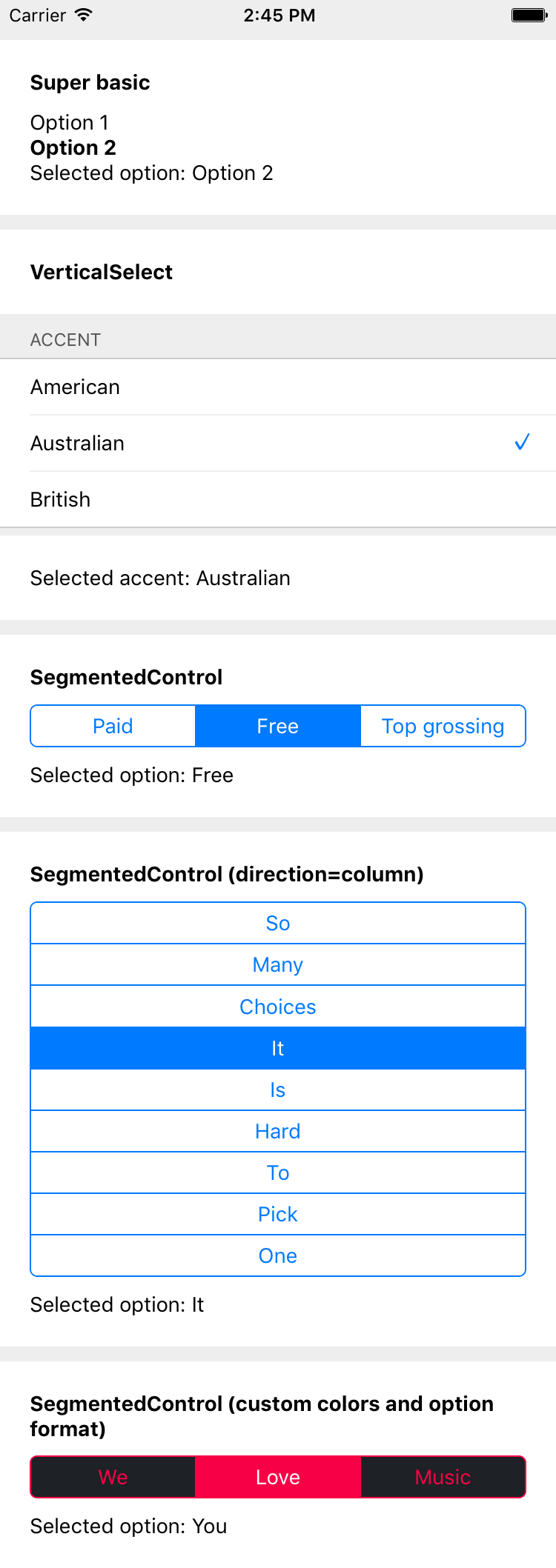
Both the container and option nodes are customizable. Comes with SegmentedControls clone, only more customizable (see below, animations to come).
Install
shnpm i -S react-native-radio-buttons
Demo app
shgit clone https://github.com/ArnaudRinquin/react-native-radio-buttons.git cd react-native-radio-buttons npm run demo
Usage
Here is an extensive overview of the component usage.
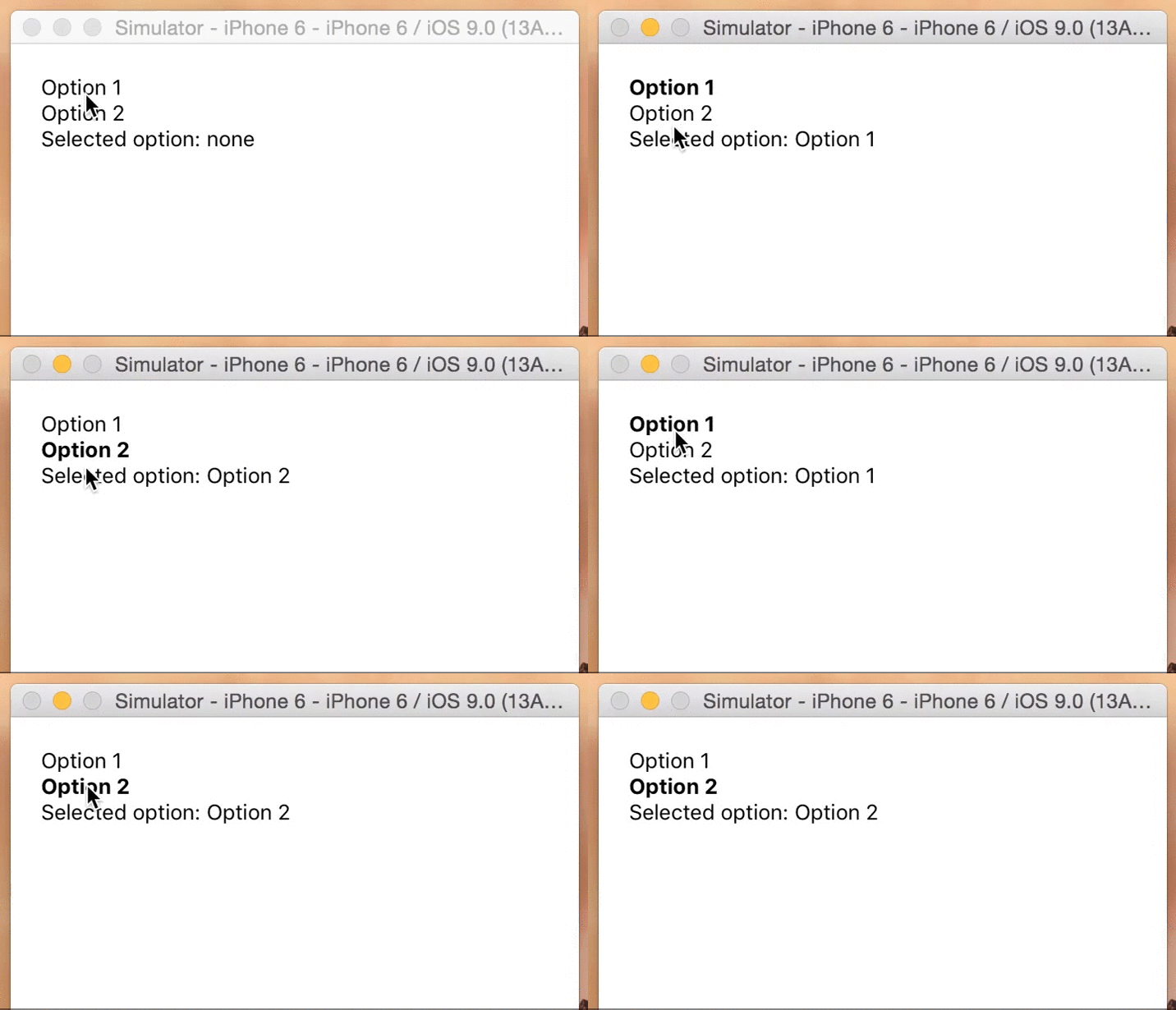
jsximport { RadioButtons } from 'react-native-radio-buttons' // ... render() { const options = [ "Option 1", "Option 2" ]; function setSelectedOption(selectedOption){ this.setState({ selectedOption }); } function renderOption(option, selected, onSelect, index){ const style = selected ? { fontWeight: 'bold'} : {}; return ( <TouchableWithoutFeedback onPress={onSelect} key={index}> <Text style={style}>{option}</Text> </TouchableWithoutFeedback> ); } function renderContainer(optionNodes){ return <View>{optionNodes}</View>; } return ( <View style={{margin: 20}}> <RadioButtons options={ options } onSelection={ setSelectedOption.bind(this) } selectedOption={this.state.selectedOption } renderOption={ renderOption } renderContainer={ renderContainer } /> <Text>Selected option: {this.state.selectedOption || 'none'}</Text> </View>); }
Will render this
Props
options - []mandatory array of anything, will be passed torenderOptiononSelection - function(selectedOption, selectedIndex){}option selection callbackselectedIndex - indexthe initially selected index, optional.selectedOption - optionthe initially selected option, optionalrenderOption - function(option, selected, onSelect, index)should return an option node, default generate<Text>nodes and adds{fontWeight:'bold'}to the selected option.renderContainer - function(optionsNodes)must render the container, default is RadioButtons.renderVerticalContainer (see below)optionStyle- optional styles to be applied to the<Text>elements of the options themselves.optionContainerStyle- optional styles to be applied to the the<View>that contain the options.testOptionEqual- function(selectedOption, currentOption){}optional compares and returns bool.
Full JavaScript SegmentedControls clone
This library comes with a clone of the native SegmentedControls, based on RadioButtons.
jsximport { SegmentedControls } from 'react-native-radio-buttons' // ... <SegmentedControls options={ options } onSelection={ setSelectedOption.bind(this) } selectedOption={ this.state.selectedOption } />
You override all the defaults through the props.
jsx<SegmentedControls tint={'#f80046'} selectedTint= {'white'} backTint= {'#1e2126'} options={ options } allowFontScaling={ false } // default: true onSelection={ setSelectedOption.bind(this) } selectedOption={ this.state.selectedOption } optionStyle={{fontFamily: 'AvenirNext-Medium'}} optionContainerStyle={{flex: 1}} />
Here is the list of the props you might override:
jsxconst IOS_BLUE = '#007AFF'; const IOS_WHITE = '#ffffff'; const DEFAULTS = { direction: 'row', tint: IOS_BLUE, backTint: IOS_WHITE, paddingTop: 5, paddingBottom: 5, textAlign: 'center', selectedTint: IOS_WHITE, selectedBackgroundColor: IOS_WHITE, separatorTint: IOS_BLUE, separatorWidth: 1, containerBorderTint: IOS_BLUE, containerBorderWidth: 1, containerBorderRadius: 5, }
You can also specify containerStyle, optionContainerStyle, and optionStyle to use any style you want:
containerStyle- optional styles to be applied to the outermost<View>component.optionStyle- optional styles to be applied to the<Text>elements of the options themselves.optionContainerStyle- optional styles to be applied to the the<View>that contain the options.
You can also specify how to extract the labels from the options through the extractText prop.
jsxoptions = [ { label: 'Option 1', value: 'opt1' }, { label: 'Option 2', value: 'opt2' } ] <SegmentedControls options={ options } onSelection={ setSelectedOption.bind(this) } selectedOption={ this.state.selectedOption } extractText={ (option) => option.label } />
If you decide to declare options as an array of objects, do also include a testOptionEqual prop for customized equality checking, otherwise changing selectedOption programmatically would not update the UI correctly.
With the above options, you'll need testOptionEqual to be as follows in order for selectedOption to display correctly.
jsx<SegmentedControls options={ options } onSelection={ setSelectedOption.bind(this) } selectedOption={ this.state.selectedOption } extractText={ (option) => option.label } testOptionEqual={(selectedValue, option) => selectedValue === option.value} />
Moreover, you can even specify the whole renderOption() function:
jsx<SegmentedControls // ... renderOption={(option, selected) => { return ( // ...render stuff ) }} }}
Helpers
RadioButtons.renderVerticalContainer;
A super simple renderContainer function that generates a <View> with {flexDirection: "column"}. It is used as default renderContainer if you don't specify it.
Usage:
jsx<RadioButtons options={ options } onSelection={ setSelectedOption } renderContainer={RadioButtons.renderVerticalContainer} />
RadioButtons.renderHorizontalContainer;
Another super simple renderContainer function that generates a <View> with {flexDirection: "row"}
Usage:
jsx<RadioButtons options={ options } onSelection={ setSelectedOption } renderContainer={RadioButtons.renderHorizontalContainer} />
RadioButtons.getViewContainerRenderer(viewContainerStyle);
An helper that generates a simple <View> with the provided style.
Usage:
jsx<RadioButtons options={ options } onSelection={ setSelectedOption } renderContainer={RadioButtons.getViewContainerRenderer({ backgroundColor: '#f80046', flexDirection: 'row', justifyContent: 'space-around', })} />
RadioButtons.getTextOptionRenderer(normalStyle, selectedStyle, extractText);
An helper that generates <Text> options wrapped in <TouchableWithoutFeedback>.
normalStyle and selectedStyle will be applied to the <Text> nodes, depending on state. extractText(options) can be specified.
Usage:
jsxconst normalStyle = { color: 'white' }; const selectedStyle = { color: '#f80046', fontWeight: 'bold' }; const extractText = (option) => option.label; <RadioButtons options={ options } onSelection={ setSelectedOption } renderOptions={RadioButtons.getTextOptionRenderer(normalStyle, selectedStyle, extractText)} />
Contributors
Showing top 12 contributors by commit count.




Related Repositories

lokesh-coder/pretty-checkbox
A pure CSS library to beautify checkbox and radio buttons.

szhsin/react-menu
React component for building accessible menu, dropdown, submenu, context menu, and more

DavydLiu/DLRadioButton
Radio Button for iOS

enisn/Xamarin.Forms.InputKit
CheckBox, Radio Button, Labeled Slider, Dropdowns etc.

bcylin/QuickTableViewController
A simple way to create a UITableView for settings in Swift.

nex3z/ToggleButtonGroup
A group of flowable toggle buttons, with multiple / single selection support and button customization.