PhoneSploit Pro
An all-in-one hacking tool to remotely exploit Android devices using ADB and Metasploit-Framework to get a Meterpreter session.
An all-in-one hacking tool written in `Python` to remotely exploit Android devices using `ADB` (Android Debug Bridge) and `Metasploit-Framework`. The project is written primarily in Python, distributed under the GNU General Public License v3.0 license, first published in 2022. It has gained significant community traction with 5,887 stars and 831 forks on GitHub. Key topics include: adb, android, android-debug-bridge, android-hacking, collaborate.
PhoneSploit Pro
PhoneSploit with Metasploit integration.
An all-in-one hacking tool written in Python to remotely exploit Android devices using ADB (Android Debug Bridge) and Metasploit-Framework.




Table of contents
- Overview
- Screenshots
- Features
- Requirements
- Installing dependencies
- Getting started
- Device setup tutorial
- Compatibility
- Installing tools manually
- Disclaimer
- Developer
- Support
Overview
Complete automation to get a Meterpreter session in one click
This tool can automatically create, install, and run a payload on the target device using Metasploit-Framework and ADB to take full control of the Android device in one click if the device has an open ADB port on TCP 5555.
The goal of this project is to make penetration testing and vulnerability assessment on Android devices easy. You no longer need to memorize commands and arguments—PhoneSploit Pro does it for you. Using this tool, you can test the security of your Android devices easily.
[!TIP]
PhoneSploit Pro can also be used as a complete ADB toolkit to perform various operations on Android devices over Wi‑Fi as well as USB.
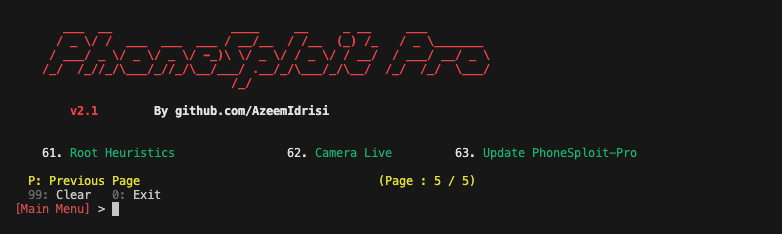
Screenshots
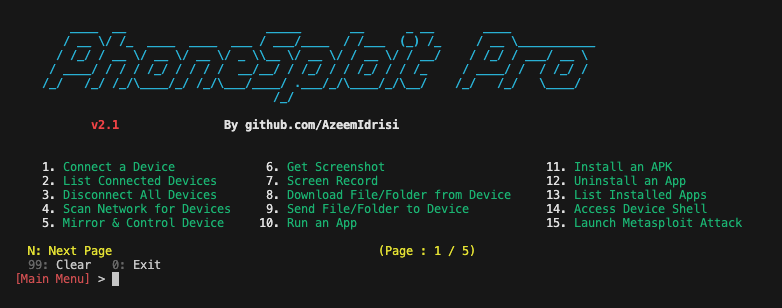
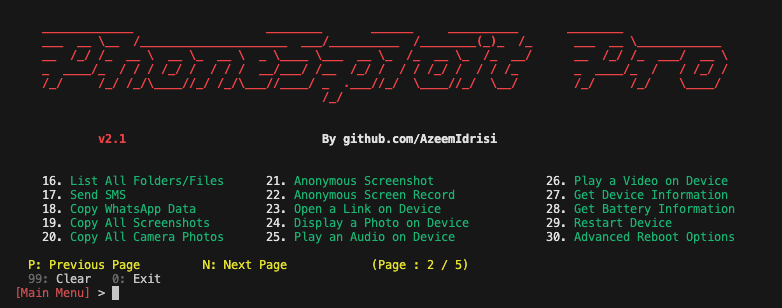
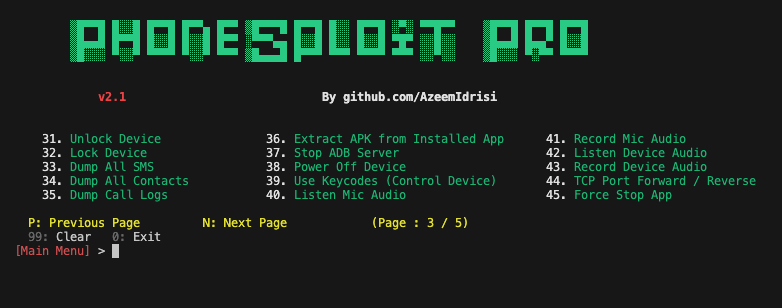
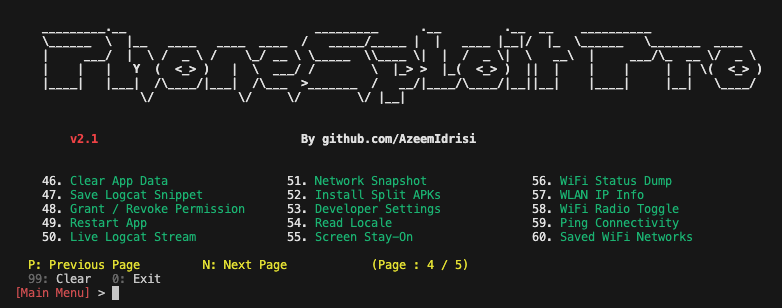
Features
| Feature | Description |
|---|---|
| Connect a device | Connect to a device remotely using ADB. |
| List connected devices | Show all devices currently attached to ADB. |
| Disconnect all devices | Disconnect every ADB session. |
| Multi-device selection | If several ADB devices are connected (USB or network), choose which device to use for the session (ANDROID_SERIAL). |
| Stop ADB server | Stop the ADB server process. |
| Access device shell | Open an interactive shell on the connected device. |
| Keycodes | Send keycodes to control the device remotely. |
| Unlock device | Turn the screen on, swipe up, and enter a password when needed. |
| Lock device | Lock the device. |
| Restart / reboot | Restart or reboot the device to System, Recovery, Bootloader, or Fastboot. |
| Power off | Power off the target device. |
| Screenshot | Take a screenshot and pull it to the computer automatically. |
| Screen recording | Record the target device’s screen for a specified time and pull the recording to the computer automatically. |
| Anonymous screenshot / screen record | Take screenshots or screen recordings and remove the file from the target device afterward. |
| Mirror and control | Mirror the screen and control the target device. |
| List files and folders | List all files and folders on the target device. |
| Download from device | Download a file or folder from the target device. |
| Send to device | Send a file or folder from the computer to the target device. |
| Copy WhatsApp data | Copy all WhatsApp data to the computer. |
| Copy screenshots | Copy all screenshots to the computer. |
| Copy camera photos | Copy all camera photos to the computer. |
| Camera live | Stream live video from the front or back camera on the target device. |
| Dump SMS | Export all SMS from the device to the computer. |
| Dump contacts | Export all contacts from the device to the computer. |
| Dump call logs | Export all call logs from the device to the computer. |
| Run an app | Launch an application on the device. |
| Install APK | Install an APK from the computer to the target device. |
| Install split APKs | Install apps shipped as multiple APK splits (e.g. split bundles). |
| Uninstall an app | Remove an installed application. |
| List installed apps | List all apps installed on the target device. |
| Extract APK | Extract the APK from an installed app. |
| Force-stop app | Force-stop a running application. |
| Clear app data | Clear storage/data for a chosen app (factory reset for that app). |
| Restart app | Restart an application (force-stop then relaunch). |
| Grant / revoke permission | Grant or revoke a runtime permission for an app. |
| Open a link | Open a URL on the target device. |
| Display a photo | Show an image or photo on the target device. |
| Play audio | Play an audio file on the target device. |
| Play video | Play a video on the target device. |
| Send SMS | Send SMS messages through the target device. |
| Device information | Read device information. |
| Battery information | Read battery status and related details. |
| Record microphone audio | Record audio from the microphone. |
| Stream microphone audio | Stream live microphone audio. |
| Record device audio | Record internal device audio. |
| Stream device audio | Stream live device audio. |
| Hack device completely | Automated Metasploit flow: fetch your IP address to set LHOST; create a payload with msfvenom, install it, and run it on the target device; launch and configure Metasploit-Framework to obtain a meterpreter session. A meterpreter session means the device is fully compromised via Metasploit-Framework, and you can run further actions from the session. |
| LAN network scan | Discover hosts on the local network to help find a target IP address; probe TCP ports 5555 and 5554 with service detection and show ADB-related fingerprints and hints for likely Android/ADB targets. |
| TCP port forwarding | Forward TCP ports over ADB, including reverse forwarding. |
| Save logcat snippet | Capture a slice of logcat output and save it to a file on the computer. |
| Live logcat stream | Stream logcat live from the device. |
| Network snapshot | Show a snapshot of network interfaces and connectivity on the device. |
| Developer settings | Open the system Developer options screen on the device. |
| Read locale | Read locale and language settings from the device. |
| Screen stay-on | Set svc power stayon (stay on over USB, stay on always, or turn stay-on off). |
| Wi‑Fi status dump | Dump detailed Wi‑Fi status from the device. |
| WLAN IP info | Show WLAN IP addressing information. |
| Wi‑Fi radio toggle | Turn the Wi‑Fi radio on or off. |
| Ping connectivity | Run ping checks against a host to test connectivity. |
| Saved Wi‑Fi networks | List saved Wi‑Fi networks known to the device. |
| Root heuristics | Heuristic checks for common signs of root access. |
Requirements
python3— Python 3.10 or newerpip— Package installer for Pythonadb— Android Debug Bridge (ADB) from Android SDK Platform Toolsmetasploit-framework— Metasploit-Framework (msfvenomandmsfconsole)scrcpy— scrcpynmap— Nmap
Installing dependencies
Use the bundled installer to set up all dependencies automatically. It detects your OS and uses the appropriate package manager.
Linux / macOS / Termux
chmod +x install.sh
./install.sh
To install specific tools only: ./install.sh --components adb,nmap,pip
For per-component prompts: ./install.sh --interactive
Windows
Run PowerShell as Administrator, then:
Set-ExecutionPolicy -Scope Process Bypass
.\install.ps1
To install specific tools only: .\install.ps1 -Components adb,nmap,pip
For per-component prompts: .\install.ps1 -Interactive
From PhoneSploit Pro
If a dependency is missing, the program shows a Missing Dependencies warning. Press I to run the installer, Y to continue anyway, or N to exit.
Getting started
[!IMPORTANT]
PhoneSploit Pro requires Python version 3.10 or higher. Please update Python before running the program.
Linux and macOS
Make sure all required software is installed.
git clone https://github.com/AzeemIdrisi/PhoneSploit-Pro.git
cd PhoneSploit-Pro/
python3 -m venv .venv
source .venv/bin/activate
pip install -r requirements.txt
python3 phonesploitpro.py
[!TIP]
You only need to activate the virtual environment (source .venv/bin/activate) each time you open a new terminal before running the program.
Windows
Make sure all required software is installed.
git clone https://github.com/AzeemIdrisi/PhoneSploit-Pro.git
cd PhoneSploit-Pro/
python -m venv .venv
.\.venv\Scripts\activate
pip install -r requirements.txt
-
Download and extract the latest
platform-toolsfrom here. -
Copy all files from the extracted
platform-toolsoradbdirectory into the PhoneSploit-Pro directory, then run:
python phonesploitpro.py
Device setup tutorial
Setting up an Android phone for the first time
- Enabling Developer Options
- Open
Settings. - Go to
About Phone. - Find
Build Number. - Tap
Build Numberseven times. - Enter your pattern, PIN, or password to enable the
Developer optionsmenu. - The
Developer optionsmenu will now appear in your Settings menu.
- Enabling USB debugging
- Open
Settings. - Go to
System>Developer options. - Scroll down and enable
USB debugging.
- Connecting with a computer
- Connect your Android device and the
adbhost computer to the same Wi‑Fi network. - Connect the device to the host computer with a USB cable.
- Open a terminal on the computer and run the following command:
adb devices
- A pop-up will appear on the Android phone when you connect to a new PC for the first time:
Allow USB debugging?. - Select
Always allow from this computer, then tapAllow. - Then, in the terminal, run the following command:
adb tcpip 5555
- You can now connect the Android phone to the computer over Wi‑Fi using
adb. - Disconnect the USB cable.
- Go to
Settings>About Phone>Status>IP addressand note the phone’sIP address. - Run PhoneSploit Pro, choose
Connect a device, and enter the target’sIP addressto connect over Wi‑Fi.
Connecting the Android phone the next time
- Connect your Android device and host computer to the same Wi‑Fi network.
- Run PhoneSploit Pro, choose
Connect a device, and enter the target’sIP addressto connect over Wi‑Fi.
Compatibility
This tool is tested on:
- ✅ Ubuntu
- ✅ Linux Mint
- ✅ Kali Linux
- ✅ Fedora
- ✅ Arch Linux
- ✅ Parrot Security OS
- ✅ Windows 11
- ✅ Termux (Android)
[!NOTE]
New features are primarily tested on Linux, so Linux is recommended for running PhoneSploit Pro.
Some features might not work properly on Windows.
Installing tools manually
If you prefer to install tools yourself, or the automatic installer is not available for your platform, use the sections below.
ADB
Linux
Open a terminal and run the following commands:
- Debian / Ubuntu
sudo apt update
sudo apt install adb
- Fedora
sudo dnf install android-tools
- Arch Linux / Manjaro
sudo pacman -Sy android-tools
For other Linux distributions, see: Android platform-tools downloads
macOS
Open a terminal and run the following command:
brew install android-platform-tools
Or download from: Android platform-tools downloads
Windows
Download from: Android platform-tools downloads
Termux
pkg update
pkg install android-tools
Metasploit-Framework
Linux and macOS
curl https://raw.githubusercontent.com/rapid7/metasploit-omnibus/master/config/templates/metasploit-framework-wrappers/msfupdate.erb > msfinstall && \
  chmod 755 msfinstall && \
  ./msfinstall
- macOS (Homebrew) — Metasploit is distributed as a Homebrew Cask (not
brew installwithout--cask):
brew install --cask metasploit
Or follow: Installing Metasploit on Linux / macOS
Or visit: Metasploit download
Windows
Visit: Metasploit download
Or see: Windows: antivirus and installers
scrcpy
Visit the scrcpy GitHub page for the latest installation instructions: scrcpy — get the app
On Windows: Copy all files from the extracted scrcpy folder into the PhoneSploit-Pro folder.
[!IMPORTANT]
Ifscrcpyis not available for your Linux distribution (for example Kali Linux), you can install it manually (Linux guide)
or build it in a few steps (Build guide).
Nmap
Linux
Open a terminal and run the following commands:
- Debian / Ubuntu
sudo apt update
sudo apt install nmap
- Fedora
sudo dnf install nmap
- Arch Linux / Manjaro
sudo pacman -Sy nmap
For other Linux distributions, see: Nmap download
macOS
Open a terminal and run the following command:
brew install nmap
Or visit: Nmap download
Windows
Download and install the latest stable release: Nmap for Windows
Termux
pkg update
pkg install nmap
Disclaimer
- This project and its developer do not promote any illegal activity and are not responsible for any misuse or damage caused by this project.
- This project is for educational purposes only.
- Please do not use this tool on other people’s devices without their permission.
- Do not use this tool to harm others.
- Use this project responsibly and only on your own devices or with explicit authorization.
- It is the end user’s responsibility to obey all applicable local, state, federal, and international laws.
Developer
<a href="https://github.com/azeemidrisi/"> <!-- <img src="https://contrib.rocks/image?repo=azeemidrisi/phonesploit-pro" /> --> <img width="150px" src=https://github.com/AzeemIdrisi/PhoneSploit-Pro/assets/112647789/a5fa646c-93a2-460f-bcb7-528fedb147e9 /> </a>Azeem Idrisi - @AzeemIdrisi
Support
If you like my work, you can support me via:
<a href="https://paypal.me/AzeemIdrisi" target="_blank"> <kbd> <img src="https://github.com/AzeemIdrisi/AzeemIdrisi/blob/main/docs/paypal-button-blue.png" alt="PayPal" width="147"></a> <a href="https://www.buymeacoffee.com/AzeemIdrisi" target="_blank"> <kbd> <img src="https://github.com/AzeemIdrisi/AzeemIdrisi/blob/main/docs/default-yellow.png" alt="Buy Me A Coffee" width="200"></a>
<hr>Copyright © 2026 Azeem Idrisi (github.com/AzeemIdrisi)
Contributors
Showing top 4 contributors by commit count.


Related Repositories

0x192/universal-android-debloater
Cross-platform GUI written in Rust using ADB to debloat non-rooted android devices. Improve your privacy, the security and battery life of your device.

wangshub/wechat_jump_game
微信《跳一跳》Python 辅助

skywind3000/awesome-cheatsheets
超级速查表 - 编程语言、框架和开发工具的速查表,单个文件包含一切你需要知道的东西 :zap:

timschneeb/awesome-shizuku
Curated list of awesome Android apps making use of Shizuku

MuntashirAkon/AppManager
A full-featured package manager and viewer for Android

firerpa/lamda
The most powerful Android RPA agent framework, next generation mobile automation.