

Hytale ui plugin
🚀 A lightweight IntelliJ IDEA plugin that adds syntax highlighting, bracket matching, and code formatting support for .ui files - making UI definition editing easier and more productive.
> A lightweight IntelliJ IDEA plugin that adds syntax > highlighting, bracket matching, and code formatting > support > for `.ui` files - making UI definition editing easier and > more productive. The project is written primarily in Java, distributed under the MIT License license, first published in 2026. Key topics include: hytale, intellij, plugin.
UI File Plugin for IntelliJ IDEA
A lightweight IntelliJ IDEA plugin that adds syntax
highlighting, bracket matching, and code formatting
support
for.uifiles - making UI definition editing easier and
more productive.
An IntelliJ IDEA plugin that provides support for .ui
files - a format for defining user interfaces.
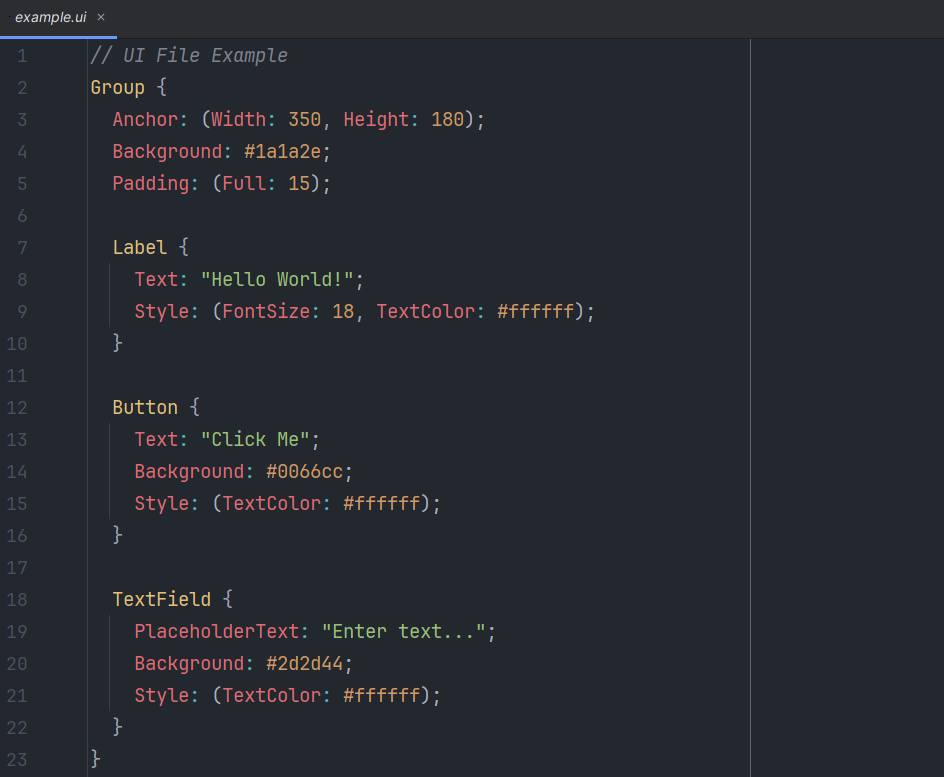
Features
✅ Live Preview - Real-time visual rendering of .ui files
in a tool window
✅ Syntax Highlighting - Color highlighting for
components, properties, strings, and comments
✅ IntelliSense/Code Completion - Auto-completion for UI
component types and their properties with descriptions
✅ Semicolon Validation - Smart validation and auto-fix
for semicolon rules (see Semicolon Rules)
✅ Color Preview - Visual color squares in the gutter for
hex color values
✅ Bracket Matching - Automatic matching of {} and
()
✅ Code Folding - Collapse and expand nested blocks
✅ New File Action - Create new .ui files from context
menu
✅ Plugin Settings - Configure plugin behavior via
Settings → Tools → Hytale UI File
Live Preview
The plugin includes a powerful live preview feature:
- Visual Rendering: See your UI components rendered in
real-time - Auto-Updates: Preview updates automatically as you
type - Zoom Controls: Zoom in/out or reset to 100% for better
viewing - Component Support: Renders Group, Label, Button, and
TextField components with accurate colors and sizes - Docked Panel: Preview appears on the right side of
your IDE
Color Picker Integration
The plugin provides an intuitive color picker for hex color
values:
- Gutter Icons: Small color squares appear in the gutter
next to hex color values (#RGB, #RRGGBB, #RRGGBBAA) - Click to Edit: Click on any color gutter icon to open
the IntelliJ color picker dialog - Intention Action: Place cursor on a color value and
pressAlt+Enter(or⌥+Enteron Mac), then select "
Choose color" - Alpha Channel Support: The color picker supports
transparency (alpha channel) - Real-time Update: The code updates immediately when
you choose a new color - Hover Tooltip: Hover over color icons to see RGB/RGBA
values
Example:
uiBackground: #1a1a2e; ← Click the color square in the gutter to change this color TextColor: #ffffff; ← Or press Alt+Enter on the color value
IntelliSense Features
The plugin provides intelligent code completion that helps
you discover and use UI components:
- Component Type Completion: Start typing and get
suggestions for all available UI components (Group, Label,
Button, TextField, Image, CheckBox, Slider, Panel,
ScrollView) - Property Completion: Inside a component block, get
context-aware property suggestions - Type Information: See the expected value type for each
property (color, string, number, boolean, etc.) - Descriptions: Each property shows a helpful
description of what it does - Smart Templates: Properties are inserted with
appropriate default values and syntax
Supported UI Components:
Group- Container with layout capabilitiesLabel- Text displayButton- Clickable button with hover/pressed statesTextField/TextInput- Text input fields with
placeholder supportImage- Image display with stretch modesCheckBox- Checkbox with labelSlider- Value slider with min/max rangePanel- Generic panel with border optionsScrollView- Scrollable container
Requirements
- IntelliJ IDEA 2025.1 - 2025.3 (Build 251.* - 253.*)
- JDK 17, 21, or 25 (for development and building)
Installation
1. Clone the Repository
bashgit clone https://github.com/BungeeDEV/hytale-ui-plugin.git cd hytale-ui-plugin
2. Build the Plugin
bash./gradlew buildPlugin
3. Install the Plugin
- Find the built plugin at:
build/distributions/ui-file-plugin-1.0.1.zip - In IntelliJ:
File → Settings → Plugins → ⚙️ → Install Plugin from Disk... - Select the
.zipor.jarfile and restart the IDE
Alternative: Test the Plugin Directly
bash./gradlew runIde
This starts a test IDE with the plugin already installed.
UI File Format Example
ui// Comment Group { Anchor: (Width: 400, Height: 250); Background: #1a1a2e; LayoutMode: Top; Padding: (Full: 20); Label #Title { Text: "Hello World!"; Anchor: (Height: 40); Style: (FontSize: 24, TextColor: #ffffff, Alignment: Center); } Button #SubmitButton { Text: "Click Me"; Anchor: (Width: 150, Height: 35); Background: #0066cc; } }
Development
Useful Gradle Tasks
bash./gradlew buildPlugin # Build the plugin ./gradlew runIde # Start test IDE ./gradlew test # Run tests ./gradlew verifyPlugin # Verify plugin
Project Structure
ui-plugin/
├── src/main/java/de/bungee/uifile/
│   ├── UILanguage.java
│   ├── UIFileType.java
│   ├── lexer/          # Tokenizer
│   ├── parser/         # Parser
│   ├── psi/            # PSI structures
│   └── highlighter/    # Syntax highlighting
└── src/main/resources/
    └── META-INF/
        └── plugin.xml
License
MIT License
Contributing
Pull requests are welcome! For major changes, please open an
issue first to discuss what you would like to change.
Contributors
Showing top 5 contributors by commit count.


Related Repositories

JannisX11/blockbench
Blockbench - A low poly 3D model editor

Azuriom/Azuriom
Azuriom is a complete open-source web solution for game servers. Enjoy dozens of extensions for endless possibilities. Already trusted by over 1,800 servers totaling more than two million users.

hyprismteam/HyPrism
Hytale launcher with mod management, and more!

vectrix-space/ignite
A Mixin loader for Paper/Velocity/Spigot/Hytale

aternosorg/mclogs
Paste, share and analyse your logs - Built for Minecraft & Hytale

HytaleModding/site
Hytale Modding Website - your one stop shop for all guides & docs related to Hytale.