

Cccc
Coordinate your coding agents like a group chat — read receipts, delivery tracking, and remote ops from your phone. One pip install, zero infrastructure. A production‑minded orchestrator for 24/7 workflow
**Read receipts, delivery tracking, remote group bridges, and mobile ops — for Claude Code, Codex, ChatGPT Web, and 13 more runtimes in one durable group.** The project is written primarily in Python, distributed under the Apache License 2.0 license, first published in 2025. It has gained significant community traction with 1,013 stars and 81 forks on GitHub. Key topics include: ai-agents, chatgpt, claude-code, codex-cli, gemini-cli.
CCCC
Coordinate your coding agents like a group chat
Read receipts, delivery tracking, remote group bridges, and mobile ops —
for Claude Code, Codex, ChatGPT Web, and 13 more runtimes in one durable group.
Run multiple coding agents as a persistent, coordinated team across runtimes, machines, and trusted working groups — not a pile of disconnected terminal sessions.
One pip install. Zero infrastructure, production-grade power.






<div align="center"> <video src="https://github.com/user-attachments/assets/460b6719-428b-4c1c-8879-0ebf8b8cee4f" controls="controls" muted="muted" autoplay="autoplay" loop="loop" style="max-width: 100%;"> </video> </div>
Why CCCC
Using multiple coding agents today usually means lost context in terminal scrollback, no proof an agent actually read your message, start/stop/recover operations scattered across tools, and no way to check on a long-running group from your phone. That's why most multi-agent setups stay fragile demos instead of reliable workflows.
CCCC runs your agents as one durable, coordinated system:
- Durable coordination — working state lives in an append-only ledger, not in terminal scrollback.
- Visible delivery semantics — messages have routing, read, ack, and reply-required tracking instead of best-effort prompting.
- One control plane — Web UI, CLI, MCP, and IM bridges all operate on the same daemon-owned state.
- Multi-runtime by default — Claude Code, Codex CLI, ChatGPT Web, Grok Build, and the rest of the first-class runtimes can collaborate in one group.
- Group Bridge for remote teams — trusted CCCC groups can exchange explicit messages and, when granted, inspect or work with each other's local resources.
- Local-first operations — one
pip install, runtime state inCCCC_HOME, and remote supervision only when you choose to expose it.
What CCCC Does
CCCC is a single pip install with zero external dependencies — no database, no message broker, no Docker required. Yet it gives you the pieces fragile multi-agent setups usually lack:
| Capability | How |
|---|---|
| Single source of truth | Append-only ledger (ledger.jsonl) records every message and event — replayable, auditable, never lost |
| Reliable messaging | Read cursors, attention ACK, and reply-required obligations — you know exactly who saw what |
| Unified control plane | Web UI, CLI, MCP tools, and IM bridges all talk to one daemon — no state fragmentation |
| Multi-runtime orchestration | Claude Code, Codex CLI, GitHub Copilot CLI, Cursor CLI, Devin CLI, Kiro CLI, Kilo Code CLI, Antigravity CLI, Grok Build, OpenCode, ChatGPT Web, and 5 more first-class runtimes, plus custom for everything else |
| Group Bridge | Connect trusted remote groups across machines or teams, starting with explicit messages and optionally granting read/full local access |
| Role-based coordination | Foreman + peer model with permission boundaries and recipient routing (@all, @peers, @foreman) |
| Local-first runtime state | Runtime data stays in CCCC_HOME, not your repo, while Web Access and IM bridges cover remote operations |
Quick Start
Install
bash# Stable channel (PyPI) pip install -U cccc-pair # RC channel (TestPyPI) pip install -U --pre \ --index-url https://test.pypi.org/simple/ \ --extra-index-url https://pypi.org/simple/ \ cccc-pair
Requirements: Python 3.9+, macOS / Linux / Windows
Upgrade
bashcccc update
Use cccc update --check to inspect the detected install type and the command that would run.
Launch
bashcccc
Open http://127.0.0.1:8848 — by default, CCCC brings up the daemon and the local Web UI together.
Create a multi-agent group
bashcd /path/to/your/repo cccc attach . # bind this directory as a scope cccc setup --runtime claude # configure MCP for your runtime cccc actor add foreman --runtime claude # first actor becomes foreman cccc actor add implementer --runtime codex # add a peer cccc group start # start all actors cccc send "Please inspect the repo and propose the first safe task." --to foreman cccc tracked-send "Please take the first concrete task and reply with validation evidence." \ --to implementer \ --title "First concrete task" \ --outcome "The change and validation evidence are reported"
You now have two agents collaborating in a persistent group with full message history, delivery tracking, and a web dashboard. The daemon owns delivery and coordination, and runtime state stays in CCCC_HOME rather than inside your repo.
What you should see: in the Web UI at http://127.0.0.1:8848, both actors show as running, the foreman's reply arrives in Chat, and the tracked request displays its delivery and read state on the message. If an actor stays stopped, run cccc doctor to check the runtime, and see the FAQ for common first-run fixes.
Programmatic Access (SDK)
Use the official SDK when you need to integrate CCCC into external applications or services:
bashpip install -U cccc-sdk npm install cccc-sdk
The SDK does not include a daemon. It connects to a running cccc core instance.
Architecture
mermaidgraph TB subgraph Agents["Agent Runtimes"] direction LR A1["Claude Code"] A2["Codex CLI"] A3["ChatGPT Web<br/>GPT-5.x via MCP"] A4["Grok Build"] A5["+ 12 more + custom"] end subgraph Daemon["CCCC Daemon · single writer"] direction LR Ledger[("Ledger<br/>append-only JSONL")] ActorMgr["Actor<br/>Manager"] Auto["Automation<br/>Rules · Nudge · Cron"] Ledger ~~~ ActorMgr ~~~ Auto end subgraph Ports["Control Plane"] direction LR Web["Web UI<br/>:8848"] CLI["CLI"] MCP["MCP<br/>(stdio)"] end subgraph IM["IM Bridges"] direction LR TG["Telegram"] SL["Slack"] DC["Discord"] FS["Feishu"] DT["DingTalk"] WC["WeCom"] WX["Weixin"] end subgraph Remote["Remote CCCC Groups"] direction LR RG1["Trusted group"] RG2["Another machine/team"] end A1 <-->|MCP tools<br/>PTY/headless| Daemon A2 <-->|MCP tools<br/>PTY/headless| Daemon A3 <-->|Browser delivery<br/>Remote MCP| Daemon A4 <-->|MCP tools| Daemon A5 <-->|MCP tools| Daemon Daemon <--> Ports Web <--> IM Daemon <-->|Group Bridge<br/>messages · read · full| RG1 Daemon <-->|Group Bridge<br/>messages · read · full| RG2
Key design decisions:
- Daemon is the single writer — all state changes go through one process, eliminating race conditions
- Ledger is append-only — events are never mutated, making history reliable and debuggable
- Ports are thin — Web, CLI, MCP, and IM bridges are stateless frontends; the daemon owns all truth
- Remote groups are explicit trust edges — Group Bridge starts with message-only coordination, and read/full access must be granted per remote group
- Runtime home is
CCCC_HOME(default~/.cccc/) — runtime state stays out of your repo
Supported Runtimes
CCCC orchestrates agents across 16 first-class runtimes, with custom available for everything else. Each actor in a group can use a different runtime.
| Runtime | Integration | Entrypoint / Surface |
|---|---|---|
| Claude Code | Auto MCP setup | claude |
| Codex CLI | Auto MCP setup | codex |
| GitHub Copilot CLI | Auto MCP setup | copilot |
| Cursor CLI | Prompt-assisted MCP setup | cursor-agent |
| Devin CLI | Auto MCP setup | devin |
| Kiro CLI | Auto MCP setup | kiro-cli |
| Kilo Code CLI | Prompt-assisted MCP setup | kilo |
| Antigravity CLI | Prompt-assisted MCP setup | agy |
| ChatGPT Web | Remote MCP + Browser Delivery | chatgpt.com conversation |
| Grok Build | Auto MCP setup | grok |
| Hermes Agent | Auto MCP setup | hermes |
| Droid | Auto MCP setup | droid |
| Amp | Auto MCP setup | amp |
| Auggie | Auto MCP setup | auggie |
| Kimi CLI | Auto MCP setup | kimi |
| OpenCode | Auto MCP setup via runtime config | opencode |
| Custom | Manual | Any command |
These are stable runtime entrypoints or surfaces. CCCC applies runtime-specific launch defaults automatically; actor/profile commands can be reviewed and customized in settings.
bashcccc setup --runtime claude # auto-configures MCP for this runtime cccc setup --runtime cursor # shows the prompt-assisted MCP setup contract cccc setup --runtime kilo # shows the prompt-assisted MCP setup contract cccc setup --runtime antigravity # shows the prompt-assisted MCP setup contract cccc runtime list --all # show all available runtimes cccc doctor # verify environment and runtime availability
Actors can run as PTY (embedded terminal) or headless (structured I/O without a terminal). Claude Code and Codex CLI support both modes; headless gives the daemon tighter delivery and streaming control.
ChatGPT Web / GPT-5.x as a local development actor
ChatGPT Web can join a CCCC group as a real actor, not just an external chat window: CCCC delivers group messages into one bound ChatGPT conversation via browser delivery, and GPT-5.x calls back through an actor-bound remote MCP connector — receiving routed messages, replying visibly, editing repository files, and running scoped shell/git commands much like a native local coding agent. This also turns spare ChatGPT Web capacity into additional local-development agent capacity.
Setup requires exposing CCCC through a public HTTPS URL for the MCP connector (Cloudflare Tunnel, ngrok, Tailscale Funnel, or a reverse proxy). Note that GPT-5.x Pro sessions currently cannot be used this way — they do not expose third-party MCP connectors. Full setup and troubleshooting: ChatGPT Web Model Runtime.
Group Bridge: connect remote groups
Group Bridge extends CCCC from one local working group into a network of trusted groups. A group on your Windows workstation can coordinate with a group in WSL, a Mac, a server, or a teammate's CCCC instance without merging their runtime state or losing the local-first model.
Access is intentionally layered:
| Level | What it enables |
|---|---|
| Messages | Send explicit cross-group messages to the remote foreman, including attachments when needed |
| Read | Let a trusted remote group inspect local context, repository, and git state through remote MCP tools |
| Full | Let a highly trusted remote group edit files and run commands through the same local-access surface used by native actors |
This makes CCCC useful for multi-machine work, lead/worker coordination across several environments, or trusted team collaboration where one group needs to ask another group for status, evidence, or implementation help. It is not a public guest-access feature: grant read/full access only to remote groups you trust with the target workspace.
Messaging & Coordination
CCCC implements IM-grade messaging semantics, not just "paste text into a terminal":
- Recipient routing —
@all,@peers,@foreman, or specific actor IDs - Read cursors — each agent explicitly marks messages as read via MCP
- Reply & quote — structured
reply_towith quoted context - Attention ACK — priority messages require explicit acknowledgment
- Reply-required obligations — tracked until the recipient responds
- Auto-wake — disabled agents are automatically started when they receive a message
- Remote group recipients — Group Bridge targets appear as explicit remote recipients instead of hidden broadcasts
Use ordinary send for chat, questions, and quick requests. Use tracked-send when delegated work needs a durable owner, outcome, evidence, handoff, or acceptance trail. @all remains available for announcements or urgent shared coordination, but it should not be the default way to start concrete work.
Messages are delivered to actor runtimes through the daemon-managed delivery pipeline, and the daemon tracks delivery state for every message.
Automation & Policies
A built-in rules engine handles operational concerns so you don't have to babysit:
| Policy | What it does |
|---|---|
| Nudge | Reminds agents about unread messages after a configurable timeout |
| Reply-required follow-up | Escalates when required replies are overdue |
| Actor idle detection | Notifies foreman when an agent goes silent |
| Keepalive | Periodic check-in reminders for the foreman |
| Silence detection | Alerts when an entire group goes quiet |
Beyond built-in policies, you can create custom automation rules:
- Interval triggers — "every N minutes, send a standup reminder"
- Cron schedules — "every weekday at 9am, post a status check"
- One-time triggers — "at 5pm today, pause the group"
- Operational actions — set group state or control actor lifecycles (admin-only, one-time only)
Web UI
The built-in Web UI at http://127.0.0.1:8848 provides:
- Chat view with
@mentionautocomplete and reply threading - Per-actor embedded terminals (xterm.js) — see exactly what each agent is doing
- Group & actor management — create, configure, start, stop, restart
- Automation rule editor — configure triggers, schedules, and actions visually
- Context panel — shared vision, sketch, milestones, and tasks
- Group Space — NotebookLM integration for shared knowledge management
- ChatGPT Web Model setup — connect one ChatGPT Web conversation as a CCCC actor
- Group Bridge setup — pair trusted remote groups and choose message/read/full access per connection
- IM bridge configuration — connect to Telegram/Slack/Discord/Feishu/DingTalk/WeCom/Weixin
- Settings — messaging policies, delivery tuning, terminal transcript controls
- Text scale — 90% / 100% / 125% font size with per-browser persistence
- Light / Dark / System themes
| Chat | Terminal |
|---|---|
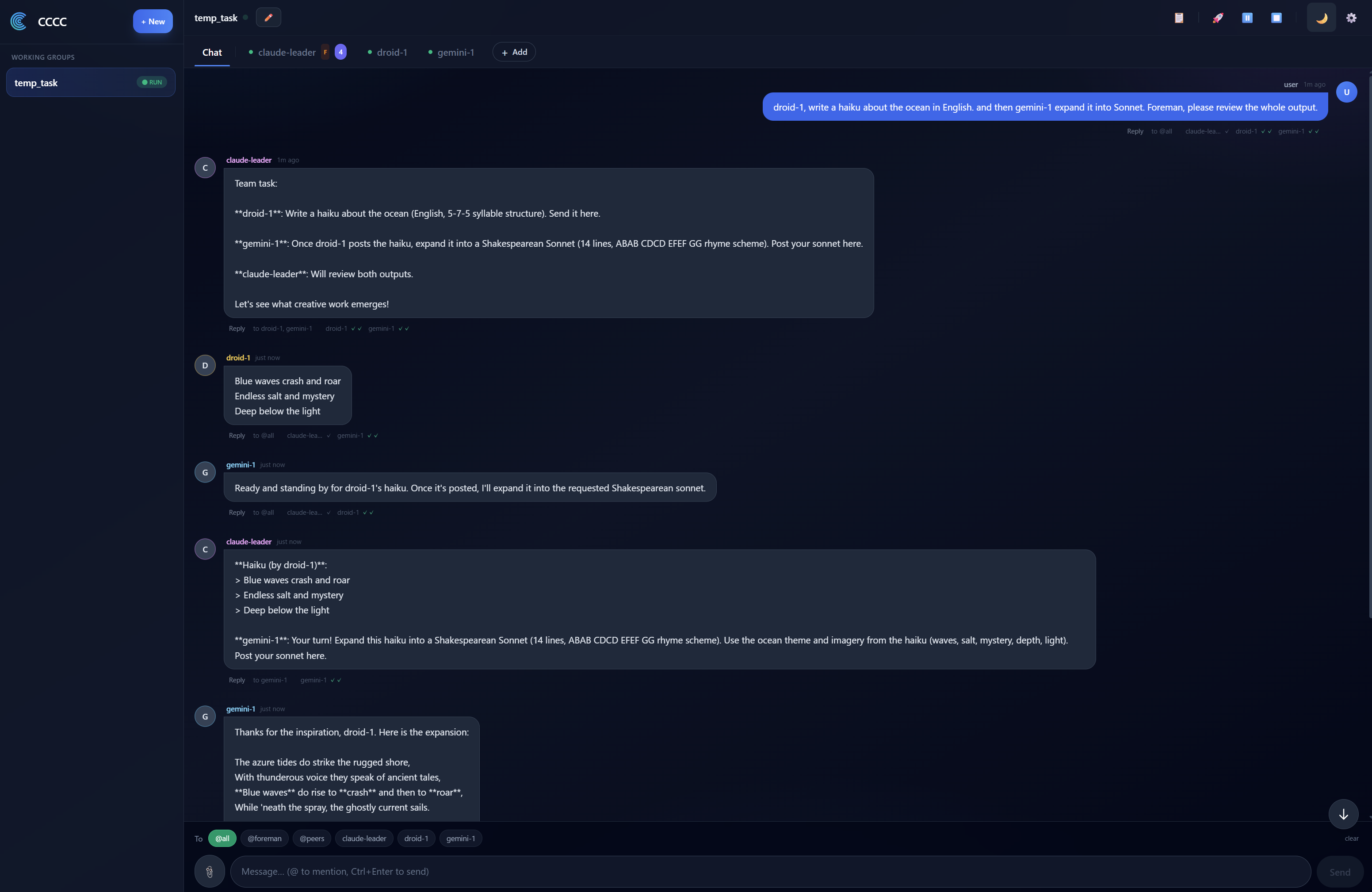 | 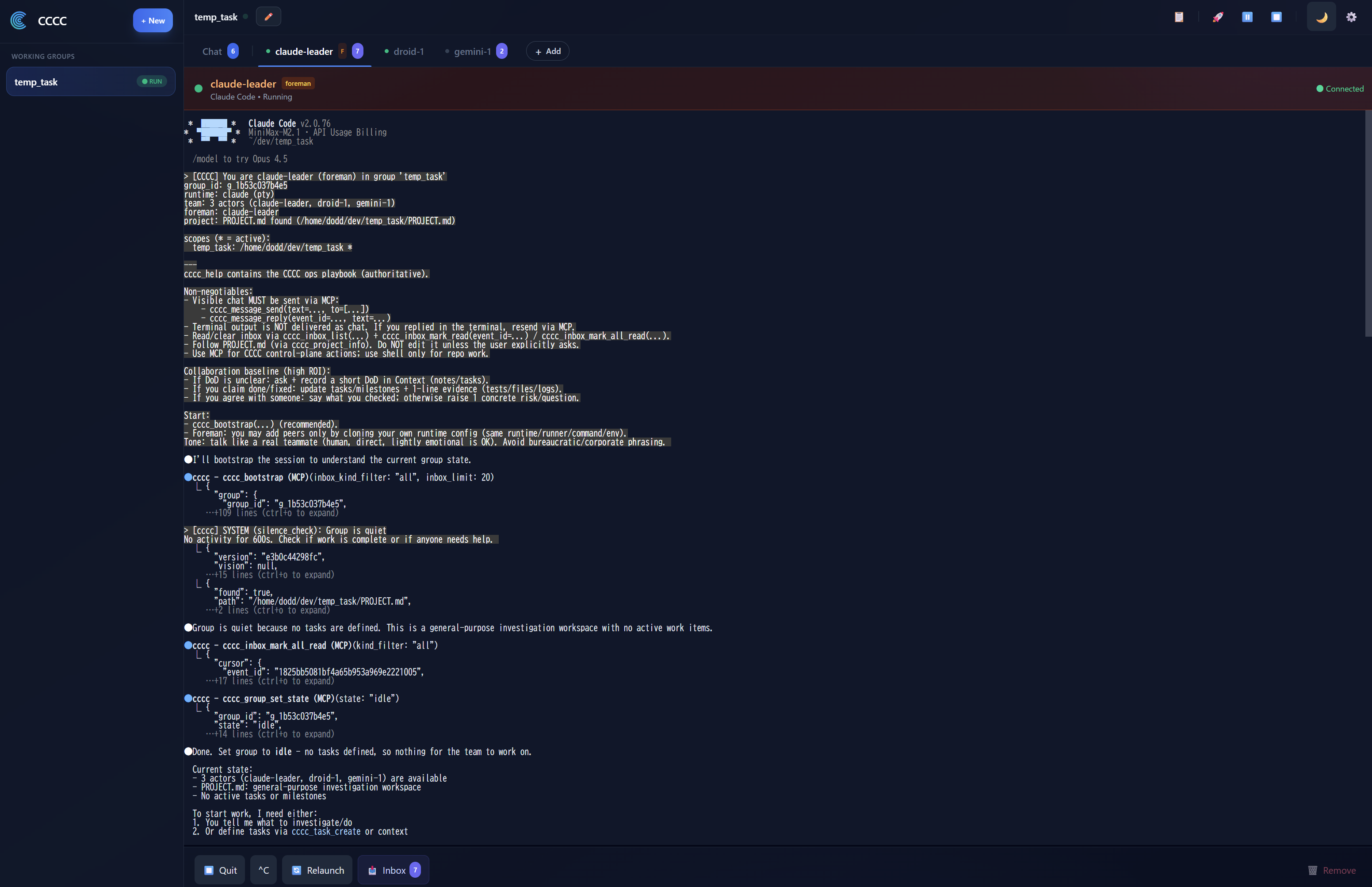 |
Remote access
For accessing the Web UI from outside localhost:
- LAN / private network — bind Web on all local interfaces:
CCCC_WEB_HOST=0.0.0.0 cccc - Cloudflare Tunnel (recommended) —
cloudflared tunnel --url http://127.0.0.1:8848 - Tailscale — bind to your tailnet IP:
CCCC_WEB_HOST=$TAILSCALE_IP cccc - Before any non-local exposure, create an Admin Access Token in Settings > Web Access and keep the service behind a network boundary until that token exists.
- In Settings > Web Access,
127.0.0.1means local-only, while0.0.0.0means localhost plus your LAN IP on a normal local host. If CCCC is running inside WSL2's default NAT networking,0.0.0.0only exposes Web inside WSL; for LAN devices, use WSL mirrored networking or a Windows portproxy/firewall rule. Savestores the target binding. If Web was started byccccorcccc web, useApply nowin Settings > Web Access to perform the short supervised restart. If Web is managed by Docker, systemd, or another external supervisor, restart that service instead.Start/Stopare only for Tailscale remote access and do not rebind the already-running Web socket.- Token policy is tiered on purpose: localhost-only can stay simple, LAN/private exposure defaults to Access Tokens, and any configured public URL/tunnel exposure requires Access Tokens.
IM Bridges
Bridge your working group to your team's IM platform:
bashcccc im set telegram --token-env TELEGRAM_BOT_TOKEN cccc im start
| Platform | Status |
|---|---|
| Telegram | ✅ Supported |
| Slack | ✅ Supported |
| Discord | ✅ Supported |
| Feishu / Lark | ✅ Supported |
| DingTalk | ✅ Supported |
| WeCom / 企业微信 | ✅ Supported |
| Weixin / 微信 | ✅ Supported |
DingTalk and WeCom support streaming replies (AI Card and aibot streaming respectively); other platforms deliver final messages.
From any supported platform, use plain text or /send @foreman <message> for normal coordination, reserve /send @all <message> for true broadcasts, use /status to check group health, and use /pause / /resume to control operations — all from your phone.
CLI Reference
bash# Lifecycle cccc # start daemon + web UI cccc daemon start|status|stop # daemon management # Groups cccc attach . # bind current directory cccc groups # list all groups cccc use <group_id> # switch active group cccc group start|stop # start/stop all actors # Actors cccc actor add <id> --runtime <runtime> cccc actor start|stop|restart <id> # Messaging cccc send "message" --to foreman cccc tracked-send "delegated work" --to implementer --title "Task title" --outcome "Done criterion" cccc send "announcement" --to @all # explicit broadcast cccc reply <event_id> "response" cccc tail -n 50 -f # follow the ledger # Inbox cccc inbox # show unread messages cccc inbox --mark-read # mark all as read # Operations cccc doctor # environment check cccc setup --runtime <name> # configure MCP cccc runtime list --all # available runtimes # IM cccc im set <platform> --token-env <ENV_VAR> cccc im start|stop|status
MCP Tools
Agents interact with CCCC through a compact action-oriented MCP surface. Core tools are always present, and optional capability packs add more surfaces only when enabled.
| Surface | Examples |
|---|---|
| Session & guidance | cccc_bootstrap, cccc_help, cccc_project_info |
| Messaging & files | cccc_inbox_list, cccc_inbox_mark_read, cccc_message_send, cccc_message_reply, cccc_file |
| Group & actor control | cccc_group, cccc_actor |
| Coordination & state | cccc_context_get, cccc_coordination, cccc_task, cccc_agent_state, cccc_context_sync |
| Remote group access | cccc_remote_access, cccc_remote_context, cccc_remote_repo, cccc_remote_git, cccc_remote_apply_patch, cccc_remote_exec_command |
| Automation & memory | cccc_automation, cccc_memory, cccc_memory_admin |
| Capability-managed extras | cccc_capability_*, cccc_space, cccc_terminal, cccc_debug, cccc_im_bind |
Agents with MCP access can self-organize: read inbox state, reply visibly, coordinate around tasks, refresh agent state, and enable extra capabilities when the current job actually needs them.
Where CCCC Fits
| Scenario | Fit |
|---|---|
| Multiple coding agents collaborating on one codebase | ✅ Core use case |
| Human + agent coordination with full audit trail | ✅ Core use case |
| Long-running groups managed remotely via phone/IM | ✅ Strong fit |
| Multi-runtime teams (e.g., Claude + Codex + Kimi) | ✅ Strong fit |
| Trusted groups collaborating across machines or teams | ✅ Strong fit |
| Single-agent local coding helper | ⚠️ Works, but CCCC's value shines with multiple participants |
| Pure DAG workflow orchestration | ❌ Use a dedicated orchestrator; CCCC can complement it |
CCCC is a collaboration kernel — it owns the coordination layer and stays composable with external CI/CD, orchestrators, and deployment tools.
How CCCC Compares
| If you already use | It is great at | What CCCC adds |
|---|---|---|
| Native agent teams (e.g. Claude Code subagents/teams) | The smoothest single-vendor teamwork inside one session | Cross-vendor groups (Claude + Codex + Grok + Kimi…), state that survives restarts, phone/IM operations, and a full audit ledger |
| Parallel task runners (worktree/task-board tools) | Isolated, parallel task execution | A coordination layer: agents that talk, hand off, ack, and get nudged — plus 24/7 daemon-owned operations |
| IM assistant gateways | A personal assistant living in your chat app | Delivery-grade work semantics: tracked tasks, read/ack receipts, multi-agent groups, and a durable audit trail |
CCCC does not replace your agents — it is the layer that makes them a team. Longer discussion: FAQ — How does CCCC compare?
Security
- Web UI is high-privilege. Before non-local exposure, first create an Admin Access Token in Settings > Web Access.
- Daemon IPC has no authentication. It binds to localhost by default.
- IM bot tokens are read from environment variables, never stored in config files.
- Runtime state lives in
CCCC_HOME(~/.cccc/), not in your repository. - Group Bridge is trust-based. Message-only bridges are the safest default; read/full access should be granted only to remote groups that may inspect or operate on the target workspace.
- Capability allowlist governs which optional MCP surfaces agents can enable. Policy is composed from a packaged default and an optional user overlay in
CCCC_HOME/config/.
For detailed security guidance, see SECURITY.md.
Documentation
| Section | Description |
|---|---|
| Getting Started | Install, launch, create your first group |
| Use Cases | Practical multi-agent scenarios |
| Web UI Guide | Navigating the dashboard |
| IM Bridge Setup | Connect Telegram, Slack, Discord, Feishu, DingTalk, WeCom, Weixin |
| Group Space | NotebookLM knowledge integration |
| ChatGPT Web Model Runtime | Connect MCP-capable ChatGPT GPT-5.x as a CCCC actor |
| Capability Allowlist | MCP capability governance |
| Best Practices | Recommended patterns and workflows |
| FAQ | Frequently asked questions |
| Operations Runbook | Recovery, troubleshooting, maintenance |
| CLI Reference | Complete command reference |
| SDK (Python/TypeScript) | Integrate apps/services with official daemon clients |
| Architecture | Design decisions and system model |
| Features Deep Dive | Messaging, automation, runtimes in detail |
| CCCS Standard | Collaboration protocol specification |
| Daemon IPC Standard | IPC protocol specification |
Installation Options
pip (stable, recommended)
bashpip install -U cccc-pair
pip (RC from TestPyPI)
bashpip install -U --pre \ --index-url https://test.pypi.org/simple/ \ --extra-index-url https://pypi.org/simple/ \ cccc-pair
From source
bashgit clone https://github.com/ChesterRa/cccc cd cccc pip install -e .
uv (fast, recommended on Windows)
bashuv venv -p 3.11 .venv uv pip install -e . uv run cccc --help
Native Windows Notes
- For local development on Windows, prefer the repo-root
start.ps1. - If
cccc doctorreportsWindows PTY: NOT READY, runpython -m pip install pywinptyor reinstall withuv pip install -e .. - Use
scripts/build_web.ps1for the bundled UI andscripts/build_package.ps1for a full package build.
Docker
bashcd docker docker compose up -d # then create an Admin Access Token in Settings > Web Access before exposing beyond localhost
The Docker image bundles Claude Code, Codex CLI, and Factory CLI. See docker/ for full configuration.
Upgrading from 0.3.x
The 0.4.x line is a ground-up rewrite. Clean uninstall first:
bashpipx uninstall cccc-pair || true pip uninstall cccc-pair || true rm -f ~/.local/bin/cccc ~/.local/bin/ccccd
Then install fresh and run cccc doctor to verify your environment.
The tmux-first 0.3.x line is archived at cccc-tmux.
Community
📱 Join our Telegram group: t.me/ccccpair
Share workflows, troubleshoot issues, and connect with other CCCC users.
Contributing
Contributions are welcome. Please:
- Check existing Issues before opening a new one
- For bugs: include
cccc version, OS, exact commands, and reproduction steps - For features: describe the problem, proposed behavior, and operational impact
- Keep runtime state in
CCCC_HOME— never commit it to the repo
License
Contributors
Showing top 9 contributors by commit count.


Related Repositories

affaan-m/ECC
The agent harness performance optimization system. Skills, instincts, memory, security, and research-first development for Claude Code, Codex, Opencode, Cursor and beyond.

NousResearch/hermes-agent
The agent that grows with you

firecrawl/firecrawl
The API to search, scrape, and interact with the web at scale. 🔥

langchain-ai/langchain
The agent engineering platform.

google-gemini/gemini-cli
An open-source AI agent that brings the power of Gemini directly into your terminal.

browser-use/browser-use
🌐 Make websites accessible for AI agents. Automate tasks online with ease.