

Hypothesis generation
This is the official repository for HypoGeniC (Hypothesis Generation in Context) and HypoRefine, which are automated, data-driven tools that leverage large language models to generate hypothesis for open-domain research. For more details, please see the original paper using the link below.
**[Mar'25]** [HypoBench: Towards Systematic and Principled Benchmarking for Hypothesis Generation](https://arxiv.org/abs/2504.11524) The project is written primarily in Python, distributed under the MIT License license, first published in 2024. Key topics include: hypothesis-generation, interpretability, llm-application, research-tool, scientific-discovery.
<a name="readme-top"></a>
<div align="center"> <img src="https://raw.githubusercontent.com/ChicagoHAI/hypothesis-generation/master/repo_assets/imgs/avatar.jpg" alt="CHAI lab Logo" width="100">
Hypothesis Generation with Large Language Models
[Mar'25] HypoBench: Towards Systematic and Principled Benchmarking for Hypothesis Generation
[Oct'24] Literature Meets Data: A Synergistic Approach to Hypothesis Generation
[Apr'24] Hypothesis Generation with Large Language Models
<!-- 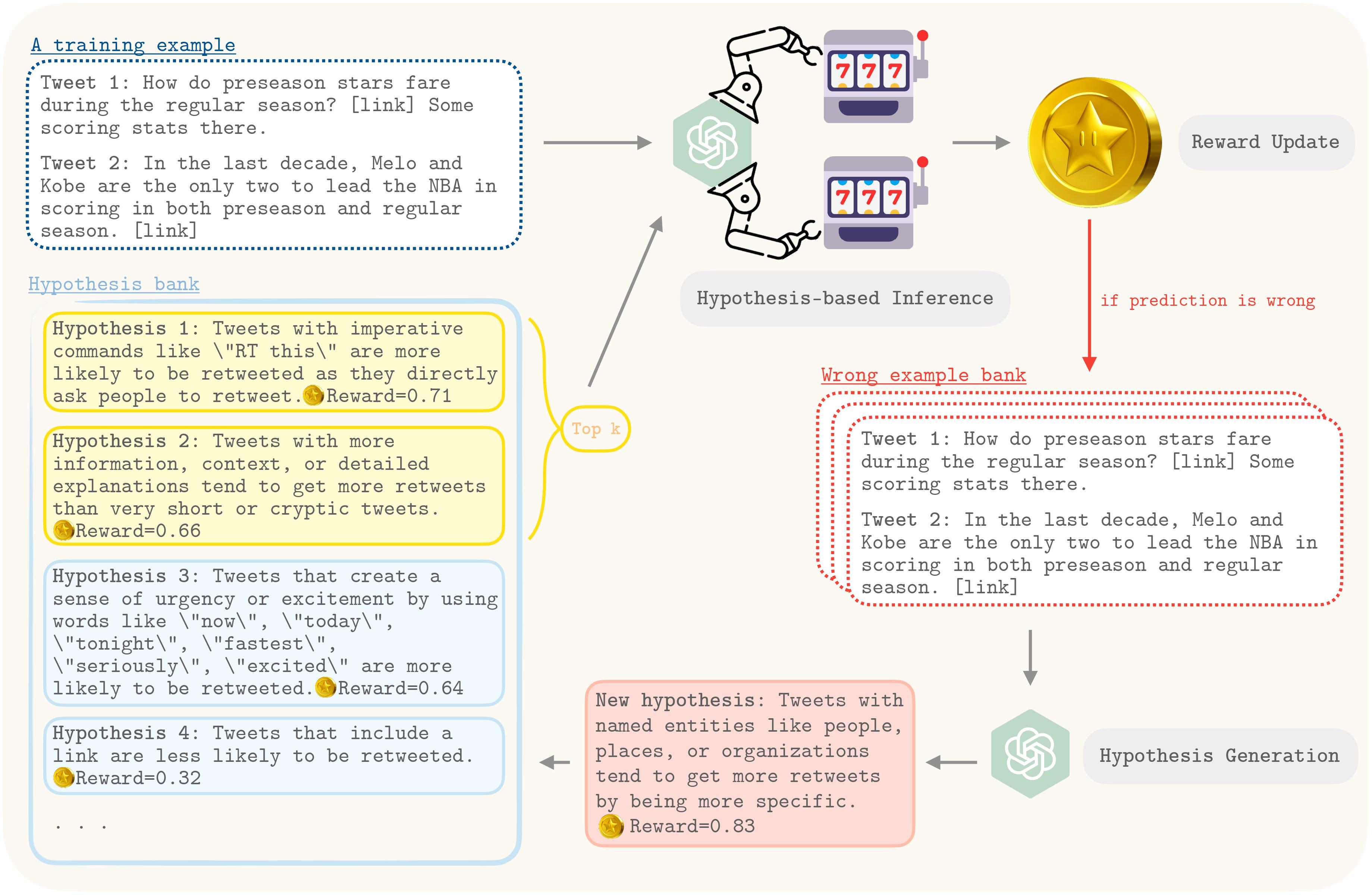 -->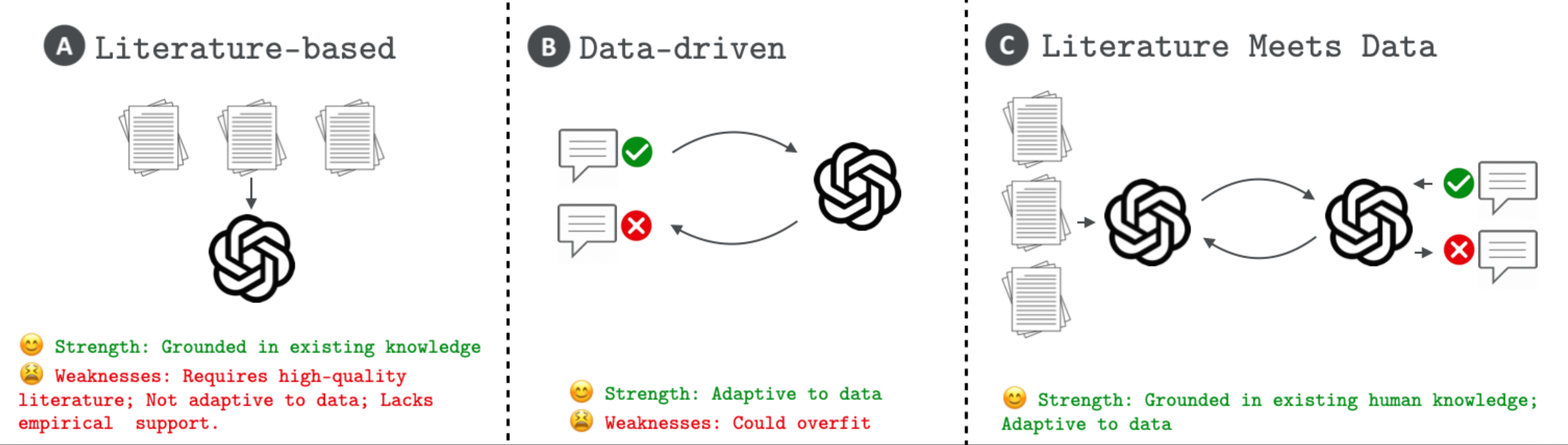
This repository is dedicated to the exploration and development of novel methodologies using large language models (LLMs) to generate hypotheses, a foundational element of scientific progress. Our works introduce frameworks for generating hypotheses with LLMs, specifically HypoGeniC (Hypothesis Generation in Context) is a data-driven framework that generates hypotheses solely based on given datasets, while HypoRefine is a synergistic approach
that incorporates both existing literature and given datasets in an agentic framework to generate hypotheses. Additionally, modules of two Union methods Literature∪HypoGeniC and Literature∪HypoRefine are provided that mechanistically combine hypotheses from literature only with hypotheses from our frameworks.
Our work highlights the capability of LLMs to assist and innovate in the hypothesis generation process for scientific inquiry.
Table of Contents
- Install environment
- Optional: set up Redis server for caching LLM responses
- Quickstart
- Usage
- Use HypoGeniC in your code
- Add a new task or dataset
Install environment
You can directly install HypoGeniC using the following commands:
bashconda create --name hypogenic python=3.10 conda activate hypogenic pip install hypogenic
OR
We recommend using the following installation procedure for easy update and customizability
bashgit clone https://github.com/ChicagoHAI/hypothesis-generation.git cd hypothesis-generation conda create --name hypogenic python=3.10 conda activate hypogenic pip install -e . # This version only supports API-based models # optionally if you would like to use local models or develop new features, consider `pip install -e ".[dev]"` # To use the literature processing feature, please also intall the following pip install git+https://github.com/allenai/s2orc-doc2json@71c022ed4bed3ffc71d22c2ac5cdbc133ad04e3c
[Optional]: set up Redis server for caching LLM responses
To save computation or API cost, we use Redis server to cache prompt & response pairs.
Install Redis server from source using the following commands:
Note: Please install in the directory of PATH_PREFIX.
bashwget https://download.redis.io/redis-stable.tar.gz tar -xzvf redis-stable.tar.gz cd redis-stable make
Quickstart
- Clone the repository and install dependencies:
bashgit clone https://github.com/ChicagoHAI/hypothesis-generation.git cd hypothesis-generation conda create --name hypogenic python=3.10 conda activate hypogenic pip install -e .
- Copy the dataset folders to
~/hypothesis-generation/data/:
bashcp -r /path/to/dataset/folders ~/hypothesis-generation/data/
- Run the pipeline:
bashconda activate hypogenic cd hypothesis-generation/ ./run_pipeline.sh
Detailed Usage
The datasets used in our works are at HypoBench-datasets.
For replicating the results in the paper, you can follow the steps below:
1. [Optional] Start Redis server
The default port used by HypoGeniC is 6832. If you want to use a different port, please specify the port number in the --port argument.
bashcd $PATH_PREFIX/redis-stable/src ./redis-server --port 6832
2. Hypothesis Generation
For help with the arguments, run:
bashhypogenic_generation --help
3. Hypothesis Inference
For help with the arguments, run:
bashhypogenic_inference --help
We will support command lines for HypoGeniC on new tasks and datasets in a later release.
Use HypoGeniC in your code
To use HypoGeniC with you own code, tasks, and datasets, you can follow the steps below:
bashgit clone https://github.com/ChicagoHAI/HypoGeniC-datasets.git ./data python ./examples/generation.py
To use HypoRefine or Union methods, follow the steps below:
(There will be 3 hypothesis banks generated: HypoRefine, Hypotheses solely from literature, and Literature∪HypoRefine.)
bashgit clone https://github.com/ChicagoHAI/Hypothesis-agent-datasets.git ./data python ./examples/union_generation.py
To run default (best hypothesis) inference on generated hypotheses:
bashpython ./examples/inference.py
To run multiple-hypothesis inference on generated hypotheses:
bashpython ./examples/multi_hyp_inference.py
More examples can be found in examples/ directory.
Add a new task or dataset
1. Data preprocessing
- To use HypoGeniC, we require users to provide a dataset in the HuggingFace datasets format:
<TASK>_train.json: A json file containing the training data.<TASK>_test.json: A json file containing the test data.<TASK>_val.json: A json file containing the validation data.- The json file should have keys:
'text_features_1', ...'text_features_n','label'. The values corresponding to each key should be a list of strings.
2. (optional) Literature PDF preprocessing
For HypoRefine or Union methods, it is required for users to provide relevant literature PDFs and preprocess them following the steps below:
- Add PDF files to the directory: literature/YOUR_TASK_NAME/raw/
- Run the following lines:
bashbash ./modules/run_grobid.sh
If you haven't set up grobid before:
bashbash ./modules/setup_grobid.sh
Then:
bashcd examples python pdf_preprocess.py --task_name YOUR_TASK_NAME
(We will support automated literature search in a later release.)
2. Write config.yaml
Create the config.yaml file in the same directory as the dataset. In the config.yaml file, please specify the following fields:
Note: For running a basic generation, you will need to write prompt templates for observations, batched_generation, and inference.
yamltask_name: <TASK> train_data_path: ./<TASK>_train.json val_data_path: ./<TASK>_test.json test_data_path: ./<TASK>_val.json prompt_templates: # You can use keys in your dataset as placeholders in the prompt templates # For example, if your dataset has a key 'text_features_1', you can use it as ${text_features_1} EXTRA_KEY1: <VALUES> EXTRA_KEY2: <VALUES> # ... # You can use EXTRA_KEYs above as placeholders in the prompt templates # For example, You can use ${EXTRA_KEY1} in the prompt templates # Additionally, you can use the following placeholders in the prompt templates # ${num_hypotheses}: Number of hypotheses to generate # The prompt templates are formatted as follows: # [ # {"role": "role1", "content": "<ROLE1_PROMPT_TEMPLATE>"}, # {"role": "role2", "content": "<ROLE2_PROMPT_TEMPLATE>"}, # ... # ] batched_generation: role1: <ROLE1_PROMPT_TEMPLATE> role2: <ROLE2_PROMPT_TEMPLATE> # ... few_shot_baseline: role1: <ROLE1_PROMPT_TEMPLATE> role2: <ROLE2_PROMPT_TEMPLATE> # ... inference: role1: <ROLE1_PROMPT_TEMPLATE> role2: <ROLE2_PROMPT_TEMPLATE> # ... is_relevant: role1: <ROLE1_PROMPT_TEMPLATE> role2: <ROLE2_PROMPT_TEMPLATE> # ... adaptive_inference: role1: <ROLE1_PROMPT_TEMPLATE> role2: <ROLE2_PROMPT_TEMPLATE> # ... adaptive_selection: role1: <ROLE1_PROMPT_TEMPLATE> role2: <ROLE2_PROMPT_TEMPLATE> # ...
Examples
./headline_binary/headline_binary_test.json
json{ "headline_1": [ "What Up, Comet? You Just Got *PROBED*", "..." ], "headline_2": [ "Scientists Everywhere Were Holding Their Breath Today. Here's Why.", "..." ], "label": [ "Headline 2 has more clicks than Headline 1", "..." ] }
./headline_binary/config.yaml
TODO: Instructions for customizing prompt to be updated
yamltask_name: headline_binary train_data_path: ./headline_binary_train.json val_data_path: ./headline_binary_test.json test_data_path: ./headline_binary_val.json prompt_templates: observations: | Headline 1: ${headline_1} Headline 2: ${headline_2} Observation: ${label} # More EXTRA_KEYs batched_generation: system: |- ... Please propose ${num_hypotheses} possible hypotheses and generate them in the format of 1. [hypothesis], 2. [hypothesis], ... ${num_hypotheses}. [hypothesis]. user: |- Here are the Observations: ${observations} Please generate hypotheses that can help determine which headlines have more clicks. Please propose ${num_hypotheses} possible hypotheses. Generate them in the format of 1. [hypothesis], 2. [hypothesis], ... ${num_hypotheses}. [hypothesis]. Proposed hypotheses: # few_shot_baseline inference: system: |- ... user: |- ... # is_relevant # adaptive_inference # adaptive_selection
3. Write an extract_label function for your new task
As we show in examples/generation.py, you can create a new task by using our BaseTask constructor (line 63). You need to implement the extract_label function for your new task. The extract_label function should take a string input (LLM generated inference text), and return the label extracted from the input.
If no extract_label function is provided, the default version will be used, which looks for final answer:\s+(.*) in the LLM generated text.
Note: you need to make sure the extracted label are in same format with the 'label' in your dataset, since the extracted label will be compared with the true label to check correctness of each LLM inference.
BibTeX
If you used this package, please consider citing the following works.
@misc{liu2025hypobenchsystematicprincipledbenchmarking,
      title={HypoBench: Towards Systematic and Principled Benchmarking for Hypothesis Generation},
      author={Haokun Liu and Sicong Huang and Jingyu Hu and Yangqiaoyu Zhou and Chenhao Tan},
      year={2025},
      eprint={2504.11524},
      archivePrefix={arXiv},
      primaryClass={cs.AI},
      url={https://arxiv.org/abs/2504.11524},
}

@misc{liu2024literaturemeetsdatasynergistic,
      title={Literature Meets Data: A Synergistic Approach to Hypothesis Generation},
      author={Haokun Liu and Yangqiaoyu Zhou and Mingxuan Li and Chenfei Yuan and Chenhao Tan},
      year={2024},
      eprint={2410.17309},
      archivePrefix={arXiv},
      primaryClass={cs.AI},
      url={https://arxiv.org/abs/2410.17309},
}

@inproceedings{zhou2024hypothesisgenerationlargelanguage,
      title={Hypothesis Generation with Large Language Models},
      author={Yangqiaoyu Zhou and Haokun Liu and Tejes Srivastava and Hongyuan Mei and Chenhao Tan},
      booktitle = {Proceedings of EMNLP Workshop of NLP for Science},
      year={2024},
      url={https://aclanthology.org/2024.nlp4science-1.10/},
}
Contributors
Showing top 7 contributors by commit count.


Related Repositories

InternScience/InternAgent
InternAgent-1.5: A Unified Agentic Framework for Long-Horizon Autonomous Scientific Discovery

yogsoth-ai/de-anthropocentric-research-engine
900+ pure-markdown skills for autonomous AI research, organized as 9 freely-composable packages over a 4-layer hierarchy (Campaign → Strategy → Tactic → SOP). Non-linear orchestration with backtracking, 6 MCP integrations. The AI is the researcher — you set the direction.

mmTheBest/arxie
Research feedback grounded in the papers that define your field

davisidarta/topometry
Systematically learn and evaluate the latent geometry of high-dimensional data, with a focus on scRNAseq analysis

EagleW/Scientific-Inspiration-Machines-Optimized-for-Novelty
Official implementation of the ACL 2024: Scientific Inspiration Machines Optimized for Novelty

JSybrandt/agatha
AGATHA: Automatic Graph-mining And Transformer based Hypothesis generation Approach