

Postinstall
💻 Bash Script to automate post-installation steps
Bash Script to automate post-installation steps. Helps to install packages on different operating systems: The project is written primarily in Shell, distributed under the GNU General Public License v3.0 license, first published in 2016. Key topics include: alpine-linux, arch-linux, bash, centos, cygwin.
postinstall.sh
Bash Script to automate post-installation steps.
Helps to install packages on different operating systems:
- Alpine Linux
- Android (Termux)
- Apple macOS
- Arch Linux
- CentOS
- Debian
- Fedora
- FreeBSD
- Haiku
- Mageia
- NetBSD
- OpenBSD
- OpenWRT
- Puppy
- RedHat
- RockyLinux
- Slackware
- SUSE
- Ubuntu
- Windows (Cygwin)
Overview
postinstall.sh is simple bash shell script which in turn generates scripts.
The generation depends on the operating system and type of installation.
The templates that are included in the generation can be stored in the file system or on a web server.
This can also be your GitHub repository.
Just fork this repository and edit it according to your needs.
postinstall.sh is not a configuration management system.
If you want to install many servers automatically, you should look at ansible.
But if you want to quickly reinstall your laptop or Raspberry Pi, postinstall.sh can help you.
Please check the Wiki for more information.
Installation
Download:
shellcurl -O "https://raw.githubusercontent.com/Cyclenerd/postinstall/master/postinstall.sh"
Alternative download with short URL:
shellcurl -fL http://bit.ly/get_postinstall -o postinstall.sh
Create a package lists and scripts as explained in this repository or in the Wiki.
Example:
shellmkdir install cd install vi packages.list
Run as root:
shellbash postinstall.sh -b install
Usage
txtUsage: postinstall.sh [-t <TYPE>] [-b <BASE>] [-h]: [-t <TYPE>] sets the type of installation (default: server) [-b <BASE>] sets the base url or dir (default: https://raw.githubusercontent.com/Cyclenerd/postinstall/master/base) [-h] displays help (this message)
Example: postinstall.sh or postinstall.sh -t workstation
Screenshot
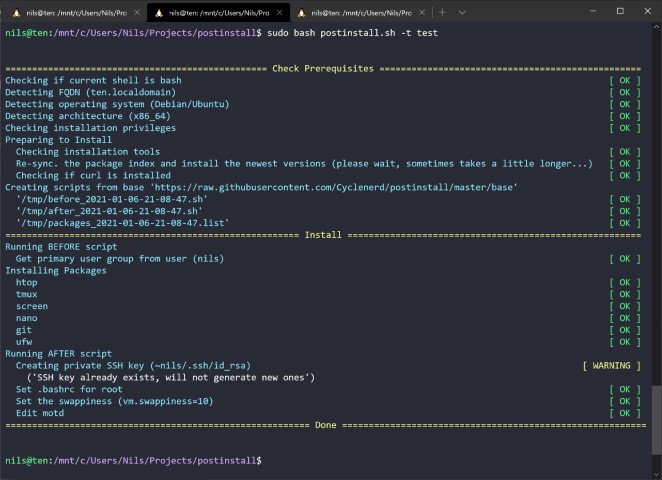
Program Flow
- Determine operating system and architecture
- Check package manager and requirements
- Generate script to run before and after installation and list of packages to install
- Install packages
Requirements
Only bash, curl, tput (ncurses-utils) and a package manager for the respective operating system:
- Alpine Linux →
apk - Apple macOS →
portorbrew - Arch Linux →
pacman - Cygwin →
apt-cyg - Debian / Ubuntu →
apt-get - FreeBSD →
pkg - Haiku →
pkgman - Mageia →
urpmi - NetBSD →
pkg_add - OpenBSD →
pkg_add - OpenWRT →
opkg - Puppy →
pkg(https://gitlab.com/sc0ttj/Pkg) - Red Hat / Fedora / CentOS →
dnforyum - Slackware →
slackpkg - SUSE / openSUSE →
zypper - Termux →
pkg
TODO
- More and better documentation
- Support for even more operating systems and package managers
Help is welcome 👍
License
GNU Public License version 3.
Please feel free to fork and modify this on GitHub (https://github.com/Cyclenerd/postinstall).
Contributors
Showing top 3 contributors by commit count.


Related Repositories

hwdsl2/setup-ipsec-vpn
Set up your own IPsec VPN server in just a few minutes, with IPsec/L2TP, Cisco IPsec and IKEv2. Supports Ubuntu, Debian, CentOS/RHEL, Amazon Linux, Alpine and Raspberry Pi. Includes client config and management scripts.

bin456789/reinstall
一键DD/重装脚本 (One-click reinstall OS on VPS)

wslutilities/wslu
A collection of utilities for Windows Subsystem for Linux

ab77/netflix-proxy
Smart DNS proxy to watch Netflix

homebridge/docker-homebridge
Homebridge Docker. HomeKit support for the impatient using Docker on x86_64, Raspberry Pi (ARM64). Includes ffmpeg + libfdk-aac.

static-web-server/static-web-server
A cross-platform, high-performance and asynchronous web server for static files-serving. ⚡