

Strwythura
Strwythura: construct an entity-resolved knowledge graph from structured data sources and unstructured content sources, implementing an ontology pipeline, plus context engineering for optimizing AI application outcomes within a specific domain. This produces a Streamlit app, with MLOps instrumentation.
This tutorial explains how to construct an *entity resolved knowledge graph* from **structured data sources** and **unstructured content sources**, implementing an *ontology pipeline*, plus *context engineering* for optimizing AI application outcomes within a specific domain. The process gets enriched by *entity embeddings* and *graph algorithms* used in an enhanced GraphRAG approach, which implements a question/answer chat bot about a particular domain. The material here provides hands-on exper... The project is written primarily in Python, distributed under the MIT License license, first published in 2024. Key topics include: dspy, entity-embedding, entity-linking, entity-resolution, entity-resolved-knowledge-graph.
Strwythura: Put the Context in Context Engineering





This tutorial explains how to construct an entity resolved knowledge graph
from structured data sources and unstructured content sources,
implementing an ontology pipeline, plus context engineering for
optimizing AI application outcomes within a specific domain.
The process gets enriched by entity embeddings and graph algorithms
used in an enhanced GraphRAG approach, which implements a question/answer
chat bot about a particular domain.
The material here provides hands-on experience with advanced
techniques as well as working code you can use elsewhere.
<img src="./strwythura/resources/logo.png" alt="Strwythura logo" width="231" style="display: block; margin-left: auto; margin-right: auto; width: 30%;" />
An article on Medium.com plus some other resources available online
serve as "companions" for working with this repo.
Please read along while running through each of the steps in this
tutorial:
Overview
<details> <summary>What this tutorial includes and how to use it.
</summary> Downstream there can be multiple patterns of usage, such as graph
analytics, dashboards, GraphRAG for question/answer chat bots, agents,
memory, tools, planners, and so on. We will emphasize how to curate
and leverage the domain-specific semantics, and optimize for the
downstream AI application outcomes. Think of this as an interactive
exploration of neurosymbolic AI in practice.
Code in the tutorial shows how to integrate popular Python libraries
following a maxim that OSFA and relying on monolithic frameworks
doesn't work well; using composable SDKs works much better:
Senzing, Placekey, LanceDB, spaCy, GLiNER, RDFlib,
NetworkX, ArrowSpace, DSPy, Ollama, Opik, Streamlit,
yWorks
The integration of these components is intended to run locally, and
could be run within an air-gapped environment. However, you can also
change the configuration to use remote LLM services instead.
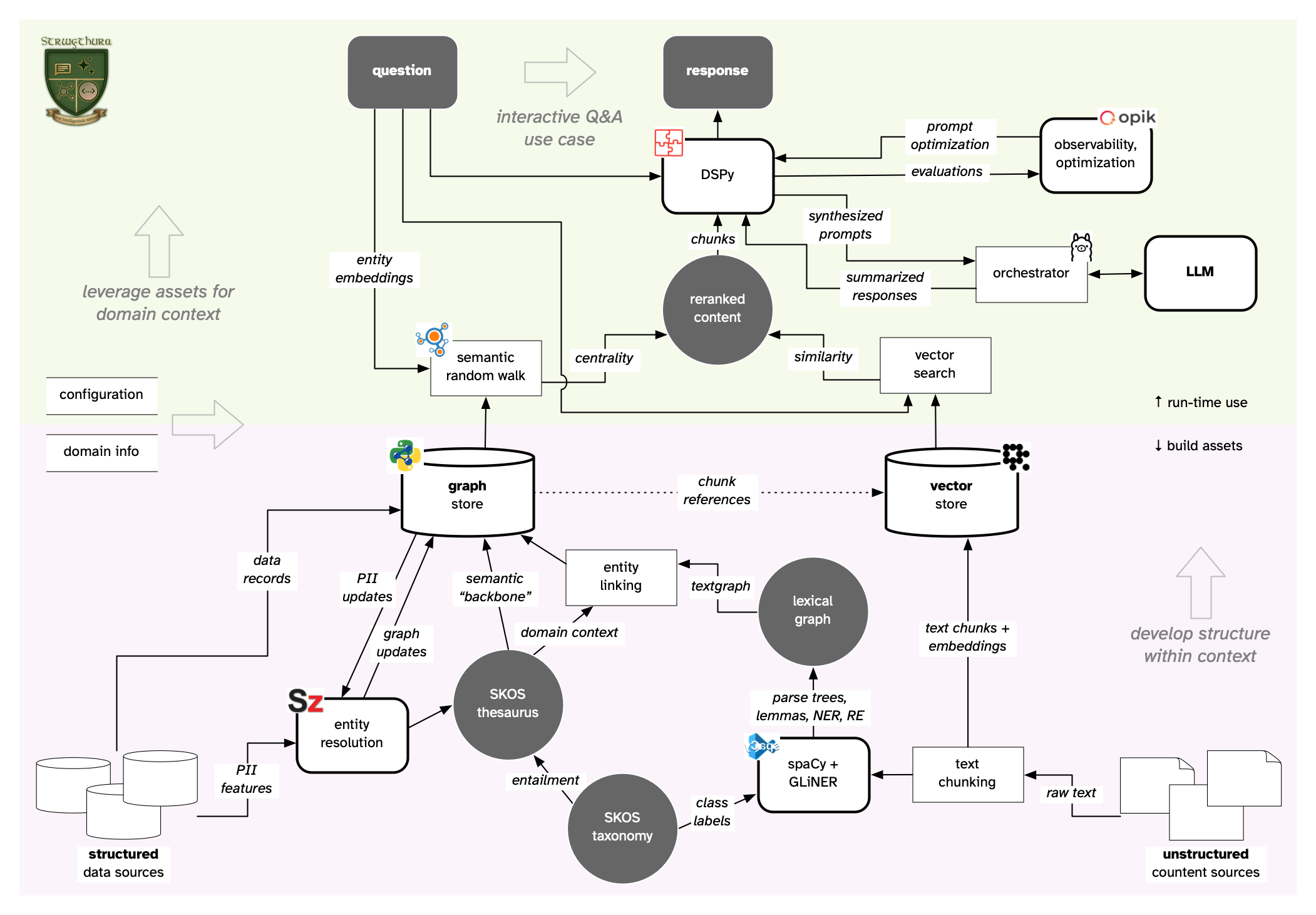
Progressing through several steps, a workflow develops assets which
are represented as a knowledge graph plus vector embeddings.
This approach unbundles the processes which otherwise tend to be
presented as monolithic "black box" frameworks. In contrast, we'll
apply more intentional ways of developing the "context" in context
engineering.
Overall, this tutorial explores the underlying concepts and
technologies used in developing AI applications. Some of these
technologies may be new to you, or at least you haven't worked with
hands-on coding examples which integrating them:
entity resolution,
named entity recognition,
domain context,
computable semantics,
ontology pipeline,
entity linking,
textgraphs,
human-in-the-loop,
spectral indexing,
interactive visualization,
graph analytics,
declarative LLM integration,
retrieval-augmented generation,
observability and optimization,
epistemic literacy.
The end result is a Streamlit app which implements an enhanced
GraphRAG for a question/answer chat bot. In terms of MLOps, this app
runs instrumented in an environment for collecting observations about
evaluations and other feedback, used for subsequent optimization.
Throughout the tutorial there are links to primary sources, articles,
videos, open source projects, plus a bibliography of recommended books
for further study.
The data and content used in this tutorial focus on a particular domain
context:
a +40-year research study which found that replacing processed red meat
with healthier foods could help reduce the risk of dementia.
Structured data includes details about the researchers and
organizations involved, while unstructured content includes articles
from media coverage of the study. Other domains can be substituted:
simply change the sources for data and content and provide a different
domain taxonomy.
The code is written primarily as a tutorial, although it is also
packaged as a Python library and can be extended for your use
cases. The code is published as open source with a business-friendly
license.
Before going any further, take this brief quiz — as quick feedback
about AI facts and fantasies:
https://derwen.ai/quiz/ai_def
Getting Started
<details> <summary>Prerequisites for this tutorial, and steps to set up your local environment.
</summary> Prerequisites
- Level: Beginner - Intermediate
- Some experience coding in Python
- Familiarity with popular packages such as Git and Docker
Target Audience
- Data Scientists, Machine Learning Engineers
- Data Engineers, MLOps
- Team Leads and Managers for the roles above
Environment
The code uses Python versions 3.11 through 3.13, and gets validated on
these through continuous integration.
The following must be downloaded and installed to run this tutorial:
- Git https://git-scm.com/install/
- Docker https://docs.docker.com/get-docker/
- Python 3.11-3.13 https://www.python.org/downloads/release/python-3139/
- Poetry https://python-poetry.org/docs/
- Ollama https://ollama.com/
- Opik https://github.com/comet-ml/opik
To get started, use git to clone the repo, then connect into the
repo directory and use poetry to install the Python dependencies:
bashgit clone https://github.com/DerwenAI/strwythura.git cd strwythura poetry update poetry run python3 -m spacy download en_core_web_md
Use docker to download the Senzing gRPC container to your
environment:
bashdocker pull senzing/serve-grpc:latest
Use ollama to download the
gemma3:12b
large language model (LLM) and have it running locally:
bashollama pull gemma3:12b
Download and run the opik server, using a different directory and
another terminal window:
</details>bashgit clone https://github.com/comet-ml/opik.git cd opik ./opik.sh
Part 1: Entity Resolution
<details> <summary>Run <em>entity resolution</em> (ER) in the Senzing SDK to merge a
collection of <strong>structured data sources</strong>, producing
<em>entities</em> and <em>relations</em> among them — imagine
this as the "backbone" for the resulting graph.
Launch the docker container for the Senzing gRPC server in another
terminal window and leave it running:
bashdocker run -it --publish 8261:8261 --rm senzing/serve-grpc
For the domain in this tutorial, suppose we have two datasets about
hypothetical business directories:
data/dementia/corp_home.json-- "Corporates Home UK"data/dementia/acme_biz.json-- "ACME Business Directory"
We also datasets about the online profiles of researchers and
scientific authors:
The JSONL format used in these datasets is based on a specific
data mapping which provides the entity resolution process
with heuristics about
features available in each structured dataset.
Now run the following Python module, which calls the Senzing SDK via a
gRPC server, merging these four datasets:
bashpoetry run python3 1_er.py
This step generates graph elements: entities, relations, properties --
which get serialized as the data/er.json JSONL file.
Take a look at the information represented in this file.
Part 2: Semantic Layer
<details> <summary>Generate a <em>domain-specific thesaurus</em> from the ER results and
combine with a SKOS-based <em>domain taxonomy</em> to populate a
<em>semantic layer</em> using <code>RDFlib</code>, to organize
construction of an <em>entity-resolved knowledge graph</em> (ERKG) as
a <code>NetworkX</code> property graph.
The following Python module takes input from:
- ER results in the
data/er.jsonfile in JSONL format, which were generated in "Part 1" - a domain taxonomy in the
data/dementia/domain.ttlfile in RDF "Turtle" format
bashpoetry run python3 2_sem.py
This populates a semantic layer in RDF, which we manage in an
RDFlib semantic graph.
It also promotes elements from the semantic graph to become the
"backbone" for an entity-resolved knowledge graph (ERKG) which we
manage as a NetworkX property graph.
Alternatively, we could store the latter in a graph database.
The generated results:
- a domain-specific thesaurus serialized as the
data/thesaurus.ttlfile in RDF "Turtle" format - a knowledge graph serialized as the
data/erkg.jsonJSON file inNetworkXnode-link data format
Take a look at the information represented in these files.
</details>Part 3: Crawl and Parse Content
<details> <summary>Crawl a collection of documents as the <strong>unstructured content
sources</strong>, chunking the text to create embeddings in a
<em>vector store</em> using <code>LanceDB</code>, while also parsing
the text to construct a <em>lexical graph</em> in
<code>NetworkX</code>.
The following Python module reloads the data/erkg.json graph from
"Part 2", then crawls the documents, chunking the text and creating
embeddings in a LanceDB <em>vector store</em>:
bashpoetry run python3 3_parse.py
Meanwhile each text chunk gets parsed in a spaCy NLP pipeline, using
zero-shot named entity recognition (NER) in GLiNER, transforming
each sentence into a sequence of NER spans, noun chunks, or individual
tokens.
We use this to extract entities and relations from the unstructured
content, based on semantic definitions from the thesaurus -- in other
words, with labels mapped to IRIs in the domain taxonomy where it's
possible to infer.
For the entities, we're using a more specific form of tokenization
based on NLP part-of-speech tagging and lemmatization for better
indexing.
These entity definitions get managed in an entity store.
The generated results:
Requests-Cacheweb page cache in thedata/url_cache.sqlitefileLanceDBvector store indata/lancedbsubdirectory- a lexical graph serialized as the
data/lex.jsonJSON file inNetworkXnode-link data format - an entity store serialized as the
data/ent.jsonJSONL file, for later use in HITL curation - entity embedding vectors serialized as the
data/ent.vectext file
Take a look at the information represented in the lexical graph and
entity store files.
Part 4: Human-in-the-Loop
<details> <summary>Provide <em>human-in-the-loop</em> (HITL) feedback and oversight by
curating the definitions for entities extracted from the unstructured
content.
The semantics used in this tutorial provide "baseline" definitions for
all nodes and edges in the lexical graph:
- node:
owl:Thingor more specific - edge:
skow:relatedor more specific
Before continuing to ERKG construction, we need to leverage any
available information which can help refine these descriptions toward
more specific classes in our domain taxonomy.
A curation step allows us to do this, blending human feedback with
additional inference -- potentially coming from LLMs, reinforcement
learning, causal analysis, probabilistic programming, axiomatic
inference, neurosymbolic approaches, and so on.
There is a "cascade" effect, where the quality of entity definitions
poses a limiting factor for how well the system can perform relation
resolution downstream.
In other words, we can leverage domain and range constraints in
the domain taxonomy, plus the entity co-occurrence calculated during
"Part 3", to infer relations more reliably once the entities are
cleaned up.
In turn, the quality of the entity and relation definitions pose a
limiting factor for the use of the graph in AI applications further
downstream.
Note: this doesn't need to be a lengthy process.
We can relevance-rank entities based on textgraph analysis, then ask
a "domain expert" to scan a report and provide feedback on obvious
instances of entities which need to be updated.
Questions to consider:
Q: Are there any instances of extracted entities which are synonyms other, more "canonical" entities?
If so, extend the thesaurus and condense these references when preparing vectors for entity embedding and ERKG construction.
Q: Can any of the EntitySource.NC or EntitySource.LEX extracted entities be promoted to EntitySource.NER definitions?
If so, add the info and link these into the taxonomy.
WIP:
Use a Streamlit app to provide a browser-based interactive UI for
curating entity store results serialized in the data/ent.json
JSONL file, before using these to construct the knowledge graph.
Part 5: Embeddings and Distillation
<details> <summary>Run <em>entity linking</em> to distill from lexical graph into an ERKG
and build an <em>entity embeddings</em> model.
A textgraph algorithm gets used to construct a lexical graph in
NetworkX which then ranks the "most referenced" entities to describe
the domain context, and cross-links entities in the ERKG with text
chunks in the vector store.
Then entity linking is used to connect entities extracted from the
unstructured content into the ERKG.
This step is a form of distillation, transforming the relatively
"noisy" lexical graph to more refined/condensed nodes in the resulting
ERKG.
bashpoetry run python3 5_embed.py
This step also constructs a separate embedding model for entity
embeddings, by running sequences of co-occurring entities through
Word2Vec in gensim to vectorize entities.
The entity embeddings get used later for navigating the ERKG, for
example to determine the neighborhoods of anchor nodes during
semantic expansion.
The generated results:
- an updated ERKG serialized as the
data/erkg.jsonJSON file inNetworkXnode-link data format - entity embeddings in the
data/ent.w2vfile ingensim.Word2Vecformat
WIP:
Entity sequence vectors get presented as input to pyarrowspace for
training an entity embeddings model based on spectral indexing.
Part 6: Interactive Visualization
<details> <summary>Use PyVis to generate an HTML page for interactive visualization of the ERKG.
Create an interactive visualization of the constructed ERKG,
using PyVis to generate the data/erkg.html file:
bashpoetry run python3 6_vis.py
Then load this this HTML page in your browser and zoom in to inspect
elements of the graph.
Visualization provides good feedback for debugging the ERKG graph at
this stage, before using it in downstream AI applications.
Part 7: Enhanced GraphRAG
<details> <summary>Implement an enhanced GraphRAG approach using <code>DSPy</code> which
leverages computable semantics in the ERKG.
First, make sure the Opik server is running in the background.
The following Python module implements a question/answer chat bot
based on DSPy and Ollama, by default running the gemma3:12b LLM
locally:
bashpoetry run python3 7_errag.py
This approach leverages an enhanced GraphRAG approach which uses
NetworkX for semantic expansion and semantic random walks for
more effective reranking of text chunks from LanceDB, before these
get presented to an LLM to summarize as chat bot responses.
Since this module shows debugging and performance telemetry, it helps
illustrate how the chat bot operates.
Next, run the full application as a Streamlit app:
bashpoetry run streamlit run app.py
Your browser should open automatically a new tab with the
question/answer chat bot, along with other analytics about the LLM
usage, and the graph and vector assets getting used.
Part 8: Observability and Optimization
<details> <summary>Manage observability of the LLM integration using <code>Opik</code>
for <code>DSPy</code> optimization.
When running the question/answer chat bot in the previous step, the
Opik server is recording observations and evaluations about use of
DSPy for LLM integration.
To view the Opik dashboard:
- open a browser tab to http://localhost:5173/
- under the "Observability" heading, click on the "Dementia Study" project
- explore the different tabs, dashboards, metrics, etc.
WIP:
Define evaluations based on
competency questions
used during the development of the domain taxonomy.
WIP:
Use the evaluations in an optimization feedback loop, for improved
prompt synthesis by DSPy in "Part 7".
What's missing?
We are iterating on this tutorial to make it simpler to understand the
workflow steps, and also enhance some components:
- use domain-specific context to constrain relation resolution and improve information on the ERKG graph edges
- resolve natural language co-reference within the source text to enhance the textgraph algorithm used to build a lexical graph
- use domain-specific context to prioritize relations followed during semantic random walks, probably using RL
- enhance inference beyond LLM "reasoning" to make use of Neurosymbolic AI methods
- incorporate use of multimodal embeddings
Reference
<details> <summary>Etymology</summary> Strwythura /ˈsdrʊ-i̯-θɪr-a/ pronounced "STRU-uh-thur-ah" --
is a conjugation of the verb "to structure"
in Welsh:
to construct or arrange according to a plan; to give a pattern or organization.
Source code for Strwythura plus its logo, documentation, and examples
have an MIT license which is
succinct and simplifies use in commercial applications.
All materials herein are Copyright © 2024-2026 Senzing, Inc.
</details> <details> <summary>Attribution</summary> Please use the following BibTeX entry for citing Strwythura if you use
it in your research or software.
Citations are helpful for the continued development and maintenance of
this library.
bibtex@software{strwythura, author = {Paco Nathan}, title = {{Strwythura: construct an entity-resolved knowledge graph from structured data sources and unstructured content sources, implementing an ontology pipeline, plus context engineering for optimizing AI application outcomes within a specific domain}}, year = 2024, publisher = {Senzing}, doi = {10.5281/zenodo.16934079}, url = {https://github.com/DerwenAI/strwythura} }
Overall, this tutorial illustrates a reference implementation for
entity-resolved retrieval-augmented generation (ER-RAG).
| acronym | definition |
|---|---|
| AI | artificial intelligence |
| AKA | also known as |
| EL | entity linking |
| ER | entity resolution |
| ERKG | entity resolved knowledge graph |
| HITL | human in the loop |
| HTML | hypertext markup language |
| IDE | integrated development environment |
| IRI | internationalized resource identifier |
| KG | knowledge graph |
| LLM | large language model |
| LSH | locality-sensitive hash |
| ML | machine learning |
| NER | named entity recognition |
| NLP | natural language processing |
| OOP | object oriented programming |
| ORM | object relational mapping |
| OSFA | one size fits all |
| PII | personally identifiable information |
| RAG | retrieval augmented generation |
| RDF | resource description framework |
| RE | relation extraction |
| RL | reinforcement learning |
| RPC | remote procedure call |
| SDK | software development kit |
| SKOS | simple knowledge organization system |
| SLA | service level agreement |
| TCP | transmission control protocol |
| URL | uniform resource locator |
| YMMV | your mileage may vary |
| WIP | work in progress |
Default ports used by the microservices required while this
application runs:
| TCP port | microservice | purpose |
|---|---|---|
| 8261 | gRPC server | Senzing SDK |
| 11434 | Ollama | LLM orchestration |
| 5173 | Opik | observability |
| 8501 | Streamlit | UI |
Many thanks to the developer teams and sponsors of the many open
source libraries which this tutorial uses:
- https://github.com/senzing-garage/sz-semantics
- https://github.com/senzing-garage/serve-grpc
- https://github.com/Placekey/placekey-py
- https://github.com/RDFLib/rdflib
- https://www.crummy.com/software/BeautifulSoup/
- https://requests.readthedocs.io/
- https://requests-cache.readthedocs.io/
- https://spacy.io/
- https://github.com/urchade/GLiNER
- https://ekzhu.com/datasketch/
- https://lancedb.com/
- https://github.com/huggingface/sentence-transformers/
- https://github.com/pydantic/pydantic
- https://networkx.org/
- https://pola.rs/
- https://github.com/tuned-org-uk/pyarrowspace
- https://radimrehurek.com/gensim/models/word2vec.html
- https://dspy.ai/
- https://github.com/pydantic/pydantic
- https://ollama.com/
- https://www.sbert.net/
- https://github.com/comet-ml/opik
- https://huggingface.co/google/gemma-3-12b-it
- https://pyvis.readthedocs.io/
- https://jinja.palletsprojects.com/en/stable/
- https://streamlit.io/
- https://matplotlib.org/
- https://github.com/yWorks/yfiles-graphs-for-streamlit
- https://pyinstrument.readthedocs.io/
- https://github.com/giampaolo/psutil
- https://github.com/gruns/icecream
Q: "Have you tried this with langextract yet?"
A: "I'll take 'How does an instructor know a student ignored the README?' from the 'What is FAFO?' category, for $200 ... but yes of course, it's an interesting package, which builds on other interesting work which is also used here. Except that key parts of that package miss the point entirely, in ways that only a hyperscaler could possibly f*ck up so badly."
Q: "What is the name of this repo about?"
A: "As you may have noticed, many open source projects published in this GitHub organization are named in a beautiful language Cymraeg, which francophones call 'Gallois' -- also, please read the Etymology blurb above."
Q: "Why aren't you using an LLM to build graphs instead?"
A: "We promise to visit you in jail."
Q: "Why don't you use a graph database in this tutorial?"
A: "It's not needed. RDFlib + NetworkX handle what's needed, and with cuGraph this can scale quite large. Feel free to extend the KnowledgeGraph class to support your favorite graph database instead. The code has been written so it could be extended with less than 100 lines of Python."
<img src="./strwythura/resources/senzing.png" alt="Senzing logo" width="300" style="display: block; margin-left: auto; margin-right: auto; width: 40%;" />
- Graph Power Hour! podcast https://senzing.com/graph-power-hour
- Senzing Learning Portal https://senzing.com/senzing-learning-portal-signup
- Senzing + Docker quickstart https://senzing.com/docs/quickstart/quickstart_docker/
- Senzing on AWS Marketplace https://aws.amazon.com/marketplace/pp/prodview-p3y2bvjkxcipo
- GitHub public repos https://github.com/senzing-garage
- ERKG Discussion Group on LinkedIn https://linkedin.com/groups/14426852
Kudos to
@docktermj,
@jbutcher21,
@brianmacy,
@cj2001,
@prrao87,
@louisguitton,
@jesstalisman-ia,
@Mec-iS,
@hellovai,
@amyhodler
and GraphGeeks for their support.
Star History
Contributors
Showing top 1 contributor by commit count.

Related Repositories

langwatch/langwatch
The platform for LLM evaluations and AI agent testing

ax-llm/ax
The pretty much "official" DSPy framework for Typescript

teilomillet/gollm
Unified Go interface for Language Model (LLM) providers. Simplifies LLM integration with flexible prompt management and common task functions.

Trampoline-AI/predict-rlm
Production focused Self-harnessed LM runtime (RLM) that allows the LM to call its sub-lm with DSPy signatures. Define your inputs, outputs, and tools — the model handles its own control flow. Get fully interpretable trajectories and performance that scales directly with model improvements. Without context rot.

evalops/cognitive-dissonance-dspy
A multi-agent LLM system for detecting and resolving cognitive dissonance.

GenseeAI/cognify
Multi-Faceted AI Agent and Workflow Autotuning. Automatically optimizes LangChain, LangGraph, DSPy programs for better quality, lower execution latency, and lower execution cost. Also has a simple agent/workflow framework