

Overscroll decor
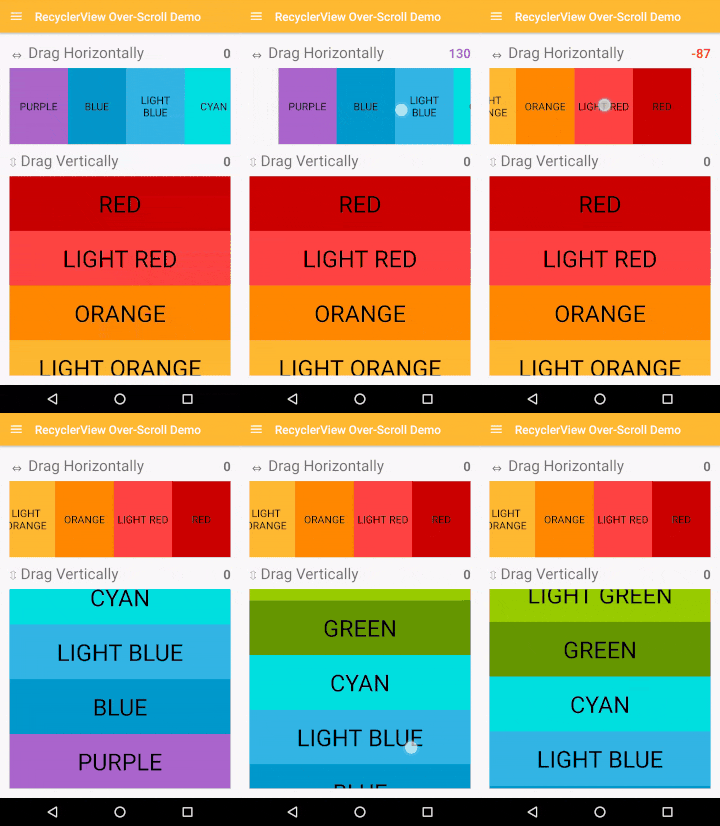
Android: iOS-like over-scrolling effect applicable over almost all scrollable Android views.
> **Announcement** > > An update regarding Bintray's shutdown: The library has been successfuly republished onto maven central, but with a different Group ID; Please update your Gradle dependencies as follows: > > ```diff > -implementation 'me.everything:overscroll-decor-android:1.1.0' > +implementation 'io.github.everythingme:overscroll-decor-android:1.1.1' > ``` The project is written primarily in Java, distributed under the BSD 2-Clause "Simplified" License license, first published in 2015. It has gained significant community traction with 2,901 stars and 396 forks on GitHub. Key topics include: android, fling, gridview, ios, listview.
Announcement
An update regarding Bintray's shutdown: The library has been successfuly republished onto maven central, but with a different Group ID; Please update your Gradle dependencies as follows:
diff-implementation 'me.everything:overscroll-decor-android:1.1.0' +implementation 'io.github.everythingme:overscroll-decor-android:1.1.1'
Over-Scroll Support For Android's RecyclerView, ListView, GridView, ScrollView ...
The library provides an iOS-like over-scrolling effect applicable over almost all Android native scrollable views. It is also built to allow for very easy adaptation to support custom views.
The core effect classes are loose-decorators of Android views, and are thus decoupled from the actual view classes' implementations. That allows developers to apply the effect over views while keeping them as untampered 'black-boxes'. Namely, it allows for keeping important optimizations such as view-recycling intact.
Gradle Dependency
Add the following to your module's build.gradle file:
groovydependencies { // ... implementation 'io.github.everythingme:overscroll-decor-android:1.1.1' }
Usage
RecyclerView
Supports both linear and staggered-grid layout managers (i.e. all native Android layouts).
Can be easily adapted to support custom layout managers.
javaRecyclerView recyclerView = (RecyclerView) findViewById(R.id.recycler_view); // Horizontal OverScrollDecoratorHelper.setUpOverScroll(recyclerView, OverScrollDecoratorHelper.ORIENTATION_HORIZONTAL); // Vertical OverScrollDecoratorHelper.setUpOverScroll(recyclerView, OverScrollDecoratorHelper.ORIENTATION_VERTICAL);
RecyclerView with items swiping / dragging
See Advanced Usage.
ListView
javaListView listView = (ListView) findViewById(R.id.list_view); OverScrollDecoratorHelper.setUpOverScroll(listView);
GridView
javaGridView gridView = (GridView) findViewById(R.id.grid_view); OverScrollDecoratorHelper.setUpOverScroll(gridView);
ViewPager
javaViewPager viewPager = (ViewPager) findViewById(R.id.view_pager); OverScrollDecoratorHelper.setUpOverScroll(viewPager);
ScrollView, HorizontalScrollView
javaScrollView scrollView = (ScrollView) findViewById(R.id.scroll_view); OverScrollDecoratorHelper.setUpOverScroll(scrollView); HorizontalScrollView horizontalScrollView = (HorizontalScrollView) findViewById(R.id.horizontal_scroll_view); OverScrollDecoratorHelper.setUpOverScroll(horizontalScrollView);
Any View - Text, Image... (Always Over-Scroll Ready)
javaView view = findViewById(R.id.demo_view); // Horizontal OverScrollDecoratorHelper.setUpStaticOverScroll(view, OverScrollDecoratorHelper.ORIENTATION_HORIZONTAL); // Vertical OverScrollDecoratorHelper.setUpStaticOverScroll(view, OverScrollDecoratorHelper.ORIENTATION_VERTICAL);
Advanced Usage
java// Horizontal RecyclerView RecyclerView recyclerView = (RecyclerView) findViewById(R.id.recycler_view); new HorizontalOverScrollBounceEffectDecorator(new RecyclerViewOverScrollDecorAdapter(recyclerView)); // ListView (vertical) ListView listView = (ListView) findViewById(R.id.list_view); new VerticalOverScrollBounceEffectDecorator(new AbsListViewOverScrollDecorAdapter(listView)); // GridView (vertical) GridView gridView = (GridView) findViewById(R.id.grid_view); new VerticalOverScrollBounceEffectDecorator(new AbsListViewOverScrollDecorAdapter(gridView)); // ViewPager ViewPager viewPager = (ViewPager) findViewById(R.id.view_pager); new HorizontalOverScrollBounceEffectDecorator(new ViewPagerOverScrollDecorAdapter(viewPager)); // A simple TextView - horizontal View textView = findViewById(R.id.title); new HorizontalOverScrollBounceEffectDecorator(new StaticOverScrollDecorAdapter(view));
RecyclerView with ItemTouchHelper based swiping / dragging
As of version 1.0.1, the effect can work smoothly with the RecyclerView's built-in mechanism for items swiping and dragging (based on ItemTouchHelper). BUT, it requires some (very little) explicit configuration work:
java// Normally you would attach an ItemTouchHelper & a callback to a RecyclerView, this way: RecyclerView recyclerView = (RecyclerView) findViewById(R.id.recycler_view); ItemTouchHelper.Callback myCallback = new ItemTouchHelper.Callback() { ... }; ItemTouchHelper myHelper = new ItemTouchHelper(myCallback); myHelper.attachToRecyclerView(recyclerView); // INSTEAD of attaching the helper yourself, simply use the dedicated adapter c'tor, e.g.: new VerticalOverScrollBounceEffectDecorator(new RecyclerViewOverScrollDecorAdapter(recyclerView, myCallback));
For more info on the swiping / dragging mechanism, try this useful tutorial.
Over-Scroll Listeners
As of version 1.0.2, the effect provides a means for registering listeners of over-scroll related events. There are two types of listeners, as follows.
State-Change Listener
The over-scroll manager dispatches events onto a state-change listener denoting transitions in the effect's state:
java// Note: over-scroll is set-up using the helper method. IOverScrollDecor decor = OverScrollDecoratorHelper.setUpOverScroll(recyclerView, OverScrollDecoratorHelper.ORIENTATION_HORIZONTAL); decor.setOverScrollStateListener(new IOverScrollStateListener() { @Override public void onOverScrollStateChange(IOverScrollDecor decor, int oldState, int newState) { switch (newState) { case STATE_IDLE: // No over-scroll is in effect. break; case STATE_DRAG_START_SIDE: // Dragging started at the left-end. break; case STATE_DRAG_END_SIDE: // Dragging started at the right-end. break; case STATE_BOUNCE_BACK: if (oldState == STATE_DRAG_START_SIDE) { // Dragging stopped -- view is starting to bounce back from the *left-end* onto natural position. } else { // i.e. (oldState == STATE_DRAG_END_SIDE) // View is starting to bounce back from the *right-end*. } break; } } }
Real-time Updates Listener
The over-scroll manager can also dispatch real-time, as-it-happens over-scroll events denoting the current offset resulting due to an over-scroll being in-effect (the offset thus denotes the current 'intensity').
java// Note: over-scroll is set-up by explicity instantiating a decorator rather than using the helper; The two methods can be used interchangeably for registering listeners. VerticalOverScrollBounceEffectDecorator decor = new VerticalOverScrollBounceEffectDecorator(new RecyclerViewOverScrollDecorAdapter(recyclerView, itemTouchHelperCallback)); decor.setOverScrollUpdateListener(new IOverScrollUpdateListener() { @Override public void onOverScrollUpdate(IOverScrollDecor decor, int state, float offset) { final View view = decor.getView(); if (offset > 0) { // 'view' is currently being over-scrolled from the top. } else if (offset < 0) { // 'view' is currently being over-scrolled from the bottom. } else { // No over-scroll is in-effect. // This is synonymous with having (state == STATE_IDLE). } } });
The two type of listeners can be used either separately or in conjunction, depending on your needs. Refer to the demo project's RecyclerView-demo section for actual concrete usage.
Custom Views
javapublic class CustomView extends View { // ... } final CustomView view = (CustomView) findViewById(R.id.custom_view); new VerticalOverScrollBounceEffectDecorator(new IOverScrollDecoratorAdapter() { @Override public View getView() { return view; } @Override public boolean isInAbsoluteStart() { // canScrollUp() is an example of a method you must implement return !view.canScrollUp(); } @Override public boolean isInAbsoluteEnd() { // canScrollDown() is an example of a method you must implement return !view.canScrollDown(); } });
Effect Behavior Configuration
java/// Make over-scroll applied over a list-view feel more 'stiff' new VerticalOverScrollBounceEffectDecorator(new AbsListViewOverScrollDecorAdapter(view), 5f, // Default is 3 VerticalOverScrollBounceEffectDecorator.DEFAULT_TOUCH_DRAG_MOVE_RATIO_BCK, VerticalOverScrollBounceEffectDecorator.DEFAULT_DECELERATE_FACTOR); // Make over-scroll applied over a list-view bounce-back more softly new VerticalOverScrollBounceEffectDecorator(new AbsListViewOverScrollDecorAdapter(view), VerticalOverScrollBounceEffectDecorator.DEFAULT_TOUCH_DRAG_MOVE_RATIO_FWD, VerticalOverScrollBounceEffectDecorator.DEFAULT_TOUCH_DRAG_MOVE_RATIO_BCK, -1f // Default is -2 );
Dynamic Effect Disabling
As of version 1.0.4, the effect can be dynamically disabled (detached) and reenabled (attached) at runtime:
javaIOverScrollDecor decor = OverScrollDecoratorHelper.setUpOverScroll(view); // Detach. You are strongly encouraged to only call this when overscroll isn't // in-effect: Either add getCurrentState()==STATE_IDLE as a precondition, // or use a state-change listener. decor.detach(); // Attach. decor.attach();
attach() and detach() can be used repeatedly - as necessary, as can be seen in the demo project (refer to action-bar menu in recycler-view demo).
Credits
App icons by <a href="http://somerandomdude.com/work/iconic/">P.J. Onori</a>,
<a href="http://graphicriver.net/item/wirecons-vector-icons/4586710?ref=tmthymllr">Timothy Miller</a>,
<a href="http://icons4android.com">Icons4Android</a>,
<a href="http://icons8.com/android-icons">Icons8.com</a>
Contributors
Showing top 3 contributors by commit count.


Related Repositories

flutter/flutter
Flutter makes it easy and fast to build beautiful apps for mobile and beyond

Genymobile/scrcpy
Display and control your Android device

react/react-native
A framework for building native applications using React

rustdesk/rustdesk
An open-source remote desktop application designed for self-hosting, as an alternative to TeamViewer.

justjavac/free-programming-books-zh_CN
:books: 免费的计算机编程类中文书籍,欢迎投稿

Hack-with-Github/Awesome-Hacking
A collection of various awesome lists for hackers, pentesters and security researchers