

Containarium
The open-source, self-hostable, agent-native sandbox. Bring your own agent (Cursor, Claude Code, OpenCode); we run the box.
**The open-source, self-hostable, agent-native sandbox.** Bring your own agent — Cursor, Claude Code, OpenCode, your own MCP client. We run the box. The project is written primarily in Go, distributed under the Apache License 2.0 license, first published in 2025. Key topics include: agent-native, agentic-ai, cloud-cost-efficiency, dev-environment, lxc.
Containarium
The open-source, self-hostable, agent-native sandbox.
Bring your own agent — Cursor, Claude Code, OpenCode, your own MCP client.
We run the box.
agent: "create me a sandbox called 'blog'"           → containarium create
agent: "wire up SSH so I can reach it"               → containarium ssh-config sync
agent: "install Caddy on :8080 inside the box"       → shell_exec (via agent-box MCP)
agent: "expose that on blog.example.com"             → containarium expose-port

curl https://blog.example.com → hello world


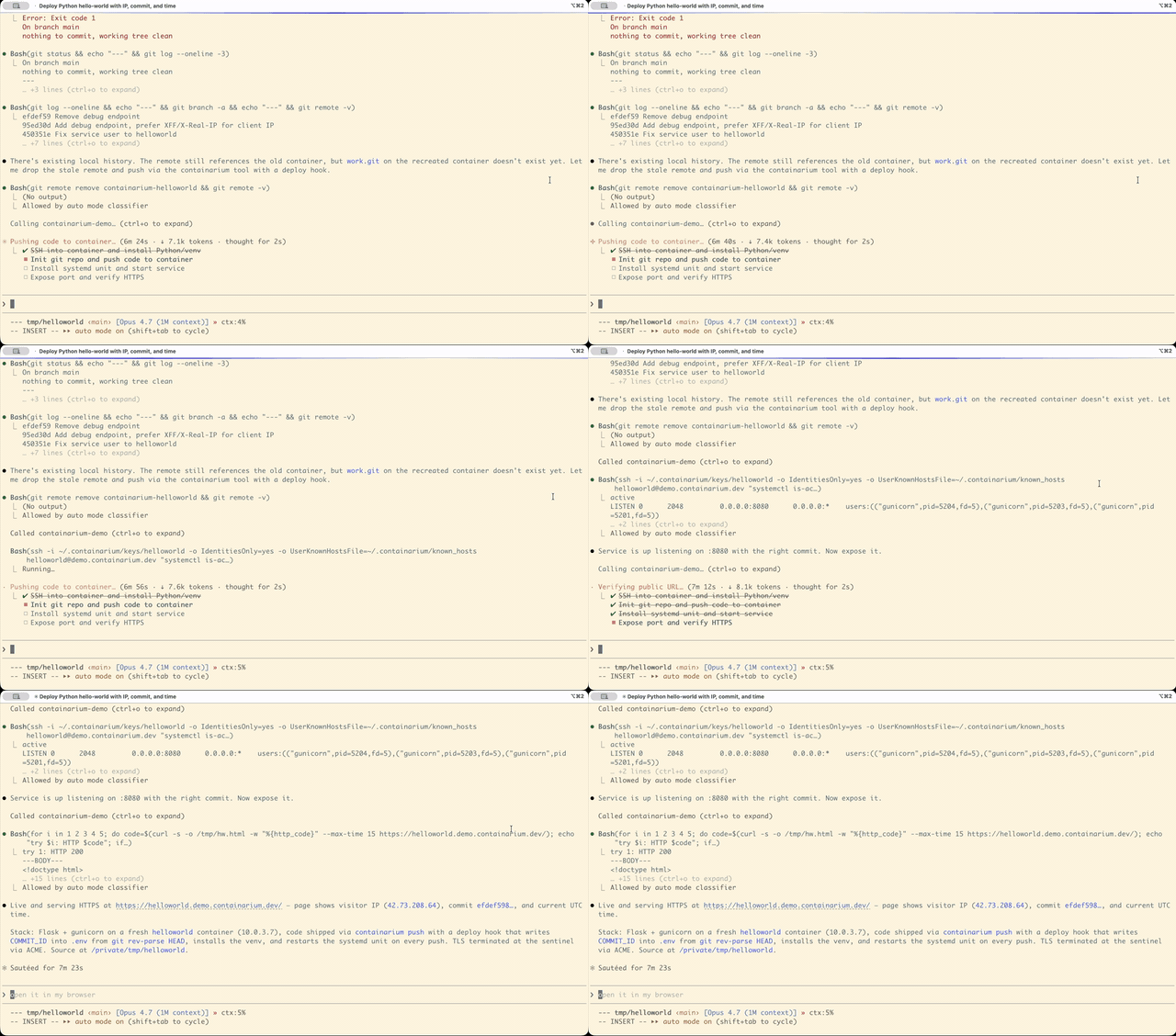
🌐 Project site: containarium.dev · 🎬 55s demo: youtu.be/IBDDD_tb8FY · 🚀 Live app: helloworld.demo.containarium.dev
Why "agent-native"?
AI agents are increasingly the primary user of dev infrastructure. They
want to build, install, deploy, and verify — not on the human's laptop
(too noisy, too risky, too local) but on a sandbox that's:
- Persistent: state survives between agent runs.
- Isolated: a misbehaving install doesn't touch your machine.
- Real: a full Linux environment with
systemd, real networking,
and the ability to host things on the open internet. - Driven by structured tools: not by an agent typing commands into a
TTY hoping nothing scrolls off-screen, but by MCP — typed,
bounded, safe.
That's the box Containarium gives you. It runs as a self-hosted
single-host platform (one VM → many isolated LXC containers), exposes
its admin surface over MCP, and ships a second MCP server that lives
inside the container so the agent can shell_exec and edit files
directly.
You bring the agent. We run the box.
Quick start
1. Self-host on a fresh Ubuntu VM (5 minutes)
bashcurl -fsSL https://raw.githubusercontent.com/footprintai/containarium/main/hacks/install.sh \ | sudo bash
That installs Containarium + Incus + dependencies, starts the daemon,
and gives you a working API at http://localhost:8080.
2. Create your first box
bashsudo containarium create alice --ssh-key ~/.ssh/id_ed25519.pub sudo containarium list
3. Wire up SSH so ssh alice just works
bashcontainarium ssh-config sync # Adds entries to ~/.containarium/ssh_config. # Then add ONE line to ~/.ssh/config: # Include ~/.containarium/ssh_config ssh alice # connects through the sentinel
4. Point your agent at the box
In ~/.cursor/mcp.json or ~/.claude.json:
jsonc{ "mcpServers": { "containarium-box": { "command": "ssh", "args": ["alice", "agent-box"] } } }
Now Claude Code, Cursor, or any MCP-speaking agent can call
shell_exec, read_file, write_file, list_directory,
move_file, delete_file directly inside Alice's container.
5. Make it reachable on a public hostname
bashcontainarium expose-port alice \ --container-port 8080 \ --domain blog.example.com
Caddy on the sentinel terminates TLS for blog.example.com and
forwards to alice-container:8080. curl https://blog.example.com
hits whatever Alice has serving on port 8080.
The four primitives
Every action in Containarium has a CLI verb (canonical) AND an MCP tool
(thin wrapper that delegates to the same Go function). See
CLAUDE.md for the convention.
agent-box — in-the-box MCP server
Runs inside every container. Reached over stdio (typically wrapped by
SSH on the client side). Exposes Linux-native operations:
| Tool | What it does |
|---|---|
shell_exec | Run a shell command, capture stdout/stderr/exit, bounded by timeout (default 30s, max 10min) and 256 KiB output cap |
read_file | Byte range OR head=N lines OR tail=N lines |
write_file | Atomic write with mkdirp (temp + rename) |
list_directory | Type/size/mtime, hidden filtering |
move_file | Atomic rename with mkdirp on destination |
delete_file | Single-file remove (refuses directories so recursive deletes go via shell_exec where blast radius is explicit) |
Resources (read-only data the agent fetches via MCP resources/read):
| URI | What it returns |
|---|---|
containarium://ci-context | JSON metadata about the current CI run (PR number, commit SHA, failing test, etc.) when the box was kept alive by the FootprintAI/containarium-run GitHub Action after a failed CI run. Returns {"available": false} on non-CI boxes so callers never have to special-case errors. |
containarium://ci-prompt | Static markdown playbook telling agents how to debug a failing CI run inside this box (what to read first, how to iterate, what not to do). Same body on every box; pair with ci-context for the per-run data. |
Optional sandbox: when AGENTBOX_ROOT is set, every file-ops path is
resolved against that root with a boundary-aware prefix check. Default
unset = no constraint. See
internal/agentbox/ for the Go implementation.
mcp-server — platform MCP server
Runs on the host. Exposes outside-the-box admin operations:
create_container, list_containers, delete_container,
start_container, stop_container, expose_port, get_metrics,
get_system_info. See cmd/mcp-server/.
containarium CLI
Same surface as the platform MCP, plus deeper administration. Top-level
verbs:
containarium create        Create a new container
containarium list          List all containers
containarium delete        Delete a container
containarium expose-port   Expose container:port on a public hostname
containarium ssh-config    Generate self-contained ssh_config
containarium route         Manage proxy routes (low-level)
containarium passthrough   Manage TCP/UDP passthrough rules
containarium token         Issue JWT tokens for the API
containarium info          System info
containarium version       Print version
Run containarium <verb> --help for full options.
Sentinel — sshpiper + Caddy + PROXY-protocol
The sentinel is a tiny always-on VM (e2-micro on GCP free tier works)
that:
- Receives SSH on port 22 (sshpiper routes to the right backend by
username). - Receives HTTPS on 443 (Caddy with TLS-passthrough or
PROXY-protocol-aware forwarding to backend Caddy). - Survives spot-VM termination on the backend with a maintenance page.
- Holds the static IP / DNS A-record so backends can be ephemeral.
See docs/SENTINEL-DESIGN.md for the full
design.
Architecture
        Agent (Cursor / Claude Code / OpenCode)
            │
            │ JWT (access; tt=access, jti, scopes)
            │ MCP over stdio  ──┐
            │                   │ ┌── refresh ──> POST /v1/tokens/refresh
            v                   ▼ │                  (single-use; old jti revoked)
        ssh user@box  → sshpiper → agent-box (in container)
            │
            │ HTTPS  (mTLS upstream; PROXY-protocol v2)
            v
        Sentinel (e2-micro, always-on)
        ├── sshpiper (port 22)            : routes by username; fail2ban per-user
        ├── Caddy + PROXY-protocol (443)  : routes by hostname / SNI suffix
        └── /wake/ source-IP allowlist    : trusted-proxy only
            │
            v
        +-------------------------------------------------+
        | Backend VM (spot or bare-metal GPU node)        |
        |                                                 |
        |  Incus (LXC) ── containers                      |
        |    ├── alice-container    : SSH + agent-box     |
        |    │   └── /run/secrets/* : tmpfs, 0440 alice   |
        |    └── bob-container      : ZFS-backed storage  |
        |                                                 |
        |  Containarium daemon                            |
        |    ├── JWT auth (iss/aud/jti/scopes)            |
        |    ├── Admin RBAC + container-owner authz       |
        |    ├── Image-digest gate (REQUIRE + VERIFY)     |
        |    ├── Secrets ── Postgres (envelope-encrypted) |
        |    │              │                             |
        |    │              v                             |
        |    │           KMS ── Vault Transit / GCP KMS   |
        |    │           (master key retirable post-cutover)
        |    └── Audit log ── Postgres + SHA-256 hash     |
        |                     chain (verify CLI)          |
        +-------------------------------------------------+
A single sentinel can front multiple backend VMs — a "pool" — and a
single deployment can run multiple pools (each isolated). See
docs/MULTI-POOL.md.
Security control surface (all opt-in via env, default-off for
upgrade safety; see docs/security/OPERATOR-SECURITY-RUNBOOK.md):
| Env var | Layer | Effect |
|---|---|---|
CONTAINARIUM_REQUIRE_IMAGE_DIGEST=true | API | refuse images without @sha256:<64hex> |
CONTAINARIUM_VERIFY_IMAGE_DIGEST=true | API | verify digest against the registry index (pre- + post-pull) |
CONTAINARIUM_ALLOWED_IMAGE_REGISTRIES | API | restrict which simplestreams remotes the daemon will pull from |
CONTAINARIUM_KMS_BACKEND={none,inproc,vault,gcp} | Secrets | envelope-encrypt DEKs through an external KMS |
CONTAINARIUM_REQUIRE_ENVELOPE=true | Secrets | refuse legacy master-key-only rows (Phase E retirement gate) |
CONTAINARIUM_POSTGRES_URL_FILE / _PASSWORD_FILE | Secrets | DB creds from disk rather than env |
CONTAINARIUM_WAKE_TRUSTED_PROXIES | Sentinel | source-IP allowlist for /wake/ |
OTEL_BEARER_REQUIRED=true | Telemetry | collector rejects un-bearered OTLP submissions |
How it's different
vs. SaaS-only sandboxes (e2b, Modal, Replit)
These give you sandboxes for AI agents, but only as hosted SaaS:
- Self-hostability: Containarium runs on your own infrastructure
(a $5 VM, your homelab, your enterprise data center). e2b, Modal,
and Replit are SaaS-only — your code, your data, and your customers
go through their compute. - License: Apache 2.0, no CLA. Fork it, sell it, run it.
- Surface: full Linux containers with
systemd, real network
namespaces, GPU passthrough. Not a process-per-call sandbox. - Transport: MCP-native from day one, not a custom SDK with MCP
bolted on.
vs. Docker AI Sandboxes (sbx)
Docker's sbx run claude and Containarium both call themselves
"AI sandboxes," but they sit on opposite ends of the same spectrum:
- Locality:
sbxruns the sandbox on the developer's laptop
(microVM, host-isolation). Containarium runs the sandbox on a VM
you host (LXC, multi-tenant, public-internet reachable via the
sentinel). - Persistence:
sbxis session-shaped (workspace mount, no
documented "give me a box that survives reboot and has a
hostname"). Containarium containers persist indefinitely, with
ZFS snapshots and 30-day retention. - Public reach:
containarium expose-port alice --domain blog.example.comis one verb.sbxis laptop-local; no
public-hostname story. - Agent surface:
sbxis CLI-first (sbx run <agent>).
Containarium is MCP-native — two MCP servers (in-the-box
agent-box+ platformmcp-server) plus the same surface via
CLI, SSH, REST/gRPC, and a web UI. - License:
sbxCLI is free; team policy (Docker Admin Console)
is a paid subscription. Containarium is Apache 2.0 — including
the audit log, RBAC, KMS integrations, and everything else on
this page.
If you're stopping an agent from rm -rf-ing the laptop it's
running on, sbx is the lighter tool. If you're giving your agent
(or your customer's agent) a persistent Linux box on the public
internet, Containarium is the shape.
vs. dev environment platforms (Codespaces, Gitpod, Coder)
Those are persistent IDEs. Containarium is a persistent box —
agent-driven, not developer-driven, no IDE assumption, SSH-as-the-API:
- Containarium environments are reached by SSH and MCP. Any IDE works
(Vim, JetBrains Remote, VS Code Remote, Cursor's remote dev — your
call). - Cost: no per-hour billing in the OSS path. Self-host costs are just
your underlying VM. - Persistence: containers survive indefinitely; Codespaces auto-delete
after inactivity.
vs. application container platforms (Docker, Kubernetes)
LXC is a system container, not an application container. Each
container has systemd, a real init, real users, real package managers,
real sudo. You can run Docker inside a Containarium container; the
reverse isn't really a thing.
If your agent is going to apt install half a Linux distro, edit
config files in /etc, run a database, and reboot — LXC is the right
shape. If your agent runs a single Python process, Docker or Modal is
fine.
What's in the box
Beyond the agent-native primitives, Containarium ships:
Multi-OS
- Ubuntu 24.04 LTS (default)
- Rocky Linux 9 (dev/test)
- RHEL 9 (production)
- Windows Server VMs via QEMU/KVM with RDP — see
docs/WINDOWS-VM-SETUP.md
GPU passthrough
For ML/AI agent workflows. Works with NVIDIA RTX 3090, RTX 4090, and
similar. PCI-level passthrough so the container sees the GPU directly.
Tested on bare-metal GPU nodes connected to the sentinel via tunnel.
Multi-backend
A single sentinel can front:
- GCP spot VMs: cost-effective cloud backends with auto-recovery
on preemption. - Bare-metal GPU nodes: any Linux box you can SSH to; reaches the
sentinel via outbound tunnel. - Windows VMs: live alongside Linux backends.
All containers from all backends appear in a single unified API.
Web UI
A basic dashboard at /webui/ for users who'd rather not type CLI:
container list, lifecycle controls, metrics, browser-based terminal.
Polished UI is intentionally a cloud-product concern — the OSS web UI
is functional, not opinionated.
Persistent storage (ZFS)
Containers survive VM restarts and spot termination. ZFS handles
compression, snapshots (daily by default, 30-day retention), and
checksums.
Sentinel HA
The sentinel itself is e2-micro (free tier). It:
- Detects spot preemption in ~10s, serves a maintenance page.
- Restarts spot VMs automatically (~85s total recovery).
- Holds the static IP, so DNS doesn't change as backends rotate.
Monitoring & observability
VictoriaMetrics + Grafana auto-provisioned. Per-container CPU,
memory, disk, network. Alerting via webhooks. SSH audit logs per
user.
Security primitives
- Unprivileged LXC containers: container root ≠ host root.
- Per-user proxy accounts:
/usr/sbin/nologinon the sentinel,
users can only proxy through to their container. - fail2ban per-user: an attack on Alice's account doesn't ban
Bob. - ClamAV + Trivy scanning across all backends.
- AppArmor profiles per container.
- AGENTBOX_ROOT sandbox to constrain agent-box file ops at runtime.
Zero-trust controls (rolled out across the v0.17 → unreleased line; see docs/security/OPERATOR-SECURITY-RUNBOOK.md):
- JWT with
iss/aud/jti/tt/scopes: 32-byte minimum
secret enforced at startup; refresh tokens are single-use; jti-based
revocation; per-tool MCP scopes propagate to server-side gates. - Admin RBAC + per-container ownership on the API surface; cluster
ops admin-only, container ops owner-only. - KMS envelope encryption for tenant secrets (Vault Transit or GCP
Cloud KMS), with a migration tool and master-key retirement gate. - tmpfs
--delivery=filefor secrets that shouldn't be visible in
/proc/<pid>/environ. - Audit log with SHA-256 hash chain +
containarium audit verify
to detect tampering. - Image-registry allowlist + pre-pull simplestreams digest
verification + post-pullvolatile.base_imagedefense-in-depth
for supply-chain hardening. SECURITY.mdwith a 90-day coordinated-disclosure window;
gosec/govulncheck/trivyrunning in CI.
CLI reference (essentials)
Container lifecycle
bash# Create (Ubuntu 24.04, default) containarium create alice --ssh-key ~/.ssh/id_ed25519.pub # Create with options containarium create ml-dev \ --ssh-key ~/.ssh/id_ed25519.pub \ --gpu 0 \ --stack gpu \ --memory 16GB \ --cpu 4 # Lifecycle containarium list containarium info containarium start alice containarium stop alice containarium delete alice
Networking
bash# Expose a container port on a public hostname containarium expose-port alice \ --container-port 8080 \ --domain blog.example.com # Lower-level route management containarium route add api.example.com --target 10.0.3.42:3000 containarium route list containarium route delete api.example.com # Raw TCP/UDP passthrough (no TLS termination) containarium passthrough add --port 50051 \ --target-ip 10.0.3.150 --target-port 50051
SSH config
bash# Print to stdout (preview) containarium ssh-config show # Write to ~/.containarium/ssh_config (one-line `Include` to wire in) containarium ssh-config sync containarium ssh-config sync --sentinel sentinel.example.com # via sentinel containarium ssh-config sync --identity ~/.ssh/containarium_ed25519
Authentication
bash# Issue an access + refresh pair (CLI-only; never exposed via API). # Access tokens are short-lived (default 15 min) and authenticate the # API. Refresh tokens are long-lived and single-use — exchange via # POST /v1/tokens/refresh for a new pair. containarium token generate \ --username admin \ --roles admin \ --secret-file /etc/containarium/jwt.secret # Use the access token curl -H "Authorization: Bearer <access-token>" http://localhost:8080/v1/containers # Inspect a token's claims (jti, scopes, expiry, validation) containarium token inspect <token> --secret-file /etc/containarium/jwt.secret # Revoke a leaked token by jti (idempotent; reads from `audit query` # or `token inspect`) containarium token revoke <jti> --reason "leak_2026_05_22" containarium token list-revoked # Mint a least-privilege token for an agent with only the scopes it # needs — server-side gates enforce this even if the agent ignores # the filter. containarium token generate \ --username alice-agent \ --scopes containers:read,containers:write \ --secret-file /etc/containarium/jwt.secret
See docs/security/OPERATOR-SECURITY-RUNBOOK.md
for the full token lifecycle, leak-response playbook, and the agent
least-privilege scope catalog.
Deployment
Manual install (recommended for getting started)
bashcurl -fsSL https://raw.githubusercontent.com/footprintai/containarium/main/hacks/install.sh \ | sudo bash
See hacks/README.md for what the script does.
Terraform (recommended for production)
bashcd terraform/gce cp examples/single-server-spot.tfvars terraform.tfvars vim terraform.tfvars # set project_id, admin_ssh_keys, allowed_ssh_sources terraform init terraform apply
See terraform/gce/README.md for variables.
System requirements
- Host OS: Ubuntu 24.04 LTS or later (containers can be any
supported OS). - Incus 6.19+ required for Docker-in-LXC support. Ubuntu 24.04's
default repos ship 6.0.0 which has an AppArmor bug
(CVE-2025-52881);
use the Zabbly Incus repository for
current builds. - ZFS kernel module (for disk quotas).
- Kernel modules:
overlay,br_netfilter,nf_nat(Docker in
containers needs these).
bash# Quick Incus install via Zabbly curl -fsSL https://pkgs.zabbly.com/key.asc | \ sudo gpg --dearmor -o /usr/share/keyrings/zabbly-incus.gpg echo 'deb [signed-by=/usr/share/keyrings/zabbly-incus.gpg] \ https://pkgs.zabbly.com/incus/stable noble main' | \ sudo tee /etc/apt/sources.list.d/zabbly-incus-stable.list sudo apt update sudo apt install incus incus-tools incus-client incus --version # 6.19 or later
API
Containarium exposes:
- REST API at
http://localhost:8080(gRPC-gateway over the gRPC
service, JWT auth) - gRPC at
:50051(mTLS, primarily used by the CLI) - Two MCP servers:
mcp-server(platform) andagent-box
(in-the-box)
OpenAPI / Swagger UI at
http://localhost:8080/swagger-ui/.
Token-issuance is CLI-only by design; the daemon does not have an
"issue token via API" endpoint, because if it did, anyone with API
access could mint admin tokens.
Hardening notes
SSH key hygiene
- Each user gets their own keypair. Never share keys between users
— sharing breaks revocation, audit, and per-user fail2ban. - The same key can authenticate to both the sentinel proxy account and
the container. That's the supported flow: simpler for users, no
security loss because the proxy account isnologinand only routes
through. - To rotate: user generates a new key, admin replaces the
authorized_keyscontent in the container.
Agent-box sandbox
If you're running an untrusted agent, set AGENTBOX_ROOT to a project
directory:
bash# In the container export AGENTBOX_ROOT=/srv/project agent-box # all file ops now constrained to /srv/project
shell_exec is intentionally not constrained beyond the LXC container
boundary itself — by design, that's the tool's contract. If you need
tighter isolation, run agent-box in a more restrictive container (e.g.
nested LXC, or chroot the user account further).
Network
- Backend VMs have no public IP by default; they reach out via
Cloud NAT and accept inbound only via sshpiper. - Sentinel allowlist: configure
allowed_ssh_sourcesin Terraform
(or firewall rules manually) to lock down who can hit port 22.
Comparison FAQ
Why not Docker / Podman?
Docker is for application containers. Containarium uses LXC system
containers — full Linux OS per container, real systemd, native SSH,
Docker-in-LXC works, persistent filesystem. If your agent will
apt install and reboot, you want LXC.
Why not Kubernetes?
K8s orchestrates application containers across many nodes.
Containarium runs many full Linux environments on one (or a few)
nodes. Different shape, different problem.
Why not Vagrant?
Vagrant orchestrates VMs on a developer's local machine. Containarium
hosts environments on shared remote infrastructure for many agents.
Why not Dev Containers / VS Code Remote Containers?
Dev Containers are project-scoped, IDE-coupled, single-developer.
Containarium gives many users (or many of one user's agents) their own
persistent boxes on shared infrastructure, IDE-agnostic.
Why not Codespaces / Gitpod?
Browser-IDE-as-a-Service, per-hour billed, vendor-locked. Containarium
is self-hosted, persistent, SSH/MCP-based, no per-hour billing in OSS.
Why not e2b / Modal / Daytona?
Closest peers — sandboxes for AI agents. They're SaaS-only and
typically optimize for short-lived, process-per-call execution.
Containarium is self-hostable, MCP-native, and gives you full
persistent Linux boxes. Pick e2b if you want hosted-only and
ephemeral; pick Containarium if you want self-hosted, persistent,
and your data on your infra.
Why LXC at all?
- Each container runs a full Linux OS with
systemd. - SSH access is first-class.
- Docker-in-LXC works (vs. fragile Docker-in-Docker).
- Real persistent filesystem, real users, real
sudo. - "Feels like a VM" for the agent — same surface area as a managed
cloud VM, fraction of the resource cost.
Use cases
- AI-agent sandboxes (the lead): Cursor, Claude Code, Cline,
OpenCode, custom agents — all reach the same MCP surface. - Shared developer environments: many developers, one host, SSH
jump server with per-user isolation. - ML / GPU experimentation: GPU passthrough into LXC.
- Education, bootcamps, workshops: per-student isolated Linux
with no per-student VM. - CI / build infrastructure: long-lived build hosts that keep
caches warm across runs. - Demo / testing infrastructure: spin up a real Linux env, test,
tear down.
In the wild
Where Containarium has been demonstrated live:
- 2026-06-04 — AI Agent Night, Taipei. When the grand-prize
giveaway (a custom vibe-keyboard) hit a snag — the event had no way
to run the lucky draw — we fired up Containarium and vibe-coded a
lucky-draw picker on the spot to save the giveaway. Still live:
lucky-draw.demo.containarium.dev.
Demoed Containarium somewhere? Open a PR and add it here.
Status
- Production-deployed on GCP (multi-region) and bare-metal GPU
nodes. - APIs are stable (protobuf-defined with gRPC-gateway).
- Apache 2.0, no CLA, accepting community PRs.
- Active maintenance: see commit history on
mainand recent
releases.
Roadmap
- Q2 2026 (in flight):
agent-boxMCP,ssh-configCLI,
expose-portCLI, demo recording. - Q3 2026:
agent-boxtier-2 (MCP Roots, background process
management), demo-driven docs and examples. - Q4 2026: OSS v1.0 cut — stable API surface, contribution
guide.
If you want to drive an item, open an issue or PR — community work is
welcome and we triage weekly.
Contributing
- Read CLAUDE.md for the CLI-first principle (every new
platform action lands ascontainarium <verb>first; MCP wraps it). - Check existing issues and PRs.
- Add tests for new features.
- Update docs if user-visible behavior changes.
No CLA. Apache 2.0 means you can use, modify, and redistribute. We
welcome PRs that align with the project's positioning and reject
those that don't (e.g. "let me add multi-tenancy to the OSS daemon"
goes into the cloud repo discussion, not here).
License
Apache License 2.0 — see LICENSE.
Acknowledgments
- Incus — modern LXC manager.
- sshpiper — SSH reverse proxy.
- mcp-go — Go MCP server library.
- Caddy — TLS / reverse proxy with
PROXY-protocol support. - Cobra — CLI framework.
- Terraform — infrastructure as code.
Support
- Project site: containarium.dev — overview, hosted cloud, GitHub Action for CI, PR previews.
- Documentation: docs/ directory.
- Issues: GitHub Issues.
- Demo video: 55s walkthrough on YouTube.
- Live demo app: helloworld.demo.containarium.dev.
- Organization: FootprintAI.
Contributors
Showing top 4 contributors by commit count.


![dependabot[bot]](https://avatars.githubusercontent.com/in/29110?v=4)

Related Repositories

CopilotKit/CopilotKit
The Frontend Stack for Agents & Generative UI. React, Angular, Mobile, Slack, and more. Makers of the AG-UI Protocol
CopilotKit/OpenGenerativeUI
Open-Source Generative UI Framework

xvirobotics/metabot
构建受监督的、自我进化的 Agent 组织的基础设施 | Infrastructure for supervised, self-improving agent organization. 飞书/Telegram 手机端运行 Claude Code 或 Kimi Code(双引擎,两家原生订阅直接用),共享记忆、Agent 工厂、定时任务、通信总线。

Railly/tinte
Agent-native design system infrastructure. Generate, compile, install, and preview design systems from one source of truth.

AgentSkillOS/SkillAnything
Making ANY Software Skill-Native -- Auto-generate production-ready AI Agent Skills for Claude Code, OpenClaw, Codex, and more.
CopilotKit/open-research-ANA
🤖 An open-source, AI agent-native research canvas application that performs real-time search with HITL (Human in The Loop) capabilities, powered by CopilotKit, Tavily and LangGraph