

Tuios
Terminal UI OS (Terminal Multiplexer)
TUIOS is a modern terminal multiplexer and window manager built with Go. It provides a vim-like modal interface with multiple terminal panes, workspaces, BSP tiling, kitty graphics protocol support, and a command palette - all running inside your existing terminal. The project is written primarily in Go, distributed under the MIT License license, first published in 2025. It has gained significant community traction with 2,681 stars and 65 forks on GitHub. Key topics include: bubbletea, charm, go, multiplexer, pty.
<a href="https://github.com/Gaurav-Gosain/tuios/releases"><img src="https://img.shields.io/github/release/Gaurav-Gosain/tuios.svg" alt="Latest Release"></a>
<a href="https://pkg.go.dev/github.com/Gaurav-Gosain/tuios?tab=doc"><img src="https://godoc.org/github.com/Gaurav-Gosain/tuios?status.svg" alt="GoDoc"></a>
<a href="https://deepwiki.com/Gaurav-Gosain/tuios"><img src="https://deepwiki.com/badge.svg" alt="Ask DeepWiki"></a>
<br>
<a title="This tool is Tool of The Week on Terminal Trove, The $HOME of all things in the terminal" href="https://terminaltrove.com/"><img src="https://cdn.terminaltrove.com/media/badges/tool_of_the_week/png/terminal_trove_tool_of_the_week_green_on_dark_grey_bg.png" alt="Terminal Trove Tool of The Week" style="width: 250px;" /></a>
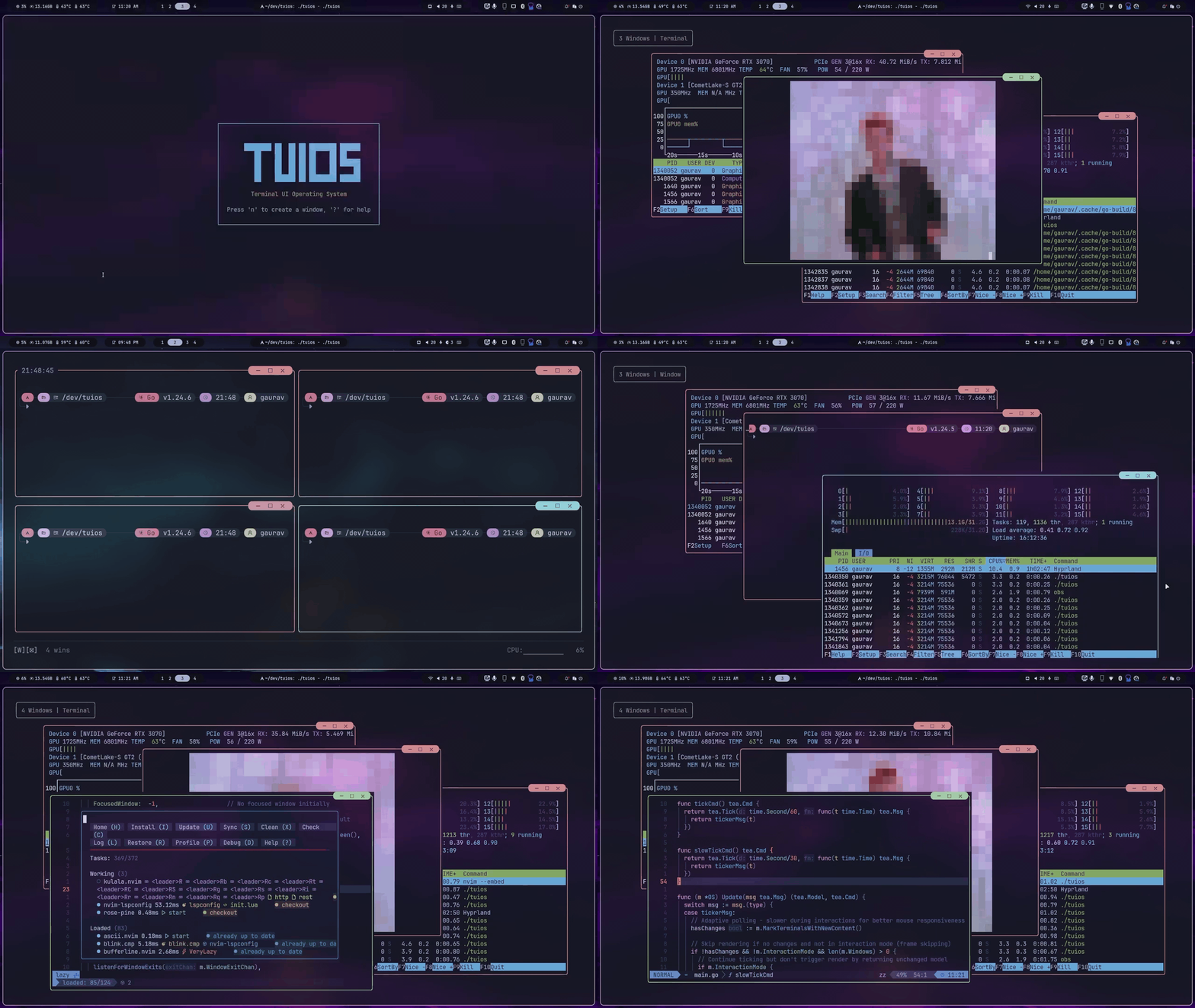
TUIOS is a modern terminal multiplexer and window manager built with Go. It provides a vim-like modal interface with multiple terminal panes, workspaces, BSP tiling, kitty graphics protocol support, and a command palette - all running inside your existing terminal.
Built on the Charm stack (Bubble Tea v2, Lipgloss v2), TUIOS features event-driven rendering for near-zero idle CPU usage, flicker-free kitty image passthrough, and comprehensive keyboard/mouse interaction.
Documentation
Full documentation is available at tuios-docs (hosted) or in the docs/ folder.
Quick Links
- Getting Started - Keybindings and quick reference
- BSP Tiling - Tiling with preselection and split control
- Configuration - Customize keybindings, themes, and behavior
- CLI Reference - All command-line options
- Tape Scripting - Automate workflows
- Sessions - Daemon mode and session persistence
- Architecture - Technical design
Installation
Package Managers
Homebrew (macOS/Linux):
bashbrew install tuios
Arch Linux (AUR):
bashyay -S tuios-bin
Nix:
bashnix run github:Gaurav-Gosain/tuios#tuios
Other Methods
bash# Quick install script (Linux/macOS) curl -fsSL https://raw.githubusercontent.com/Gaurav-Gosain/tuios/main/install.sh | bash # Go install go install github.com/Gaurav-Gosain/tuios/cmd/tuios@latest # Docker docker run -it --rm ghcr.io/gaurav-gosain/tuios:latest
GitHub Releases - Pre-built binaries for all platforms.
Requirements: A terminal with true color support. Kitty graphics and sixel support recommended (Ghostty, Kitty, WezTerm).
Features
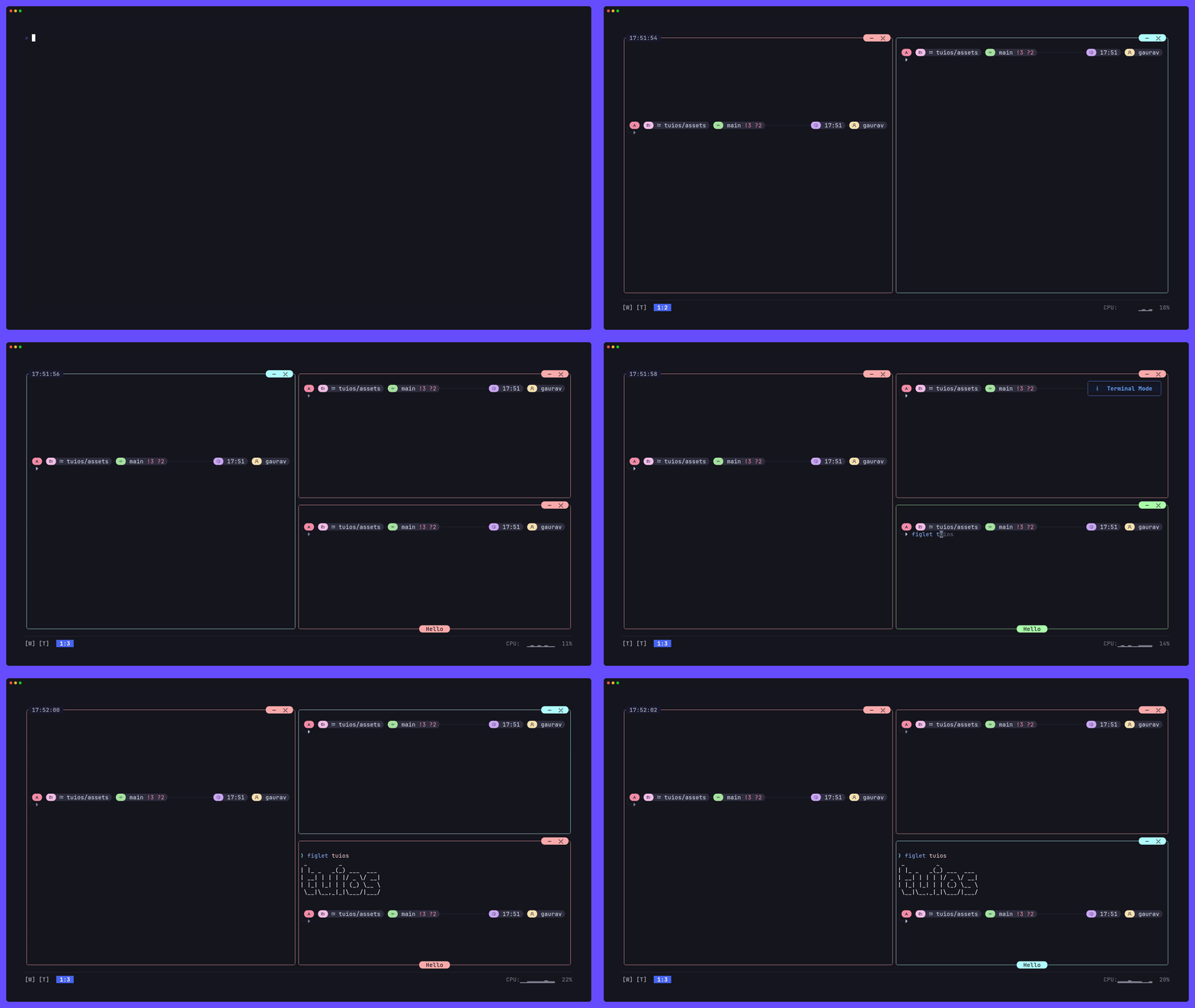
Core
- Multiple Terminal Panes - Create, resize, drag, and organize terminal sessions
- 9 Workspaces - Independent workspace isolation with instant switching
- Modal Interface - Vim-inspired Window Management and Terminal modes
- Command Palette - Fuzzy-searchable action launcher (<kbd>Ctrl</kbd>+<kbd>P</kbd>)
- Pane Zoom - Fullscreen any pane with <kbd>z</kbd> (WM mode) or <kbd>Prefix</kbd>+<kbd>z</kbd>. Shared borders hidden when zoomed, dockbar shows Z indicator.
Tiling
- BSP Tiling - Binary Space Partitioning with spiral layout
- Smart Auto-Split - Aspect-ratio-aware splitting (opt-in)
- Shared Borders - tmux-style separator lines between panes (
--shared-borders) - Preselection - Control where the next pane spawns
- Equalize Splits - Reset all splits to balanced ratios
Scrollback & Copy Mode
- Vim-Style Copy Mode - Navigate 10,000-line scrollback with hjkl, search with
/, yank withy - Mouse Wheel Scrollback - Scroll wheel enters copy mode directly (no alt-screen)
- Interactive Scrollbar - Click or drag the right border to jump to scroll position
- Selection Auto-Scroll - Drag selection above/below pane to scroll
- Scrollback Browser - OSC 133-aware command/output block navigation
- Scroll Position Indicator - Shows offset/total on the bottom border
Graphics & Protocols
- Kitty Graphics Protocol - Full image rendering with flicker-free video playback.
mpv --vo=kittyworks (both shm and base64), and youterm works. - Sixel Graphics - Sixel image passthrough (experimental, no pixel-level clipping yet)
- Kitty Keyboard Protocol - Progressive enhancement (CSI u) with push/pop/query support. Fish 4.x compatible; Shift+printable bypasses the protocol and sends text directly.
- Synchronized Output - Mode 2026 prevents screen tearing
- Shared Memory Support -
t=spassthrough for mpv--vo-kitty-use-shm - Terminal Queries - OSC 4 palette, OSC 10-12 colors, CSI 14/16/18t sizing, DA1/DA2
- Experimental - Kitty text sizing protocol (OSC 66) - basic passthrough works but has known issues with scrollback and window repositioning
- Not Yet Supported - Kitty animation protocol (a=f, a=a, a=c)
Session Management
- Daemon Mode - Persistent sessions with detach/reattach (like tmux)
- Session Switcher - In-app session list (<kbd>Prefix</kbd>+<kbd>S</kbd>)
- Layout Templates - Save/load window arrangements with working directories and startup commands
- Layout CLI -
tuios layout list,tuios layout delete,tuios layout export
Automation
- Tape Scripting - DSL for recording and replaying terminal workflows
- Tape Recording - Record live sessions (<kbd>Prefix</kbd>+<kbd>T</kbd> <kbd>r</kbd>)
- Headless Execution - Run scripts in CI/CD with
tuios tape run - Layout Export - Convert layouts to tape scripts for sharing
More
- Showkeys Overlay - Display pressed keys for presentations
- Customizable Keybindings - TOML configuration with Kitty protocol support
- Mouse Support - Click, drag, resize, scrollbar interaction
- SSH Server Mode - Remote terminal multiplexing
- Web Terminal Mode - Browser-based access (separate
tuios-webbinary) - Themes - Bundled themes with custom theme support
Quick Start
bashtuios # Launch TUIOS tuios --show-keys # Launch with key overlay for learning
Essential Keys
| Key | Action |
|---|---|
| <kbd>Ctrl</kbd>+<kbd>P</kbd> | Command palette - search and run any action |
| <kbd>n</kbd> | New pane (Window Management mode) |
| <kbd>i</kbd> / <kbd>Enter</kbd> | Enter Terminal mode |
| <kbd>Esc</kbd> / <kbd>Prefix</kbd>+<kbd>d</kbd> | Back to Window Management mode |
| <kbd>z</kbd> (WM) or <kbd>Prefix</kbd>+<kbd>z</kbd> | Toggle pane zoom (fullscreen) |
| <kbd>Prefix</kbd>+<kbd>Space</kbd> | Toggle BSP tiling |
| <kbd>Prefix</kbd>+<kbd>[</kbd> | Enter copy mode (vim scrollback) |
| <kbd>Prefix</kbd>+<kbd>S</kbd> | Session switcher |
| <kbd>Prefix</kbd>+<kbd>L</kbd> then <kbd>l</kbd>/<kbd>s</kbd> | Load/Save layout template |
| <kbd>Prefix</kbd>+<kbd>?</kbd> | Help overlay |
| <kbd>Prefix</kbd>+<kbd>q</kbd> | Quit |
The prefix key is <kbd>Ctrl</kbd>+<kbd>B</kbd> by default (configurable).
Daemon Mode
bashtuios new mysession # Create persistent session tuios attach mysession # Reattach tuios ls # List sessions tuios kill-session mysession # Kill session
Layout Templates
bash# In-app: Ctrl+B, L, l to load / Ctrl+B, L, s to save # Or via command palette: Ctrl+P → "Save Layout" / "Load Layout" # CLI: tuios layout list # List saved layouts tuios layout delete mysetup # Delete a layout tuios layout export mysetup # Export as tape script
Configuration
bashtuios config edit # Edit config in $EDITOR tuios keybinds list # View all keybindings
See Configuration Guide for all options including show_clock, show_cpu, show_ram, shared_borders, custom themes, and keybinding customization.
What's New in v0.7.0
Architecture Overhaul
- Event-driven rendering - PTY output signals trigger renders instead of fixed-rate ticking. Near-zero CPU at idle.
- Graphics batched with render cycle - Kitty commands flush after text content, preventing tearing.
Performance
- Kitty graphics flicker elimination - Reuses image IDs so frames replace in-place without delete+re-place.
- Raw passthrough - File-based kitty transmissions forward the path directly (no read+encode+chunk).
- Fast render path - Unfocused panes use the emulator's built-in
Render()bypassing cell-by-cell iteration. - Hot path cleanup - Removed
defer/recoverfrom style comparison (~20k calls/frame), fixed string builder leak. - Visibility gating - Minimized/off-workspace panes skip rendering entirely.
- Synchronized output - Mode 2026 wrapping for all graphics output.
New Features
- Command palette (<kbd>Ctrl</kbd>+<kbd>P</kbd>) - Fuzzy search across 30+ actions with ranked results.
- Pane zoom (<kbd>z</kbd> in WM mode or <kbd>Prefix</kbd>+<kbd>z</kbd>) - Fullscreen toggle for the focused pane. Shared borders hidden when zoomed, dockbar shows Z indicator.
- Session switcher (<kbd>Prefix</kbd>+<kbd>S</kbd>) - Browse and switch daemon sessions in-app.
- Layout templates - Save/load window arrangements with CWD, startup commands, BSP tree, proportional scaling.
- Shared borders (
--shared-borders) - tmux-style thin separator lines between tiled panes. - Smart auto-split - Aspect-ratio-aware BSP splitting (opt-in via command palette).
- Interactive scrollbar - Click/drag the right border to scroll, theme-aware colors.
- Mouse wheel scrollback - Scroll wheel enters copy mode directly with full vim/selection support.
- Selection auto-scroll - Drag selection above/below pane to scroll during visual mode.
- Dock stats opt-in - Clock, CPU, RAM hidden by default (
--show-clock,--show-cpu,--show-ram).
Terminal Protocol Support
- Kitty keyboard protocol - Full CSI u support: push (
CSI > u), pop (CSI < u), query (CSI ? u), set (CSI = u). Keys encoded in CSI u format when the protocol is active. - Mode 2026 (synchronized output) and mode 2027 (unicode core) tracked in the VT emulator.
- OSC 4 palette color query/set, OSC 52 clipboard operations.
- DA1 now advertises sixel capability (attribute 4).
- Sixel passthrough re-enabled with raw data passthrough and active area clearing on hide (experimental).
Bug Fixes
- Images follow windows during drag and reposition on resize.
ctrl+dwindow close no longer requires double-press (race condition fix).- Visual line mode (
Shift+V) highlights immediately. - Off-screen windows don't corrupt ANSI rendering.
- Background windows stay fresh (no stale content on focus switch).
- Tiling toggle immediately shows/hides borders.
- Sixel images hidden during overlays and copy mode scrollback.
Dependencies
- Bubble Tea v2.0.2, Lipgloss v2.0.2, Wish v2.0.0, Log v2.0.0 (all stable releases).
Architecture
TUIOS follows the Model-View-Update pattern on Bubble Tea v2. For details, see Architecture Guide.
Key design decisions:
- Event-driven rendering - PTY reader goroutines signal bubbletea via a buffered channel. No fixed-rate ticking for terminal content.
- Kitty graphics passthrough - Image IDs are reused across frames for flicker-free video. Output is batched with the render cycle and wrapped in mode 2026 sync.
- BSP tiling - Binary space partitioning tree with configurable schemes (spiral, smart split). Shared borders mode overlaps window rects and draws separator lines as a separate layer.
- Copy mode - Full vim navigation over scrollback with mouse wheel entry, scrollbar interaction, and selection auto-scroll (timer-based continuous drag scrolling).
Core Components:
- Window Manager (
internal/app/os.go) - Central state, workspaces, overlays - Terminal Emulation (
internal/vt/) - ANSI parser with scrollback, kitty/sixel graphics, kitty keyboard protocol, OSC 133 - Rendering (
internal/app/render.go) - Layer composition, viewport culling, graphics batching - Input (
internal/input/) - Modal routing, 100+ configurable keybindings, mouse handling - Kitty Passthrough (
internal/app/kitty_passthrough.go) - Flicker-free image forwarding with ID reuse and sync output
Performance
- Event-driven rendering - Zero CPU at idle. Renders only when PTY data arrives or interaction occurs.
- Kitty graphics - Flicker-free via image ID reuse. Tearing-free via mode 2026 sync + render cycle batching.
- Fast unfocused render - Unfocused panes use emulator's built-in
Render()instead of cell-by-cell. - Style caching - LRU cache with sequence-based change detection (40-60% allocation reduction).
- Viewport culling - Off-screen and minimized panes skip rendering.
- Memory pooling - Pooled strings, buffers, and styles.
Development
bashgit clone https://github.com/gaurav-gosain/tuios.git cd tuios go build -o tuios ./cmd/tuios ./tuios
bashgo test ./... # Run tests go vet ./... # Lint staticcheck ./... # Static analysis
Support: 
Star History
License
MIT License - see LICENSE for details.
Acknowledgments
Contributors
Showing top 12 contributors by commit count.


![github-actions[bot]](https://avatars.githubusercontent.com/in/15368?v=4)




Related Repositories

yorukot/superfile
Pretty fancy and modern terminal file manager

dlvhdr/gh-dash
A rich terminal UI for GitHub that doesn't break your flow.

go-musicfox/go-musicfox
go-musicfox是用Go写的又一款网易云音乐命令行客户端,支持UnblockNeteaseMusic、各种音质级别、lastfm、MPRIS、MacOS交互响应(睡眠暂停、蓝牙耳机连接断开响应、菜单栏控制等)...

idursun/jjui
jjui is a TUI designed for interacting with the Jujutsu version control system.

floatpane/matcha
A beautiful and functional email client for your terminal, built with Go and the charming Bubble Tea TUI library. Never leave your command line to check your inbox or send an email again!

lrstanley/bubblezone
helper utility for BubbleTea, allowing easy mouse event tracking