

DropdownTitleView
A UINavigationItem.titleView compatible UIControl with a title, subtitle, and dropdown.
A simple and configurable "dropdown" view built for `UINavigationItem.titleView`. The project is written primarily in Swift, distributed under the MIT License license, first published in 2018. Key topics include: githawk.
DropdownTitleView
A simple and configurable "dropdown" view built for UINavigationItem.titleView.
Installation
Just add DropdownTitleView to your Podfile and pod install. Done!
pod 'DropdownTitleView'
Usage
Create an instance of DropdownTitleView, configure it, and set it as a UINavigationItem's titleView:
swiftfunc viewDidLoad() { super.viewDidLoad() let titleView = DropdownTitleView() titleView.configure(title: "Hello world!", subtitle: "Is this thing on?") navigationItem.titleView = titleView }
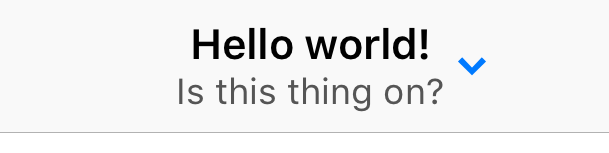
Add touch handling like you would any other UIControl:
swiftfunc viewDidLoad() { super.viewDidLoad() // setup and set titleView titleView.addTarget( self, action: #selector(onTitle), for: .touchUpInside ) } @objc func onTitle() { print("do something") }
Configuration
DropdownTitleView has several appearance options:
titleFontandtitleColor-UIFontandUIColorof the top title labelsubtitleFontandsubtitleColor-UIFontandUIColorof the bottom subtitle labelchevronTintColor-UIColortint of the chevron image
All of these values are configurable via UIAppearance as well!
swiftDropdownTitleView.appearance().chevronTintColor = .blue DropdownTitleView.appearance().titleColor = .black DropdownTitleView.appearance().subtitleColor = .lightGray DropdownTitleView.appearance().titleFont = .systemFontOfSize(18) DropdownTitleView.appearance().subtitleFont = .systemFontOfSize(13)
You can also control the features of the view with params in configure(...) function:
subtitle- Leavenilto remove the subtitle and vertically center the titlechevronEnabled- Set tofalseto remove the chevronaccessibilityLabelandaccessibilityHint- Set Accessibility features on the control
Acknowledgements
- Created with ❤️ by Ryan Nystrom
Contributors
Showing top 1 contributor by commit count.

Related Repositories

GitHawkApp/GitHawk
The (second) best iOS app for GitHub.
GitHawkApp/MessageViewController
A SlackTextViewController replacement written in Swift for the iPhone X.
GitHawkApp/StyledTextKit
Declarative building and fast rendering attributed string library.
GitHawkApp/ContextMenu
An iOS context menu UI inspired by Things 3.
GitHawkApp/Squawk
Quick & interactive iOS alerts in Swift.
GitHawkApp/FlatCache
Implementation of Soroush Khanlou's Flat Cache.