

TED
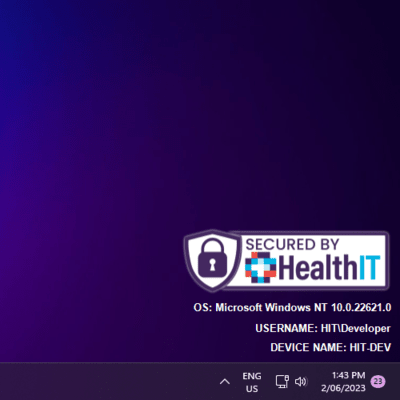
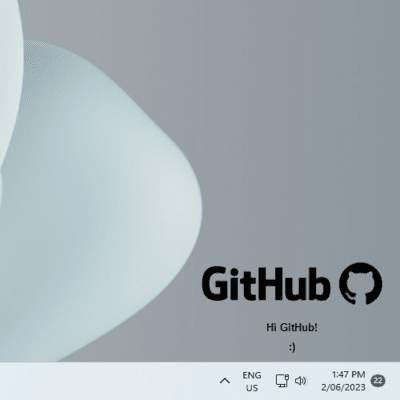
TED - Tag Every Desktop - is a commandline tool, inspired by the classic BGInfo, designed for MSPs to be able to display images and text programmatically on the desktop, positioned above the wallpaper but below the icons.
TED is a command-line tool, inspired by the classic [BGInfo](https://learn.microsoft.com/en-us/sysinternals/downloads/bginfo), designed for MSPs to be able to display images and text programmatically on the desktop, positioned above the wallpaper but below the icons. It utilizes the bottom right corner of the primary monitor as the drawing area. The project is written primarily in C#, distributed under the GNU General Public License v3.0 license, first published in 2023. Key topics include: csharp, customization, msp, tool, windows.

TED (Tag Every Desktop) - a Health IT Project
TED is a command-line tool, inspired by the classic BGInfo, designed for MSPs to be able to display images and text programmatically on the desktop, positioned above the wallpaper but below the icons. It utilizes the bottom right corner of the primary monitor as the drawing area.
TED runs as a lightweight desktop process so it can repaint itself when Windows redraws the desktop. This avoids modifying or replacing the user's wallpaper.
Features
- Display images and text on the desktop
- Ability to specify different images based on perceived desktop luminance. Font color also adjusts between black or white based on perceived desktop luminance.
- Substitute system values in the text with special tokens
- DPI aware
- Persistent desktop overlay that redraws itself without replacing the user's wallpaper
- Customizable with a variety of command-line switches
- Designed for deployment via an RMM
Requirements
- Windows 8 or later
Limitations
In remote desktop environments, Explorer and GPU composition behavior can still vary between Windows versions and client settings.
Installation
Download the latest compiled binary for TED. You can find the latest downloads for TED below - this ensures your RMM always grabs the latest version!
We recommend managing and deploying TED via your RMM.
Usage
TED supports the following switches:
-ior-image: Path or URL to the image to be drawn.-dior-darkimage: Path or URL to the image to be drawn when the perceived desktop luminance is light.-lior-lightimage: Path or URL to the image to be drawn when the perceived desktop luminance is dark.-for-font: Name of the font to use. Default is Arial.-fsor-fontsize: Font size in pixels. Default is 8.-lsor-linespacing: Space between text lines in pixels. Default is 8.-hpor-hpad: Horizontal padding amount in pixels. Default is 10.-vpor-vpad: Vertical padding amount in pixels. Default is 10.-wor-width: The width of the image when drawn, in pixels. By default this is -1.- A value of -1 disables fixed width scaling and instead uses automatic image scaling to resize (respecting aspect ratio) the image to the size of the longest line of text.
-aor-align: How the text should be aligned. Default is Left. Accepted values are Left, Center or Right. Not case-sensitive.-line: The text to be drawn. This switch can be repeated multiple times to draw multiple lines of text. Lines can contain system tokens and inline rich text formatting, both documented below. If no lines are provided, TED renders the following by default:- "USERNAME: @userName"
- "MACHINE NAME: @machineName"
- "OS: @osName"
Line tokens
Tokens can be used inside any -line value. TED substitutes them at runtime with values from the current Windows session, machine identity, operating system, and primary network connection.
| Token | Runtime value |
|---|---|
@userName | Current Windows user name |
@machineName | Computer name |
@machineSerial | Device serial number |
@manufacturer | Device manufacturer |
@model | Device model |
@ipAddress | Primary IP address |
@macAddress | Primary MAC address |
@osName | Operating system name |
@osVersion | Operating system version |
Inline formatting
Lines also support a small set of inline rich text tags:
| Tag | Example |
|---|---|
| Bold | <b>text</b> |
| Italic | <i>text</i> |
| Underline | <u>text</u> |
| Named color | <color=green>text</color> |
| Hex color | <color=#800080>text</color> |
Untagged text uses TED's luminance-based black or white text color. Tagged colors are drawn as specified.
Examples
We've provided an example PowerShell script to make deploying with your RMM quick and easy. You can find the script here.
TED is a CLI tool and can be called like so:
shellted -di path/to/dark_image.png -li path/to/light_image.png -f Arial -fs 14 -ls 5 -hp 10 -vp 10 -line "Hello, @userName!" -line "You are using @osName on @machineName."
Inline rich text formatting can be used inside lines:
shellted -line "<color=purple>OS: </color><color=green>@osName</color>" -line "<b><u>Device:</u></b> <i>@machineName</i>"
In terms of real world usage, we've found this to be a fantastic tool for helping clients quickly identify key information about their machine whilst on the phone with them.
Adding tokens
Adding tokens to the text system requires editing the source and compiling your own binary.
Tokens are stored in TokenLookup inside Tokenizer.cs.
Add your token as the dictionary key and the substituted value provider as the value, then compile and use your new token in a -line value.
Contributing
Contributions to TED are welcome! If you find any issues or have suggestions for improvement, please feel free to open an issue or submit a pull request.
Supporting the project
:heart: the project and would like to show your support? Please consider donating to one of our favourite charities:
Please let us know if you have donated because of this project!
License
This project is licensed under the GNU General Public License v3.0
Contact
For any inquiries or further information, please contact the developers:
Contributors
Showing top 3 contributors by commit count.


Related Repositories

jellyfin/jellyfin
The Free Software Media System - Server Backend & API

files-community/Files
A modern file manager that helps users organize their files and folders.

ShareX/ShareX
ShareX is a free and open-source application that enables users to capture or record any area of their screen with a single keystroke. It also supports uploading images, text, and various file types to a wide range of destinations.

doocs/leetcode
🔥LeetCode solutions in any programming language | 多种编程语言实现 LeetCode、《剑指 Offer(第 2 版)》、《程序员面试金典(第 6 版)》题解

DevToys-app/DevToys
A Swiss Army knife for developers.

AvaloniaUI/Avalonia
Develop Desktop, Embedded, Mobile and WebAssembly apps with C# and XAML. The future of .NET UI