

CliWaifuTamagotchi
CLI ASCII avatar for entertainment and motivational purposes
- [✨ Overview](#-overview) - [🎬 Launching Process](#-launching-process) - [🎨 Customization](#-customization) - [📂 Project Structure](#-project-structure) - [⚙️ Core Scripts](#-core-scripts) - [main.go](#maingo) - [utils/app-utils.go](#utilsapp-utilsgo) - [utils/commands-utils.go](#utilscommands-utilsgo) - [utils/happiness-utils.go](#utilshappiness-utilsgo) - [utils/palette-handler.go](#utilspalette-handlergo) - [utils/settings-handler.go](#utilssettings-handlergo) - [utils/encouragements-hand... The project is written primarily in Go, distributed under the GNU General Public License v3.0 license, first published in 2025. Key topics include: cli, customization, go, golang, golang-cli.
🫂 CliWaifuTamagotchi
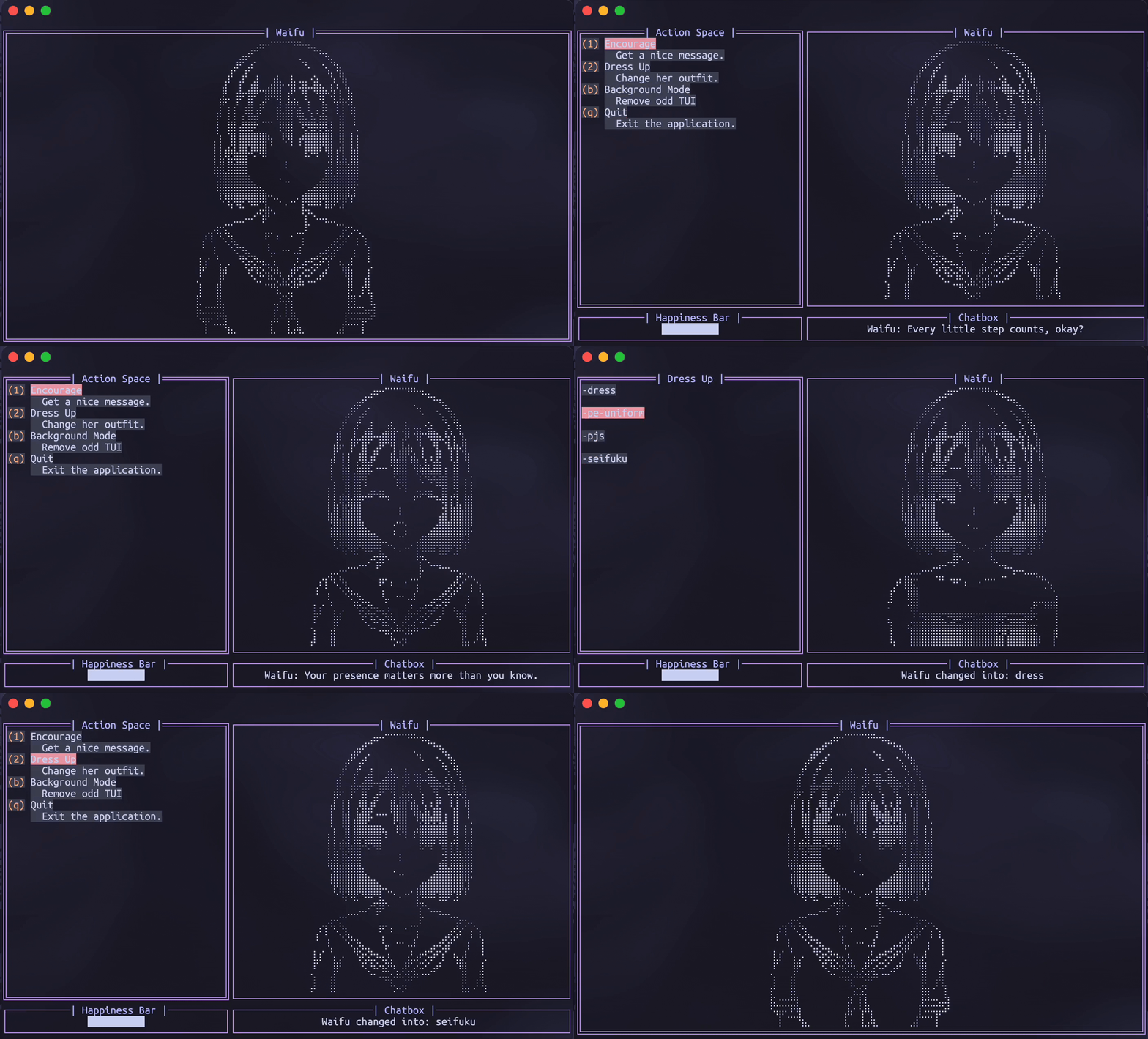
Preview:
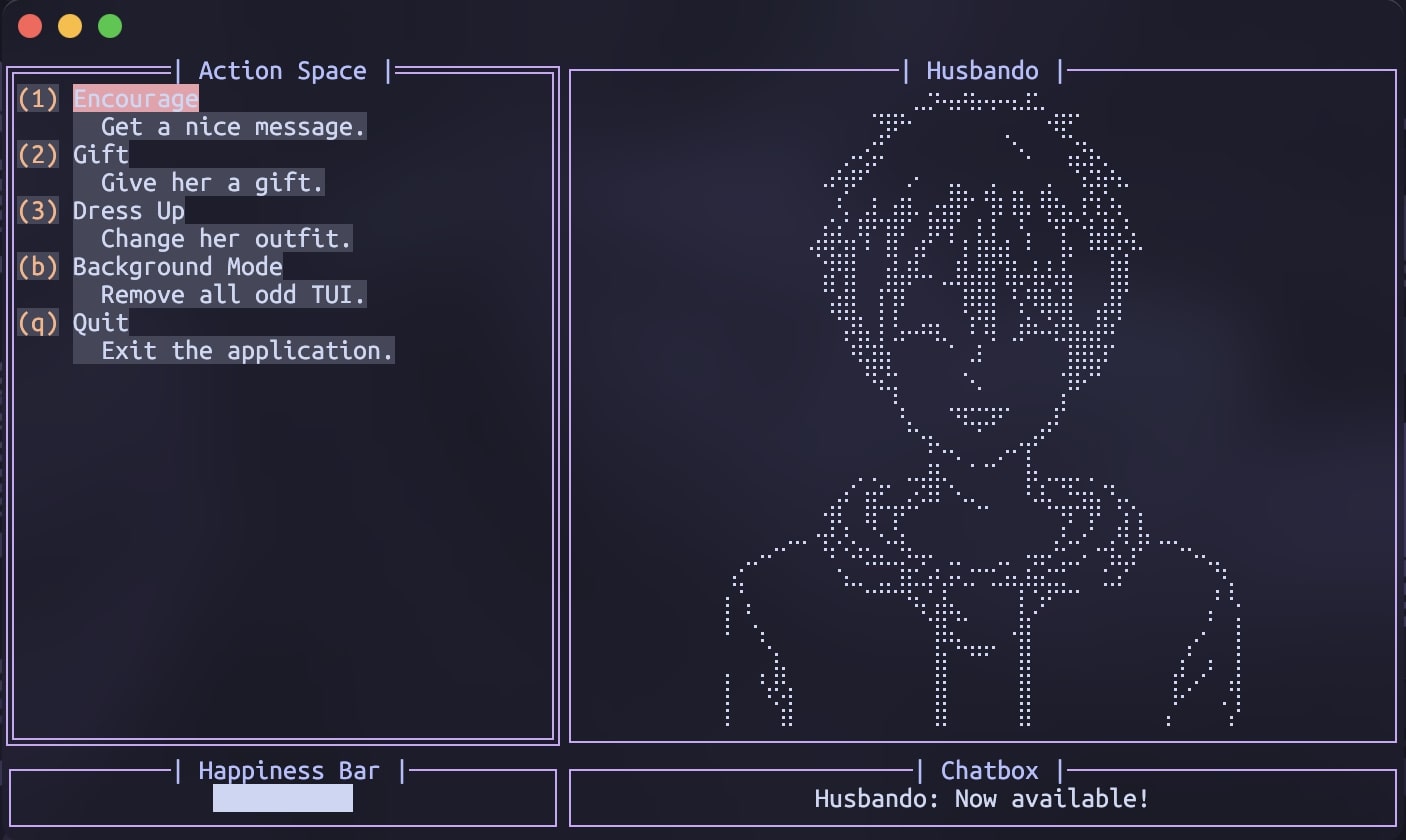
You can turn the avatar to husbando in ~/.config/cliwaifutamagotchi/settings.json!


📑 Table of Contents
- ✨ Overview
- 🎬 Launching Process
- 🎨 Customization
- 📂 Project Structure
- ⚙️ Core Scripts
- 📜 Notes & Error handling
- 🛐 Special thanks
✨ Overview
CliWaifuTamagotchi is a terminal-based tamagotchi that:
- Renders ASCII expressions and clothes.
- Provides a small set of interactions: Encourage, Gift, Dress Up, Background Mode, Quit.
- Uses a persistent color palette stored in
~/.config/cliwaifutamagotchi/palette.json. - Uses persistent detail settings stored in
~/.config/cliwaifutamagotchi/settings.json. - Customize some of the functions editing
words-of-encouragement.txtandgifts.jsonin the same directory. - Has minimal UI built using
tviewandtcell. - Has Vim-style navigation: Use
h,j,k,lkeys for intuitive navigation and selection (Must be enabled in settings.json).
No tons of loops - only one function that repeats itself every 5 seconds. Everything handles and updates according to it.
🎬 Launching Process
<details> <summary><b>Brew</b> (macOS)</summary>- Install
bashbrew install HenryLoM/CliWaifuTamagotchi/cliwt
- Run
bashcliwt
</details> <details> <summary><b>AUR</b> (Arch)</summary>
- Install
bashyay -S cliwt
or
bashparu -S cliwt
- Run
bashcliwt
</details> <details> <summary><b>Git</b> (Source code)</summary>
- Clone repository
bashgit clone https://github.com/HenryLoM/CliWaifuTamagotchi.git cd CliWaifuTamagotchi
- Build app yourself, then run
bashgo build -o cliwt ./cliwt
- Or run directly for development
bashgo run main.go
</details>
💡 Notes
- First run creates
~/.config/cliwaifutamagotchi/directory andpalette.json,settings.jsonfiles in it on its own if missing.- On macOS, ensure your terminal supports true color for best rendering.
🎨 Customization
- Palette<br>
JSON file is in~/.config/cliwaifutamagotchi/; Namedpalette.json<br>
JSON file's structure:
{
  "background": "#1e1e2e",
  "foreground": "#cdd6f4",
  "border": "#cba6f7",
  "accent": "#eba0ac",
  "title": "#b4befe"
}
Note: default palette is Catppuchin (Mocha).
- Settings<br>
JSON file is in~/.config/cliwaifutamagotchi/; Namedsettings.json<br>
JSON file's structure:
{
  "name": "Waifu",
  "defaultMessage": "...",
  "vimNavigation": false,
  "avatarType": "waifu",
  "keys": {
    "encourage": "l",
    "dressup": "2",
    "backgroundMode": "b",
    "quit": "q"
  }
}
Note: try to avoid key overrides when using
"vimNavigation": true.
- Words of encouragement<br>
TXT file is in~/.config/cliwaifutamagotchi/; Namedwords-of-encouragement.txt<br>
Note: It's extensible!
- Gifts<br>
JSON file is in~/.config/cliwaifutamagotchi/; Namedgifts.json<br>
Note: It's extensible!
📂 Project Structure
CliWaifuTamagotchi/
│
├── README.md
├── LICENSE
├── .gitignore
├── go.mod
├── go.sum
├── main.go                             # Main file that launches the project
│
├── screenshots/
│   ├── result.gif
│   ├── reactions.jpg
│   └── husbando-preview.jpg
│
└── utils/
    │
    ├── ascii-arts/
    │   │
    │   ├── waifu/                      # Arts for waifu avatar
    │   │   ├── clothes/...             # ASCII bodies
    │   │   └── expressions/...         # ASCII heads
    │   │
    │   └── husbando/...                # Arts for husbando avatar
    │       ├── clothes/...             # ASCII bodies
    │       └── expressions/...         # ASCII heads
    │
    ├── assets/
    │   └── words-of-encouragement.txt  # List of lines for Encouragement function
    │
    ├── app-utils.go                    # Main helpers
    ├── commands-utils.go               # Functions for the Action Space
    ├── happiness-utils.go              # Happiness scoring system
    ├── palette-handler.go              # Handling palette out of the file
    ├── settings-handler.go             # Handling settings out of the file
    ├── encouragements-handler.go       # Handling encouragements out of the file
    └── gifts-handler.go                # Handling gifts out of the file
⚙️ Core Scripts
main.go
- Loads ASCII head, blink frames, and body.
- Displays actions menu: Encourage, Dress Up, Quit.
- Handles user input (keys and navigation).
- Queues UI updates safely using
app.QueueUpdateDrawviaUIEventsChanthat keeps UI changes in order.
utils/app-utils.go
- Helper functions for loading ASCII files.
- Manages UI rendering and widget updates.
utils/commands-utils.go
-
Implements interactions logic:
Encourage: random encouraging phrase + happy frame.GiftMenu: choose gifts, apply happiness, show reaction.DressUp: swaps body/outfit based on selection.BackgroundMode: fills the TUI with Waifu, removing all of the odd elements.
-
Manages UI state and async updates via UIEventsChan.
-
Caches custotmizable files to reduce disk reads.
utils/happiness-utils.go
- Handles the bar and changes emotions of the avatar.
- Handles the happiness scores.
utils/palette-handler.go
- Loads palette from
~/.config/cliwaifutamagotchi/palette.json. - Creates default palette if missing.
- Provides color application helpers.
utils/settings-handler.go
- Loads settings from
~/.config/cliwaifutamagotchi/settings.json. - Creates default settings if missing.
utils/encouragements-handler.go
- Loads settings from
~/.config/cliwaifutamagotchi/words-of-encouragement.txt. - Restores default encouragements from relative directory if missing.
utils/gifts-handler.go
- Loads settings from
~/.config/cliwaifutamagotchi/gifts.json. - Restores default gifts if missing.
📜 Notes & Error handling
Errors:
- See errors you can't explain? Try to remove
~/.config/cliwaifutamagotchi/directory (you can do a backup). If it worked, it means customization was updated and there was a conflict. - If error remains, leave the issue, we could solve it together!
Warning:
- Missing/malformed ASCII files may cause a wrong output; handle carefully if modifying assets inside the structure.
Read if you want to contribute:
- The project lives only because there are people who use it. Let's make sure we build it for people, not to earn another achievement for our profiles.
- Keep the code clean and constructive.
- Keep the project PG.
- Keep the Unix philosophy principle: a program should do one thing and do it well.
- The two main goals of the project:
- A TUI that is as customizable as we can make it.
- A tool that is as lightweight as possible, since the project assumes users leave it running in the background.
Future plans you can help with:
- More interactions (feeding, timed events, stats).
- Save selected outfit and preferences.
- Unit tests and error handling improvements.
- Custom separate font support (because a lot of people meet problems with visuals with their fonts).
- Maybe "Pose Mode" - loop animation or specific pose to select and have on the background.
- Maybe separate module handle stderr so Waifu reacts to the errors you get during your work.
- Maybe separate module to use a ChatBot.
🛐 Special thanks
- sutemo — for the amaazing female & male sprites you can see in the project.
- mininit — for embedding all assets and enabling a clean, pure build process.
- Ali Medhat — for adding Vim-style navigation.
- Isaac Hesslegrave — for implementing Arch Linux support via
yayandparu.
⤴︎ Return to the 📑 Table of Contents ⤴︎
Contributors
Showing top 3 contributors by commit count.


Related Repositories

n8n-io/n8n
Fair-code workflow automation platform with native AI capabilities. Combine visual building with custom code, self-host or cloud, 400+ integrations.

ohmyzsh/ohmyzsh
🙃 A delightful community-driven (with 2,500+ contributors) framework for managing your zsh configuration. Includes 300+ optional plugins (rails, git, macOS, hub, docker, homebrew, node, php, python, etc), 140+ themes to spice up your morning, and an auto-update tool that makes it easy to keep up with the latest updates from the community.

yt-dlp/yt-dlp
A feature-rich command-line audio/video downloader

google-gemini/gemini-cli
An open-source AI agent that brings the power of Gemini directly into your terminal.

sherlock-project/sherlock
Hunt down social media accounts by username across social networks

junegunn/fzf
:cherry_blossom: A command-line fuzzy finder