

Swift VIPER Module
Xcode template for VIPER Architecture written in Swift 4
When you decide to use VIPER architecture in your project, it is very tired create new modules, because you need create at least 5 files for each. Imagine that you need to create 6 modules...I was suffering this problem, and this is the raison why I've created this template. It's very useful for me and I hope that for you too. The project is written primarily in Swift, first published in 2017. Key topics include: architecture, swift, swift4, viper, xcode-templates.

:warning: Deprecated :warning:
This library is deprecated.
When you decide to use VIPER architecture in your project, it is very tired create new modules, because you need create at least 5 files for each. Imagine that you need to create 6 modules...I was suffering this problem, and this is the raison why I've created this template. It's very useful for me and I hope that for you too.
How to install
Using script (easy)
Only need execute this command in terminal:
swiftsudo swift install.swift
You should be this output message:
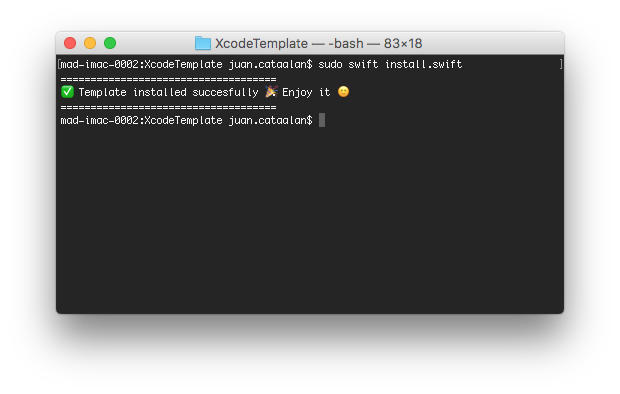
If all it's ok you now could find your template in Xcode.
Manual
Go to Application folder, browse to the Xcode application icon. Right-click it and choose 'Show Package Contents'. Then browse to:
Contents/Developer/Platforms/iPhoneOS.platform/Developer/Library/Xcode/Templates/Project Templates/iOS/Application and add "Module VIPER.xctemplate" file. Now you can find your template in Xcode.
Easy to use
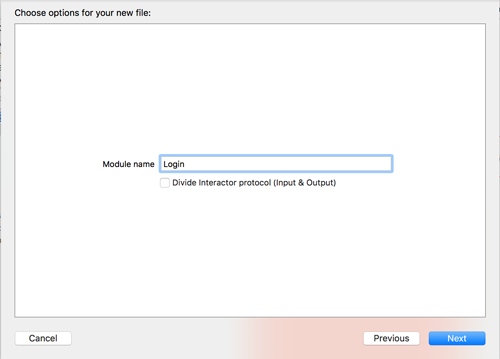
Generated code
This template generates all files that you need to create a new VIPER module. All generated code is Swift 3.
This is an example, we're creating a Login module:
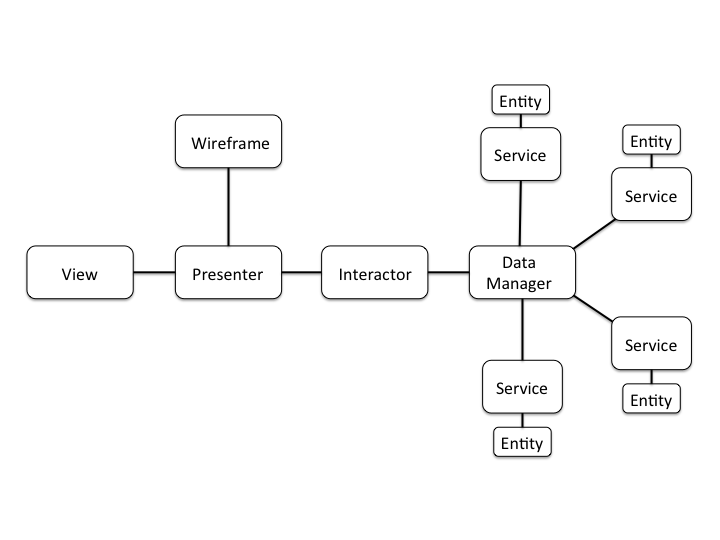
VIPER diagram overview
Why VIPER?
After using VIPER, I've found it to be very beneficial in many ways. Let’s get back to the list of things we set out to accomplish when architecting our app to see if VIPER addresses them.
- Easy to iterate on
- Collaboration friendly
- Separated out concerns
- Spec-ability
Next steps
Would you like decide what will be the next feature? now, you can do it here
- Create bash script to install more easy
- Divide Interactor protocol (Input & Output) (NEW! Version 1.1)
- Swift 4 & XCode 9 (NEW! Version 1.2)
- Add Dependency Injection Framework
- Customize name of components
-
Create groups in template(Only available for Project templates)
References
- iOS Architecture Patterns
- #8 VIPER to be or not to be?
- https://www.objc.io/issues/13-architecture/viper/
- https://www.ckl.io/blog/ios-project-architecture-using-viper/
Contributed
This is an open source project, so feel free to contribute. How?
- Open an issue.
- Send feedback via email.
- Propose your own fixes, suggestions and open a pull request with the changes.
Author
- Juanpe Catalán 🐦
Contributors
Showing top 3 contributors by commit count.


Related Repositories

binhnguyennus/awesome-scalability
The Patterns of Scalable, Reliable, and Performant Large-Scale Systems

charlax/professional-programming
A collection of learning resources for curious software engineers

nilbuild/design-patterns-for-humans
An ultra-simplified explanation to design patterns

DovAmir/awesome-design-patterns
A curated list of software and architecture related design patterns.

karanpratapsingh/system-design
Learn how to design systems at scale and prepare for system design interviews

mingrammer/diagrams
:art: Diagram as Code for prototyping cloud system architectures