

Hand gesture recognition using mediapipe
MediaPipe(Python版)を用いて手の姿勢推定を行い、検出したキーポイントを用いて、簡易なMLPでハンドサインとフィンガージェスチャーを認識するサンプルプログラムです。(Estimate hand pose using MediaPipe(Python version). This is a sample program that recognizes hand signs and finger gestures with a simple MLP using the detected key points.)
[Japanese/[English](https://github.com/Kazuhito00/hand-gesture-recognition-using-mediapipe/blob/main/README_EN.md)] The project is written primarily in Jupyter Notebook, distributed under the Apache License 2.0 license, first published in 2020. Key topics include: gesture, gesture-recognition, hand-pose-estimation, hands, mediapipe.
[Japanese/English]
Note
<br>キーポイント分類について、モデルを集めたリポジトリを作成しました。
<br>→ Kazuhito00/hand-keypoint-classification-model-zoo
hand-gesture-recognition-using-mediapipe
MediaPipe(Python版)を用いて手の姿勢推定を行い、検出したキーポイントを用いて、<br>簡易なMLPでハンドサインとフィンガージェスチャーを認識するサンプルプログラムです。
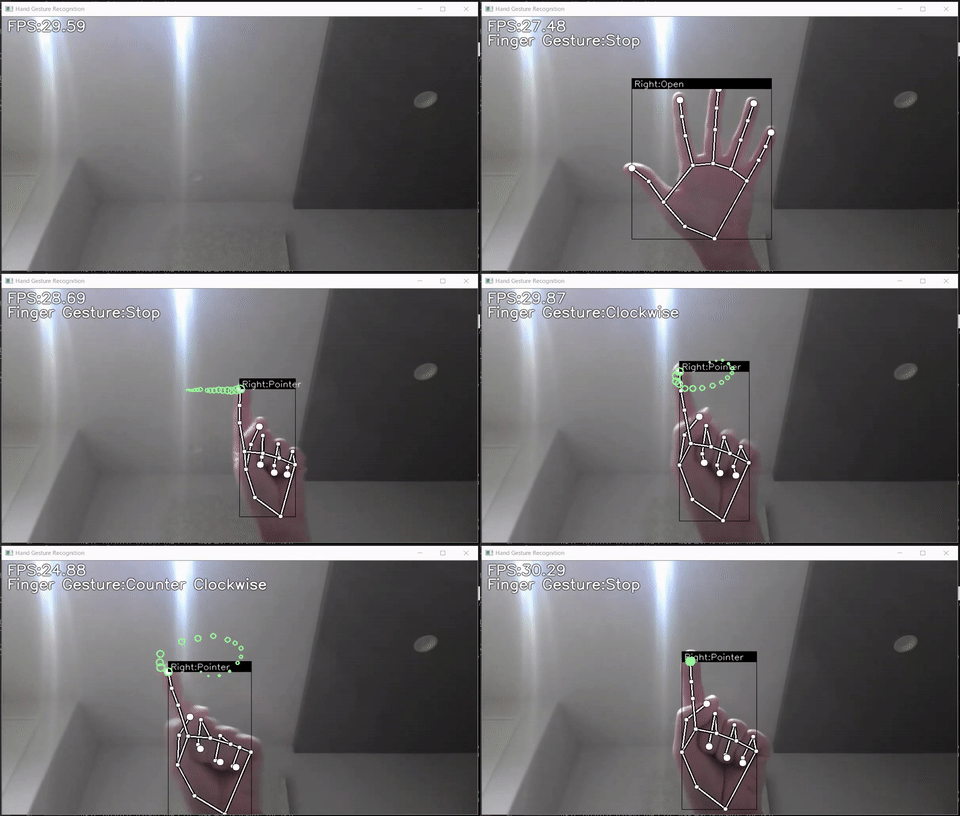
本リポジトリは以下の内容を含みます。
- サンプルプログラム
- ハンドサイン認識モデル(TFLite)
- フィンガージェスチャー認識モデル(TFLite)
- ハンドサイン認識用学習データ、および、学習用ノートブック
- フィンガージェスチャー認識用学習データ、および、学習用ノートブック
Requirements
- mediapipe 0.8.4
- OpenCV 4.6.0.66 or Later
- Tensorflow 2.9.0 or Later
- protobuf <3.20,>=3.9.2
- scikit-learn 1.0.2 or Later (学習時に混同行列を表示したい場合のみ)
- matplotlib 3.5.1 or Later (学習時に混同行列を表示したい場合のみ)
Demo
Webカメラを使ったデモの実行方法は以下です。
bashpython app.py
DockerとWebカメラを使ったデモの実行方法は以下です。
bashdocker build -t hand_gesture . xhost +local: && \ docker run --rm -it \ --device /dev/video0:/dev/video0 \ -v `pwd`:/home/user/workdir \ -v /tmp/.X11-unix/:/tmp/.X11-unix:rw \ -e DISPLAY=$DISPLAY \ hand_gesture:latest python app.py
デモ実行時には、以下のオプションが指定可能です。
- --device<br>カメラデバイス番号の指定 (デフォルト:0)
- --width<br>カメラキャプチャ時の横幅 (デフォルト:960)
- --height<br>カメラキャプチャ時の縦幅 (デフォルト:540)
- --use_static_image_mode<br>MediaPipeの推論にstatic_image_modeを利用するか否か (デフォルト:未指定)
- --min_detection_confidence<br>
検出信頼値の閾値 (デフォルト:0.5) - --min_tracking_confidence<br>
トラッキング信頼値の閾値 (デフォルト:0.5)
Directory
<pre> │ app.py │ keypoint_classification.ipynb │ point_history_classification.ipynb │ ├─model │ ├─keypoint_classifier │ │ │ keypoint.csv │ │ │ keypoint_classifier.hdf5 │ │ │ keypoint_classifier.py │ │ │ keypoint_classifier.tflite │ │ └─ keypoint_classifier_label.csv │ │ │ └─point_history_classifier │ │ point_history.csv │ │ point_history_classifier.hdf5 │ │ point_history_classifier.py │ │ point_history_classifier.tflite │ └─ point_history_classifier_label.csv │ └─utils └─cvfpscalc.py </pre>app.py
推論用のサンプルプログラムです。<br>また、ハンドサイン認識用の学習データ(キーポイント)、<br>
フィンガージェスチャー認識用の学習データ(人差指の座標履歴)を収集することもできます。
keypoint_classification.ipynb
ハンドサイン認識用のモデル訓練用スクリプトです。
point_history_classification.ipynb
フィンガージェスチャー認識用のモデル訓練用スクリプトです。
model/keypoint_classifier
ハンドサイン認識に関わるファイルを格納するディレクトリです。<br>
以下のファイルが格納されます。
- 学習用データ(keypoint.csv)
- 学習済モデル(keypoint_classifier.tflite)
- ラベルデータ(keypoint_classifier_label.csv)
- 推論用クラス(keypoint_classifier.py)
model/point_history_classifier
フィンガージェスチャー認識に関わるファイルを格納するディレクトリです。<br>
以下のファイルが格納されます。
- 学習用データ(point_history.csv)
- 学習済モデル(point_history_classifier.tflite)
- ラベルデータ(point_history_classifier_label.csv)
- 推論用クラス(point_history_classifier.py)
utils/cvfpscalc.py
FPS計測用のモジュールです。
Training
ハンドサイン認識、フィンガージェスチャー認識は、<br>学習データの追加、変更、モデルの再トレーニングが出来ます。
ハンドサイン認識トレーニング方法
1.学習データ収集
「k」を押すと、キーポイントの保存するモードになります(「MODE:Logging Key Point」と表示される)<br>
<img src="https://user-images.githubusercontent.com/37477845/102235423-aa6cb680-3f35-11eb-8ebd-5d823e211447.jpg" width="60%"><br><br>
「0」~「9」を押すと「model/keypoint_classifier/keypoint.csv」に以下のようにキーポイントが追記されます。<br>
1列目:押下した数字(クラスIDとして使用)、2列目以降:キーポイント座標<br>
<img src="https://user-images.githubusercontent.com/37477845/102345725-28d26280-3fe1-11eb-9eeb-8c938e3f625b.png" width="80%"><br><br>
キーポイント座標は以下の前処理を④まで実施したものを保存します。<br>
<img src="https://user-images.githubusercontent.com/37477845/102242918-ed328c80-3f3d-11eb-907c-61ba05678d54.png" width="80%">
<img src="https://user-images.githubusercontent.com/37477845/102244114-418a3c00-3f3f-11eb-8eef-f658e5aa2d0d.png" width="80%"><br><br>
初期状態では、パー(クラスID:0)、グー(クラスID:1)、指差し(クラスID:2)の3種類の学習データが入っています。<br>
必要に応じて3以降を追加したり、csvの既存データを削除して、学習データを用意してください。<br>
<img src="https://user-images.githubusercontent.com/37477845/102348846-d0519400-3fe5-11eb-8789-2e7daec65751.jpg" width="25%"> <img src="https://user-images.githubusercontent.com/37477845/102348855-d2b3ee00-3fe5-11eb-9c6d-b8924092a6d8.jpg" width="25%"> <img src="https://user-images.githubusercontent.com/37477845/102348861-d3e51b00-3fe5-11eb-8b07-adc08a48a760.jpg" width="25%">
2.モデル訓練
「keypoint_classification.ipynb」をJupyter Notebookで開いて上から順に実行してください。<br>
学習データのクラス数を変更する場合は「NUM_CLASSES = 3」の値を変更し、<br>「model/keypoint_classifier/keypoint_classifier_label.csv」のラベルを適宜修正してください。<br><br>
X.モデル構造
「keypoint_classification.ipynb」で用意しているモデルのイメージは以下です。
<img src="https://user-images.githubusercontent.com/37477845/102246723-69c76a00-3f42-11eb-8a4b-7c6b032b7e71.png" width="50%"><br><br>
フィンガージェスチャー認識トレーニング方法
1.学習データ収集
「h」を押すと、指先座標の履歴を保存するモードになります(「MODE:Logging Point History」と表示される)<br>
<img src="https://user-images.githubusercontent.com/37477845/102249074-4d78fc80-3f45-11eb-9c1b-3eb975798871.jpg" width="60%"><br><br>
「0」~「9」を押すと「model/point_history_classifier/point_history.csv」に以下のようにキーポイントが追記されます。<br>
1列目:押下した数字(クラスIDとして使用)、2列目以降:座標履歴<br>
<img src="https://user-images.githubusercontent.com/37477845/102345850-54ede380-3fe1-11eb-8d04-88e351445898.png" width="80%"><br><br>
キーポイント座標は以下の前処理を④まで実施したものを保存します。<br>
<img src="https://user-images.githubusercontent.com/37477845/102244148-49e27700-3f3f-11eb-82e2-fc7de42b30fc.png" width="80%"><br><br>
初期状態では、静止(クラスID:0)、時計回り(クラスID:1)、反時計回り(クラスID:2)、移動(クラスID:4)の<br>4種類の学習データが入っています。<br>
必要に応じて5以降を追加したり、csvの既存データを削除して、学習データを用意してください。<br>
<img src="https://user-images.githubusercontent.com/37477845/102350939-02b0c080-3fe9-11eb-94d8-54a3decdeebc.jpg" width="20%"> <img src="https://user-images.githubusercontent.com/37477845/102350945-05131a80-3fe9-11eb-904c-a1ec573a5c7d.jpg" width="20%"> <img src="https://user-images.githubusercontent.com/37477845/102350951-06444780-3fe9-11eb-98cc-91e352edc23c.jpg" width="20%"> <img src="https://user-images.githubusercontent.com/37477845/102350942-047a8400-3fe9-11eb-9103-dbf383e67bf5.jpg" width="20%">
2.モデル訓練
「point_history_classification.ipynb」をJupyter Notebookで開いて上から順に実行してください。<br>
学習データのクラス数を変更する場合は「NUM_CLASSES = 4」の値を変更し、<br>「model/point_history_classifier/point_history_classifier_label.csv」のラベルを適宜修正してください。<br><br>
X.モデル構造
「point_history_classification.ipynb」で用意しているモデルのイメージは以下です。
<img src="https://user-images.githubusercontent.com/37477845/102246771-7481ff00-3f42-11eb-8ddf-9e3cc30c5816.png" width="50%"><br>
「LSTM」を用いたモデルは以下です。<br>使用する際には「use_lstm = False」を「True」に変更してください(要tf-nightly(2020/12/16時点))<br>
<img src="https://user-images.githubusercontent.com/37477845/102246817-8368b180-3f42-11eb-9851-23a7b12467aa.png" width="60%">
Application example
以下に応用事例を紹介します。
- Control DJI Tello drone with Hand gestures
- Classifying American Sign Language Alphabets on the OAK-D
Reference
Author
高橋かずひと(https://twitter.com/KzhtTkhs)
License
hand-gesture-recognition-using-mediapipe is under Apache v2 license.
Contributors
Showing top 4 contributors by commit count.


Related Repositories

software-mansion/react-native-reanimated
React Native's Animated library reimplemented
software-mansion/react-native-gesture-handler
Declarative API exposing platform native touch and gesture system to React Native.
iberianpig/fusuma
Multitouch gestures with libinput driver on Linux

AlloyTeam/AlloyFinger
Super tiny size multi-touch gestures library for the web. You can touch this →

fairygui/FairyGUI-unity
A flexible UI framework for Unity

Hitomis/transferee
[暂停维护]一个帮助您完成从缩略视图到原视图无缝过渡转变的神奇框架