PicHoro
一款手机端云存储平台/图床管理和文件上传/下载工具,支持直接管理Webdav,Alist,SSH/SFTP,云服务器,兼容S3 API的平台,腾讯COS,阿里OSS,七牛云,又拍云,兰空图床,Imgur,SM.MS和github
PicHoro 是一款基于 Flutter 的手机端云存储平台/图床管理和文件上传/下载工具,最新版本 **V3.0.1**。 The project is written primarily in Dart, distributed under the MIT License license, first published in 2022. Key topics include: alist, aliyun-oss, android, flutter, github.
简介
PicHoro 是一款基于 Flutter 的手机端云存储平台/图床管理和文件上传/下载工具,最新版本 V3.0.1。
- 与 PicGo/PicList 配置互通,可直接扫码导入
- 支持云存储/图床/云服务器平台和网盘管理(通过 Alist)
- 提供文件上传、下载管理及多格式链接分享功能
支持多种图片/PDF/文本文件/音视频的在线预览和播放,具体支持的格式请查看支持的格式列表。
桌面端推荐:如果您需要桌面端图床管理,推荐使用 PicList
支持的图床/存储平台
- 兰空图床V2
- SM.MS
- Github
- Imgur
- 七牛云存储
- 腾讯云COS V5
- 阿里云OSS
- 又拍云存储
- FTP-SSH/SFTP
- 兼容S3 API接口的平台
- Alist V3
- WebDav
特色功能
核心特性
- 云存储/图床管理 - 新建/删除/修改存储桶,创建/删除目录和文件,上传和下载文件和照片等
- 网盘管理 - 通过 Alist V3 或 WebDav 管理多种网盘
- 图片压缩 - 支持压缩为 webp/jpg/png 格式
- 多格式文件预览 - 包括图片/PDF/文本文件/音视频等
- SSH/SFTP支持 - 可视化管理文件,内置 SSH 终端可直接管理云服务器
- PicGo兼容性 - 支持扫描二维码将 PicGo(v2.3.0-beta.2 以上版本)配置文件直接导入 PicHoro
其他功能
- 每种图床最多支持 26 个备用配置,可快速切换
- 连续上传模式,相机拍照后自动上传并返回拍照页面
- 支持导入剪贴板中的网络图片链接,换行符分割可批量导入
- 上传图片后自动复制链接到剪贴板
- 自定义复制到剪贴板的链接格式,占位符与 PicGo 一致
- 多种文件重命名方式(时间戳、随机字符串和自定义重命名)
- 相册分图床显示,支持多选管理,复制多张图片链接或删除
- 支持导出配置至剪贴板(与 PicGo 配置文件格式相同)
- 查看和导出软件日志,快捷查找问题和报告 bug
文件预览支持
| 平台 | 图片 | 文本文件 | |
|---|---|---|---|
| Alist | ✅ | ✅ | ✅ |
| 阿里云 | ✅ | ✅ | ✅ |
| S3 | ✅ | ✅ | ✅ |
| 腾讯云 | ✅ | ✅ | ✅ |
| 又拍云 | ✅ | ✅ | ✅ |
| 七牛云 | ✅ | ✅ | ✅ |
| WebDav | ✅ | ✅ | ✅ |
| FTP | ✅ | ❌ | ✅ |
| Github | ✅ | ❌ | ✅ |
| Imgur | ✅ | ❌ | ❌ |
| 兰空 | ✅ | ❌ | ❌ |
| SM.MS | ✅ | ❌ | ❌ |
下载
安卓
- Github 下载: Github release
- 官网下载: 最新版本 V3.0.1
iOS
目前暂无 iOS 版本。如果您有兴趣帮助开发 iOS 版本,请联系我们提供技术支持。
应用展示
<table rules="none"> <tr> <td><img src="https://github.com/user-attachments/assets/567296e9-3408-498c-b4b8-9e5d3bf0a78a" width="200" height="400" alt="主页面"/></td> <td><img src="https://github.com/user-attachments/assets/601ac48d-3895-460e-ba3c-b8aa70b58870" width="200" height="400" alt="相册页面"/></td> <td><img src="https://github.com/user-attachments/assets/d103a07f-8cec-465b-8c71-162fcbcd83c4" width="200" height="400" alt="文件管理"/></td> </tr> <tr> <td><img src="https://github.com/user-attachments/assets/32f65a09-de1b-4038-817c-15a215d60da0" width="200" height="400" alt="设置页面"/></td> <td><img src="https://github.com/user-attachments/assets/f9f0c1f5-f49c-4337-9ccd-34a6e91d1217" width="200" height="400" alt="图床配置"/></td> <td><img src="https://github.com/user-attachments/assets/4f424b59-c40f-4fbc-8abc-fddd0fd809f0" width="200" height="400" alt="通用设置"/></td> </tr> <tr> <td><img src="https://github.com/user-attachments/assets/167aecbc-a74d-4d10-bd43-e43af7d9d24d" width="200" height="400" alt="管理页面"/></td> <td><img src="https://github.com/user-attachments/assets/053ba6e7-2762-4822-8a17-d7fd23964a1e" width="200" height="400" alt="文件列表"/></td> <td><img src="https://github.com/user-attachments/assets/9638734e-3488-4667-8f9c-9320f99fc033" width="200" height="400" alt="上传下载"/></td> </tr> </table>最近更新
详细更新日志请查看更新日志
开发与交流
- 开发进度: 查看 Projects
- 讨论交流: 加入 Github 讨论区
- 问题反馈: 在 Github Issues 提出
Telegram 交流群:

开发说明
软件修改步骤
- 准备环境: 安装 Android Studio、Android SDK 21+ 和 Flutter 3.27
- 克隆仓库:
git clone https://github.com/Kuingsmile/PicHoro.git - Windows 用户推荐使用 VSCode 编辑和调试代码
图床修改说明
兰空图床相册 ID 参数生效条件:
- 基于付费企业版兰空图床搭建
- 开源免费版需修改源代码文件
/app/Services/ImageService.php:
php// 原代码 if ($albumId = $user->configs->get(UserConfigKey::DefaultAlbum)) { if ($user->albums()->where('id', $albumId)->exists()) { $image->album_id = $albumId; } } // 修改后 if ($request->has('album_id')) { $image->album_id = $request->input('album_id'); } else { if ($albumId = $user->configs->get(UserConfigKey::DefaultAlbum)) { if ($user->albums()->where('id', $albumId)->exists()) { $image->album_id = $albumId; } } }
软件打包
使用以下命令构建:
bashflutter build apk --release
构建成功后,在 build\app\outputs\flutter-apk\release 生成 app-release.apk 文件。
注意: 请设置
minifyEnabled false和shrinkResources false,否则打包后可能闪退。
License
Copyright (c) 2022-present, Kuingsmile
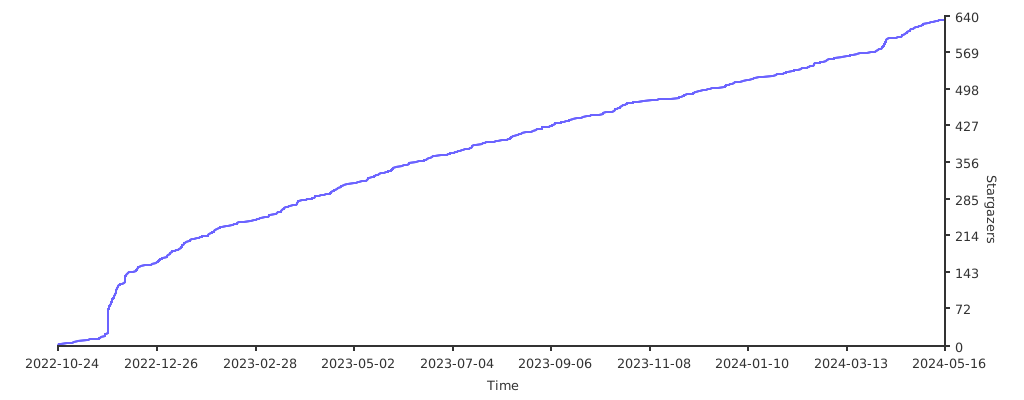
Github Star 趋势
Contributors
Showing top 1 contributor by commit count.

Related Repositories

OpenListTeam/OpenList
A new AList Fork to Anti Trust Crisis

kenzok8/openwrt-packages
openwrt常用软件包

Xmarmalade/alisthelper
Alist Helper is an application developed using Flutter, designed to simplify the use of the desktop version of alist. It can manage alist, allowing you to easily start and stop the alist program.

krau/SaveAny-Bot
Save Any Telegram File to Anywhere 📂 (Alist, Disk, Webdav, S3, Rclone...) . Support restrict saving content and files beyond telegram.

helloxz/zdir
A multifunctional private storage program that integrates file indexing, online preview, and sharing, supporting both WebDAV and cloud download.

sbwml/luci-app-alist
2025-06-19 存档,由 OpenList 取代:https://github.com/sbwml/luci-app-openlist