

Sbmt outbox
Transactional outbox pattern
Microservices often publish messages after a transaction has been committed. Writing to the database and publishing a message are two separate transactions, so they must be atomic. A failed publication of a message could lead to a critical failure of the business process. The project is written primarily in Ruby, distributed under the MIT License license, first published in 2024. Key topics include: gem, inbox, outbox, ruby.


Sbmt-Outbox
<img src="https://raw.githubusercontent.com/SberMarket-Tech/sbmt-outbox/master/.github/outbox-logo.png" alt="sbmt-outbox logo" height="220" align="right" />Microservices often publish messages after a transaction has been committed. Writing to the database and publishing a message are two separate transactions, so they must be atomic. A failed publication of a message could lead to a critical failure of the business process.
The Outbox pattern provides a reliable solution for message publishing. The idea behind this approach is to have an "outgoing message table" in the service's database. Before the main transaction completes, a new message row is added to this table. As a result, two actions take place as part of a single transaction. An asynchronous process retrieves new rows from the database table and, if they exist, publishes the messages to the broker.
Installation
Add this line to your application's Gemfile:
rubygem "sbmt-outbox"
And then execute:
shellbundle install
Demo
Learn how to use this gem and how it works with Ruby on Rails at here https://github.com/SberMarket-Tech/outbox-example-apps
Auto configuration
We recommend going through the configuration and files creation process using the following Rails generators:
Each generator can be run by using the --help option to learn more about the available arguments.
Initial configuration
If you plug the gem into your application for the first time, you can generate the initial configuration:
shellrails g outbox:install
Outbox/inbox items creation
An ActiveRecord model can be generated for the outbox/inbox item like this:
shellrails g outbox:item MaybeNamespaced::SomeOutboxItem --kind outbox rails g outbox:item MaybeNamespaced::SomeInboxItem --kind inbox
As the result, a migration and a model will be created and the outbox.yml file configured.
Transport creation
A transport is a class that is invoked while processing a specific outbox or inbox item. The transport must return either a boolean value or a dry monad result.
shellrails g outbox:transport MaybeNamespaced::SomeOutboxItem some/transport/name --kind outbox rails g outbox:transport MaybeNamespaced::SomeInboxItem some/transport/name --kind inbox
Usage
To create an Outbox item, you should call the Interactor with the Item Model Class and event_key as arguments. The latter will be the Partitioning Key.
rubytransaction do some_record.save! result = Sbmt::Outbox::CreateOutboxItem.call( MyOutboxItem, event_key: some_record.id, attributes: { payload: some_record.generate_payload, options: { key: some_record.id, # optional, may be used when producing to a Kafka topic headers: {'FOO_BAR' => 'baz'} # optional, you can add custom headers } } ) raise result.failure unless result.success? end
To create multiple Outbox items in batch, you should call the Interactor with the Item Model Class and batch attributes, each item should have same list of keys. Each item should have event_key element, it will be the Partitioning Key.
rubytransaction do some_record.save! another_record.save! result = Sbmt::Outbox::CreateOutboxBatch.call( MyOutboxItem, batch_attributes: [ { event_key: some_record.id, payload: some_record.generate_payload, options: { key: some_record.id, # optional, may be used when producing to a Kafka topic headers: {'FOO_BAR' => 'baz'} # optional, you can add custom headers } }, { event_key: another_record.id, payload: another_record.generate_payload, options: { key: another_record.id, # optional, may be used when producing to a Kafka topic headers: {'FOO_BAR' => 'baz'} # optional, you can add custom headers } } ] ) raise result.failure unless result.success? end
Monitoring
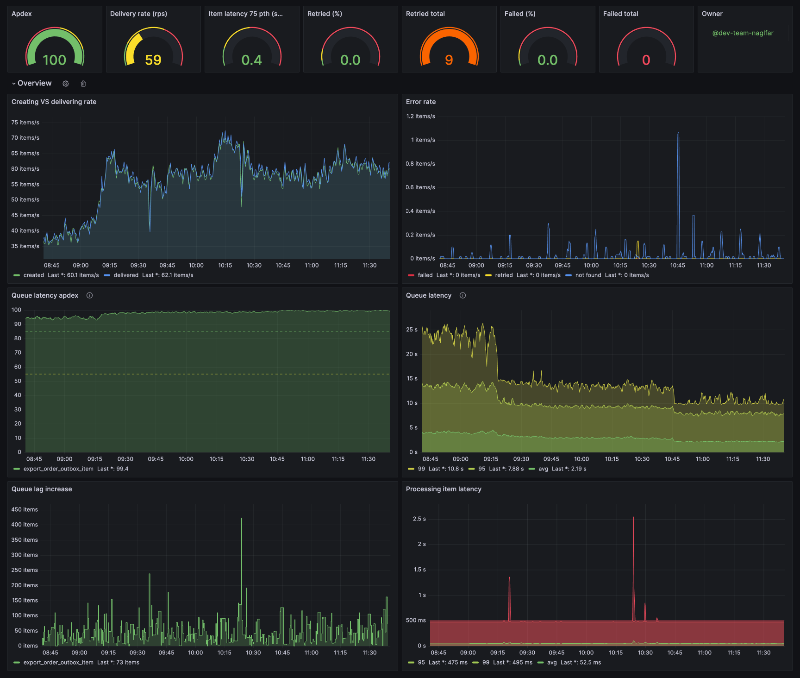
We use Yabeda to collect all kind of metrics.
Example of a Grafana dashboard that you can import from a file:
Manual configuration
Outboxfile
First of all you should create an Outboxfile at the root of your application with the following code:
ruby# frozen_string_literal: true require_relative "config/environment" # Comment out this line if you don't want to use a metrics exporter Yabeda::Prometheus::Exporter.start_metrics_server!
config/initializers/outbox.rb
The config/initializers/outbox.rb file contains the overall general configuration.
ruby# config/initializers/outbox.rb Rails.application.config.outbox.tap do |config| config.redis = {url: ENV.fetch("REDIS_URL")} # Redis is used as a coordinator service config.paths << Rails.root.join("config/outbox.yml").to_s # optional; configuration file paths, deep merged at the application start, useful with Rails engines # optional config.poller = ActiveSupport::OrderedOptions.new.tap do |pc| # max parallel threads (per box-item, globally) pc.concurrency = 6 # max threads count (per worker process) pc.threads_count = 1 # maximum processing time of the batch, after which the batch will be considered hung and processing will be aborted pc.general_timeout = 60 # poll buffer consists of regular items (errors_count = 0, i.e. without any processing errors) and retryable items (errors_count > 0) # max poll buffer size = regular_items_batch_size + retryable_items_batch_size pc.regular_items_batch_size = 200 pc.retryable_items_batch_size = 100 # poll tactic: default is optimal for most cases: rate limit + redis job-queue size threshold # poll tactic: aggressive is for high-intensity data: without rate limits + redis job-queue size threshold # poll tactic: low-priority is for low-intensity data: rate limits + redis job-queue size threshold + + redis job-queue lag threshold pc.tactic = "default" # number of batches that one thread will process per rate interval pc.rate_limit = 60 # rate interval in seconds pc.rate_interval = 60 # mix / max redis job queue thresholds per box-item for default / aggressive / low-priority poll tactics pc.min_queue_size = 10 pc.max_queue_size = 100 # min redis job queue time lag threshold per box-item for low-priority poll tactic (in seconds) pc.min_queue_timelag = 5 # throttling delay for default / aggressive / low-priority poll tactics (in seconds) pc.queue_delay = 0.1 end # optional config.processor = ActiveSupport::OrderedOptions.new.tap do |pc| # max threads count (per worker process) pc.threads_count = 4 # maximum processing time of the batch, after which the batch will be considered hung and processing will be aborted pc.general_timeout = 120 # BRPOP delay (in seconds) for polling redis job queue per box-item pc.brpop_delay = 2 end
Outbox pattern
You should create a database table in order for the process to view your outgoing messages.
rubycreate_table :my_outbox_items do |t| t.uuid :uuid, null: false t.string :event_name, null: false # optional, use it when you have several events per one outbox table t.string :event_key, null: false t.integer :bucket, null: false t.integer :status, null: false, default: 0 t.jsonb :options t.binary :payload, null: false # when using mysql the column type should be mediumblob t.integer :errors_count, null: false, default: 0 t.text :error_log t.timestamp :processed_at t.timestamps end add_index :my_outbox_items, :uuid, unique: true add_index :my_outbox_items, [:status, :id, :bucket], algorithm: :concurrently, include: [:errors_count] add_index :my_outbox_items, [:event_name, :event_key, :id] add_index :my_outbox_items, :created_at
You can combine various types of messages within a single table. To do this, you should include an event_name field in the table. However, this approach is only justified if it is assumed that there won't be many events, and those events will follow the same retention and retry policy.
ruby# app/models/my_outbox_item.rb class MyOutboxItem < Sbmt::Outbox::OutboxItem validates :event_name, presence: true # optional end
outbox.yml
The outbox.yml configuration file is the main configuration for the gem, where parameters for each outbox/inbox item are located.
yaml# config/outbox.yml default: &default owner: foo-team # optional, used in Yabeda metrics bucket_size: 16 # optional, default 16, see into about the buckets at the #Concurrency section metrics: enabled: true # default false, yabeda server autostart with port: 9090 and path: /metrics port: 9090 # optional, default, used in Yabeda metrics probes: enabled: false # optional, default true port: 5555 # default, used for Kubernetes probes outbox_items: # outbox items section my_outbox_item: # underscored model class name owner: my_outbox_item_team # optional, used in Yabeda metrics retention: P1W #optional, default: P1W, for statuses: failed and discarded, retention period, https://en.wikipedia.org/wiki/ISO_8601#Durations min_retention_period: P1D #optional, default: P1D, for statuses: failed and discarded, retention period, https://en.wikipedia.org/wiki/ISO_8601#Durations retention_delivered_items: PT6H #optional, default: P1W, for statuses: delivered, retention period for delivered items, https://en.wikipedia.org/wiki/ISO_8601#Durations delivered_min_retention_period: PT1H #optional, default: PT1H, for statuses: delivered, retention period for delivered items, https://en.wikipedia.org/wiki/ISO_8601#Durations deletion_batch_size: 1_000 #optional, default: 1_000 deletion_sleep_time: 0.5 #optional, default: 0.5 deletion_time_window: PT4H #optional, default: PT4H, for statuses: delivered, retention period for delivered items, https://en.wikipedia.org/wiki/ISO_8601#Durations max_retries: 3 # default 0, the number of retries before the item will be marked as failed strict_order: false # optional, default transports: # transports section produce_message: # underscored transport class name # transport reserved options class: produce_message # optional; default is inferred from transport name disposable: false # optional; default false; if true, the transport class will be instantiated only once # ProduceMessage instance arguments topic: "my-topic-name" development: <<: *default test: <<: *default bucket_size: 2 production: <<: *default bucket_size: 256
CAUTION:
- ⚠️ If this option is enabled and an error occurs while processing a message in a bucket,
subsequent messages in that bucket won't be processed until the current message is either skipped or successfully processed - ⚠️ Cannot use
retry_strategiesand thestrict_orderoption at the same time
ruby# app/services/import_order.rb class ProduceMessage def initialize(topic:) @topic = topic end def call(outbox_item, payload) # send message to topic true # mark message as processed end end
If you use Kafka as a transport, it is recommended that you use the sbmt-kafka_producer gem for this purpose.
Transports are defined as follows when event_name is used:
yamloutbox_items: my_outbox_item: transports: # transport reserved options - class: produce_message event_name: "order_created" # event name marker # ProduceMessage instance arguments topic: "order_created_topic" # some transport argument - class: produce_message event_name: "orders_completed" topic: "orders_completed_topic"
Inbox pattern
The database migration will be the same as described in the Outbox pattern.
ruby# app/models/my_inbox_item.rb class MyInboxItem < Sbmt::Outbox::InboxItem end
yaml# config/outbox.yml # see main configuration at the Outbox pattern inbox_items: # inbox items section my_inbox_item: # underscored model class name owner: my_inbox_item_team # optional, used in Yabeda metrics retention: P1W #optional, default: P1W, for statuses: failed and discarded, retention period, https://en.wikipedia.org/wiki/ISO_8601#Durations min_retention_period: P1D #optional, default: P1D, for statuses: failed and discarded, retention period, https://en.wikipedia.org/wiki/ISO_8601#Durations retention_delivered_items: PT6H #optional, default: P1W, for statuses: delivered, retention period for delivered items, https://en.wikipedia.org/wiki/ISO_8601#Durations delivered_min_retention_period: PT1H #optional, default: PT1H, for statuses: delivered, retention period for delivered items, https://en.wikipedia.org/wiki/ISO_8601#Durations deletion_batch_size: 1_000 #optional, default: 1_000 deletion_sleep_time: 0.5 #optional, default: 0.5 deletion_time_window: PT4H #optional, default: PT4H, for statuses: delivered, retention period for delivered items, https://en.wikipedia.org/wiki/ISO_8601#Durations max_retries: 3 # default 0, the number of retries before the item will be marked as failed transports: # transports section import_order: # underscored transport class name source: "kafka" # default transport arguments
ruby# app/services/import_order.rb class ImportOrder def initialize(source:) @source = source end def call(outbox_item, payload) # some work to create order in the database true # mark message as processed end end
If you use Kafka, it is recommended that you use the sbmt-kafka_consumer gem for this purpose.
Retry strategies
The gem uses several types of retry strategies to repeat message processing if an error occurs. These strategies can be combined and will be executed one after the other. Each retry strategy takes one of three actions: to process the message, to skip processing the message or to skip processing and mark the message as "skipped" for future processing.
Exponential backoff
This strategy periodically attempts to resend failed messages, with increasing delays in between each attempt.
yaml# config/outbox.yml outbox_items: my_outbox_item: ... minimal_retry_interval: 10 # default: 10 maximal_retry_interval: 600 # default: 600 multiplier_retry_interval: 2 # default: 2 retry_strategies: - exponential_backoff
Latest available
This strategy ensures idempotency. In short, if a message fails and a later message with the same event_key has already been delivered, then you most likely do not want to re-deliver the first one when it is retried.
yaml# config/outbox.yml outbox_items: my_outbox_item: ... retry_strategies: - exponential_backoff - latest_available
The exponential backoff strategy should be used in conjunction with the latest available strategy, and it should come last to minimize the number of database queries.
Partition strategies
Depending on which type of data is used in the event_key, it is necessary to choose the right partitioning strategy.
Number partitioning
This strategy should be used when the event_key field contains a number. For example, it could be 52523, or some-chars-123. Any characters that aren't numbers will be removed, and only the numbers will remain. This strategy is used as a default.
yaml# config/outbox.yml outbox_items: my_outbox_item: ... partition_strategy: number
Hash partitioning
This strategy should be used when the event_key is a string or uuid.
yaml# config/outbox.yml outbox_items: my_outbox_item: ... partition_strategy: hash
Rake tasks
shellrake outbox:delete_items rake outbox:update_status_items
Example run:
shellrake outbox:delete_items[OutboxItem,1] # Mandatory parameters box class and status rake outbox:update_status_items[OutboxItem,0,3] # Mandatory parameters box class, current status and new status
Both tasks have optional parameters:
ruby- start_time # boxes are younger than the specified time, by default nil, time is specified in the format "2025-01-05T23:59:59" - end_time # boxes are older than the specified time, by default 6.hours.ago, time is specified in the format "2025-01-05T23:59:59" - batch_size # batch size, by default 1_000 - sleep_time # sleep time between batches, by default 0.5
Example with optional parameters:
- format optional parameters:
shellrake outbox:delete_items[klass_name,status,start_time,end_time,batch_size,sleep_time] rake outbox:update_status_items[klass_name,status,new_status,start_time,end_time,batch_size,sleep_time]
- example:
shellrake outbox:delete_items[OutboxItem,1,"2025-01-05T23:59:59","2025-01-05T00:00:00",10_000,5] rake outbox:update_status_items[OutboxItem,0,3,"2025-01-05T23:59:59","2025-01-05T00:00:00",10_000,5]
Concurrency
The worker process consists of a poller and a processor, each of which has its own thread pool.
The poller is responsible for fetching messages ready for processing from the database table.
The processor, in turn, is used for their consistent processing (while preserving the order of messages and the partitioning key).
Each bunch of buckets (i.e. buckets partition) is consistently fetched by poller one at a time. Each bucket is processed one at a time by a processor.
A bucket is a number in a row in the bucket column generated by the partitioning strategy based on the event_key column when a message was committed to the database within the range of zero to bucket_size.
The number of bucket partitions, which poller uses is 6 by default. The number of poller threads is 2 by default and is not intended for customization.
The default number of processor threads is 4 and can be configured with the --concurrency option, thereby allowing you to customize message processing performance.
This architecture was designed to allow the daemons to scale without stopping the entire system in order to avoid mixing messages chronologically.
Middlewares
You can wrap item processing within middlewares. There are three types:
- client middlewares – triggered outside of a daemon; executed alongside an item is created
- server middlewares – triggered inside a daemon; divided into two types:
- batch middlewares – executed alongside a batch being fetched from the database
- item middlewares – execute alongside an item during processing
- polling middlewares - execute with element during pooling
The order of execution depends on the order specified in the outbox configuration:
ruby# config/initializers/outbox.rb Rails.application.config.outbox.tap do |config| config.item_process_middlewares.push( 'MyFirstItemMiddleware', # goes first 'MySecondItemMiddleware' # goes second ) end
Client middlewares
ruby# config/initializers/outbox.rb Rails.application.config.outbox.tap do |config| config.create_item_middlewares.push( 'MyCreateItemMiddleware' ) config.create_batch_middlewares.push( 'MyCreateBatchMiddleware' ) end # my_create_item_middleware.rb class MyCreateItemMiddleware def call(item_class, item_attributes) # your code yield # your code end end # my_create_batch_middleware.rb class MyCreateBatchMiddleware def call(item_class, batch_attributes) # your code yield # your code end end
Server middlewares
Example of a batch middleware:
ruby# config/initializers/outbox.rb Rails.application.config.outbox.tap do |config| config.batch_process_middlewares.push( 'MyBatchMiddleware' ) end # my_batch_middleware.rb class MyBatchMiddleware def call(job) # your code yield # your code end end
Example of an item middleware:
ruby# config/initializers/outbox.rb Rails.application.config.outbox.tap do |config| config.item_process_middlewares.push( 'MyItemMiddleware' ) end # my_create_item_middleware.rb class MyItemMiddleware def call(item) # your code yield # your code end end
Example of an polling middleware:
ruby# config/initializers/outbox.rb Rails.application.config.outbox.tap do |config| config.polling_item_middlewares.push( 'MyItemMiddleware' ) end # my_create_polling_middleware.rb class MyPollingItemMiddleware def call(item) # your code yield # your code end end ## Tracing The gem is optionally integrated with OpenTelemetry. If your main application has `opentelemetry-*` gems, the tracing will be configured automatically. ## Web UI Outbox comes with a [Ract web application](https://github.com/SberMarket-Tech/sbmt-outbox-ui) that can list existing outbox and inbox models. ```ruby Rails.application.routes.draw do mount Sbmt::Outbox::Engine => "/outbox-ui" end
The path /outbox-ui cannot be changed for now
Under the hood it uses a React application provided as npm package.
By default, the npm packages is served from https://cdn.jsdelivr.net/npm/sbmt-outbox-ui@x.y.z/dist/assets/index.js. It could be changed by the following config option:
ruby# config/initializers/outbox.rb Rails.application.config.outbox.tap do |config| config.cdn_url = "https://some-cdn-url" end
UI development
If you want to implement some features for Outbox UI, you can serve javascript locally like the following:
- Start React application by
npm run dev - Configure Outbox to serve UI scripts locally:
ruby# config/initializers/outbox.rb Rails.application.config.outbox.tap do |config| config.ui.serve_local = true end
We would like to see more features added to the web UI. If you have any suggestions, please feel free to submit a pull request 🤗.
CLI Arguments
| Key | Description |
|---|---|
--boxes or -b | Outbox/Inbox processors to start` |
--concurrency or -c | Number of process threads. Default 4. |
--poll-concurrency or -p | Number of poller partitions. Default 6. |
--poll-threads or -n | Number of poll threads. Default 1. |
--poll-tactic or -t | Poll tactic. Default "default". |
Development & Test
Installation
- Install Dip
- Run
dip provision
Usage
- Run
dip setup - Run
dip test
See more commands at dip.yml.
Contributors
Showing top 10 contributors by commit count.





Related Repositories

primer/octicons
A scalable set of icons handcrafted with ❤️ by GitHub

RubyMetric/chsrc
chsrc 全平台通用换源工具与框架. Change Source everywhere for every software

athityakumar/colorls
A Ruby gem that beautifies the terminal's ls command, with color and font-awesome icons. :tada:

rails/bootsnap
Boot large Ruby/Rails apps faster

pedrozath/coltrane
🎹🎸A music theory library with a command-line interface

sproogen/modern-resume-theme
A modern static resume template and theme. Powered by Jekyll and GitHub pages.