

DreamServer
Turn your PC, Mac, or Linux box into an AI server. LLM inference, chat UI, voice, agents, workflows, RAG, and image generation.
**Turn your PC, Mac, or Linux box into a private AI server.** The project is written primarily in Shell, distributed under the Apache License 2.0 license, first published in 2026. It has gained significant community traction with 2,106 stars and 325 forks on GitHub. Key topics include: ai-agents, amd, comfyui, docker, llama-cpp.
Dream Server
Turn your PC, Mac, or Linux box into a private AI server.
AI server and homelab setup is rapidly becoming a solved problem.
It should feel that way for everyone.




Dream Server installs and wires together everything you need to run AI locally, so you do not have to assemble Ollama, Open WebUI, n8n, ComfyUI, and privacy tools by hand:
- Local model inference — run open models on your own hardware
- ChatGPT-style web UI — talk to your models from any browser
- Control dashboard — manage models, services, setup, GPU status, and extensions from one place
- Voice, agents, and workflows — build automations that can listen, speak, call tools, and get work done
- RAG and search — connect local documents, private search, and retrieval workflows
- Image generation — run local image tools without sending prompts to a hosted API
- Privacy and ops — keep service auth, secrets, observability, and diagnostics in one local stack
No cloud required. No subscriptions required. Your prompts and data stay on your machine unless you choose otherwise. Cloud and hybrid API modes are optional when you want them.
Release validation: Operational changes are checked with a release-grade
fleet and distro lab: zero-prereq bootstrap, fresh installs, product flows,
full-model capabilities, lifecycle recovery, and the final User Green gate. See
Release Validation for what a green
run proves.
Repo layout: the repository root holds the public README, installers,
security policy, GitHub workflows, and project coordination docs. The
dream-server/ directory is the product runtime: services, installer phases,
compose overlays, dashboard, CLI, tests, and operator docs.
Stable consumption: v2.5.2 is the current stable release. main moves
quickly; use it for active development and validation candidates. For forks,
appliances, labs, or production-like installs, pin a tagged release or audited
commit and keep your own validation receipt. Stable patch fixes land on
release/2.5.x before being merged forward. See
Release Channels,
Installer Trust, and
Forkability.
Get Started
Linux and macOS:
bashcurl -fsSL https://raw.githubusercontent.com/Light-Heart-Labs/DreamServer/main/dream-server/get-dream-server.sh | bash
Prefer to inspect before running or pin a release tag? See
Installer Trust.
Windows users should use the PowerShell installer shown below or follow the Windows Quickstart.
After install, open http://localhost:3000 and start chatting.
API endpoint: Linux Docker installs expose llama-server on http://localhost:11434 by default (
OLLAMA_PORT) while containers usellama-server:8080. macOS native Metal and Windows native/Lemonade paths use http://localhost:8080 unless overridden. Open WebUI stays on http://localhost:3000.
No GPU? Dream Server also runs in cloud mode — same full stack, powered by OpenAI/Anthropic/Together APIs instead of local inference:
bash./install.sh --cloud
Port conflicts? Every port is configurable via environment variables. See
.env.examplefor the full list, or override at install time:bashWEBUI_PORT=9090 ./install.sh
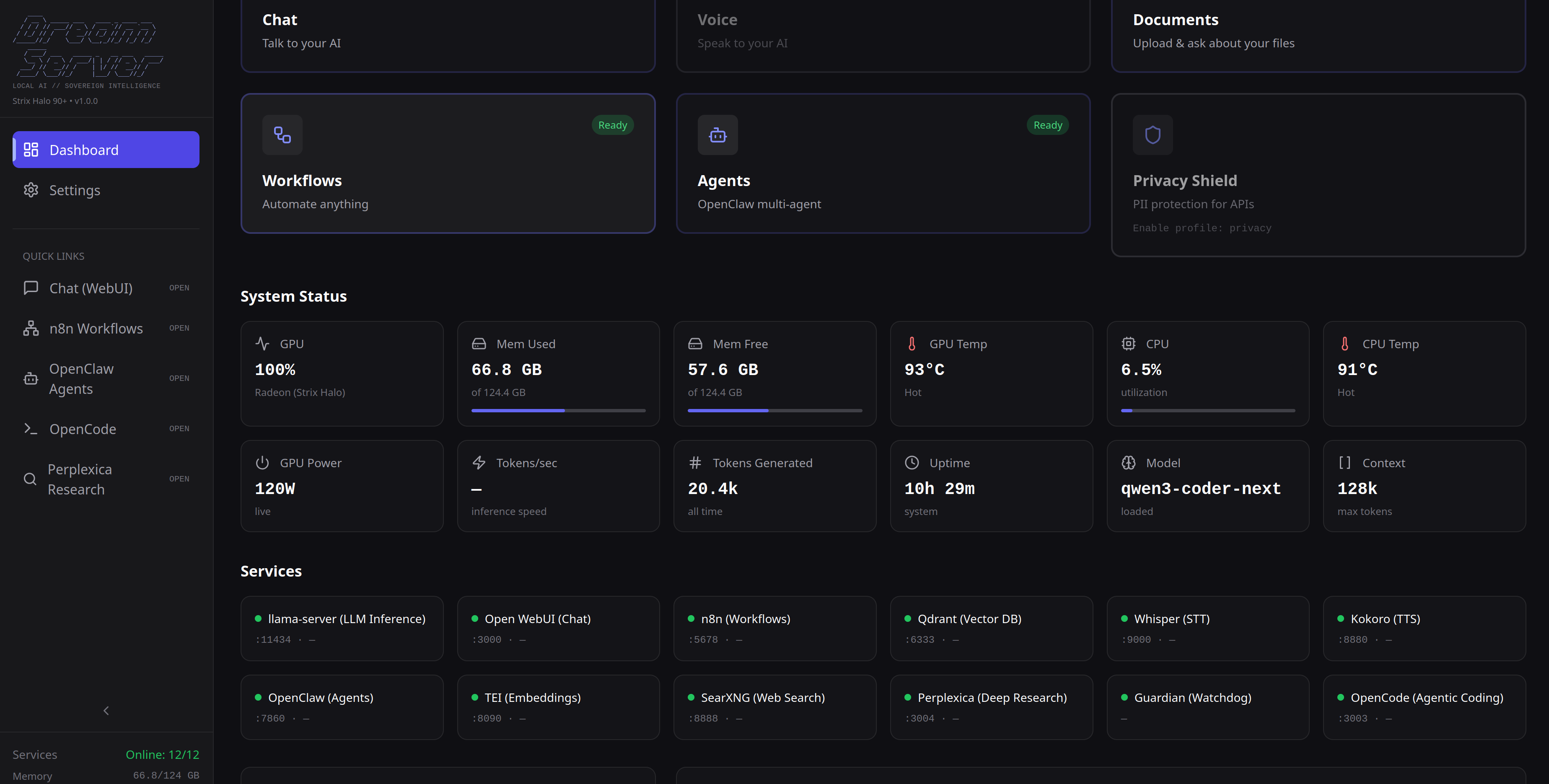
New here? Read the Friendly Guide or listen to the audio version — a complete walkthrough of what Dream Server is, how it works, and how to make it your own. No technical background needed.
At A Glance
| Question | Answer |
|---|---|
| What is it? | A local AI server stack for your own hardware, with a one-command Linux/macOS installer and a PowerShell installer for Windows. |
| Who is it for? | People who want private AI at home, in a lab, or on a workstation without hand-wiring a dozen services. |
| What do I get? | Local inference, Open WebUI chat, a control dashboard, voice, agents, workflows, RAG, search, image generation, privacy tools, observability, and developer tools. |
| What does it run on? | Linux, Windows with WSL2/Docker Desktop, and macOS Apple Silicon. |
| Is cloud required? | No. Local mode is the default; cloud and hybrid API modes are optional. |
| If you know... | Dream Server adds... |
|---|---|
| Ollama / llama.cpp | The surrounding server stack: chat, dashboard, voice, RAG, workflows, agents, privacy, and service management. |
| Open WebUI | A full installer and control plane around Open WebUI, plus pre-wired local services. |
| AnythingLLM | Broader local AI appliance behavior beyond RAG: inference, chat, voice, workflows, image generation, and ops. |
| n8n self-hosted AI starter kits | Workflow automation as one part of a larger private AI server. |
Current Platform Support
Platform Status Linux (NVIDIA + AMD + Intel Arc) Supported — install and run today Windows (NVIDIA + AMD) Supported — install and run today macOS (Apple Silicon) Supported — install and run today Tested Linux distros: Ubuntu 24.04/22.04, Debian 12, Linux Mint 21.3, Fedora 41+, Rocky Linux 9, Arch Linux, Manjaro, CachyOS, and openSUSE Tumbleweed. Other distros using apt, dnf, pacman, or zypper should also work — open an issue if yours doesn't.
Release validation: Operational changes run through a release-grade gate
that covers zero-prereq bootstrap, clean installs, product behavior,
full-model capabilities, lifecycle recovery, and User Green. See
Release Validation and the
Validation Matrix.Windows: Requires Docker Desktop with WSL2 backend. NVIDIA GPUs use Docker GPU passthrough; AMD Strix Halo runs through the platform-specific accelerated path documented in the Windows installer and support matrix.
macOS: Requires Apple Silicon (M1+) and Docker Desktop. llama-server runs natively with Metal GPU acceleration; all other services run in Docker.
See the Support Matrix for supported
platform claims and the Validation Matrix
for the layered test surface used to test those claims.
Why Dream Server?
A handful of companies control the vast majority of global AI traffic — and with it, your data, your costs, and your uptime. Every query you send to a centralized provider is business intelligence you don’t own, running on infrastructure you don’t control, priced on terms you can’t negotiate.
If AI is becoming critical infrastructure, it shouldn’t be rented. Self-hosting local AI should be a sovereign human right, not a career choice.
Because running your own AI shouldn't require a CS degree and a weekend of debugging CUDA drivers. Right now, setting up local AI means stitching together a dozen projects, writing Docker configs from scratch, and praying everything talks to each other. Most people give up and go back to paying OpenAI.
We built Dream Server so you don't have to.
- One command — detects your GPU, picks the right model, generates credentials, launches everything
- Chatting in under 2 minutes — bootstrap mode gives you a working model instantly while your full model downloads in the background
- Full service stack, pre-wired — chat, agents, voice, workflows, search, RAG, image generation, privacy tools, observability, and developer tools. All talking to each other out of the box
- Fully moddable — every service is an extension. Drop in a folder, run
dream enable, done
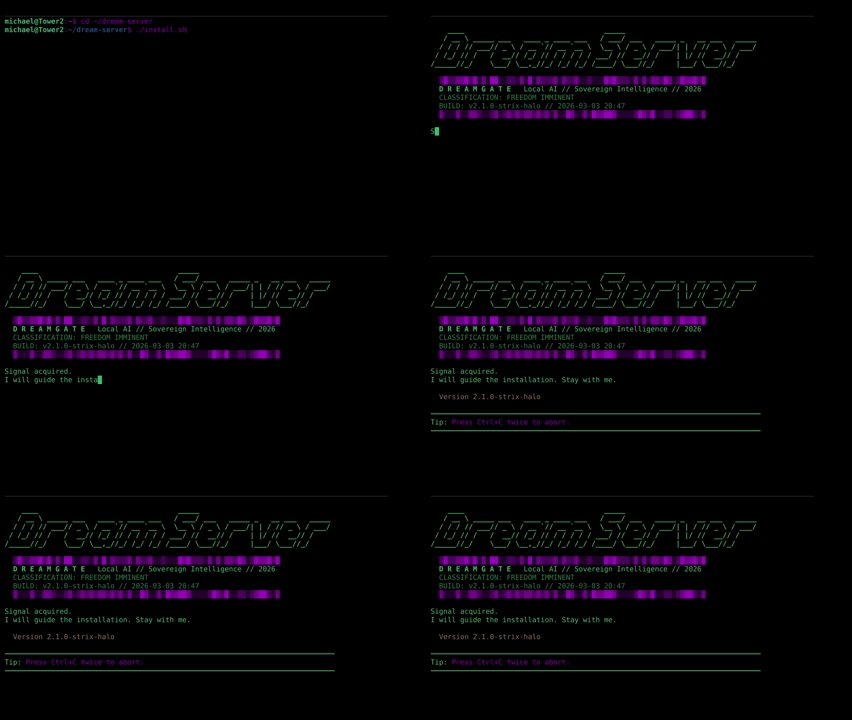
The DREAMGATE installer handles everything — GPU detection, model selection, service orchestration.
</div> <details> <summary><b>Manual install (Linux)</b></summary></details> <details> <summary><b>Windows (PowerShell)</b></summary>bashgit clone https://github.com/Light-Heart-Labs/DreamServer.git cd DreamServer/dream-server ./install.sh
Requires Docker Desktop with WSL2 backend enabled.
Install Docker Desktop first and make sure it is running before you start.
Open a normal PowerShell session and run:
powershellSet-ExecutionPolicy -Scope Process -ExecutionPolicy Bypass git clone https://github.com/Light-Heart-Labs/DreamServer.git cd DreamServer .\install.ps1
The
Set-ExecutionPolicycommand allows the installer script to run in the current session. It does not change your system-wide policy.
Running as Administrator is not recommended for the installer because user-level paths such as.opencode,data/, and.envcan be created with admin-owned permissions.
The installer detects your GPU, picks the right model, generates credentials, starts all services, and creates a Desktop shortcut to the Dashboard. Manage with .\dream-server\installers\windows\dream.ps1 status.
Requires Apple Silicon (M1+) and Docker Desktop.
Install Docker Desktop first and make sure it is running before you start.
bashgit clone https://github.com/Light-Heart-Labs/DreamServer.git cd DreamServer/dream-server ./install.sh
The installer detects your chip, picks the right model for your unified memory, launches llama-server natively with Metal acceleration, and starts all other services in Docker. Manage with ./dream-macos.sh status.
See the macOS Quickstart for details.
</details>What's In The Box
Chat & Inference
- Open WebUI — full-featured chat interface with conversation history, web search, document upload, and 30+ languages
- llama-server — high-performance LLM inference with continuous batching, auto-selected for your GPU; Linux Docker host API defaults to
localhost:11434, native macOS/Windows paths uselocalhost:8080, and container API runs on8080 - LiteLLM — API gateway supporting local/cloud/hybrid modes
- TEI Embeddings — text embedding service for RAG and search workflows
Voice
- Whisper — speech-to-text
- Kokoro — text-to-speech
Agents & Automation
- Hermes Agent — default local-first autonomous/browser agent with memory, skills, and a magic-link-gated proxy
- OpenClaw — deprecated legacy autonomous agent, still opt-in during the migration window
- n8n — workflow automation with 400+ integrations (Slack, email, databases, APIs)
- APE — Agent Policy Engine for auditing and governing autonomous tool calls
- OpenCode — browser-based AI coding assistant wired to the local stack
- Memory Shepherd — host/systemd helper for agent memory lifecycle management
Knowledge & Search
- Qdrant — vector database for retrieval-augmented generation (RAG)
- SearXNG — self-hosted web search (no tracking)
- Perplexica — deep research engine
- Brave Search — optional paid Brave Search API integration
Creative
- ComfyUI — node-based image generation
Privacy & Ops
- Privacy Shield — PII scrubbing proxy for API calls
- Dashboard — real-time GPU metrics, service health, model management
- Dashboard API — service health, setup, status, metrics, and management API behind the dashboard
- Token Spy — token usage monitor for local and proxied LLM traffic
- Langfuse — optional LLM observability and tracing
Hardware Auto-Detection
The installer detects your GPU and first assigns a deterministic hardware tier. Linux and macOS then run the versioned catalog selector (dream-server/scripts/select-model.py), while Windows uses the PowerShell catalog selector in dream-server/installers/windows/lib/tier-map.ps1; both read dream-server/config/model-library.json to choose the best installable GGUF for the detected memory envelope. The final choice is written to .env as LLM_MODEL, GGUF_FILE, MAX_CONTEXT, and MODEL_RECOMMENDATION_*.
MODEL_PROFILE=qwen is the default non-Gemma catalog profile, so the effective pick can be Qwen, Phi, or DeepSeek depending on what fits best. MODEL_PROFILE=gemma4 forces Gemma 4 where available, and MODEL_PROFILE=auto uses Gemma 4 on NVIDIA, Apple Silicon, and Intel Arc tiers. Override tier selection with ./install.sh --tier 3; override the model family with MODEL_PROFILE=gemma4 ./install.sh or MODEL_PROFILE=auto ./install.sh.
When Hermes is enabled, which is the default agent path, installers keep the first-run bootstrap model at a 64K context floor and promote the full local model context to 128K where the selected model supports it. That avoids Hermes's hard 64K minimum while preserving the under-2-minute first chat experience. The examples below are current catalog-selector outputs for common hardware envelopes; exact installs can differ with detected VRAM/RAM, host architecture, existing downloads, or explicit profile overrides. Throughput still needs a local benchmark after first launch.
NVIDIA
| Tier / envelope | Current default catalog pick | Context | Example hardware |
|---|---|---|---|
| 0 / 8 GB CPU fallback | Qwen3.5 2B (Q4_K_M) | 8K | Low-RAM CPU-only |
| 1 / 8 GB discrete VRAM | Qwen3.5 9B (Q4_K_M) | 32K | RTX 4060, RTX 3060 12GB |
| 2 / 12 GB discrete VRAM | Phi-4 14B (Q4_K_M) | 16K | RTX 4070-class cards |
| 3 / 24 GB discrete VRAM | Qwen3.5 27B (Q4_K_M) | 32K | RTX 4090, A6000 |
| 4 / 48 GB discrete VRAM | DeepSeek R1 Distill Llama 70B (Q4_K_M) | 32K | A6000 Ada, L40S |
| NV_ULTRA / 90+ GB amd64 discrete VRAM | Qwen3 Coder Next (Q4_K_M) | 128K | Multi-GPU A100/H100 |
| NV_ULTRA / 90+ GB arm64 unified memory | Qwen3.6 35B-A3B (UD-Q4_K_M) | 128K | DGX Spark / GB10-class hosts |
AMD Strix Halo (Unified Memory)
| Tier / envelope | Current default catalog pick | Context | Hardware |
|---|---|---|---|
| SH_COMPACT / 64 GB unified RAM | Qwen3.6 35B-A3B (UD-Q4_K_M) | 128K | Ryzen AI MAX+ 395 (64GB) |
| SH_LARGE / 96 GB unified RAM | DeepSeek R1 Distill Llama 70B (Q4_K_M) | 32K | Ryzen AI MAX+ 395 (96GB) |
| SH_LARGE / 124 GB unified RAM | Qwen3.6 35B-A3B (UD-Q4_K_M) | 128K | Ryzen AI MAX+ 395 (128GB class) |
The selector routes unified-memory hosts away from Qwen3 Coder Next when that model would otherwise be selected, because current repo policy documents correctness issues on those backends.
Apple Silicon (Unified Memory, Metal)
| Tier / envelope | Current default catalog pick | Context | Example hardware |
|---|---|---|---|
| 0 / 8 GB unified RAM | Phi-4 Mini (Q4_K_M) | 128K | M1/M2 base (8GB) |
| 1 / 16 GB unified RAM | Qwen3.5 9B (Q4_K_M) | 32K | M4 Mac Mini (16GB) |
| 2 / 32 GB unified RAM | Phi-4 14B (Q4_K_M) | 16K | M4 Pro Mac Mini, M3 Max MacBook Pro |
| 3 / 48 GB unified RAM | Qwen3.5 27B (Q4_K_M) | 32K | M4 Pro (48GB), M2 Max (48GB) |
| 4 / 64+ GB unified RAM | Qwen3.6 35B-A3B (UD-Q4_K_M) | 128K | M2 Ultra Mac Studio, M4 Max (64GB+) |
Intel Arc (Linux, SYCL)
| Tier / envelope | Current default catalog pick | Context | Example hardware |
|---|---|---|---|
| ARC_LITE / 6 GB discrete VRAM | Phi-4 Mini (Q4_K_M) | 128K | Arc A380 |
| ARC_LITE / 8 GB discrete VRAM | Qwen3.5 9B (Q4_K_M) | 32K | Arc A750 |
| ARC / 16 GB discrete VRAM | Phi-4 14B (Q4_K_M) | 16K | Arc A770 16GB, newer Arc GPUs |
Gemma 4 profile tiers remain in the installer tier maps: E2B on entry hardware, E4B on midrange hardware, 26B-A4B on pro hardware, and 31B on large/ultra hardware.
Bootstrap Mode
No waiting for large downloads. Dream Server uses bootstrap mode by default:
- Downloads a tiny 1.5B model in under a minute
- You start chatting immediately
- The full model downloads in the background
- Hot-swap to the full model when it's ready — zero downtime
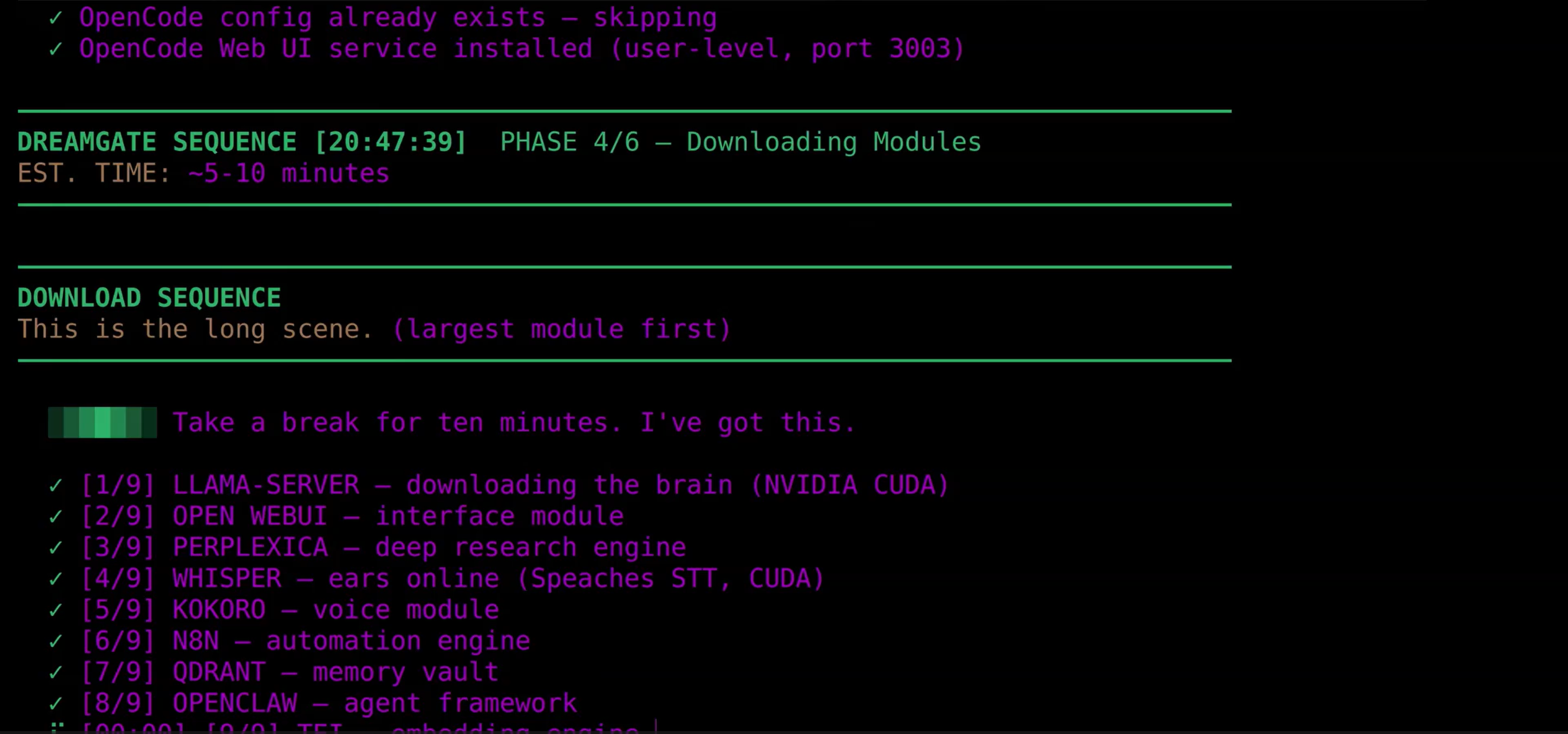
The installer pulls all services in parallel. Downloads are resume-capable — interrupted downloads pick up where they left off.
</div>The bootstrap model starts with a 64K context window so Hermes can work during the first session. After the background download finishes, Dream Server swaps to the full model and restores the Hermes/full-model context target.
Skip bootstrap: ./install.sh --no-bootstrap
Switching Models
The installer picks a model for your hardware, but you can switch anytime:
bashdream model current # What's running now? dream model list # Show all available tiers dream model swap T3 # Switch to a different tier
If the new model isn't downloaded yet, pre-fetch it first:
bash./scripts/pre-download.sh --tier 3 # Download before switching dream model swap T3 # Then swap (restarts llama-server)
Already have a GGUF you want to use? Drop it in data/models/, update GGUF_FILE and LLM_MODEL in .env, and restart with the CLI:
bashdream restart llm
Or restart the container directly from the installed dream-server directory:
bashdocker compose restart llama-server
Rollback is automatic — if a new model fails to load, Dream Server reverts to your previous model.
Extensibility
Dream Server is designed to be modded. Every service is an extension — a folder with a manifest.yaml and a compose.yaml. The dashboard, CLI, health checks, and compose stack all discover extensions automatically.
extensions/services/
  my-service/
    manifest.yaml      # Metadata: name, port, health endpoint, GPU backends
    compose.yaml       # Docker Compose fragment (auto-merged into the stack)
bashdream enable my-service # Enable it dream disable my-service # Disable it dream list # See everything
The installer itself is modular — 19 library modules, a shared service registry, and 13 ordered phases. Want to add a hardware tier, swap a default model, or skip a phase? Start with the installer architecture map so you update the Linux, macOS, Windows, upgrade, and host-agent writers together.
Full extension guide | Installer architecture
dream-cli
The dream CLI manages your entire stack:
bashdream status # Health checks + GPU status dream list # All services and their state dream logs llm # Tail logs (aliases: llm, stt, tts) dream restart [service] # Restart one or all services dream start / stop # Start or stop the stack dream mode cloud # Switch to cloud APIs via LiteLLM dream mode local # Switch back to local inference dream mode hybrid # Local primary, cloud fallback dream model swap T3 # Switch to a different hardware tier dream enable n8n # Enable an extension dream disable whisper # Disable one dream config show # View .env (secrets masked) dream preset save gaming # Snapshot current config dream preset load gaming # Restore it
How It Compares
Other tools get you part of the way. Dream Server gets you the whole way.
| Dream Server | Ollama + Open WebUI | LocalAI | |
|---|---|---|---|
| Scope | Full AI stack — inference to agents to workflows | LLM + chat | LLM only |
| One-command install | Everything, auto-configured | LLM + chat only | LLM only |
| Hardware auto-detect + model selection | NVIDIA + AMD Strix Halo + Apple Silicon + Intel Arc + CPU/cloud fallback | No | No |
| AMD APU unified memory support | Platform-specific accelerated backend, selected by installer | Partial (Vulkan) | No |
| Autonomous AI agents | Hermes Agent default; OpenClaw legacy opt-in | No | No |
| Workflow automation | n8n (400+ integrations) | No | No |
| Voice (STT + TTS) | Whisper + Kokoro | No | No |
| Image generation | ComfyUI | No | No |
| RAG pipeline | Qdrant + embeddings | No | No |
| Extension system | Manifest-based, hot-pluggable | No | No |
| Multi-GPU | Yes (NVIDIA) | Partial | Partial |
Documentation
| Quickstart | Step-by-step install guide with troubleshooting |
| Docs Index | Maintained map for operators, contributors, and reviewers |
| Build On Dream Server | Forking, custom editions, extension templates, and downstream validation |
| Forkability | How to fork, audit, customize, and independently operate Dream Server |
| Maintainer Runbook | Release, rollback, validation, and operator continuity guidance for maintainers and forks |
| High-Risk Change Map | Which changes require focused checks, fleet validation, or release-grade gates |
| Headless Setup | QR onboarding, first-boot setup, AP mode, mDNS, and local agent access |
| Support Matrix | Current platform and GPU support status |
| Release Validation | User Green gates and the release-grade fleet/distro validation policy |
| Validation Matrix | Sanitized CI, distro lab, and real-hardware fleet release-readiness evidence |
| Validation Reproducibility | How forks and operators can reproduce the validation story on their own hardware |
| Offline And Mirroring | Pinning, mirroring, and preserving release artifacts for independent operation |
| Installer Trust | Inspect-first install paths, ref pinning, and current provenance limits |
| Model Management | Dashboard model downloads, switching, and manual GGUF workflows |
| Hardware Guide | What to buy, tier recommendations |
| FAQ | Common questions and configuration |
| Extensions | How to add custom services |
| Installer Architecture | Modular installer deep dive |
| Installer Phase Contracts | Phase ownership, idempotency, failure modes, and validation expectations |
| Compose Resolver Contracts | Rules for compose layers, extensions, backends, ports, and mode overlays |
| Changelog | Version history and release notes |
| Contributing | How to contribute |
Contributors And Recognition
Dream Server is built by a growing group of contributors across installers, GPU support, dashboard, security, extensions, docs, and release validation. The README keeps the product overview focused; the long-form credits, upstream acknowledgements, and contributor history live in CONTRIBUTORS.md.
Dream Server has been recognized by the local AI and developer community, including AMD Featured Developer recognition, selection as a May 2026 AMD Lemonade Developer Challenge winner, and a feature at (Co)nnect: Philly's AI Ecosystem Summit at Pennovation Works.
License
Apache 2.0 — Use it, modify it, ship it. See LICENSE.
<div align="center">
Built by Light Heart Labs and the growing resistance that refuses to rent what should be owned.
</div>Contributors
Showing top 12 contributors by commit count.


![dependabot[bot]](https://avatars.githubusercontent.com/in/29110?v=4)


Related Repositories

affaan-m/ECC
The agent harness performance optimization system. Skills, instincts, memory, security, and research-first development for Claude Code, Codex, Opencode, Cursor and beyond.

NousResearch/hermes-agent
The agent that grows with you

langchain-ai/langchain
The agent engineering platform.

firecrawl/firecrawl
The API to search, scrape, and interact with the web at scale. 🔥

google-gemini/gemini-cli
An open-source AI agent that brings the power of Gemini directly into your terminal.

browser-use/browser-use
🌐 Make websites accessible for AI agents. Automate tasks online with ease.