

CyberVerse
Self hosted, real-time digital human agent platform. Build voice-first AI agents with WebRTC, persona memory, tools, RAG, and optional digital-human video.
CyberVerse CyberVerse is an open-source real-time digital-human Agent framework. It uses WebRTC, persona memory, tools, RAG, and optional digital-human video capabilities to help you build AI agents centered on voice interaction. The project is written primarily in Python, distributed under the GNU General Public License v3.0 license, first published in 2026. It has gained significant community traction with 1,267 stars and 175 forks on GitHub. Key topics include: ai-agents, ai-companion, digital-human, digital-life, jarvis-assistant.
One Photo. A Living Digital Human.
Ever dreamed of having your own J.A.R.V.I.S. — an AI that truly sees you, hears you, and talks back in real time?
Want to see someone you've lost again, hear their voice, watch them smile at you?
Or maybe there's a character you've always wished you could bring to life?
Just one photo. CyberVerse makes them alive.
What is a Digital-Human Agent?
<p align="center"> <a href="docs/assets/digital-human-agent.jpeg"><img src="docs/assets/digital-human-agent.jpeg" alt="CyberVerse digital-human Agent" width="100%"/></a> </p>Demo
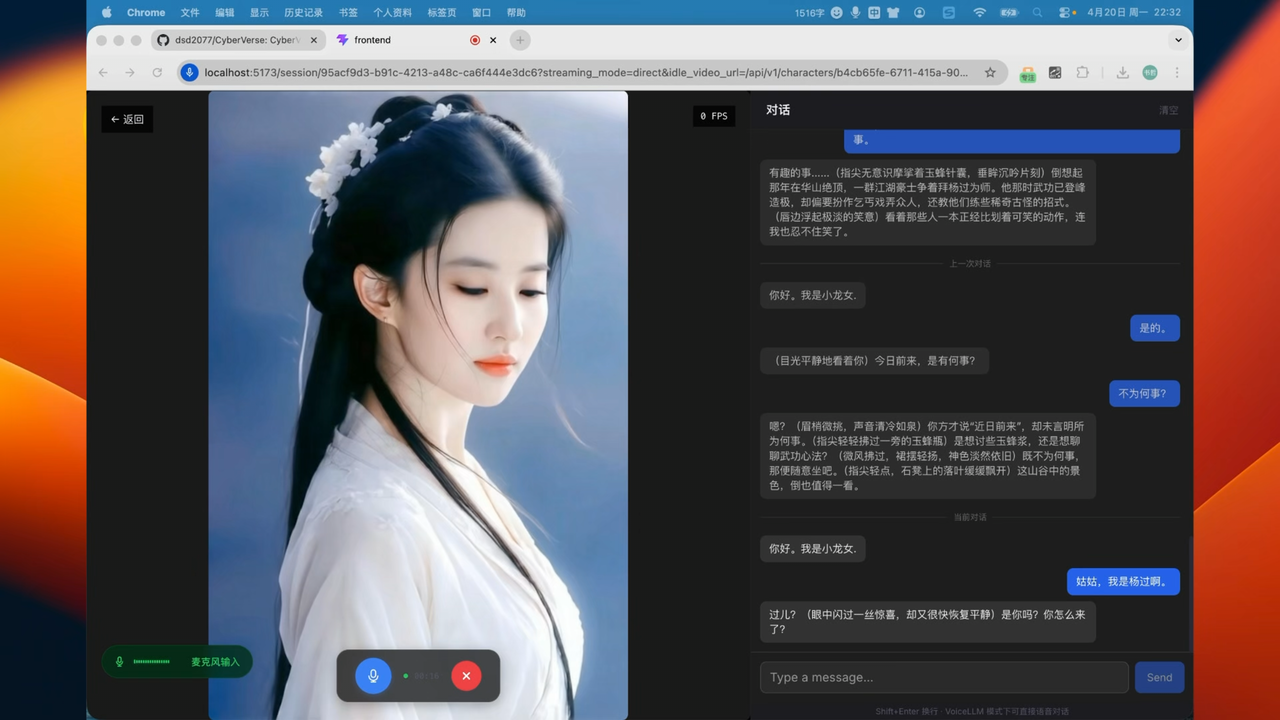
<p align="center"><em>The following characters are demo examples only. They are not bundled with CyberVerse and are not provided for commercial use.</em></p> <p align="center"> <a href="docs/assets/character1.png"><img src="docs/assets/character1.png" alt="CyberVerse character selection gallery" width="100%"/></a> </p> <p align="center"> <a href="docs/assets/character2.png"><img src="docs/assets/character2.png" alt="CyberVerse character gallery examples" width="100%"/></a> </p> <div align="center">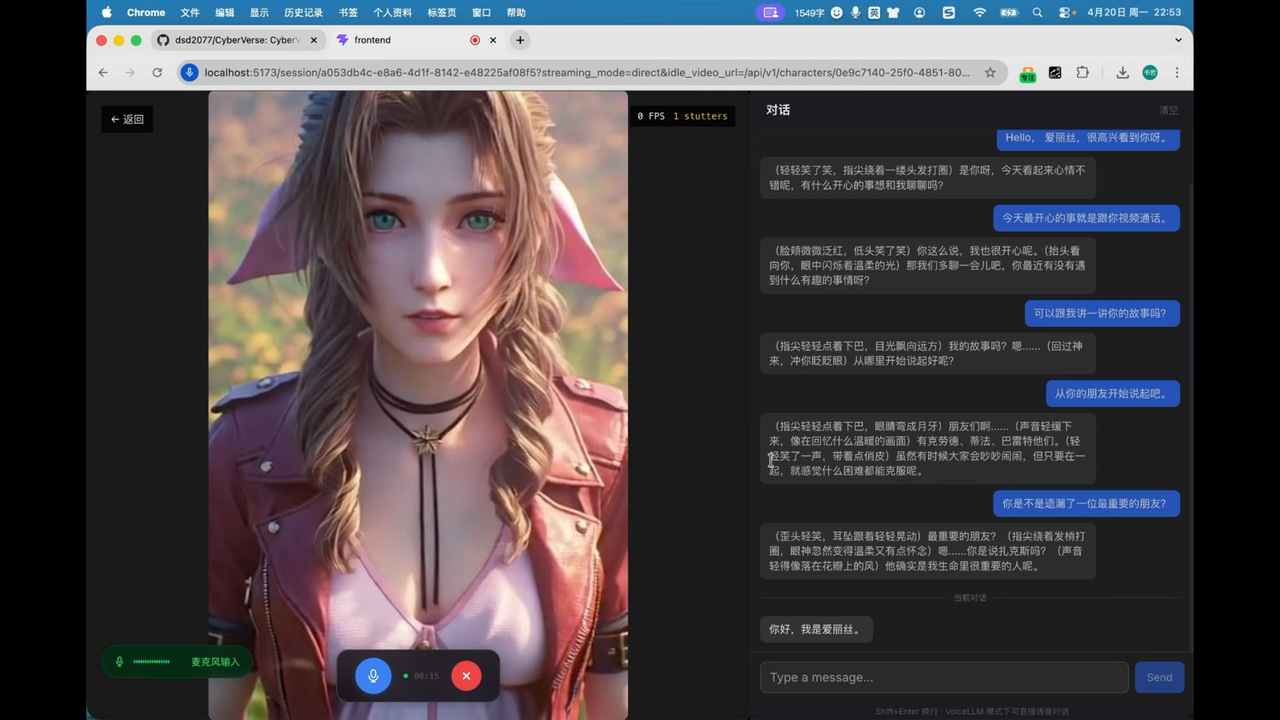 | 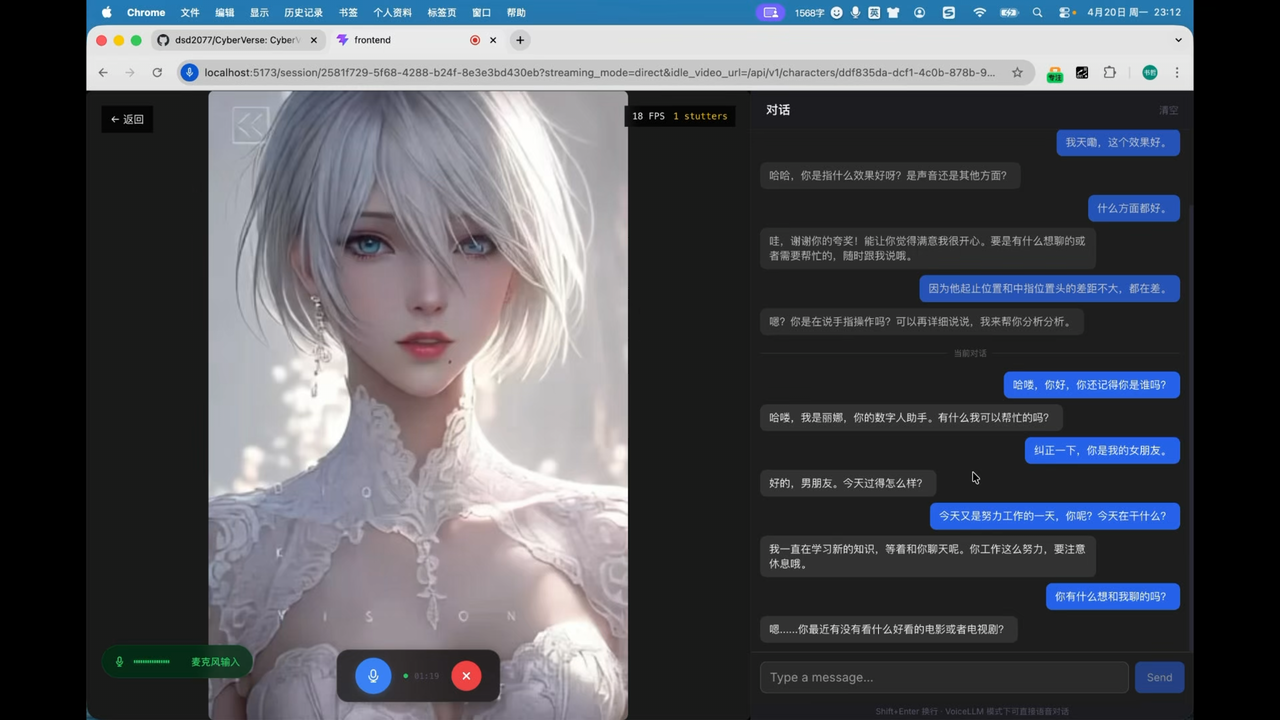 |
|---|---|
| Alice — watch on YouTube | Lina — watch on YouTube |
 |
|---|
| Xiaolongnü — watch on YouTube |
Features
Realtime Voice Agent
Voice is CyberVerse's default interaction mode, designed for low-latency realtime conversations that can run for long sessions. Users can continuously talk with an Agent through a microphone, interrupt the model while it is speaking, and mix voice and text input in the same conversation turn.
Each character can have its own voice, welcome message, and personality configuration, and voice cloning is supported. Conversations support pause and resume; when inference.avatar.enabled is set to false, the platform runs in pure voice mode, publishes only the audio stream, requires no local Avatar GPU, and keeps the core voice experience intact.
Audio/Video over WebRTC
The session pipeline is built on WebRTC and can choose direct P2P (embedded TURN / NAT traversal) or LiveKit SFU mode based on the deployment scenario, balancing low latency with connectivity in complex network environments.
In standard mode and supported omni sessions, the Agent can also receive user camera frames or screen-sharing frames as visual input, enabling face-to-face interaction that can listen and see instead of being limited to plain text context.
PersonaAgent + SubAgent Tasks
CyberVerse uses a multi-agent architecture: PersonaAgent stays in the foreground to maintain fluid conversation, respond quickly to interruptions, and handle context switches; long-running work such as search, research, material organization, summarization, and HTML report generation is delegated to background SubAgents asynchronously.
This keeps complex tasks from slowing down voice turns. Users can keep speaking, ask follow-up questions, or adjust direction, and PersonaAgent can return the SubAgent result once it is ready.
Character Memory and RAG
Each character's conversation history is persisted to local disk and automatically loaded when you re-enter a conversation, preserving continuity across sessions. You can also import knowledge bases, documents, and biographical material for a character; the system indexes them for retrieval-augmented generation, making answers better aligned with the character's background and persona.
Optional Digital Human Video
When you have GPU resources and want the Agent to be visible, enable avatar inference: a single character reference image can drive realtime facial animation, lip-sync, and cached idle video playback through configurable backends such as FlashHead and LiveAct. If you do not have a GPU or do not need video yet, disable it to return to a pure voice Agent; the same character and persona configuration continues to work.
Plugin-Based Stack
Brain, voice, hearing, tools, memory, and face are all replaceable modules. You can combine omni models, LLMs, TTS, ASR, embeddings, RAG, tool calls, and Avatar backends in cyberverse_config.yaml, then configure different vendors' API keys and service endpoints in the web UI at /settings to switch providers and model combinations by scenario. The LiteLLM plugin adds access to 100+ LLM providers (AWS Bedrock, Azure, Vertex AI, Mistral, Cohere, etc.) through a single unified interface.
Quick Start
Prerequisites
- Node 18+
- Go 1.25 (required:
protoc-gen-go,protoc-gen-go-grpc) - Conda
- Python 3.10+
- FFmpeg
- libopus-dev、libopusfile-dev、libsoxr-dev,pkg-config
For pure voice sessions, no local avatar GPU is required. Runtime cost depends on the realtime voice/omni/LLM/TTS/ASR providers you configure.
To verify, use:
bashnode --version go version protoc --version ffmpeg -version conda --version
Step 1: Clone
bashgit clone https://github.com/dsd2077/CyberVerse.git cd CyberVerse
Step 2: Create Python environment
bashconda create -n cyberverse python=3.10 conda activate cyberverse
Step 3: Configure environment variables
bashcp infra/.env.example .env
Edit .env and fill in the supported API keys:
Alibaba Cloud Qwen-series models:
envDASHSCOPE_API_KEY=your_dashscope_api_key
Or Volcengine Doubao-series models:
envDOUBAO_ACCESS_TOKEN=your_doubao_access_token DOUBAO_APP_ID=your_doubao_app_id
Doubao Voice: follow the Volcengine quick start to get App ID / API Key, then fill in DOUBAO_APP_ID / DOUBAO_ACCESS_TOKEN.
After the stack is running, you can change API keys and service endpoints from the web UI at /settings instead of editing .env only.
Step 4: Create local config and enable voice-only mode
bashcp infra/cyberverse_config.example.yaml cyberverse_config.yaml cp -r infra/avatar_models avatar_models
Edit cyberverse_config.yaml:
yamlinference: avatar: enabled: false
With enabled: false, CyberVerse runs as a pure voice agent assistant.
Step 5: Install project dependencies
bashmake setup
This installs the base editable package ([dev,inference]), generates gRPC stubs, and installs frontend dependencies.
Install the voice-agent extras used by the default config:
bash# all optional groups at once pip install -e ".[all]"
Step 6: Start services (3 terminals)
Terminal 1 — Python inference server:
bashconda activate cyberverse make inference
Terminal 2 — Go API server:
bashmake server
Terminal 3 — Frontend:
bashmake frontend
Step 7: Verify
bash# Check API health curl -s http://localhost:8080/api/v1/health
Open http://localhost:5173 in your browser.
Optional: Full Digital-Human Video
If you want to drive realtime Avatar video with FlashHead or LiveAct, follow the steps below.
Additional Requirements
- GPU with CUDA 12.8+
- PyTorch 2.8 (CUDA 12.8)
- FFmpeg with
libvpxfor video encoding - Avatar model weights
Install PyTorch (CUDA 12.8):
bashpip3 install torch==2.8.0 torchvision==0.23.0 torchaudio==2.8.0 --index-url https://download.pytorch.org/whl/cu128
Install vllm if you use LiveAct:
bashpip install vllm==0.11.0
Download Model Weights
CyberVerse currently supports FlashHead and LiveAct; download only what you need. More models will continue to be added.
bashpip install "huggingface_hub[cli]"
FlashHead (SoulX-FlashHead)
| Model Component | Description | Link |
|---|---|---|
SoulX-FlashHead-1_3B | 1.3B FlashHead weights | Hugging Face, ModelScope |
wav2vec2-base-960h | Audio feature extractor | Hugging Face, ModelScope |
bash# If you are in mainland China, you can use a mirror first: # export HF_ENDPOINT=https://hf-mirror.com hf download Soul-AILab/SoulX-FlashHead-1_3B \ --local-dir ./checkpoints/SoulX-FlashHead-1_3B hf download facebook/wav2vec2-base-960h \ --local-dir ./checkpoints/wav2vec2-base-960h
LiveAct (SoulX-LiveAct)
| ModelName | Download |
|---|---|
| SoulX-LiveAct | Hugging Face, ModelScope |
| chinese-wav2vec2-base | Hugging Face, ModelScope |
bashhf download Soul-AILab/LiveAct \ --local-dir ./checkpoints/LiveAct hf download TencentGameMate/chinese-wav2vec2-base \ --local-dir ./checkpoints/chinese-wav2vec2-base
Configure Avatar Inference
Set enabled: true in cyberverse_config.yaml. Model-specific settings live in
one file per model under avatar_models/; update those paths to match your
local checkpoints.
yamlinference: avatar: enabled: true default: "flash_head" # use "flash_head" or "live_act" idle_strategy: "silent_inference" runtime: cuda_visible_devices: 0 # shared GPU ID(s), e.g. 0,1 for multi-GPU world_size: 1 # shared GPU count, set to 2 for dual-GPU model_config_dir: "avatar_models"
Then edit the active model file, for example avatar_models/flash_head.yaml or
avatar_models/live_act.yaml. The Web UI also edits model parameters in those
per-model files.
Baidu Xiling H5 Digital Human
For Baidu Xiling, keep credentials in .env:
envBAIDU_XILING_APP_ID="your-app-id" BAIDU_XILING_APP_KEY="your-app-key" # Optional when the figure needs a fixed camera. BAIDU_XILING_CAMERA_ID="0"
Baidu Xiling is selected per character in the Web UI. It is not an avatar
inference model and should not be configured as inference.avatar.default.
CyberVerse still runs ASR/LLM/TTS/history through the orchestrator, then sends
16 kHz 16-bit mono PCM chunks to the browser. The frontend embeds the Baidu H5
iframe and drives it with the official sendAudioData / AUDIO_STREAM_RENDER
message format.
LiveAct FP4 GEMM (Optional)
FP4 acceleration requires building and installing lightx2v_kernel from LightX2V. Use PyTorch 2.7+ and a CUTLASS checkout on the build machine.
Preparation
bashpip install scikit_build_core uv
Build wheel
bashgit clone https://github.com/NVIDIA/cutlass.git git clone https://github.com/ModelTC/LightX2V.git cd LightX2V/lightx2v_kernel # Replace /path/to/cutlass with the absolute path to your cutlass clone. MAX_JOBS=$(nproc) && CMAKE_BUILD_PARALLEL_LEVEL=$(nproc) \ uv build --wheel \ -Cbuild-dir=build . \ -Ccmake.define.CUTLASS_PATH=/path/to/cutlass \ --verbose \ --color=always \ --no-build-isolation
Install wheel
bashpip install dist/*.whl --force-reinstall --no-deps
Enable in CyberVerse
In avatar_models/live_act.yaml (or the web UI), under live_act:
yamlfp8_gemm: false fp4_gemm: true
Restart the inference service after changing these flags.
SageAttention & FlashAttention (Optional)
bash# SageAttention (source build) git clone https://github.com/thu-ml/SageAttention.git cd SageAttention export EXT_PARALLEL=4 NVCC_APPEND_FLAGS="--threads 8" MAX_JOBS=32 # Optional python setup.py install
bash# FlashAttention (optional) wget -O flash_attn-2.8.1+cu12torch2.8cxx11abiTRUE-cp312-cp312-linux_x86_64.whl \ "https://github.com/Dao-AILab/flash-attention/releases/download/v2.8.1/flash_attn-2.8.1%2Bcu12torch2.8cxx11abiTRUE-cp312-cp312-linux_x86_64.whl" pip install flash_attn-2.8.1+cu12torch2.8cxx11abiTRUE-cp312-cp312-linux_x86_64.whl
Avatar Hardware Benchmarks
Realtime digital-human video requires GPU acceleration. Below are benchmarks for FlashHead and LiveAct avatar models:
| Model | Quality | GPU | Count | Resolution | FPS | Real-time? |
|---|---|---|---|---|---|---|
| FlashHead 1.3B | Pro | RTX 5090 | 2 | 512×512 | 25+ | ✅ Yes |
| FlashHead 1.3B | Pro | RTX 5090 | 1 | 464x464 | 20 | ✅ Yes |
| FlashHead 1.3B | Pro | RTX PRO 6000 | 1 | 512×512 | 20 | ✅ Yes |
| FlashHead 1.3B | Pro | RTX 4090 | 1 | 512×512 | ~10.8 | ❌ No |
| FlashHead 1.3B | Lite | RTX 4090 | 1 | 512×512 | 25+ | ✅ Yes |
| LiveAct 18B | — | RTX PRO 6000 | 2 | 320×480 | 20 | ✅ Yes |
| LiveAct 18B | — | RTX PRO 6000 | 1 | 256×417 | 20 | ✅ Yes |
Pro favors visual quality; Lite favors speed. The table reflects typical quality–compute balances — more GPU headroom lets you push higher quality; tighter hardware calls for lower settings (resolution, Pro vs Lite, etc.) to stay realtime.
When avatar inference is enabled, make inference reads inference.avatar.default from cyberverse_config.yaml and initializes exactly that one avatar model in the current inference process. Wait until you see:
Active avatar model initialized: <model_name>CyberVerse Inference Server started on port 50051
QA — Self-Check
Use this section when avatar video stutters, freezes, or falls behind audio. The first step is to confirm whether inference can keep up with playback.
Check RTP from inference logs
RTP (real-time performance factor) compares how long a chunk took to generate versus how long that chunk lasts at the configured FPS:
textRTP = elapsed / (frames / fps)
| RTP | Meaning |
|---|---|
| < 1 | Inference is faster than playback — headroom for realtime streaming |
| = 1 | Exactly realtime |
| > 1 | Inference is slower than playback — production cannot keep up with consumption; video will lag or stutter |
Watch the inference terminal (make inference) while the character is speaking. Look for LiveAct or FlashHead chunk lines.
LiveAct example (RTP > 1 — cannot keep realtime):
textINFO:inference.plugins.avatar.live_act_plugin:LiveAct chunk: idx=2 frames=32 320x480 fps=20 iter=2 elapsed=1.870s is_final=False
- Playback duration:
32 / 20 = 1.6s - RTP:
1.870 / 1.6 ≈ 1.17(> 1 → too slow for 320×480 @ 20 fps on this GPU)
FlashHead logs use the same idea (elapsed vs num_frames / fps):
textINFO:...FlashHead video chunk generated: chunk_index=1 num_frames=33 512x512 fps=20 ... elapsed=2.100s
Here RTP = 2.100 / (33/20) ≈ 1.27 — also above realtime.
What to do when RTP > 1
- Lower resolution or quality — e.g. LiveAct
infer_params.size, FlashHeadheight/width, or FlashHeadmodel_type: "lite"instead of"pro". - Add compute — more GPUs (
runtime.world_size,cuda_visible_devices), enable FP8/FP4 GEMM or compile options where supported, or use a faster GPU. - Match the benchmark table — pick a resolution/FPS/GPU row marked Yes under Real-time? in Avatar Hardware Benchmarks above.
Pure voice mode (inference.avatar.enabled: false) does not use avatar RTP; stutter there is usually network/WebRTC or upstream voice latency — see Remote Access Notes.
Remote Access Notes
When streaming_mode: direct uses the embedded TURN server, the browser must be able to reach the server's 8443/TCP. If the page loads but audio/video never connects, or the server logs show ICE connection state: failed or publish timeout waiting for connection, first check whether your machine can reach port 8443 on the server:
bashnc -vz <server-ip> 8443
If 8443 is not reachable, the usual cause is a cloud security group, firewall, or NAT restriction. In that case, you can forward your local 8443 to the server through an SSH tunnel:
bashssh -L 8443:127.0.0.1:8443 user@host -p port
After the tunnel is established, the browser will access the remote TURN service through local 127.0.0.1:8443.
If you want the browser to connect to the remote server directly instead of through an SSH tunnel, set pipeline.ice_public_ip in cyberverse_config.yaml to the server's public IP or domain. If you are using an SSH tunnel, you can keep the default value (127.0.0.1).
Roadmap
1. Realtime Audio/Video Agent Platform
Make voice-first realtime agents easy to run, customize, and embed.
- Character CRUD with multiple reference images, active image, fixed/random display mode, optional face crop, tags, voice fields, personality, welcome message, and system prompt
- Realtime voice sessions over WebRTC — direct P2P (embedded TURN) or LiveKit SFU
- Pure voice sessions with
inference.avatar.enabled: false - Pluggable modules (omni model, LLM, TTS, ASR, embedding, RAG, avatar); configure different vendors' API keys via YAML and UI settings
- Session management: per-character chat history persisted to disk and loaded when a conversation starts
- Voice cloning: supports Doubao voice cloning
- Hybrid input: supports both voice and text in the same conversation
- Voice interruption while the model is speaking, plus session pause and resume
- User camera input and screen-sharing visual frames in standard mode and supported omni sessions
- PersonaAgent and background SubAgent task execution
- Import knowledge, documents, and biographical material for character-grounded RAG Q&A
- Embeddable for developers (Web component or SDK) to integrate self-hosted instances into their own sites
- Live streaming: audio/video output for broadcast-style use cases
2. Realtime Digital-Human Calls
When Avatar GPU resources are available, turn the voice Agent into a realtime video call.
- Realtime avatar video driven from reference images via configurable avatar plugins (e.g. FlashHead, LiveAct)
- Cached idle video playback for character presence
- Audio/video synchronization for realtime speaking segments
- More avatar backends with different quality/latency/cost tradeoffs
- Better avatar deployment profiles for consumer GPU, workstation GPU, and cloud GPU environments
3. Agent Network
Connect multiple agents so they can communicate, collaborate, and form networks.
- Enable agent-to-agent communication
- Enable multi-agent collaboration and delegation
- Enable shared memory and shared knowledge between agents
- Build an open network of connected agents
Community
<p align="center"> <a href="docs/assets/wechat_group.jpg"><img src="docs/assets/wechat_group.jpg" alt="CyberVerse WeChat group QR code" width="320"/></a> </p> <p align="center">If the QR code has expired, add the maintainer on WeChat: <strong>wx_dsd2077</strong>. Please note <strong>CyberVerse</strong> in your friend request; we will invite you to the group.</p>Star History
<p align="center"> <a href="https://star-history.com/#dsd2077/CyberVerse&Date"> <img src="https://api.star-history.com/svg?repos=dsd2077/CyberVerse&type=Date" alt="Star History Chart" width="100%"/> </a> </p>License
GNU General Public License v3.0 — see LICENSE.
Acknowledgements
-
SoulX-FlashHead — Avatar model by Soul AI Lab
-
SoulX-LiveAct - Avatar model by Soul AI Lab
-
MuseTalk — Real-time lip-sync model by TME Lyra Lab
-
Pion — Go WebRTC implementation
Contributors
Showing top 4 contributors by commit count.


Related Repositories

affaan-m/ECC
The agent harness performance optimization system. Skills, instincts, memory, security, and research-first development for Claude Code, Codex, Opencode, Cursor and beyond.

NousResearch/hermes-agent
The agent that grows with you

langchain-ai/langchain
The agent engineering platform.

firecrawl/firecrawl
The API to search, scrape, and interact with the web at scale. 🔥

google-gemini/gemini-cli
An open-source AI agent that brings the power of Gemini directly into your terminal.

browser-use/browser-use
🌐 Make websites accessible for AI agents. Automate tasks online with ease.