

MSPeekCollectionViewDelegateImplementation
A custom paging behavior that peeks the previous and next items in a collection view
The peeking logic is now done using a custom `UICollectionViewLayout` which makes it easier to integrate and will introduce less bugs! (And hopefully it will solve all the issues you were facing) The project is written primarily in Swift, distributed under the MIT License license, first published in 2018. Key topics include: cell, collectionview, collectionviewlayout, delegate, implementation.
MSPeekCollectionViewDelegateImplementation
Version 3.0.0 is here! 🎉
The peeking logic is now done using a custom UICollectionViewLayout which makes it easier to integrate and will introduce less bugs! (And hopefully it will solve all the issues you were facing)
Migrating from 2.0.0 to 3.0.0
I've tried to keep minimal effort to migrate from v2 to v3. Here are the steps:
1- Replace MSPeekCollectionViewDelegateImplementation initialization with MSCollectionViewPeekingBehavior
2- On your collectionView, call configureForPeekingBehavior like this:
swiftcollectionView.configureForPeekingBehavior(behavior: behavior)
3- Set the collection view's delegate as the view controller (Or any other class you want)
4- In the collection view delegate function scrollViewWillEndDragging, call the behavior's scrollViewWillEndDragging like this:
swiftfunc scrollViewWillEndDragging(_ scrollView: UIScrollView, withVelocity velocity: CGPoint, targetContentOffset: UnsafeMutablePointer<CGPoint>) { behavior.scrollViewWillEndDragging(scrollView, withVelocity: velocity, targetContentOffset: targetContentOffset) }
5- ???
6- Profit 💰
You can check out the example for a detailed use
Introduction


Current design trends require complex designs which allow horizontal scrolling inside vertical scrolling. So to show the users that they can scroll vertically, a peeking item should be shown on the side. This library does exactly that.
I wrote this library because there's no pod that does this simple feature. Also, other libraries require me to inherit from a UICollectionViewController, which doesn't give alot of freedom if I'm inheriting from other View Controllers.
Example
To run the example project, clone the repo, and run pod install from the Example directory first.
Requirements
- XCode 11.2.1
- Swift 5
This pod will probably work on older versions of XCode but I haven't tested it.
Installation
MSPeekCollectionViewDelegateImplementation is available through CocoaPods. To install
it, simply add the following line to your Podfile:
rubypod 'MSPeekCollectionViewDelegateImplementation'
Usage
Storyboard
-
Drag-Drop a
UICollectionView -
Set the reuse identifier for the collection view's cell to
Cell -
Create a reference for the collection view
swift@IBOutlet weak var collectionView: UICollectionView!
-
Bind collection view to outlet
-
Import library
swiftimport MSPeekCollectionViewDelegateImplementation
- Create a variable of type
MSCollectionViewPeekingBehavior
swiftvar behavior: MSCollectionViewPeekingBehavior!
- In
viewDidLoad(), , initialize the behavior and configure thecollectionViewfor peek behavior:
swiftbehavior = MSCollectionViewPeekingBehavior() collectionView.configureForPeekingBehavior(behavior: behavior)
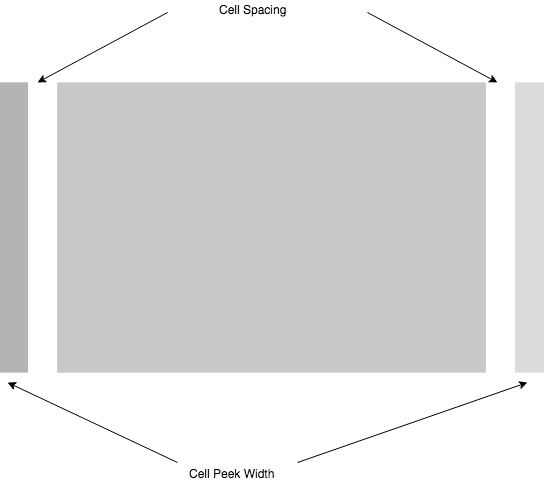
Or you can use whatever arguments from the ones below (Can be combined together as needed):
swiftbehavior = MSCollectionViewPeekingBehavior(cellSpacing: 10)
swiftbehavior = MSCollectionViewPeekingBehavior(cellPeekWidth: 20)
swift//minimumItemsToScroll is the minimum number of items that can be scrolled behavior = MSCollectionViewPeekingBehavior(minimumItemsToScroll: 1)
swift//maximumItemsToScroll is the maximum number of items that can be scrolled if the scroll distance is large behavior = MSCollectionViewPeekingBehavior(maximumItemsToScroll: 3)
swift//numberOfItemsToShow is the number of items that will be shown at the same time. behavior = MSCollectionViewPeekingBehavior(numberOfItemsToShow: 3)
- In
viewDidLoad(), set the collection view's delegate to self:
swiftcollectionView.delegate = self
- In the collection view delegate function
scrollViewWillEndDragging, call the behavior'sscrollViewWillEndDragginglike this:
swiftfunc scrollViewWillEndDragging(_ scrollView: UIScrollView, withVelocity velocity: CGPoint, targetContentOffset: UnsafeMutablePointer<CGPoint>) { behavior.scrollViewWillEndDragging(scrollView, withVelocity: velocity, targetContentOffset: targetContentOffset) }
- Create the data source implementation as an extension for the
ViewController
swiftextension ViewController: UICollectionViewDataSource { func numberOfSections(in collectionView: UICollectionView) -> Int { return 1 } func collectionView(_ collectionView: UICollectionView, numberOfItemsInSection section: Int) -> Int { return 4 } func collectionView(_ collectionView: UICollectionView, cellForItemAt indexPath: IndexPath) -> UICollectionViewCell { let cell = collectionView.dequeueReusableCell(withReuseIdentifier: "Cell", for: indexPath) //TODO: Configure cell return cell } }
- In
viewDidLoad(), Set the collection view's data source toself
swiftcollectionView.dataSource = self
Working Example
swiftimport UIKit import MSPeekCollectionViewDelegateImplementation class ViewController: UIViewController { @IBOutlet weak var collectionView: UICollectionView! var behavior = MSCollectionViewPeekingBehavior() override func viewDidLoad() { super.viewDidLoad() collectionView.configureForPeekingBehavior(behavior: behavior) collectionView.delegate = self collectionView.dataSource = self } } extension ViewController: UICollectionViewDataSource { func numberOfSections(in collectionView: UICollectionView) -> Int { return 1 } func collectionView(_ collectionView: UICollectionView, numberOfItemsInSection section: Int) -> Int { return 4 } func collectionView(_ collectionView: UICollectionView, cellForItemAt indexPath: IndexPath) -> UICollectionViewCell { let cell = collectionView.dequeueReusableCell(withReuseIdentifier: "Cell", for: indexPath) cell.contentView.backgroundColor = UIColor.red return cell } } extension ViewController: UICollectionViewDelegate { func scrollViewWillEndDragging(_ scrollView: UIScrollView, withVelocity velocity: CGPoint, targetContentOffset: UnsafeMutablePointer<CGPoint>) { behavior.scrollViewWillEndDragging(scrollView, withVelocity: velocity, targetContentOffset: targetContentOffset) } func scrollViewDidEndDecelerating(_ scrollView: UIScrollView) { print(behavior.currentIndex) } }
Features
Scrolling to a specific item
The MSCollectionViewPeekingBehavior now has a function to scroll to a specific index
swiftpublic func scrollToItem(at index: Int, animated: Bool)
You can do something like:
swiftbehavior.scrollToItem(at: 1, animated: true)
Listen to index changes
You can use the scroll view's delegate function to do that (Make sure you conform to UICollectionViewDelegate):
swiftfunc scrollViewDidEndDecelerating(_ scrollView: UIScrollView) { print(behavior.currentIndex) }
Customization
Vertical Scroll Direction
The implementation supports collection views with vertical directions and will automatically position cells correctly, you can set the scrolling and peeking to be vertical using:
swiftdelegate = MSCollectionViewPeekingBehavior(scrollDirection: .vertical) collectionView.configureForPeekingBehavior(behavior: behavior)
Author
Maher Santina, maher.santina90@gmail.com
Sponsor
If you're liking this repo I'd really appreciate it if you sponsor me (Orange Juice) so that I can continue supporting this project. I'm also working on adding more reusable UI elements similar to this one to make developer's lives easier. Please see my sponsor page for more details
Contributing
Any contribution is highly appreciated, please see CONTRIBUTING.md for more info.
License
MSPeekCollectionViewDelegateImplementation is available under the MIT license. See the LICENSE file for more info.
Contributors
Showing top 7 contributors by commit count.


Related Repositories

x-extends/vxe-table
vxe table 支持 vue2, vue3 的表格解决方案

younatics/ExpandableCell
✨ Awesome expandable, collapsible tableview cell for iOS written in Swift 5
younatics/YNExpandableCell
✨ Awesome expandable, collapsible tableview cell for iOS written in Swift 4

liangdahong/UITableViewDynamicLayoutCacheHeight
🖖高性能的自动计算采用 Autolayout 布局的 UITableViewCell 和 UITableViewHeaderFooterView 的高度,内部自动管理高度缓存。

uazu/qcell
Statically-checked alternatives to RefCell and RwLock

TIO-IKIM/CellViT
CellViT: Vision Transformers for Precise Cell Segmentation and Classification