

Vanilla place picker
Simple(vanilla) yet 'Do it all' place picker for your place picking needs in Android
Vanilla Place Picker provides a UI that displays an interactive map to get the place details and Autocomplete functionality, which displays place predictions based on user search input. The project is written primarily in Kotlin, distributed under the MIT License license, first published in 2019. Key topics include: android, autocomplete, easy-to-use, google-map, google-place-autocomplete.
Vanilla Place Picker


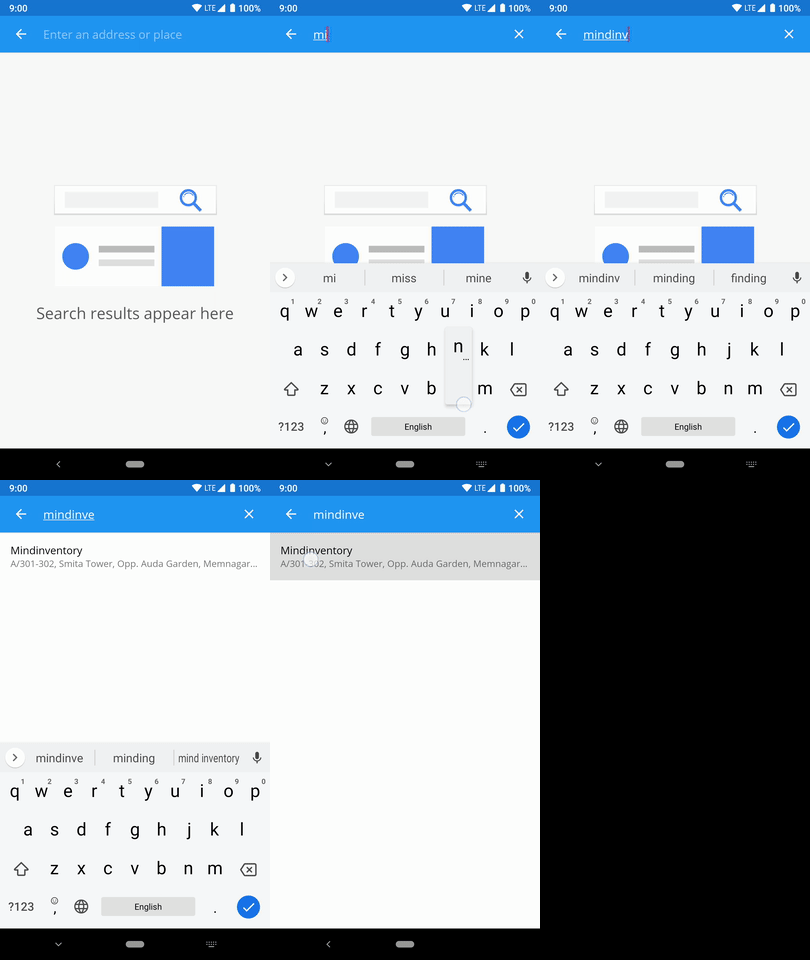
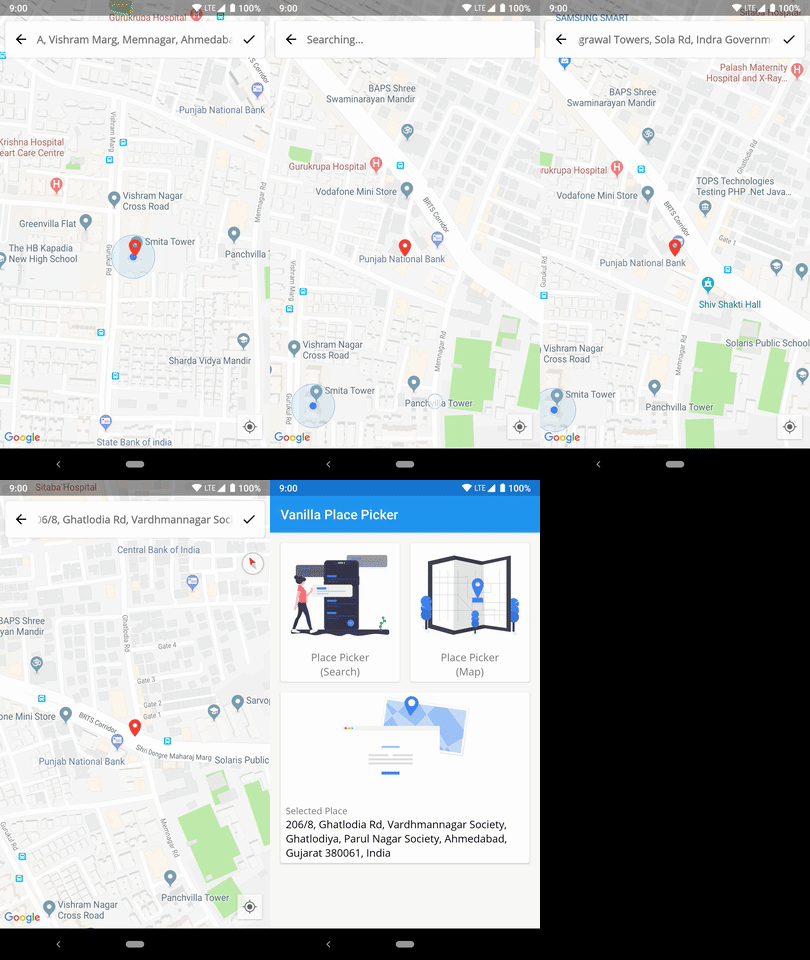
Vanilla Place Picker provides a UI that displays an interactive map to get the place details and Autocomplete functionality, which displays place predictions based on user search input.
Developers often come across a requirement of adding precise location. So, a place picker which is easy to implement, less time consuming, and simple enough for users to use it is always in demand and here we have a Vanilla Place Picker which developer can add it in quick simple steps.
Preview
Key features
- Android 13 support
- Simple implementation for place picker either using Autocomplete, Map or both
- Set your own custom map styles
- Customise map pin icon
- Set default location position
- Use it without location permission
- Choose to show only open businesses or all
- Highly customise attributes
- Multi languages support
- RTL layout support
Usage
Dependencies
- Step 1. Add the JitPack repository in your project build.gradle:
bashallprojects { repositories { ... maven { url 'https://jitpack.io' } } }
or
If Android studio version is Arctic Fox or higher then add it in your settings.gradle
bashdependencyResolutionManagement { repositories { ... maven { url 'https://jitpack.io' } } }
- Step 2. Add the dependency in your app module build.gradle file
bashdependencies { ... implementation 'com.github.Mindinventory:VanillaPlacePicker:X.X.X' }
Implementation
- Step 1. Add Google MAP API KEY in your local.properties file with the same variable name as defined below (google.maps_api_key)
bashgoogle.maps_api_key=PLACE YOUR API KEY HERE
- Step 2. To get Google MAP Api key from local.properties file, write below defined code in your app module build.gradle file
bashandroid { ... defaultConfig { ... #Access Google MAP Api Key from local.properties file def properties = new Properties() file("../local.properties").withInputStream { properties.load(it) #Share the key with your `AndroidManifest.xml` manifestPlaceholders = [ googleMapsApiKey:"${properties.getProperty('google.maps_api_key')}"] }
- Step 3. Add below defined meta-data code to your AndroidManifest.xml:
bash<application ... > ... <meta-data android:name="com.google.android.geo.API_KEY" android:value="${googleMapsApiKey}" /> </application>
- Step 4. Add VanillaPlacePicker Builder in to your activity class:
bash#startActivityForResult is deprecated so better to use registerForActivityResult var placePickerResultLauncher = registerForActivityResult(ActivityResultContracts.StartActivityForResult()) { result -> if (result.resultCode == Activity.RESULT_OK && result.data != null) { val vanillaAddress = VanillaPlacePicker.getPlaceResult(result.data) } } #Launch caller with Intent val intent = VanillaPlacePicker.Builder(this) .with(PickerType.MAP_WITH_AUTO_COMPLETE) // Select Picker type to enable autocompelte, map or both .withLocation(23.057582, 72.534458) .setPickerLanguage(PickerLanguage.HINDI) // Apply language to picker .setLocationRestriction(LatLng(23.0558088,72.5325067), LatLng(23.0587592,72.5357321)) // Restrict location bounds in map and autocomplete .setCountry("IN") // Only for Autocomplete .enableShowMapAfterSearchResult(true) // To show the map after selecting the place from place picker only for PickerType.MAP_WITH_AUTO_C /* * Configuration for Map UI */ .setMapType(MapType.SATELLITE) // Choose map type (Only applicable for map screen) .setMapStyle(R.raw.style_json) // Containing the JSON style declaration for night-mode styling .setMapPinDrawable(android.R.drawable.ic_menu_mylocation) // To give custom pin image for map marker .build() placePickerResultLauncher.launch(intent)
Requirements
- minSdkVersion >= 21
- Androidx
LICENSE!
Vanilla Place Picker is MIT-licensed.
Let us know!
We’d be really happy if you send us links to your projects where you use our component. Just send an email to sales@mindinventory.com And do let us know if you have any questions or suggestion regarding our work.
Contributors
Showing top 11 contributors by commit count.


Related Repositories

flutter/flutter
Flutter makes it easy and fast to build beautiful apps for mobile and beyond

Genymobile/scrcpy
Display and control your Android device

react/react-native
A framework for building native applications using React

justjavac/free-programming-books-zh_CN
:books: 免费的计算机编程类中文书籍,欢迎投稿

rustdesk/rustdesk
An open-source remote desktop application designed for self-hosting, as an alternative to TeamViewer.

Hack-with-Github/Awesome-Hacking
A collection of various awesome lists for hackers, pentesters and security researchers