

MySqlBackup.Net
A tool to backup and restore MySQL database in C#/VB.NET/ASP.NET.
*A versatile tool for backing up and restoring MySQL databases in C#, VB.NET, and ASP.NET.* The project is written primarily in C#, distributed under the The Unlicense license, first published in 2017. Key topics include: csharp, mysql, mysql-backup, mysql-database, mysql-export.
MySqlBackup.NET
A versatile tool for backing up and restoring MySQL databases in C#, VB.NET, and ASP.NET.
Latest Release: v2.7.1 (May 11, 2026)
Change Log
Overview
MySqlBackup.NET is a .NET library (DLL) designed to backup and restore MySQL databases. Compatible with multiple MySQL connectors—MySql.Data.DLL, MySqlConnector.DLL, and Devart.Express.MySql.DLL—it offers a programmatic alternative to tools like MySqlDump, providing greater control and flexibility in .NET environments.
Developed in C#, this library supports any .NET language (e.g., VB.NET, F#) and excels in scenarios where MySqlDump.exe or MySQL Workbench are impractical, such as web-based applications (ASP.NET) or end-user tools with simplified interfaces.
Key Features
- Backup and restore MySQL databases programmatically.
- Supports all .NET languages.
- Export/import via files or
MemoryStream. - Conditional row exports (filter tables/rows).
- Progress reporting for export and import tasks.
- Flexible row export modes:
INSERT,INSERT IGNORE,REPLACE,ON DUPLICATE KEY UPDATE,UPDATE. - Ideal for ASP.NET and web service integration.
Getting Started
Installation
Download
Grab the latest release from: GitHub Releases
NuGet Packages
Install via NuGet Package Manager:
-
MySqlConnector:
PM> Install-Package MySqlBackup.NET.MySqlConnector
https://www.nuget.org/packages/MySqlBackup.NET.MySqlConnector/ -
MySql.Data Connector:
PM> Install-Package MySqlBackup.NET
https://www.nuget.org/packages/MySqlBackup.NET/ -
Devart Express Connector:
PM> Install-Package MySqlBackup.Net.DevartExpress
https://www.nuget.org/packages/MySqlBackup.Net.DevartExpress/
Add to Your Project
See the detailed guide:
How to Add This Library into Your Project
Basic Usage
Start by adding the appropriate using statement to your file:
csharp// For MySqlConnector.NET (MIT) using MySqlConnector; // For MySQL .NET Connector by Oracle using MySql.Data.MySqlClient; // For dotConnect for MySQL by Devart using Devart.Data.MySql;
Backup a Database
csharpstring constr = "server=localhost;user=root;pwd=1234;database=test1;convertzerodatetime=true;"; string filePath = @"C:\backup.sql"; using (MySqlConnection conn = new MySqlConnection(constr)) { using (MySqlCommand cmd = conn.CreateCommand()) { using (MySqlBackup mb = new MySqlBackup(cmd)) { conn.Open(); mb.ExportToFile(filePath); } } }
Restore a Database
csharpstring constr = "server=localhost;user=root;pwd=1234;database=test1;convertzerodatetime=true;"; string filePath = @"C:\backup.sql"; using (MySqlConnection conn = new MySqlConnection(constr)) { using (MySqlCommand cmd = conn.CreateCommand()) { using (MySqlBackup mb = new MySqlBackup(cmd)) { conn.Open(); mb.ImportFromFile(filePath); } } }
Why MySqlBackup.NET?
Unlike MySQL Workbench (developer-focused) or MySqlDump.exe (restricted in web environments), MySqlBackup.NET offers:
- End-User Simplicity: Preset parameters for a one-click backup experience.
- Web Compatibility: Runs seamlessly in ASP.NET, bypassing hosting restrictions on executables.
- Programmatic Control: Fine-tuned output handling within .NET.
Dependencies
MySqlBackup.NET requires one of these MySQL connectors:
| Connector | Source | License | DLLs |
|---|---|---|---|
| MySqlConnector | MySqlConnector | MIT | MySqlConnector.dll |
| MySql.Data | MySQL Connector/Net | GPL | MySql.Data.dll |
| Devart Express | dotConnect for MySQL | Custom (FAQ) | Devart.Data.dll, Devart.Data.MySql.dll |
Compatibility
We aim for MySqlBackup.NET to achieve 100% SQL compliance, ensuring seamless compatibility with mysqldump and mysql.exe for both backup and restore operations. Version 2.6 introduces key improvements, addressing some flaws in previous version and compatibility challenges with mysqldump-generated files. If you encounter any incompatibilities, we welcome feedback via GitHub Issues to help us refine and uphold this goal.
Configuration Tips
Unicode Support
- Always use the default character set of
utf8mb4, orutf8in older MySQL versions that do not supportutf8mb4. - It is recommended to use
convertzerodatetime=truein the connection string for compatibility when handling null datetime values.
Performance Benchmark
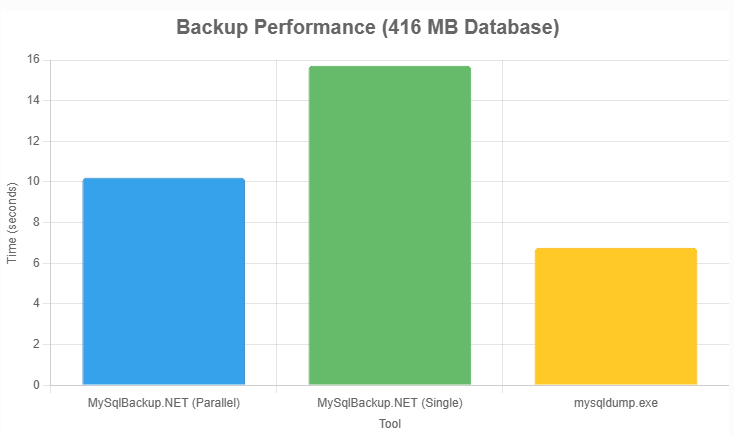
For a 416 MB database (400,000 rows, 4 tables, InnoDB) on an Intel Core i7-4770S (3.10GHz, 16GB RAM, SSD Samsung 870 Evo 500GB):
| Task | Tool | Avg. Time | File Size |
|---|---|---|---|
| Backup | MySqlBackup.NET (Parallel) | ~10.21s | 571.588 MB |
| Backup | MySqlBackup.NET (Single) | ~15.72s | 571.588 MB |
| Backup | mysqldump.exe | ~6.76s | 566.976 MB |
| Restore | MySqlBackup.NET | ~35.87s | - |
| Restore | mysql.exe | ~32.76s | - |
MySqlBackup.NET v2.6 offers competitive performance, especially in parallel mode, with significant improvements over previous versions. Full details: Performance Benchmark Wiki.
License
MySqlBackup.NET is released under The Unlicense, making it free for any use.
Explore more on GitHub!
Contributors
Showing top 6 contributors by commit count.


Related Repositories

jellyfin/jellyfin
The Free Software Media System - Server Backend & API

files-community/Files
A modern file manager that helps users organize their files and folders.

ShareX/ShareX
ShareX is a free and open-source application that enables users to capture or record any area of their screen with a single keystroke. It also supports uploading images, text, and various file types to a wide range of destinations.

doocs/leetcode
🔥LeetCode solutions in any programming language | 多种编程语言实现 LeetCode、《剑指 Offer(第 2 版)》、《程序员面试金典(第 6 版)》题解

DevToys-app/DevToys
A Swiss Army knife for developers.

AvaloniaUI/Avalonia
Develop Desktop, Embedded, Mobile and WebAssembly apps with C# and XAML. The future of .NET UI