

Ts monorepo
Template for setting up a TypeScript monorepo
**ts monorepo** is a Template for setting up a TypeScript monorepo The project is written primarily in TypeScript, distributed under the MIT License license, first published in 2019. It has gained significant community traction with 1,621 stars and 177 forks on GitHub. Key topics include: create-react-app, intellij, jest, lerna, monorepo.

Template project for setting up a TypeScript monorepo

<!-- START doctoc generated TOC please keep comment here to allow auto update --> <!-- DON'T EDIT THIS SECTION, INSTEAD RE-RUN doctoc TO UPDATE -->
Table of content
<!-- END doctoc generated TOC please keep comment here to allow auto update -->Features
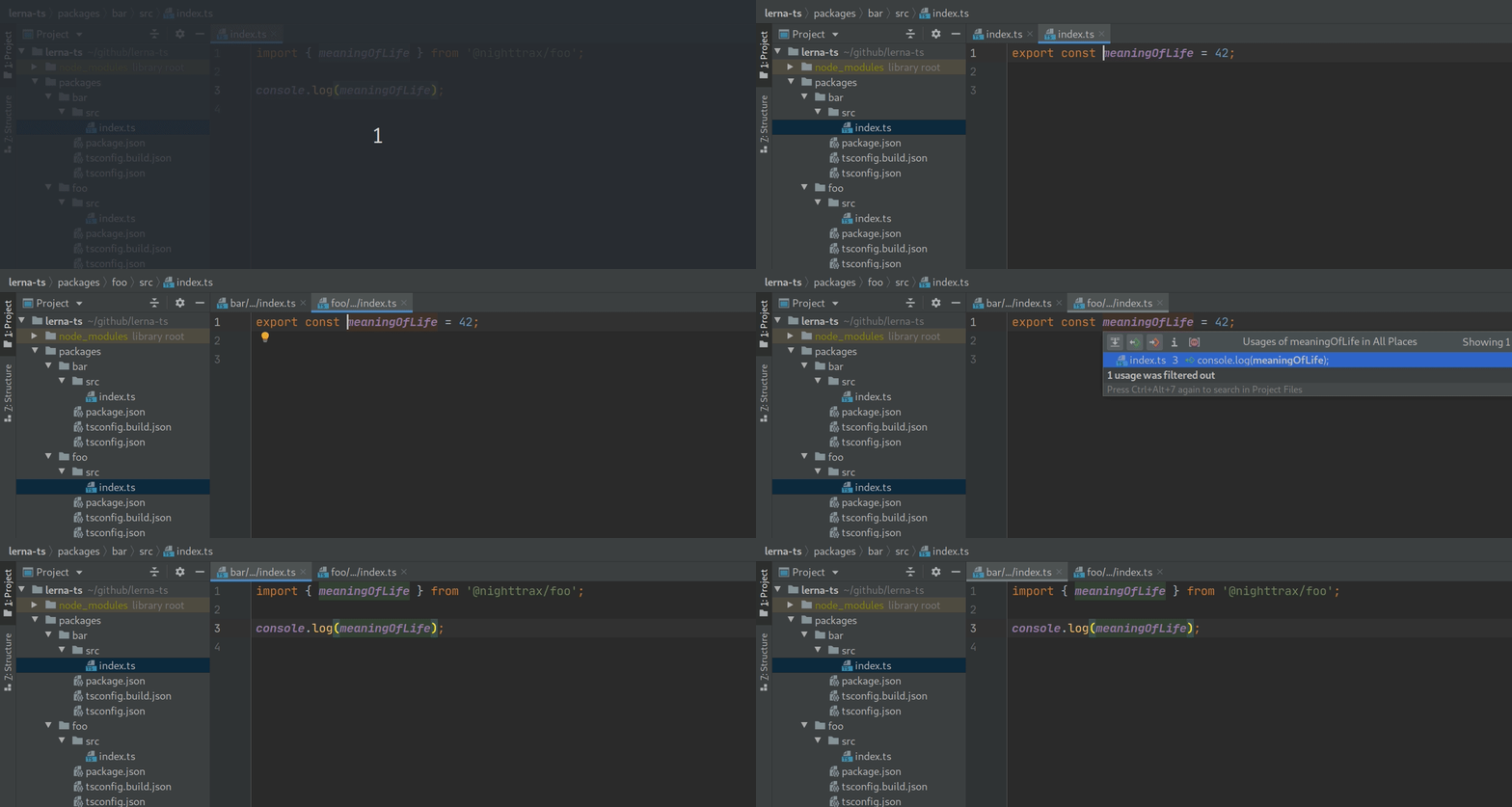
The main focus of this repo is making the
Go to definitionfeature in IDEs work without any surprises, meaning it will work after a fresh clone without needing to build the project.
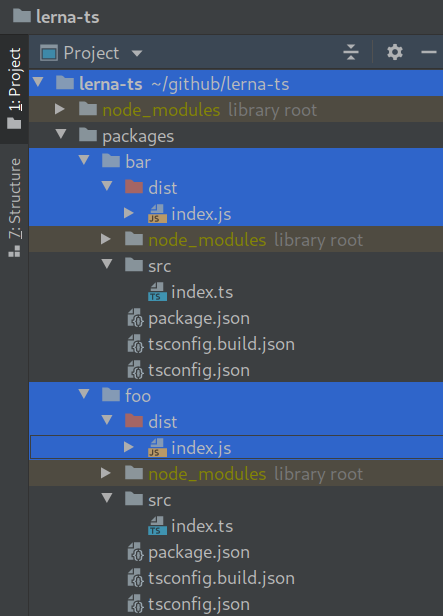
The secondary focus is to remove surprises when publishing packages. The repo is set up so that each package gets a clean build output without any artifacts from other packages.
Setup
Click the Use this template button at the top of the GitHub page.
This repo uses pnpm, but should work fine with any of the following:
I strongly recommend pnpm, not only because it's usually faster, but because it avoids dependency problems caused by hoisting (see https://github.com/NiGhTTraX/ts-monorepo/commit/d93139166b25fab15e9538df58a7d06270b846c9 as an example).
sh# Install pnpm with your preferred method: https://pnpm.io/installation. npm i -g pnpm # Install all dependencies. pnpm i
Then customize the template to your own needs, removing examples you don't need, and adding the tools you do need. Compilation targets, module systems, tree shaking etc. are left up to you to decide.
Docs
See the following blog posts:
- How to set up a TypeScript monorepo and make Go to definition work
- Making TypeScript monorepos play nice with other tools
If you're looking for the project references solution checkout the project-references branch.
Packages vs apps
This repo contains two types of workspaces:
packages: meant to be published to npm and installed,apps: meant to be executed.
A good example to illustrate the difference is create-react-app: you wouldn't publish an app like this to npm, you would run it, more specifically you would build the JS bundle and then deploy that somewhere.
For packages, you don't want to bundle all the monorepo dependencies, and instead publish them individually. That's why packages have a separate build tsconfig.json that resolves monorepo dependencies to node_modules.
Integrations
ts-node
Use tsconfig-paths to resolve the path aliases at runtime:
json{ "scripts": { "start": "ts-node -r tsconfig-paths/register src/index.ts" } }
See the full example here.
Babel
Use babel-plugin-module-resolver to resolve the path aliases:
jsmodule.exports = { presets: [ ["@babel/preset-env", { targets: { node: "current" } }], "@babel/preset-typescript", ], plugins: [ [ "module-resolver", { alias: { "^@nighttrax/(.+)": "../\\1/src", }, }, ], ], };
See the full example here.
webpack
Use tsconfig-paths-webpack-plugin to resolve the path aliases:
jsconst TsconfigPathsPlugin = require("tsconfig-paths-webpack-plugin"); module.exports = { resolve: { plugins: [new TsconfigPathsPlugin()] } };
See the full example here.
jest
If you use Babel then see this example from the Babel section above.
If you use ts-jest then you can use its pathsToModuleNameMapper helper:
jsconst { pathsToModuleNameMapper } = require("ts-jest"); const { compilerOptions } = require("../../tsconfig.json"); module.exports = { preset: "ts-jest", moduleNameMapper: pathsToModuleNameMapper(compilerOptions.paths, { // This has to match the baseUrl defined in tsconfig.json. prefix: "<rootDir>/../../", }), };
See the full example here.
Vite
Use vite-tsconfig-paths in the Vite config:
typescriptimport { defineConfig } from "vite"; import react from "@vitejs/plugin-react"; import tsconfigPaths from "vite-tsconfig-paths"; export default defineConfig({ plugins: [ react(), tsconfigPaths() ], });
See full example here.
NextJS
Extend Next's webpack config to enable compiling packages from the monorepo:
jsmodule.exports = { webpack: (config) => { // Let Babel compile outside of src/. const tsRule = config.module.rules.find( (rule) => rule.test && rule.test.toString().includes("tsx|ts") ); tsRule.include = undefined; tsRule.exclude = /node_modules/; return config; }, };
See the full example here.
NestJS
Include the path aliases in both tsconfig.json and tsconfig.build.json and tell NestJS where to find the main.js file:
json{ "collection": "@nestjs/schematics", "sourceRoot": "src", "entryFile": "apps/nestjs/src/main" }
See the full example here.
Storybook
Extend Storybook's webpack config and apply the tsconfig-paths-webpack-plugin:
jsconst TsconfigPathsPlugin = require('tsconfig-paths-webpack-plugin'); module.exports = { webpackFinal: async (config) => { config.resolve.plugins = [ ...(config.resolve.plugins || []), new TsconfigPathsPlugin({ extensions: config.resolve.extensions, }), ]; return config; }, };
See the full example here.
create-react-app
Note: this is not supported anymore.
Use craco or react-app-rewired to extend CRA's webpack config and apply the tsconfig-paths-webpack-plugin:
jsconst TsconfigPathsPlugin = require("tsconfig-paths-webpack-plugin"); module.exports = (config) => { // Remove the ModuleScopePlugin which throws when we // try to import something outside of src/. config.resolve.plugins.pop(); // Resolve the path aliases. config.resolve.plugins.push(new TsconfigPathsPlugin()); // Let Babel compile outside of src/. const oneOfRule = config.module.rules.find((rule) => rule.oneOf); const tsRule = oneOfRule.oneOf.find((rule) => rule.test.toString().includes("ts|tsx") ); tsRule.include = undefined; tsRule.exclude = /node_modules/; return config; };
See the full example here. For tests, see the jest example.
Contributors
Showing top 8 contributors by commit count.
![renovate[bot]](https://avatars.githubusercontent.com/in/2740?v=4)


![dependabot[bot]](https://avatars.githubusercontent.com/in/29110?v=4)


Related Repositories

timarney/react-app-rewired
Override create-react-app webpack configs without ejecting

GetStream/Winds
A Beautiful Open Source RSS & Podcast App Powered by Getstream.io

scaffold-eth/scaffold-eth
🏗 forkable Ethereum dev stack focused on fast product iterations

dilanx/craco
Create React App Configuration Override, an easy and comprehensible configuration layer for Create React App.

gitname/react-gh-pages
Deploying a React App (created using create-react-app) to GitHub Pages

soumyajit4419/Portfolio
My self coded personal website build with React.js