

PyCNC
Python CNC machine controller for Raspberry Pi and other ARM Linux boards
PyCNC is a free open-source high-performance G-code interpreter and CNC/3D-printer controller. It can run on a variety of Linux-powered ARM-based boards, such as Raspberry Pi, Odroid, Beaglebone and others. This gives you a flexibility to pick a board you are most familiar with, and use everything Linux has to offer, while keeping all your G-code runtime on the same board without a need to have a separate microcontroller for real-time operation. Our choice of Python as main programming language ... The project is written primarily in Python, distributed under the MIT License license, first published in 2017. Key topics include: 3d-printer, 3d-printing, cnc, cnc-controller, cnc-machine.


PyCNC is a free open-source high-performance G-code interpreter and
CNC/3D-printer controller. It can run on a variety of Linux-powered ARM-based
boards, such as Raspberry Pi, Odroid, Beaglebone and others. This gives you a
flexibility to pick a board you are most familiar with, and use everything
Linux has to offer, while keeping all your G-code runtime on the same board
without a need to have a separate microcontroller for real-time operation.
Our choice of Python as main programming language significantly reduces code
base compared to C/C++ projects, reduces boilerplate and microcontroller-specific
code, and makes the project accessible to a broader audience to tinker with.
Realtime Motor Control in Linux?
Typically there is no way to control stepper motors from Linux runtime
environment due to the lack of real time GPIO control. Even kernel based
modules can not guarantee precise control of pulses for steppers.
However, we can use a separate hardware module, DMA (Direct Memory Access)
which provides high precision for GPIO outputs. This module can copy bytes which
represent GPIO states from RAM buffer directly to GPIO with some clock based
on main chip internal oscillator without using CPU's cores. Using such approach
this project generates impulses for moving stepper motors and that is very
precise way regardless CPU load and OS time jitter.
This approach also allows to use Python language for this project. Typically,
Python is not good choice for real time application, but since project just
needs to set up DMA buffers and hardware will do the rest, Python become the
perfect choice for easy development of this project.
Video demo - YouTube video
And the original video when PyCNC was just a prototype YouTube video
Current gcode and features support
- Commands G0, G1, G2, G3, G4, G17, G18, G19, G20, G21, G28, G53, G90, G91, G92,
M2, M3, M5, M30, M84, M104, M105, M106, M107, M109, M114, M140, M190 are
supported. Commands can be easily added, see gmachine.py
file. - Four axis are supported - X, Y, Z, E.
- Circular interpolation for XY, ZX, YZ planes is supported.
- Spindle with rpm control is supported.
- Extruder and bed heaters are supported.
- Hardware watchdog.
Watchdog
PyCNC uses one of DMA channels as hardware watchdog for safety purpose. If
board, OS or PyCNC hangs this watchdog should disable all GPIO pins(by
switching them into input state, for RPi this would be GPIO0-29) in 15 seconds.
Since there is a high current and dangerous devices like heated bed, extruder
heater, this feature should prevent uncontrollable overheating. But don't count
on such software features too much, they can hang too or output MOSFET become
shorted, use hardware protection like thermal cutoff switches in your machines.
Hardware
Currently, this project supports Raspberry Pi 1-3. Developed and tested with
RPI3. And there is a way to add new boards. See hal.py file.
Note: Current Raspberry Pi implementation uses the same resources as on board
3.5 mm jack(PWM module), so do not use it. HDMI audio works.
Config
All configs are stored in config.py and contain hardware
properties, limitations and pin names for hardware control.
Raspberry Pi implementation should be connected to A4988, DRV8825 or any other
stepper motor drivers with DIR and STEP pin inputs.
Default config is created for Raspberry Pi 2-3 and this wiring config:
| Circuit name | RPi pin name | RAMPSv1.4 board pin name | Note |
|---|---|---|---|
| X step | GPIO21 | A0 | |
| X dir | GPIO20 | A1 | |
| steppers enable | GPIO26 | A2, A8, D24, D30, D38 | all steppers |
| Y step | GPIO16 | A6 | |
| Y dir | GPIO19 | A7 | |
| Z dir | GPIO13 | D48 | |
| Z step | GPIO12 | D46 | |
| E1 step | GPIO6 | D36 | reserve |
| E1 dir | GPIO5 | D34 | reserve |
| E0 dir | GPIO7 | D28 | |
| E0 step | GPIO8 | D26 | |
| Z max | GPIO11 | D19 | |
| Z min | GPIO25 | D18 | |
| Y max | GPIO9 | D15 | |
| Y min | GPIO10 | D14 | |
| X max | GPIO24 | D2 | |
| X min | GPIO23 | D3 | |
| heater bed | GPIO22 | D8 | |
| heater 2 | GPIO27 | D9 | uses for fan |
| heater 1 | GPIO18 | D10 | |
| ser 1 | GPIO17 | D11 | reserve |
| ser 2 | GPIO15 | D6 | reserve |
| ser 3 | GPIO4 | D5 | reserve |
| ser 4 | GPIO14 | D4 | reserve |
| I2C SCL | GPIO3 | - | to ads111x |
| I2C SDA | GPIO2 | - | to ads111x |
| ads1115 ch0 | - | A15 | heater 2 - nc |
| ads1115 ch1 | - | A14 | bed sensor |
| ads1115 ch2 | - | A13 | extruder sensor |
| ads1115 ch3 | - | - | not connected |
So having Raspberry Pi connected this way, there is no need to configure
pin map for project. RAMPS v1.4 board can
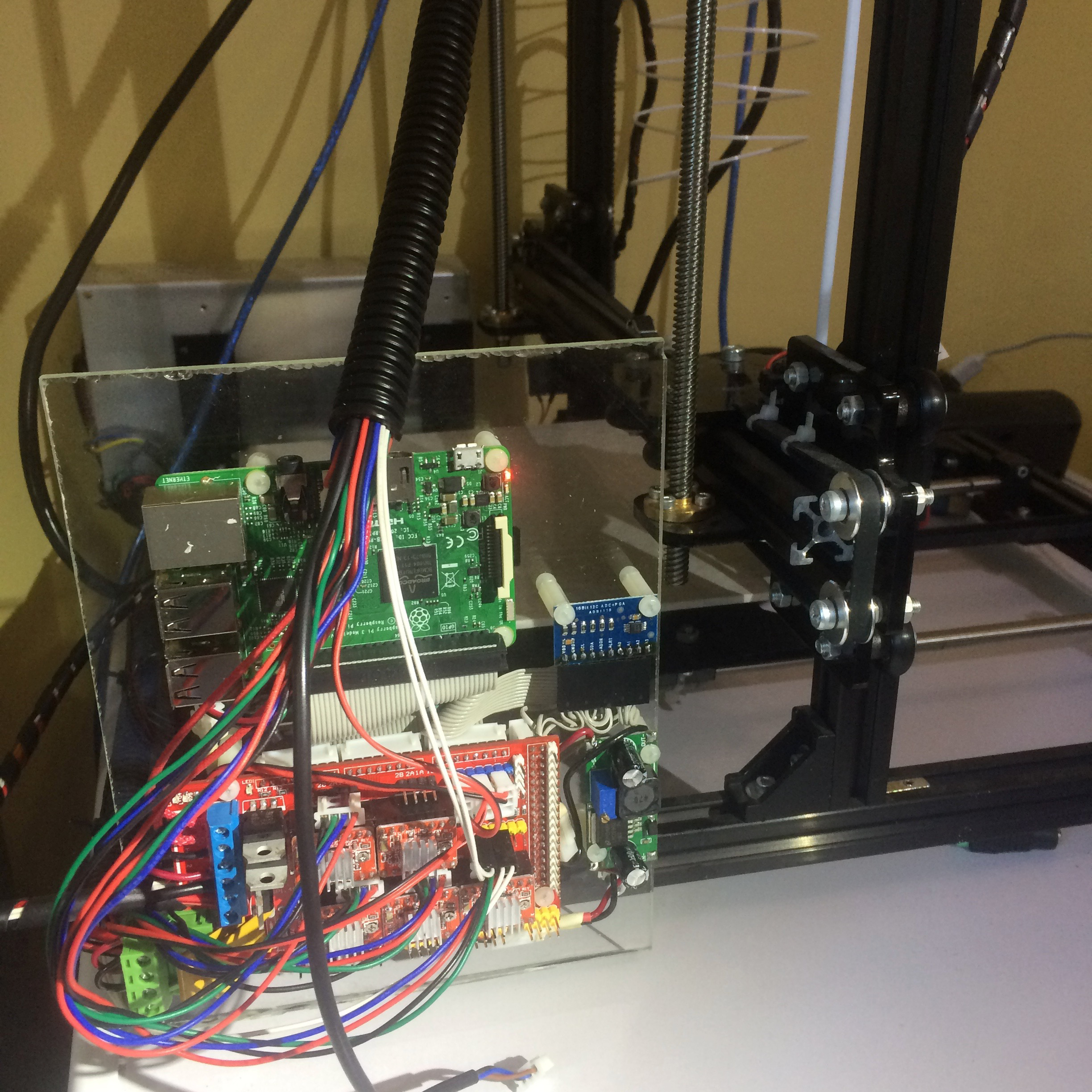
be used for this purpose. Full reference circuit diagram and photos of
assembled controller(click to enlarge):


Usage
Just clone this repo and run ./pycnc from repo root. It will start in
interactive terminal mode where gcode commands can be entered manually.
To run file with gcode commands, just run ./pycnc filename.
Optionally, pycnc can be installed. Run
bashsudo pip install .
in repo root directory to install it. After than, pycnc command will be added
to system path. To remove installation, just run:
bashsudo pip remove pycnc
Performance notice
Pure Python interpreter would not provide great performance for high speed
machines. Overspeeding setting causes motors mispulses and probably lose of
trajectory. According to my tests, Raspberry Pi 2 can handle axises with 400
pulses on mm with top velocity ~800 mm per min. There is always way out! :)
Use JIT Python implementation like PyPy. RPi2 can handle up to 18000 mm per
minute on the machine with 80 steps per millimeter motors with PyPy.
Note: Raspbian has outdated PyPy version in repositories(v4.0). Moreover v4.0
has issue with mmap module implementation. Use PyPy v5.0+, download it for
your OS from here.
PyPy installation:
bashwget wget https://bitbucket.org/pypy/pypy/downloads/pypy2-v5.7.1-linux-armhf-raspbian.tar.bz2 sudo mkdir /opt/pypy sudo tar xvf pypy2-v5.7.1-linux-armhf-raspbian.tar.bz2 --directory /opt/pypy/ --strip-components=1 sudo ln -s /opt/pypy/bin/pypy /usr/local/bin/pypy
Project architecture

Dependencies
Nothing for runtime. Just pure Python code.
For uploading to PyPi there is a need in pandoc:
bashsudo dnf install pandoc sudo pip install pypandoc
GCode simulation
Just a link, mostly for myself :), to a nice web software for gcode files
emulation (very helpful for manual creating of gcode files):
https://nraynaud.github.io/webgcode/
License
see LICENSE file.
Author
Nikolay Khabarov
Contributors
Showing top 1 contributor by commit count.

Related Repositories

OrcaSlicer/OrcaSlicer
G-code generator for 3D printers (Bambu, Prusa, Voron, VzBot, RatRig, Creality, etc.)

OctoPrint/OctoPrint
OctoPrint is the snappy web interface for your 3D printer!

slic3r/Slic3r
Open Source toolpath generator for 3D printers

maziggy/bambuddy
Your Bambu Lab. No Cloud. Your Rules. Self-hosted command center for Bambu Lab — from one A1 to a 40-printer farm.

luc-github/ESP3D
FW for ESP8266/ESP8285/ESP32 used with 3D printer

ad-si/awesome-3d-printing
A curated list of awesome 3D printing resources