Flutter screenutil
Flutter screen adaptation, font adaptation, get screen information
**A flutter plugin for adapting screen and font size.Let your UI display a reasonable layout on different screen sizes!** The project is written primarily in Dart, distributed under the Apache License 2.0 license, first published in 2018. It has gained significant community traction with 4,029 stars and 509 forks on GitHub. Key topics include: dart, flutter, scale, screen, screenutil.
flutter_screenutil



A flutter plugin for adapting screen and font size.Let your UI display a reasonable layout on different screen sizes!
Note: This plugin is still under development, and some APIs might not be available yet.
<p align="center"> <a href="https://afdian.com/a/zy124"><img width="200" src="https://pic1.afdiancdn.com/static/img/welcome/button-sponsorme.png" alt="zy0124"></a> </p> <p align="center"> <a href="https://www.buymeacoffee.com/zhuoyuanL" target="_blank"><img src="https://cdn.buymeacoffee.com/buttons/v2/default-green.png" alt="Buy Me A Coffee" style="height: 60px !important;width: 217px !important;"></a> </p>Usage
Add dependency
Please check the latest version before installation.
If there is any problem with the new version, please use the previous version
yamldependencies: flutter: sdk: flutter # add flutter_screenutil flutter_screenutil: ^{latest version}
Add the following imports to your Dart code
dartimport 'package:flutter_screenutil/flutter_screenutil.dart';
Properties
| Property | Type | Default Value | Description |
|---|---|---|---|
| designSize | Size | Size(360,690) | The size of the device screen in the design draft, in dp |
| builder | Function | null | Return widget that uses the library in a property (ex: MaterialApp's theme) |
| child | Widget | null | A part of builder that its dependencies/properties don't use the library |
| rebuildFactor | Function | default | Function that take old and new screen metrics and returns whether to rebuild or not when changes. |
| splitScreenMode | bool | false | support for split screen |
| minTextAdapt | bool | false | Whether to adapt the text according to the minimum of width and height |
| context | BuildContext | null | Get physical device data if not provided, by MediaQuery.of(context) |
| fontSizeResolver | Function | default | Function that specify how font size should be adapted. Default is that font size scale with width of screen. |
| responsiveWidgets | Iterable<String> | null | List/Set of widget names that should be included in rebuilding tree. (See How flutter_screenutil marks a widget needs build) |
| excludeWidgets | Iterable<String> | null | List/Set of widget names that should be excluded from rebuilding tree. |
| enableScaleWH | Function | null | Support enable scale width and height. |
| enableScaleText | Function | null | Support enable scale text. |
Note : You must either provide builder, child or both.
Rebuild list
Starting from version 5.9.0, ScreenUtilInit won't rebuild the whole widget tree, instead it will mark widget needs build only if:
- Widget is not a flutter widget (widgets are available in Flutter Docs)
- Widget does not start with underscore (
_) - Widget does not declare
SUmixin responsiveWidgetsdoes not contains widget name
If you have a widget that uses the library and doesn't meet these options you can either add SU mixin or add widget name in responsiveWidgets list.
Initialize and set the fit size and font size to scale according to the system's "font size" accessibility option
Please set the size of the design draft before use, the width and height of the design draft.
The first way (You should use it once in your app)
dartvoid main() => runApp(MyApp()); class MyApp extends StatelessWidget { const MyApp({Key? key}) : super(key: key); Widget build(BuildContext context) { //Set the fit size (Find your UI design, look at the dimensions of the device screen and fill it in,unit in dp) return ScreenUtilInit( designSize: const Size(360, 690), minTextAdapt: true, splitScreenMode: true, // Use builder only if you need to use library outside ScreenUtilInit context builder: (_ , child) { return MaterialApp( debugShowCheckedModeBanner: false, title: 'First Method', // You can use the library anywhere in the app even in theme theme: ThemeData( primarySwatch: Colors.blue, textTheme: Typography.englishLike2018.apply(fontSizeFactor: 1.sp), ), home: child, ); }, child: const HomePage(title: 'First Method'), ); } }
The second way:You need a trick to support font adaptation in the textTheme of app theme
Hybrid development uses the second way
not support this:
dartMaterialApp( ... //To support the following, you need to use the first initialization method theme: ThemeData( textTheme: TextTheme( button: TextStyle(fontSize: 45.sp) ), ), )
but you can do this:
dartvoid main() async { // Add this line await ScreenUtil.ensureScreenSize(); runApp(MyApp()); } ... MaterialApp( ... builder: (ctx, child) { ScreenUtil.init(ctx); return Theme( data: ThemeData( primarySwatch: Colors.blue, textTheme: TextTheme(bodyText2: TextStyle(fontSize: 30.sp)), ), child: HomePage(title: 'FlutterScreenUtil Demo'), ); }, )
dartclass MyApp extends StatelessWidget { Widget build(BuildContext context) { return MaterialApp( debugShowCheckedModeBanner: false, title: 'Flutter_ScreenUtil', theme: ThemeData( primarySwatch: Colors.blue, ), home: HomePage(title: 'FlutterScreenUtil Demo'), ); } } class HomePage extends StatefulWidget { const HomePage({Key key, this.title}) : super(key: key); final String title; _HomePageState createState() => _HomePageState(); } class _HomePageState extends State<HomePage> { Widget build(BuildContext context) { //Set the fit size (fill in the screen size of the device in the design) //If the design is based on the size of the 360*690(dp) ScreenUtil.init(context, designSize: const Size(360, 690)); ... } }
Note: calling ScreenUtil.init second time, any non-provided parameter will not be replaced with default value. Use ScreenUtil.configure instead
API
Enable or disable scale
dartWidget build(BuildContext context) { return ScreenUtilInit( enableScaleWH: ()=>false, enableScaleText: ()=>false, //... ); }
or
dartScreenUtil.enableScale(enableWH: () => false, enableText: () => false);
Pass the dp size of the design draft
dartScreenUtil().setWidth(540) (dart sdk>=2.6 : 540.w) //Adapted to screen width ScreenUtil().setHeight(200) (dart sdk>=2.6 : 200.h) //Adapted to screen height , under normal circumstances, the height still uses x.w ScreenUtil().radius(200) (dart sdk>=2.6 : 200.r) //Adapt according to the smaller of width or height ScreenUtil().setSp(24) (dart sdk>=2.6 : 24.sp) //Adapter font 12.sm //return min(12,12.sp) ScreenUtil().pixelRatio //Device pixel density ScreenUtil().screenWidth (dart sdk>=2.6 : 1.sw) //Device width ScreenUtil().screenHeight (dart sdk>=2.6 : 1.sh) //Device height ScreenUtil().bottomBarHeight //Bottom safe zone distance, suitable for buttons with full screen ScreenUtil().statusBarHeight //Status bar height , Notch will be higher ScreenUtil().textScaleFactor //System font scaling factor ScreenUtil().scaleWidth //The ratio of actual width to UI design ScreenUtil().scaleHeight //The ratio of actual height to UI design ScreenUtil().orientation //Screen orientation 0.2.sw //0.2 times the screen width 0.5.sh //50% of screen height 20.setVerticalSpacing // SizedBox(height: 20 * scaleHeight) 20.horizontalSpace // SizedBox(height: 20 * scaleWidth) const RPadding.all(8) // Padding.all(8.r) - take advantage of const key word EdgeInsets.all(10).w //EdgeInsets.all(10.w) REdgeInsets.all(8) // EdgeInsets.all(8.r) EdgeInsets.only(left:8,right:8).r // EdgeInsets.only(left:8.r,right:8.r). BoxConstraints(maxWidth: 100, minHeight: 100).w //BoxConstraints(maxWidth: 100.w, minHeight: 100.w) Radius.circular(16).w //Radius.circular(16.w) BorderRadius.all(Radius.circular(16)).w
Adapt screen size
Pass the dp size of the design draft((The unit is the same as the unit at initialization)):
Adapted to screen width: ScreenUtil().setWidth(540),
Adapted to screen height: ScreenUtil().setHeight(200), In general, the height is best to adapt to the width
If your dart sdk>=2.6, you can use extension functions:
example:
instead of :
dartContainer( width: ScreenUtil().setWidth(50), height:ScreenUtil().setHeight(200), )
you can use it like this:
dartContainer( width: 50.w, height:200.h )
Note
The height can also use setWidth to ensure that it is not deformed(when you want a square)
The setHeight method is mainly to adapt to the height, which is used when you want to control the height of a screen on the UI to be the same as the actual display.
Generally speaking, 50.w!=50.h.
dart//for example: //If you want to display a rectangle: Container( width: 375.w, height: 375.h, ), //If you want to display a square based on width: Container( width: 300.w, height: 300.w, ), //If you want to display a square based on height: Container( width: 300.h, height: 300.h, ), //If you want to display a square based on minimum(height, width): Container( width: 300.r, height: 300.r, ),
Adapter font
dart//Incoming font size(The unit is the same as the unit at initialization) ScreenUtil().setSp(28) 28.sp //for example: Column( crossAxisAlignment: CrossAxisAlignment.start, children: <Widget>[ Text( '16sp, will not change with the system.', style: TextStyle( color: Colors.black, fontSize: 16.sp, ), textScaleFactor: 1.0, ), Text( '16sp,if data is not set in MediaQuery,my font size will change with the system.', style: TextStyle( color: Colors.black, fontSize: 16.sp, ), ), ], )
Setting font does not change with system font size
APP global:
dartMaterialApp( debugShowCheckedModeBanner: false, title: 'Flutter_ScreenUtil', theme: ThemeData( primarySwatch: Colors.blue, ), builder: (context, widget) { return MediaQuery( ///Setting font does not change with system font size data: MediaQuery.of(context).copyWith(textScaleFactor: 1.0), child: widget, ); }, home: HomePage(title: 'FlutterScreenUtil Demo'), ),
Specified Text:
dartText("text", textScaleFactor: 1.0)
Specified Widget:
dartMediaQuery( // If there is no context available you can wrap [MediaQuery] with [Builder] data: MediaQuery.of(context).copyWith(textScaleFactor: 1.0), child: AnyWidget(), )
Example
To use second method run: flutter run --dart-define=method=2
Effect
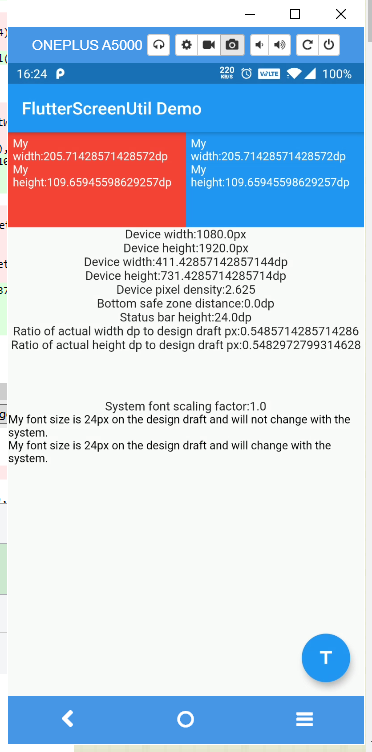
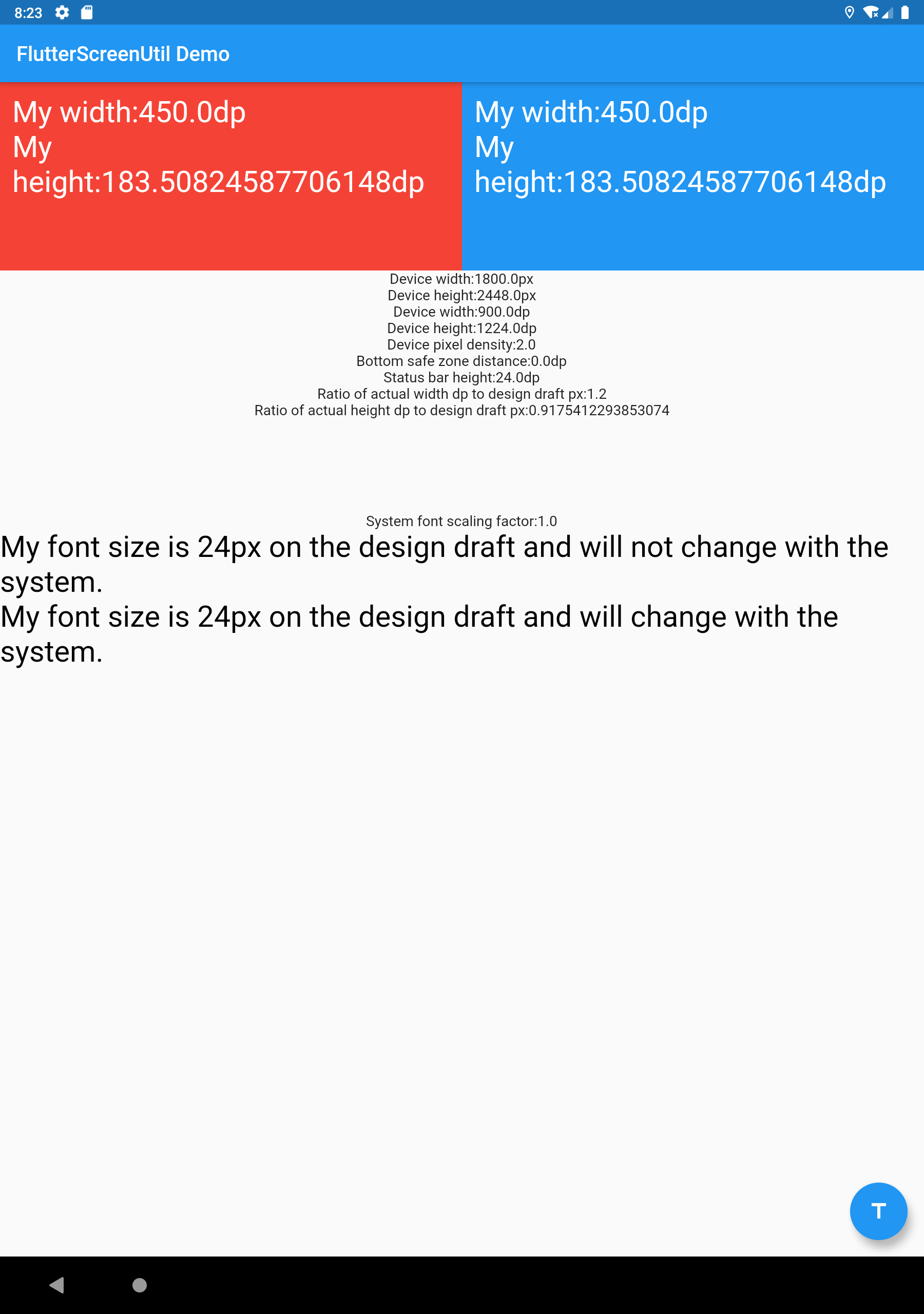
Update for Version 5.9.0 (Tests)
Reported as bug in #515
In version 5.9.0, to ensure compatibility and proper functioning of your tests, it is crucial to use the method tester.pumpAndSettle(); when conducting widget tests that depend on animations or a settling time to complete their state.
In the previous version, this step was not strictly necessary. However, to maintain consistency in your tests and avoid unexpected errors, it's strongly recommended incorporating await tester.pumpAndSettle(); in your widget tests if you are using version 5.9.0
Example usage:
darttestWidgets('Should ensure widgets settle correctly', (WidgetTester tester) async { await tester.pumpWidget( const MaterialApp( home: ScreenUtilInit( child: MyApp(), ), ), ); // Insertion of recommended method to prevent failures await tester.pumpAndSettle(); // Continue with your assertions and tests });
Contributors
Showing top 12 contributors by commit count.


