

Pig ci rails
Monitor your Ruby Applications metrics (Memory, SQL Requests & Request Time) as part of your test suite.
Monitor your Ruby Applications metrics (Memory, SQL Requests & Request Time) as part of your test suite. If your app exceeds an acceptable threshold it'll fail the test suite. The project is written primarily in Ruby, distributed under the MIT License license, first published in 2019. Key topics include: code-performance, gem, rspec, rspec-rails, ruby.
Deprecation notice
This gem is not longer actively maintained, I suggest using theses alternatives instead:
Sample Output
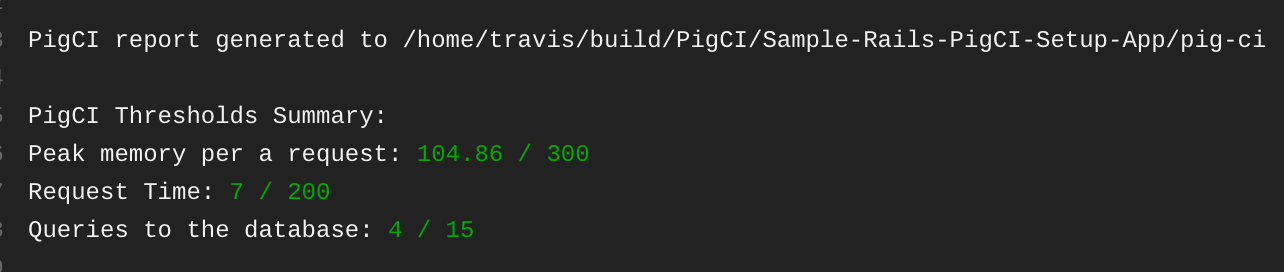
Installation
Add this line to your application's Gemfile:
rubygroup :test do gem 'pig-ci-rails' end
And then execute:
bash$ bundle
Or install it yourself as:
bash$ gem install pig-ci-rails
Usage
On it's own
ruby# In spec/rails_helper.rb require 'pig_ci' PigCI.start
Configuring thresholds
Configuring the thresholds will allow your test suite to fail in CI. You will need to configure the thresholds depending on your application.
ruby# In spec/rails_helper.rb require 'pig_ci' PigCI.start do |config| # Maximum memory in megabytes config.thresholds.memory = 350 # Maximum time per a HTTP request config.thresholds.request_time = 250 # Maximum database calls per a request config.thresholds.database_request = 35 end if RSpec.configuration.files_to_run.count > 1
Configuring other options
This gems was setup to be configured by passing a block to the PigCI.start method, e.g:
ruby# In spec/rails_helper.rb require 'pig_ci' PigCI.start do |config| config.option = 'new_value' # E.g. disable terminal summary output config.generate_terminal_summary = false # Rails caches repeated SQL queries, you might want to omit these from your report. config.ignore_cached_queries = true end # if RSpec.configuration.files_to_run.count > 1
You can see the full configuration options lib/pig_ci.rb.
Skipping individual tests
If you have a scenario where you'd like PigCI to not log a specific test, you can add the RSpec metadata pig_ci: true. For example:
rubyRSpec.describe "Comments", type: :request do # This test block will be not be tracked. describe "GET #index", pig_ci: false do it do get comments_path expect(response).to be_successful end end end
Framework support
Currently this gem only supports Ruby on Rails tested via RSpec.
Metric notes
Minor fluctuations in memory usage and request time are to be expected and are nothing to worry about. Though any large spike is a signal of something worth investigating.
Memory
By default, this gem will tell Rails to eager load your application on startup. This aims to help identify leaks, over just pure bulk.
You can disable this functionality by setting your configuration to be:
rubyrequire 'pig_ci' PigCI.start do |config| config.during_setup_eager_load_application = false end
Request Time
Often the first request test will be slow, as rails is loading a full environment & rendering assets. To mitigate this issue, this gem will make a blank request to your application before your test suite starts & compiling assets.
You can disable this functionality by setting your configuration to be:
rubyrequire 'pig_ci' PigCI.start do |config| config.during_setup_make_blank_application_request = false config.during_setup_precompile_assets = false end
Authors
- This gem was made by @MikeRogers0.
- It was originally inspired by oink, after it was used to monitor acceptance tests and it spotted a memory leak. It seemed like something that would be useful to have as part of CI.
- The HTML output was inspired by simplecov.
Development
After checking out the repo, run bin/setup to install dependencies. Then, run rake spec to run the tests. You can also run bin/console for an interactive prompt that will allow you to experiment.
To install this gem onto your local machine, run bundle exec rake install. To release a new version, update the version number in version.rb, and then run bundle exec rake release, which will create a git tag for the version, push git commits and tags, and push the .gem file to rubygems.org.
Contributing
Bug reports and pull requests are welcome on GitHub at PigCI/pig-ci-rails. This project is intended to be a safe, welcoming space for collaboration, and contributors are expected to adhere to the Contributor Covenant code of conduct.
Code of Conduct
Everyone interacting in the PigCI project’s codebases, issue trackers, chat rooms and mailing lists is expected to follow the code of conduct.
Contributors
Showing top 4 contributors by commit count.
![dependabot-preview[bot]](https://avatars.githubusercontent.com/in/2141?v=4)
![dependabot[bot]](https://avatars.githubusercontent.com/in/29110?v=4)
