

Garmin csv plan
A quick n' dirty way of "automating" training plans into Garmin Connect.
This is a PHP implementation of the great program that mgifos created [here](https://github.com/mgifos/quick-plan). The intentions of the program is to parse a CSV file and create workouts in Garmin Connect. It has the ability to: - Import workouts from a file into Garmin Connect - Prefix workouts with some text Ex.: Convert `14k, 4x 1.6k @TMP` TO `HANSON:14k, 4x 1.6k @TMP` - Add notes to workout steps Ex.: run: 225:00; Example notes here. ("Example notes here." will be inserted as a note to the... The project is written primarily in PHP, first published in 2020. Key topics include: csv, cycling, garmin, garmin-calendar, running.
Garmin Plan

This is a PHP implementation of the great program that mgifos created here.
The intentions of the program is to parse a CSV file and create workouts in Garmin Connect.
It has the ability to:
- Import workouts from a file into Garmin Connect
- Prefix workouts with some text Ex.: Convert
14k, 4x 1.6k @TMPTOHANSON:14k, 4x 1.6k @TMP - Add notes to workout steps Ex.: run: 225:00; Example notes here. ("Example notes here." will be inserted as a note to the workout step.)
- Schedule existing workouts based upon name: Ex.: Simple Google Sheets CSV Plan
- Delete workouts that are made based upon the CSV file
- ONLY delete workouts (Do not import anything)
- Schedule workouts on Garmin Connect calendar based upon a start OR end date
- Create swimming workouts by specifying the pool size as an option Ex.:
--pool-size=25yds - Import AND schedule multiple workouts per day Ex.: multi-events-day.csv
- Nest repeated steps Ex.: test-repeater.csv
Google Sheet Examples
Example
CONVERT THIS -
csvrunning: 2x4x2'@z5 - warmup: 20:00 - repeat: 2 - repeat: 4 - run: 1:00 @z5 - recover: 2:00 @z2 - recover: 4:00 - cooldown: 10:00
INTO
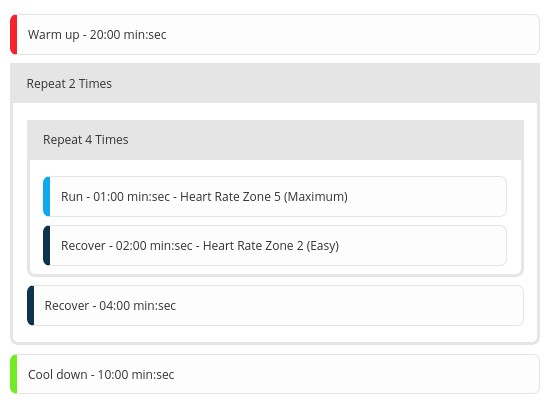
AND SCHEDULED ONTO
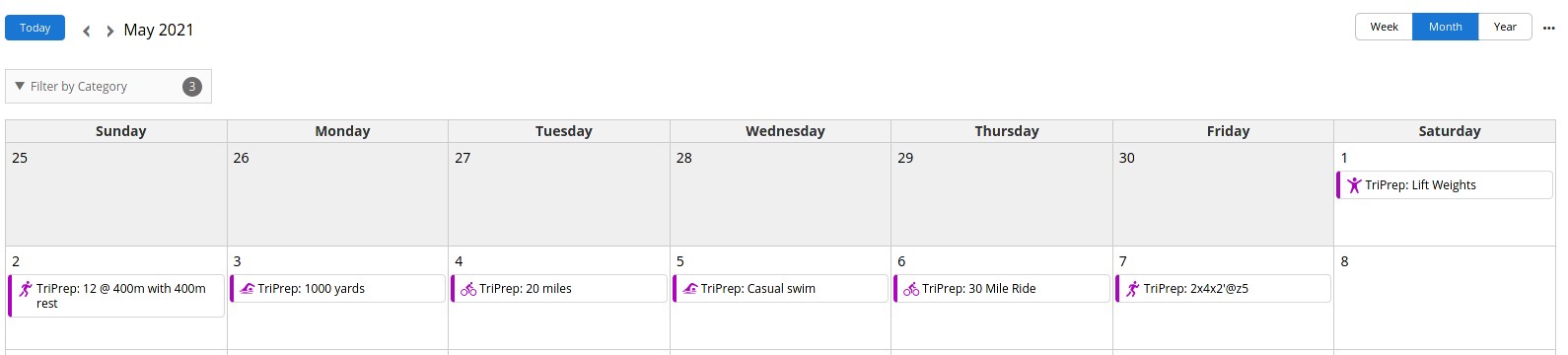
THROUGH THIS COMMAND -
shelldocker-compose exec garmin-dev bin/console garmin:workout tests/Resource/all-example.csv schedule -s '2021-05-01' -r 'TriPrep: '
Setting up the application to develop or run
- Download and install PHP and composer
- Run
composer install - Put your username and password in
.envfile - Run the application by
./bin/console garmin:workout
Running the program through Docker
- Copy the CSV file to the root directory (The file will then be copied to the Docker container)
docker-compose run garmin ./bin/console garmin:workout <file.csv>
Usage
Specify a CSV file to create and delete workouts in Garmin connect and schedule them on the Garmin calendar.
Examples
You can remove the -m and -p flag by copying .env to .env.local AND updating the file with your username and password under
GARMIN_USERNAME and GARMIN_PASSWORD.
GARMIN_AUTHENTICATION_FILE_PATH in the .env.local file can be used to change the default path for the garmin_credentials.json. By default it is routed
to the default Symfony project directory.
If you have pool workouts included in your plan, then you must specify the --pool-size option with the length of the pool. Ex.:
25yds
100m
shell# Basic example of importing workouts into Garmin bin/console garmin:workout <file.csv> -m <garmin_email> -p <garmin_password> # Import AND Schedule workouts into Garmin on January 1, 2020. End date is assumed based upon plan length. # End date can be specified with the -d flag. The same can be assumed with the start date. bin/console garmin:workout <file.csv> schedule -m <garmin_email> -p <garmin_password> -s '2020-01-01' # Same as above but delete all previous items first, import items and schedule them, and prefix with HANSON: before all workouts bin/console garmin:workout <file.csv> schedule -m <garmin_email> -p <garmin_password> -s '2020-01-01' -x -r 'HANSON:' # Only delete the previous workouts (notice capital "x") bin/console garmin:workout <file.csv> schedule -m <garmin_email> -p <garmin_password> -s '2020-01-01' -X -r 'HANSON:' # Do a mock run of importing workouts like above bin/console garmin:workout <file.csv> schedule -m <garmin_email> -p <garmin_password> -s '2020-01-01' --dry-run
Arguments
| Value | Description |
|---|---|
| <path-to-file.csv> | The RELATIVE CSV file path that you want to import into Garmin connect |
| import OR schedule | Specify import OR schedule to either just import the workouts into Garmin connect or import AND schedule the workouts. [default value: "import"] |
Options
| Short form | Long form | Description |
|---|---|---|
| -m | --email=EMAIL | Email to login to Garmin [default: ""] |
| -p | --password=PASSWORD | Password to login to Garmin [default: ""] |
| -P | --critical-power | This number is only used when a power target is specified as a % of critical power. If it is omitted then power targets must be specified in Watts directly. |
| -x | --delete | Delete previous workouts from CSV file |
| -X | --delete-only | NLY delete workouts that are contained in the CSV file |
| --dry-run | Dry run that will prevent anything from being created or deleted from Garmin | |
| --pool-size | The pool size specified for all workouts in the plan Ex.: 25yds OR 100m | |
| -r | --prefix=PREFIX | A prefix to put before every workout name/title |
| -s | --start=START | Date of the FIRST day of the first week of the plan Ex.: 2021-01-01 YYYY-MM-DD |
| -d | --end=END | Date of the LAST day of the last week of the plan Ex.: 2021-01-31 YYYY-MM-DD |
| -h | --help | Display help message |
| -q | --quiet | Do not output any message |
| -V | --version | Display this application version |
| --ansi | Force ANSI output | |
| --no-ansi | Disable ANSI output | |
| -n | --no-interaction | Do not ask any interactive question |
| -e | --env=ENV | The Environment name. [default: "dev"] |
| --no-debug | Switches off debug mode. | |
| -v OR -vv OR -vvv | --verbose | Increase the verbosity of messages: 1 for normal output, 2 for more verbose output and 3 for debug |
Developing and running the program through Docker
-
Start by building and running the docker file -
docker-compose up garmin-dev -
Install dependencies -
docker-compose exec garmin-dev composer installa) Adding dependencies or removing dependencies can be done through
docker-compose exec garmin-dev composer require <package>b) Updating dependencies csn be done through
docker-compose exec garmin-dev composer update -
Run the docker install by running
docker-compose up garmin-dev(This runs the docker container and keeps it up) -
Execute a command by running
docker-compose exec garmin-dev bin/console garmin:workout ...
Running PHPUnit tests
If you want to run PHPUnit tests, then you can easily run it through the dev build.
- Follow the above to develop and run the program through Docker.
- Run the following -
docker-compose exec garmin-dev vendor/bin/phpunit
Overriding Docker
Create a new file in the root called docker-compose.override.yaml.
yamlversion: '3.3' services: garmin-dev: environment: XDEBUG_CONFIG: "client_host=<local_IP>"
Debugging the application through PhpStorm
-
If running linux, then you will need to modify the
docker-compose.yamlfile and add your IP in place ofhost.docker.internal -
Go to PhpStorm -> Settings -> Languages & Frameworks -> PHP -> Servers
a) Click "+"
b) Name docker-cli (Same as serverName under PHP_IDE_CONFIG environment variable)
c) Host _
d) Default 80
e) Debugger Xdebug
f) Check the checkbox next to "Use path mappings"
g) Modify the absolute path on the server to /var/www/html
Contributors
Showing top 4 contributors by commit count.


Related Repositories

AykutSarac/jsoncrack.com
✨ Innovative and open-source visualization application that transforms various data formats, such as JSON, YAML, XML and CSV into interactive graphs.

SheetJS/sheetjs
📗 SheetJS Spreadsheet Data Toolkit -- New home https://git.sheetjs.com/SheetJS/sheetjs

sinaptik-ai/pandas-ai
Chat with your database or your datalake (SQL, CSV, parquet). PandasAI makes data analysis conversational using LLMs and RAG.

modood/Administrative-divisions-of-China
中华人民共和国行政区划:省级(省份)、 地级(城市)、 县级(区县)、 乡级(乡镇街道)、 村级(村委会居委会) ,中国省市区镇村二级三级四级五级联动地址数据。

mikefarah/yq
yq is a portable command-line YAML, JSON, XML, CSV, TOML, HCL and properties processor

exceljs/exceljs
Excel Workbook Manager