Raylib nuklear
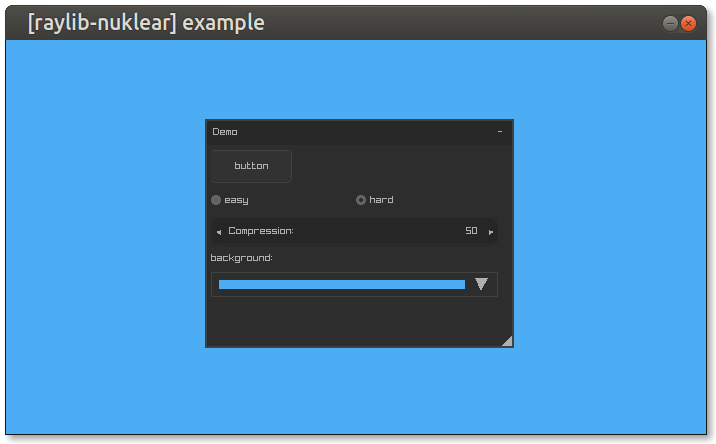
Nuklear immediate mode GUI for raylib
Use the [Nuklear](https://github.com/Immediate-Mode-UI/Nuklear) immediate mode cross-platform GUI library in [raylib](https://www.raylib.com/). The project is written primarily in C, distributed under the zlib License license, first published in 2020. Key topics include: nuklear, raylib.
raylib-nuklear

Use the Nuklear immediate mode cross-platform GUI library in raylib.
Usage
- Since this is a header-only library, you must first define
RAYLIB_NUKLEAR_IMPLEMENTATIONin one of your.cfiles...c#define RAYLIB_NUKLEAR_IMPLEMENTATION - Include the
raylib-nuklear.hfile...c#include "path/to/raylib-nuklear.h" - Use
InitNuklear(fontSize)orInitNuklearEx(font, fontSize)to create the nuklear context...cstruct nk_context *ctx = InitNuklear(10); - Build your Nuklear GUI through the standard Nuklear API
- Update the input for the GUI using
UpdateNuklear(ctx) - Render the context using
DrawNuklear(ctx) - Destroy the nuklear context with
UnloadNuklear(ctx)
Example
c#define RAYLIB_NUKLEAR_IMPLEMENTATION #include "raylib-nuklear.h" int main() { InitWindow(640, 480, "raylib-nuklear example"); // Create the Nuklear Context int fontSize = 10; struct nk_context *ctx = InitNuklear(fontSize); while (!WindowShouldClose()) { // Update the Nuklear context, along with input UpdateNuklear(ctx); // Nuklear GUI Code // https://github.com/Immediate-Mode-UI/Nuklear/wiki/Window if (nk_begin(ctx, "Nuklear", nk_rect(100, 100, 220, 220), NK_WINDOW_BORDER|NK_WINDOW_MOVABLE|NK_WINDOW_CLOSABLE)) { nk_layout_row_static(ctx, 50, 150, 1); if (nk_button_label(ctx, "Button")) { // Button was clicked! } } nk_end(ctx); // Render BeginDrawing(); ClearBackground(RAYWHITE); // Render the Nuklear GUI DrawNuklear(ctx); EndDrawing(); } // De-initialize the Nuklear GUI UnloadNuklear(ctx); CloseWindow(); return 0; }
API
cstruct nk_context* InitNuklear(int fontSize); // Initialize the Nuklear GUI context using raylib's font struct nk_context* InitNuklearEx(Font font, float fontSize); // Initialize the Nuklear GUI context, with a custom font bool IsNuklearValid(struct nk_context* ctx); // Check if the Nuklear context is valid Font LoadFontFromNuklear(int fontSize); // Loads the default Nuklear font void UpdateNuklear(struct nk_context* ctx); // Update the input state and internal components for Nuklear void UpdateNuklearEx(struct nk_context* ctx, float deltaTime); // Update the input state and internal components for Nuklear, with a custom frame time void DrawNuklear(struct nk_context* ctx); // Render the Nuklear GUI on the screen void UnloadNuklear(struct nk_context* ctx); // Deinitialize the Nuklear context struct nk_color ColorToNuklearColor(Color color); // Convert a raylib Color to a Nuklear color object struct nk_colorf ColorToNuklearColorF(Color color); // Convert a raylib Color to a Nuklear floating color struct Color NuklearColorToColor(struct nk_color color); // Convert a Nuklear color to a raylib Color struct Color NuklearColorFToColor(struct nk_colorf color); // Convert a Nuklear floating color to a raylib Color struct Rectangle NuklearRectToRectangle(struct nk_context* ctx, struct nk_rect rect); // Convert a Nuklear rectangle to a raylib Rectangle struct nk_rect RectangleToNuklearRect(struct nk_context* ctx, Rectangle rect); // Convert a raylib Rectangle to a Nuklear Rectangle struct nk_image TextureToNuklearImage(Texture tex); // Get a Nuklear image from a Texture void SetNuklearScaling(struct nk_context * ctx, float scaling); // Sets the scaling for the given Nuklear context float GetNuklearScaling(struct nk_context * ctx); // Retrieves the scaling of the given Nuklear context
See the Nuklear API documenation for more how to use Nuklear.
Comparision
There are a few other graphical user interface solutions out there for use with raylib. raygui, Nuklear, and ImGui with rlImGui, are popular choices. It's best to choose the GUI that fits your needs best. Generally, if you're unsure which GUI to use with raylib, use raygui.
| Nuklear | raygui | rlImGui | |
|---|---|---|---|
| Only C | :white_check_mark: | :white_check_mark: | C++ |
| Minimal Dependencies | :white_check_mark: | :white_check_mark: | :x: |
| Automatic Layouts | :white_check_mark: | :x: | :white_check_mark: |
| Advanced Controls | :white_check_mark: | :x: | :white_check_mark: |
| Documentation | :white_check_mark: | :x: | :white_check_mark: |
| Industry Standard | :x: | :x: | :white_check_mark: |
| Easy to Use | :x: | :white_check_mark: | :x: |
Development
While this project uses CMake, CMake is not required in order to use raylib-nuklear.
git submodule update --init
mkdir build
cd build
cmake ..
make
./example/raylib-nuklear-example
make test
License
raylib-nuklear is licensed under an unmodified zlib/libpng license, which is an OSI-certified, BSD-like license that allows static linking with closed source software. Check LICENSE for further details.
Contributors
Showing top 10 contributors by commit count.



Related Repositories

vurtun/nuklear
A single-header ANSI C gui library

Immediate-Mode-UI/Nuklear
A single-header ANSI C immediate mode cross-platform GUI library

ghaerr/microwindows
The Nano-X Window System

keharriso/love-nuklear
Lightweight immediate mode GUI for LÖVE games

snuk182/nuklear-rust
The bindings to the Nuklear 2D immediate GUI library.

zecruel/CadZinho
Minimalist computer aided design (CAD) software