

PicView
Fast, free and customizable picture viewer
PicView is a fast, free and fully customizable picture viewer for macOS and Windows 10/11. It supports virtually all image file types, including _(animated)_ `WEBP`, _(animated)_ `GIF`, `SVG`, `AVIF`, `HEIC`, `PSD` and many others. The project is written primarily in C#, distributed under the Other license, first published in 2017. It has gained significant community traction with 3,297 stars and 177 forks on GitHub. Key topics include: avalonia, batch-processing, comics-reader, convert-images, csharp.
PicView is a fast, free and fully customizable picture viewer for macOS and Windows 10/11. It supports virtually all image file types, including (animated) WEBP, (animated) GIF, SVG, AVIF, HEIC, PSD and many others.
Enjoy a clean, free, and fast experience with no annoying pop-ups, and zero tracking. It works out of the box — or you can customize it to your needs.
<p align=center> <a href="https://github.com/Ruben2776/PicView/releases"> <img alt="Downloads shield" src="https://img.shields.io/github/downloads/Ruben2776/PicView/total?color=%23007ACC&label=Total%20downloads&style=flat-square"> </a> <a href="https://github.com/Ruben2776/PicView/releases"> <img alt="Downloads shield" src="https://img.shields.io/github/downloads/Ruben2776/PicView/latest/total?color=%23007ACC&label=Latest%20downloads&style=flat-square"> </a> <a href="https://github.com/Ruben2776/PicView/blob/master/LICENSE.txt"> <img alt="GPL v3 License" src="https://img.shields.io/badge/license-GPLv3-green.svg?maxAge=3600&style=flat-square"> </a> <img alt="Windows OS" src="https://img.shields.io/badge/OS-Windows%2010/11%2064%20bit-00adef.svg?maxAge=3600&style=flat-square"> <img alt="macOS" src="https://img.shields.io/badge/OS-macOS-8A2BE2.svg?maxAge=3600&style=flat-square"> </p>Downloads


-blueviolet?style=flat-square&logo=apple&logoColor=fff)

Latest releases at PicView.org
Scoop:
cmdscoop bucket add extras; scoop install extras/picview
Winget:
cmdwinget install picview
Homebrew:
cmdbrew install picview
Mirrors
uptodown <br>
FossHub <br>
SourceForge <br>
Major Geeks
If you like PicView, consider giving it a star or a like on AlternativeTo!
<br>💙 Donate
Developing PicView has ongoing costs (website hosting, Apple Developer license, AI subscription, etc.).
If you enjoy PicView, please consider supporting its development:

<a href="https://www.paypal.com/paypalme/Ruben2776"><img src="https://img.shields.io/badge/PayPal-grey?logo=paypal"><a/>
<a href="https://github.com/sponsors/Ruben2776"><img src="https://img.shields.io/github/sponsors/Ruben2776"><a/>
Features and screenshots
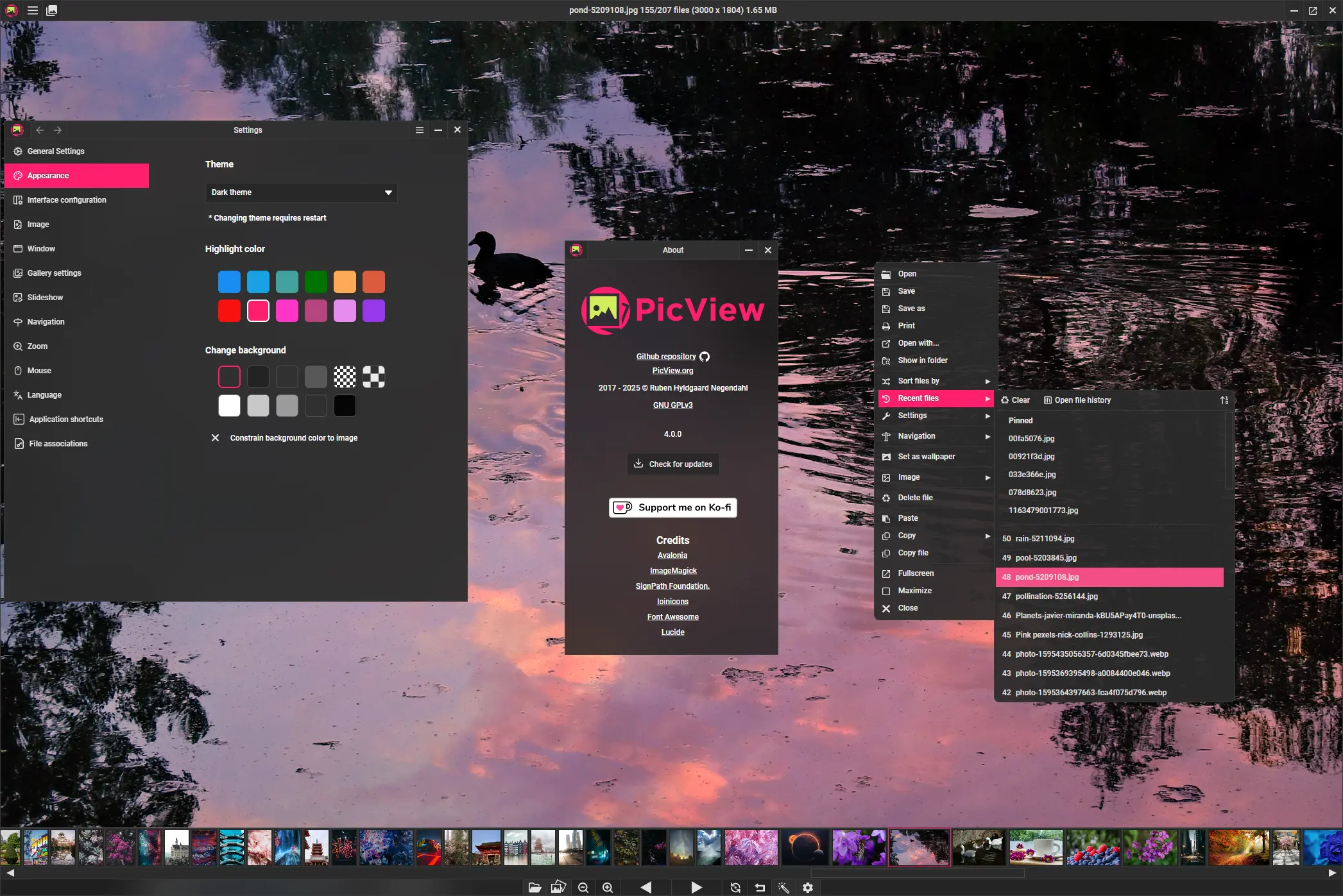
UI overview with bottom gallery.
<br>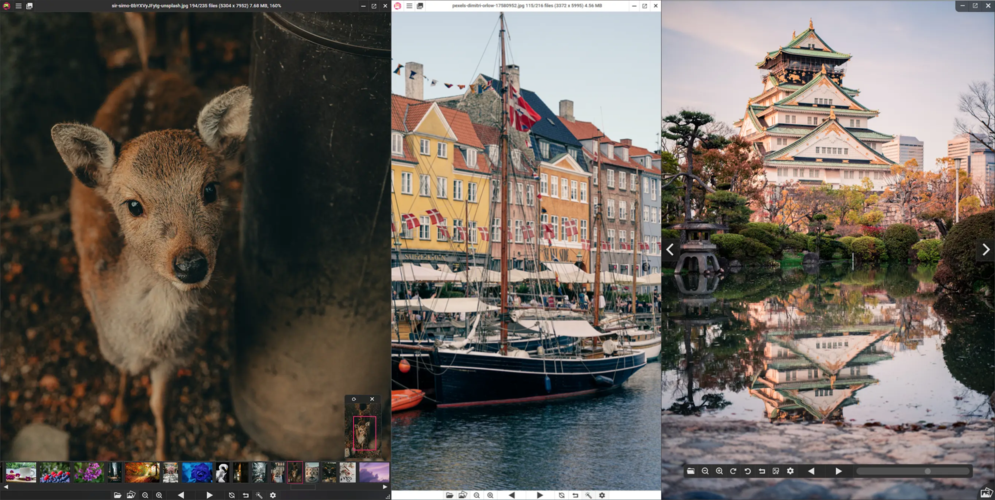
Switch between a dark and a light theme and toggle between hiding the UI.
<br> <h3 align="center"> Image Info Window </h3> <h4 align="center"> <img src="https://picview.org/assets/screenshots/exifwindow/450/Image-Info-exif-dark-theme-4.0.webp" /> </h4>Perform operations such as renaming, file conversion, copying, compressing, resizing, adding it to the recycle bin and editing the EXIF image rating.
You can change the image size by editing the width and/or height textboxes. To resize by a percentage, simply add the % symbol after the value.
If the GPS coordinates are saved on the image, you can click the Google or Bing buttons to open the respective maps at the GPS coordinates
<br> <h3 align="center"> Image Gallery </h3> <h1 align="center"> <img src="https://picview.org/assets/screenshots/gallery/PicView3.0-galleryAnimation.webp" /> </h1>Press G to open or close the image gallery
Navigate the gallery with the arrow keys or W,A,S,D and load the selected image with Enter or the E key.
The bottom gallery can be turned on or off
Quickly crop image by pressing C. Hold Shift for square selection.
Convert/Optimize all your pictures
All selected files will be sent to Output folder. The default name for the output folder will be the localized translation for Batch resize.
The `Convert to dropdown option allows you to convert all the files to a popular format.
The Compression dropdown option allows you to compress the files, either without losing quality or sacrifing some quality for greater reduced file size.
The Quality dropdown option allows you to change quality of supported file types. The higher the Quality setting, the more detail is preserved in the image, but the larger the file size.
The Resize dropdown option allows you to resize the picture by height, width and percentage while keeping the aspect ratio of the image.
Generate thumbnails
The thumb tab item allows you to generate up to 7 thumbnails.
They can be resized by height, width and percentage while keeping the aspect ratio.
Each thumbnail will be sent to its own folder. Each folder will have a suggested folder name from small to medium, large etc., in an ascending order
<br>Renaming

Rename or move files in the title bar by pressing F2 or right-clicking it.
Changing the file extension will convert the image to the respective format.
File support
<br>
- Common: .jpg .jpeg .jpe .png .bmp .tif .tiff .gif .ico .jfif .webp .svg .svgz
- Advanced: .psd .psb .xcf .jxl .heic .heif .jp2 .hdr .tga .dds
- RAW: .3fr .arw .cr2 .cr3 .crw .dcr .dng .erf .kdc .mdc .mef .mos .mrw .nef .nrw .orf .pef .raf .raw .rw2 .srf .x3f
- Other: .pgm .hdr .cut .exr .dib .emf .wmf .wpg .pcx .xbm .xpm .wbmp
Shortcuts
You can view and change keyboard shortcuts by opening the Keybindings window by pressing K.
Alternatively, they are also listed at PicView.org.
Technical overview
PicView is built in C# .NET using Avalonia cross-platform XAML UI framework.
All builds are compiled using NativeAOT (with trimming), resulting in a fully self-contained native executable.
Using Cysharp’s ZLinq and ZString for zero allocation and high performance, and R3 for high-performance ViewModel binding and event streams.
Magick.NET is used for its rich file support, image editing, and information capabilities.
Contributions


Building: <br>
Open and run the solution in Visual Studio or Rider.
If you're using arm64 hardware, make sure to change the platform target to your CPU architecture in the project properties, as well as changing the Magick.NET NuGet packages to match.
Contributions are welcome! Check out the Help wanted label to get started.
Improvements to the current code or bug fixes are also welcome!
Translators/Languages
Simplified Chinese by <a href="https://github.com/Crystal-RainSlide">Crystal-RainSlide</a>, <a href="https://github.com/jasoneri">jasoneri</a><br>
Traditional Chinese by <a href="https://github.com/wcxu21">wcxu21</a>, <a href="https://github.com/jasoneri">jasoneri</a><br>
Spanish by <a href="https://github.com/lk-KEVIN">lk.KEVIN</a> <i>(help wanted to update translation)</i><br>
Korean by <a href="https://github.com/VenusGirl">VenusGirl</a><br>
German by <a href="https://github.com/Brotbox">Brotbox</a>, uDEV2019<br>
Polish by <a href="https://github.com/YourSenseiCreeper">YourSenseiCreeper</a><br>
French by <a href="https://www.challenger-systems.com/2021/11/picview-156.html">Sylvain LOUIS</a> <br>
Italian by <a href="https://github.com/franpoli">franpoli</a> <br>
Russian by <a href="https://github.com/andude10">andude10</a> <br>
Romanian by <a href="https://crowdin.com/profile/lmg">M. Gabriel Lup</a> <br>
Swedish by <a href="https://github.com/sparmark">Stefan Parmark</a> <br>
Brazilian Portuguese by <a href="https://github.com/andercard0">Anderson Cardoso</a> <br>
Dutch by <a href="https://github.com/Lien5">Lien5</a> <br>
Japanese by <a href="https://github.com/coolvitto">coolvitto</a> <br>
Hebrew by <a href="https://github.com/Y-PLONI">Y-PLONI</a> <br>
Hungarian by <a href="https://github.com/JohnFowler58">JohnFowler58</a> <br>
Turkish by <a href="https://github.com/odest">Dest</a><br>
Slovenian by <a href="https://github.com/anderlli0053">Andrew Poženel</a><br>
Serbian by <a href="https://github.com/ozzii">ozzii</a>, <a href="https://github.com/rammba">Radoš Milićev</a><br>
English and Danish by <a href="https://github.com/Ruben2776">Ruben2776</a><br>
Looking for translators!
If you want to help translate another language or update/improve a current one and be listed here, please take a look at
https://github.com/Ruben2776/PicView/issues/13.

Code Signing Policy
All releases are built via GitHub Actions, virus scanned and digitally signed.
Free code signing is provided by SignPath.io, certificate by SignPath Foundation.
Privacy Policy
PicView does not collect, send, or receive any user data.
Contributors
Showing top 12 contributors by commit count.


![dependabot[bot]](https://avatars.githubusercontent.com/in/29110?v=4)





Related Repositories

ShareX/ShareX
ShareX is a free and open-source application that enables users to capture or record any area of their screen with a single keystroke. It also supports uploading images, text, and various file types to a wide range of destinations.

AvaloniaUI/Avalonia
Develop Desktop, Embedded, Mobile and WebAssembly apps with C# and XAML. The future of .NET UI

BeyondDimension/SteamTools
🛠「Watt Toolkit」是一个开源跨平台的多功能 Steam 工具箱。

d2phap/ImageGlass
🏞 A fast, open-source, modern image viewer for 90+ formats – including WEBP, GIF, SVG, AVIF, JXL, HEIC and more – built for smooth browsing across Windows, macOS, and Linux.

YSGStudyHards/DotNetGuide
🌈【C#/.NET/.NET Core学习、工作、面试指南】记录、收集和总结C#/.NET/.NET Core基础知识、学习路线、开发实战、编程技巧练习、学习视频、文章、书籍、项目框架、社区组织、开发必备工具、技术前沿周刊、常见面试题、面试须知、简历模板、人才招聘、以及自己在学习和工作中的一些微薄见解。希望能和大家一起学习,共同进步。如果本知识库能为您提供帮助,别忘了给予支持哦(关注、点赞、分享)💖。

LykosAI/StabilityMatrix
Multi-Platform Package Manager for Stable Diffusion