

Pios discord theme
A SUPERHOT piOS inspired Discord theme.
[dark]: https://saltssaumure.github.io/pios-discord-theme/preview/dark.png [light]: https://saltssaumure.github.io/pios-discord-theme/preview/light.png [cosy]: https://saltssaumure.github.io/pios-discord-theme/preview/cosy.png [compact]: https://saltssaumure.github.io/pios-discord-theme/preview/compact.png The project is written primarily in SCSS, distributed under the GNU Affero General Public License v3.0 license, first published in 2019. Key topics include: betterdiscord, betterdiscord-theme, discord-theme, replugged, replugged-theme.
piOS Discord Theme




A customisable SUPERHOT piOS inspired Discord theme.
| Dark mode | Light mode |
|---|---|
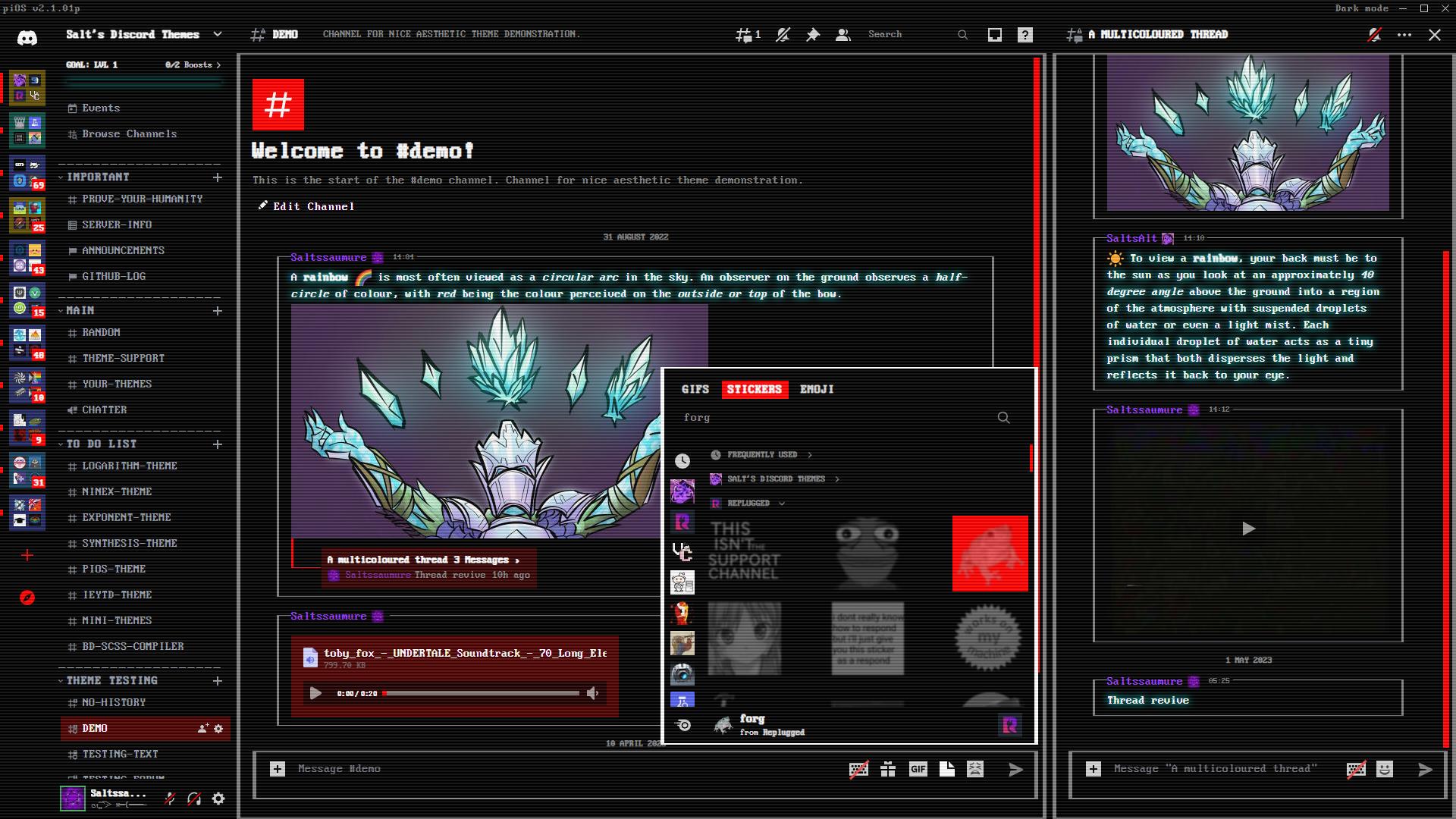 | 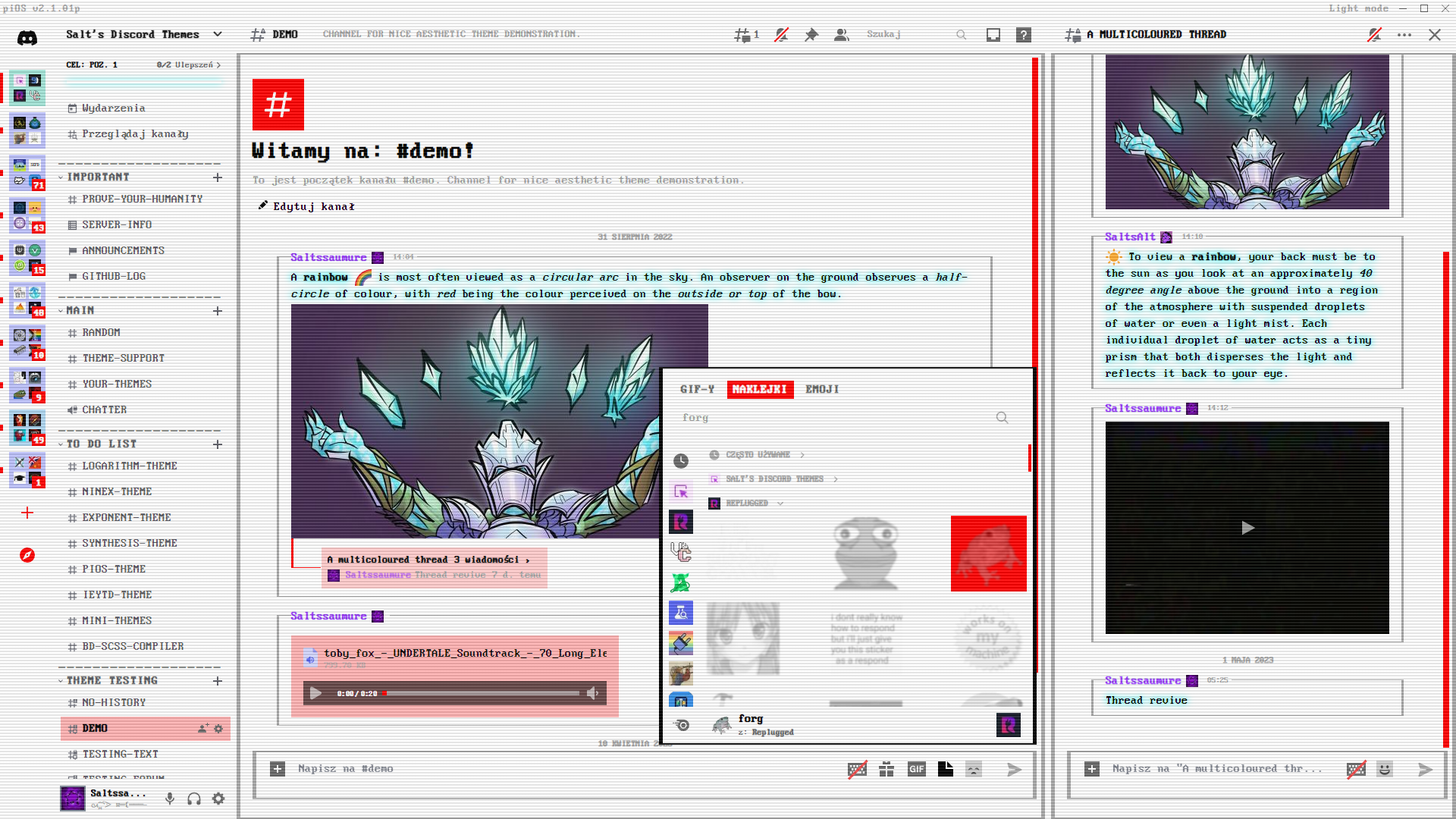 |
Installation
BetterDiscord
<details> <summary>Click to expand</summary>- Download
piOS.theme.css: - Place the file in the themes folder:
Settings>BetterDiscord>Themes>Open Themes Folder
- Toggle on the theme card.
Replugged
<details> <summary>Click to expand</summary>Automatic
- Click to install:
Manual
- Download
net.saltssaumure.piOS.asar: - Place the file in the themes folder:
Settings>Replugged>Themes>Open Themes Folder
- Click
Load Missing Themesand toggle on the theme card.
Vencord
<details> <summary>Click to expand</summary>Local
- Download
piOS.theme.css: - Place the file in the themes folder:
Settings>Vencord>Themes>Local Themes>Open Themes Folder
- Click
Load missing Themesand toggle on the theme card.
Online
- Paste the link in
Settings>Vencord>Themes>Online Themes:https://saltssaumure.github.io/pios-discord-theme/piOS.theme.css
Customisation
To switch between Cosy and Compact mode, go to the Discord settings:
Settings>App Settings>Appearance>Message Display.
| Cosy mode | Compact mode |
|---|---|
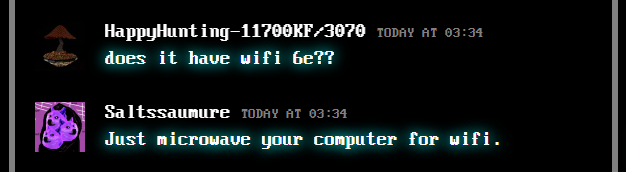 | 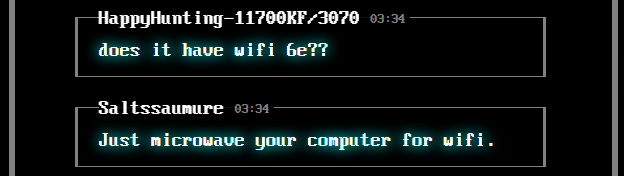 |
To edit the following variables, follow the instructions for your client mod.
| Description | Variable name | Valid values | Default value | Demonstration |
|---|---|---|---|---|
| Glow hue | --pios-glow-hue | Any number. | 180 (cyan) | |
| Glow intensity | --pios-glow-intensity | A number between 0 and 1. | 1 (maximum brightness) | 1 chat, icon / 0 chat, icon |
| Compact message spacing | --pios-spacing | A number 0 or above. | 1 (default spacing) | 1 spacing / 2.5 spacing |
| Colour accent hue | --pios-accent-hue | Any number. | 0 (red) | 270 (purple) colour picker, screenshot |
| Title bar text | --pios-title-text | Any quoted text. | "piOS v2.1.01p" | Screenshot |
| Scanline stripes on/off | --crt-stripe | block (on) or none (off). | block | Screenshot |
| ⛐ Moving scanline on/off | --crt-scanline | block (on) or none (off). | block | Video |
| ⚠ Screen flicker on/off | --crt-flicker | flicker (on) or none (off). | none | |
| Background colour | --pios-background-color | Any colour. | #000000 (dark) / #FFFFFF (light) | |
| Bright foreground colour | --pios-bright-color | Any colour. | #FFFFFF (dark) / #000000 (light) | |
| Middle foreground colour | --pios-middle-color | Any colour. | #D3D3D3 (dark) / #696969 (light) | |
| Dim foreground colour | --pios-dim-color | Any colour. | #808080 (dark) / #A9A9A9 (light) |
- ⛐ This effect is performance-intensive.
- ⚠ This is a fast flickering effect and may not be suitable for those with photosensitive epilepsy.
BetterDiscord
<details> <summary>Click to expand</summary>- Open
Settings>BetterDiscord>Themes. - Click the pencil icon on this theme.
- Edit the variable values and save changes.
Replugged
<details> <summary>Click to expand</summary>- Enable
Automatically Apply Quick CSSinSettings>Replugged>General. - Open
Settings>Replugged>Quick CSS. - Copy and paste lines 15-20 of
piOS.theme.css. - Edit the variable values and save.
Vencord
<details> <summary>Click to expand</summary>Local
Open Themes FolderinSettings>Vencord>Themes>Local Themes- Open
piOS.theme.csswith your favourite text editor. - Edit the variable values and save.
Online
Enable Custom CSSinSettings>Vencord>Vencordand clickOpen QuickCSS File.- Copy and paste lines 15-20 of
piOS.theme.css. - Edit the variable values.
License
Copyright (c) 2019-2024 Saltssaumure
This theme is free software: you can redistribute it and/or modify it under the terms of the GNU Affero General Public License as published by the Free Software Foundation, either version 3 of the License, or (at your option) any later version.
This theme is distributed in the hope that it will be useful, but WITHOUT ANY WARRANTY; without even the implied warranty of MERCHANTABILITY or FITNESS FOR A PARTICULAR PURPOSE. See the GNU Affero General Public License for more details.
Credits
Themes
- RadialStatus by DiscordStyles (Gibbu) - MIT license
- Squared by MiniDiscordThemes (Saltssaumure) - MIT license
- CRT by MiniDiscordThemes (Saltssaumure) - MIT license
Fonts
- Perfect DOS VGA 437 by Zeh Fernando - "The license is this: this font is free to use in whatever you want."
- Fixedsys Excelsior by bathos and kika - Public domain / CC0
Questions or suggestions?
- Post an issue on GitHub.
- Post in
#theme-supporton my support server.
Contributors
Showing top 1 contributor by commit count.

Related Repositories

BetterDiscord/BetterDiscord
Better Discord enhances Discord desktop app with new features.

mwittrien/BetterDiscordAddons
A series of plugins and themes for BetterDiscord.
BetterDiscord/Installer
A simple standalone program which automates the installation, removal and maintenance of BetterDiscord.

refact0r/midnight-discord
a dark, customizable discord theme.

Jiiks/BetterDiscordApp
Better Discord App enhances Discord desktop app with new features.

riolubruh/YABDP4Nitro
Yet Another BetterDiscord Plugin for Nitro features. Unlock screensharing modes, use cross-server and gif emotes and much more!