

Saturn datepicker
Angular Material Datepicker with range selection
This is patched version of Material Datepicker for Angular with range selection support. I created this repository and this package due to it takes a lot of time to contribute to material2 repository: [Issue #4763 in material2 repo](https://github.com/angular/material2/issues/4763) from 2017-present. The project is written primarily in TypeScript, distributed under the MIT License license, first published in 2018. Key topics include: angular, angular-material, angular8, date-picker-range, datepicker.
Material range datepicker
Material datepicker with range support
What is this?
This is patched version of Material Datepicker for Angular with range selection support.
I created this repository and this package due to it takes a lot of time to contribute to material2 repository:
Issue #4763 in material2 repo from 2017-present.<br>
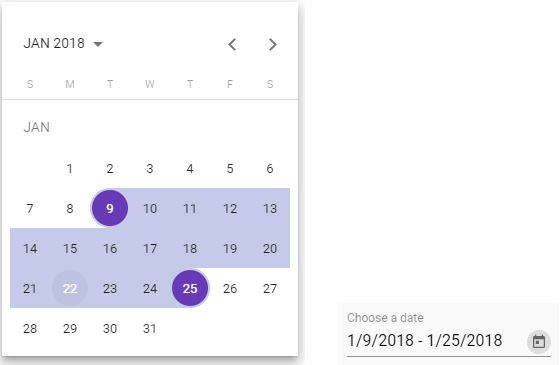
DEMO with extra features examples
Advantages
- You can change order of views: month, year and multi-year
- You can keep calendar to be opened after selecting a date (in singular range mode) or a range of dates (in range mode)
- You can use all original material attributes: min, max, formControl and others
Changelog
8.0.6
Fixed randomly selected date when using rangeHoverEffect = false and changing between months
8.0.5
Works with angular 9.0
8.0.4
Fix building process
8.0.2
Added option to switch off rangeHoverEffect
8.0.1
Fixed loading issue on es2015 targets
8.0.0
Updated to 8.2.0 material code
7.4.0
Inline usage of calendar. See demo.
Thanks to @beyondsanity for this feature
7.3.0
Introducing footer component for calendar. See demo for example usage.
Thanks @paullryan for this feature
7.2.1
Update to datepicker material 7.3.1
7.2.0
Select first date on close feature
7.1.0
Range selection have a preview now.
6.1.0
Merged #31
- Add option to sort views when clicking on period label button (month -> year or year -> month)
- Add option to enable closing datepicker after date selection #30
It's awesome, but how to use it?
As easy as pie.
Installation: yarn add saturn-datepicker or npm install saturn-datepicker
Import SatDatepickerModule, SatNativeDateModule and MatDatepickerModule
angular2html<mat-form-field> <input matInput placeholder="Choose a date" [satDatepicker]="picker" [value]="date"> <sat-datepicker #picker [rangeMode]="true"></sat-datepicker> <sat-datepicker-toggle matSuffix [for]="picker"></sat-datepicker-toggle> </mat-form-field>
Add styles:
- If you are using CSS: copy-paste or include somehow the file
saturn-datepicker/bundle.css - If you are using SCSS (preferable):
scss@import '~saturn-datepicker/theming'; @include sat-datepicker-theme($theme); // material theme data structure https://material.angular.io/guide/theming#defining-a-custom-theme
ngModel/formControl value have this interface:
typescriptexport interface SatDatepickerRangeValue<D> { begin: D | null; end: D | null; }
FAQ
How to change date format or locale?
As same as for material, but with more code, just import constants from 'saturn-datepicker'.
Also you need to install @angular/material-moment-adapter package.
import { DateAdapter, MAT_DATE_FORMATS, MAT_DATE_LOCALE, SatDatepickerModule } from 'saturn-datepicker'
import { MAT_MOMENT_DATE_FORMATS, MomentDateAdapter } from '@angular/material-moment-adapter'


@NgModule({
    imports: [
        SatDatepickerModule,
    ],
    providers: [
        MyReportsService,
        {provide: DateAdapter, useClass: MomentDateAdapter, deps: [MAT_DATE_LOCALE]},
        {provide: MAT_DATE_FORMATS, useValue: MAT_MOMENT_DATE_FORMATS},
    ],
})
export class MyModule {
}

For advanced formatting, please look through material documentation.

Also you can see [#78](https://github.com/SaturnTeam/saturn-datepicker/issues/78) [#81](https://github.com/SaturnTeam/saturn-datepicker/issues/81) [#53](https://github.com/SaturnTeam/saturn-datepicker/issues/53)
How to add option to sort views when clicking on period label button ?
orderPeriodLabel option sort the label period views.
- Default [multi-year]: multi-year then back to month
- Month [month]: month > year > multi-year
angular2html<mat-form-field> <input matInput [satDatepicker]="resultPicker"> <sat-datepicker #resultPicker [rangeMode]="true" orderPeriodLabel="month"> </sat-datepicker> </mat-form-field>
How disable closing datepicker after date selection ?
closeAfterSelection option enables or disables datepicker closing after date selections. By default the option is true
angular2html<mat-form-field> <input matInput [satDatepicker]="resultPicker"> <sat-datepicker #resultPicker [rangeMode]="true" [closeAfterSelection]="false"> </sat-datepicker> </mat-form-field>
In range mode, how to select the first date selected if the user closes the picker without selecting another ?
selectFirstDateOnClose option enables or disables the selection of the first date when closing the datepicker before selecting another date.
By default the option is false
angular2html<mat-form-field> <input matInput [satDatepicker]="resultPicker"> <sat-datepicker #resultPicker [rangeMode]="true" [selectFirstDateOnClose]="true"> </sat-datepicker> </mat-form-field>
In range mode, how to disable the mouseover effect ?
rangeHoverEffect option enables or disables the mouseover listener on days when the rangeMode parameter is used and is enabled.
By default the option is true
angular2html<mat-form-field> <input matInput [satDatepicker]="resultPicker"> <sat-datepicker #resultPicker [rangeMode]="true" [closeAfterSelection]="false" [rangeHoverEffect]="false"> </sat-datepicker> </mat-form-field>
Licence: MIT
Contributors
Showing top 12 contributors by commit count.





Related Repositories

justjavac/free-programming-books-zh_CN
:books: 免费的计算机编程类中文书籍,欢迎投稿

angular/angular
Deliver web apps with confidence 🚀

storybookjs/storybook
Storybook is the industry standard workshop for building, documenting, and testing UI components in isolation

leonardomso/33-js-concepts
📜 33 JavaScript concepts every developer should know.

ionic-team/ionic-framework
A powerful cross-platform UI toolkit for building native-quality iOS, Android, and Progressive Web Apps with HTML, CSS, and JavaScript.

prettier/prettier
Prettier is an opinionated code formatter.