Stirling PDF
#1 PDF Application on GitHub that lets you edit PDFs on any device anywhere
Stirling PDF is a powerful, open-source PDF editing platform. Run it as a personal desktop app, in the browser, or deploy it on your own servers with a private API. Edit, sign, redact, convert, and automate PDFs without sending documents to external services. The project is written primarily in TypeScript, distributed under the Other license, first published in 2023. It has gained significant community traction with 79,865 stars and 6,999 forks on GitHub. Key topics include: docker, hacktoberfest, java, pdf, pdf-converter.
Stirling PDF is a powerful, open-source PDF editing platform. Run it as a personal desktop app, in the browser, or deploy it on your own servers with a private API. Edit, sign, redact, convert, and automate PDFs without sending documents to external services.
<p align="center"> <a href="https://hub.docker.com/r/stirlingtools/stirling-pdf"> <img src="https://img.shields.io/docker/pulls/frooodle/s-pdf" alt="Docker Pulls"> </a> <a href="https://discord.gg/HYmhKj45pU"> <img src="https://img.shields.io/discord/1068636748814483718?label=Discord" alt="Discord"> </a> <a href="https://scorecard.dev/viewer/?uri=github.com/Stirling-Tools/Stirling-PDF"> <img src="https://api.scorecard.dev/projects/github.com/Stirling-Tools/Stirling-PDF/badge" alt="OpenSSF Scorecard"> </a> <a href="https://github.com/Stirling-Tools/stirling-pdf"> <img src="https://img.shields.io/github/stars/stirling-tools/stirling-pdf?style=social" alt="GitHub Repo stars"> </a> </p>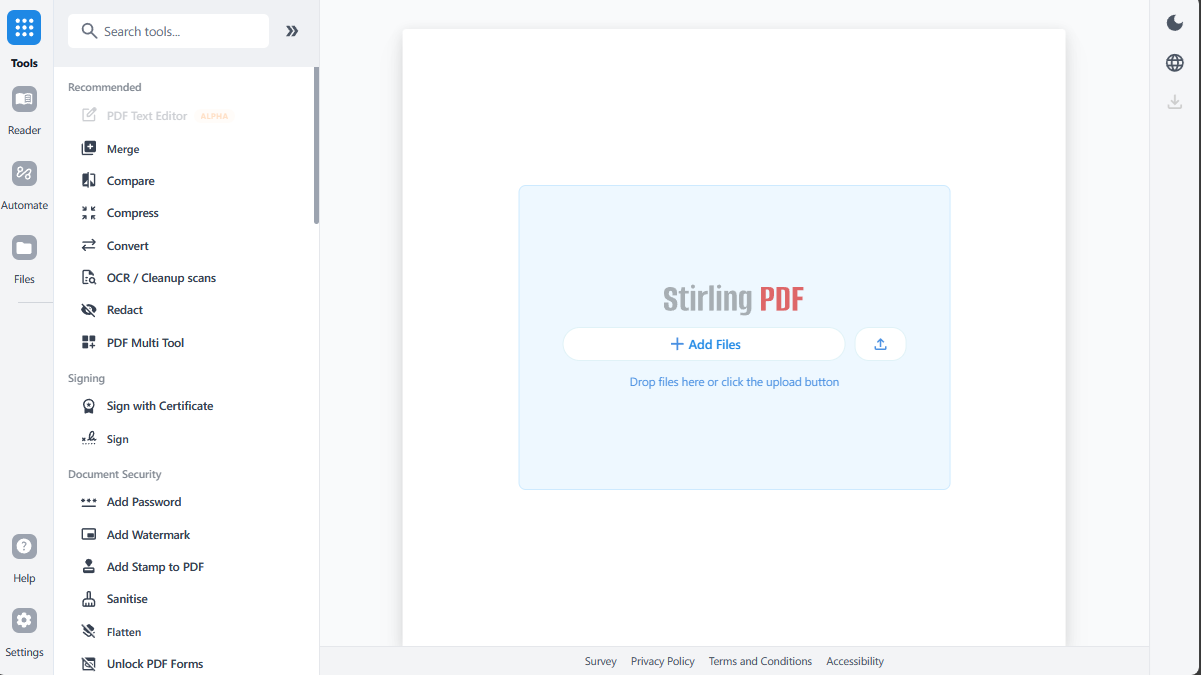
Key Capabilities
- Everywhere you work - Desktop client, browser UI, and self-hosted server with a private API.
- 50+ PDF tools - Edit, merge, split, sign, redact, convert, OCR, compress, and more.
- Automation & workflows - No-code pipelines direct in UI with APIs to process millions of PDFs.
- Enterprise‑grade - SSO, auditing, and flexible on‑prem deployments.
- Developer platform - REST APIs available for nearly all tools to integrate into your existing systems.
- Global UI - Interface available in 40+ languages.
For a full feature list, see the docs: https://docs.stirlingpdf.com
Quick Start
bashdocker run -p 8080:8080 docker.stirlingpdf.com/stirlingtools/stirling-pdf
Then open: http://localhost:8080
For full installation options (including desktop and Kubernetes), see our Documentation Guide.
Resources
Support
- Community Discord
- Bug Reports: Github issues
Contributing
We welcome contributions! Please see CONTRIBUTING.md for guidelines.
This project uses Task as a unified command runner for all build, dev, and test commands. Run task install to get started, or see the Developer Guide for full details.
For adding translations, see the Translation Guide.
License
Stirling PDF is open-core. See LICENSE for details.
Contributors
Showing top 12 contributors by commit count.

![dependabot[bot]](https://avatars.githubusercontent.com/in/29110?v=4)

![stirlingbot[bot]](https://avatars.githubusercontent.com/in/1113334?v=4)
![github-actions[bot]](https://avatars.githubusercontent.com/in/15368?v=4)


Related Repositories

louislam/uptime-kuma
A fancy self-hosted monitoring tool

macrozheng/mall
mall项目是一套电商系统,包括前台商城系统及后台管理系统,基于Spring Boot+MyBatis实现,采用Docker容器化部署。 前台商城系统包含首页门户、商品推荐、商品搜索、商品展示、购物车、订单流程、会员中心、客户服务、帮助中心等模块。 后台管理系统包含商品管理、订单管理、会员管理、促销管理、运营管理、内容管理、统计报表、财务管理、权限管理、设置等模块。

bregman-arie/devops-exercises
Linux, Jenkins, AWS, SRE, Prometheus, Docker, Python, Ansible, Git, Kubernetes, Terraform, OpenStack, SQL, NoSQL, Azure, GCP, DNS, Elastic, Network, Virtualization. DevOps Interview Questions

netdata/netdata
The fastest path to AI-powered full stack observability, even for lean teams.

moby/moby
The Moby Project - a collaborative project for the container ecosystem to assemble container-based systems

traefik/traefik
The Cloud Native Application Proxy