

PyDebloatX
Python GUI for uninstalling the default Windows 10 apps.
**PyDebloatX** is a Python GUI for uninstalling the default Windows 10 apps. The project is written primarily in Python, distributed under the MIT License license, first published in 2020. It has gained significant community traction with 1,688 stars and 117 forks on GitHub. Key topics include: debloat, fluent, gui, microsoft-store, pydebloatx.
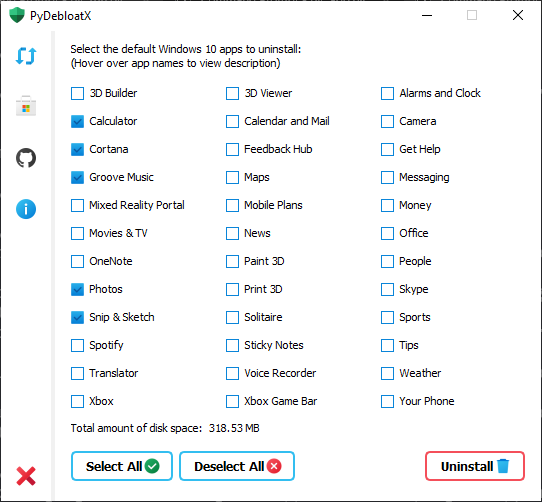
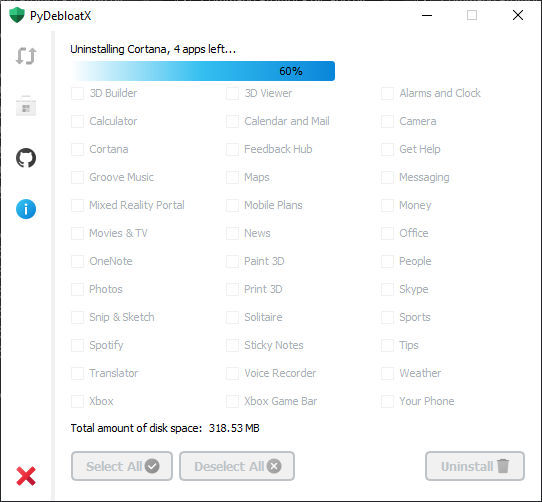
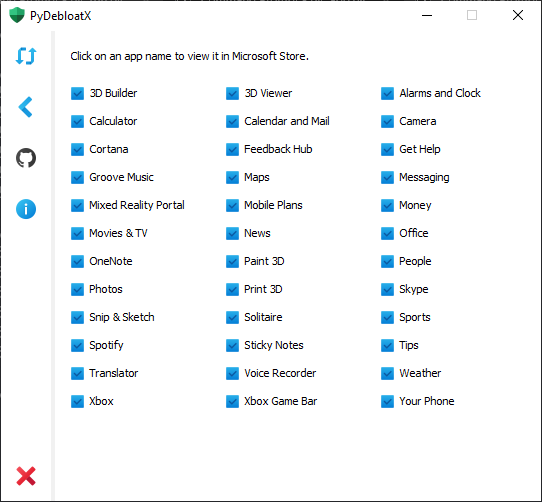
Installing
Pre-built binaries are available from the releases page.
PyDebloatX installer is also available from the Windows Package Manager Winget:
powershellwinget install --id=Teraskull.PyDebloatX -e
Shortcuts
- <kbd>CTRL</kbd> <kbd>R</kbd> - refresh the list of installed apps.
- <kbd>CTRL</kbd> <kbd>S</kbd> - view links to apps in Microsoft Store.
- <kbd>CTRL</kbd> <kbd>G</kbd> - visit the GitHub page.
- <kbd>CTRL</kbd> <kbd>A</kbd> - view the "About" window.
- <kbd>CTRL</kbd> <kbd>Q</kbd> - quit the app.
Features
- Intuitive design allows to easily navigate through the GUI and uninstall apps with a few clicks.
- It is not possible to break the OS using this tool. All listed apps can be reinstalled with Microsoft Store using the "Store" sidebar tab. Apps like Edge or Cortana are deeply integrated with Windows 10, so they cannot be easily uninstalled without creating any issues.
- The GUI does not require elevated administrator privileges to run. It also does not save registry entries.
Dependencies
Usage
batchgit clone https://github.com/Teraskull/PyDebloatX cd PyDebloatX pip install -r requirements.txt cd pydebloatx python app.py
Building
Run setup.bat to build the executable.
Run setup-portable.bat to build a one-file portable executable.
Translating
Run the following command to create the translation file:
batchlupdate gui_main.py gui_about.py app.py -ts Language/[locale_CODE].ts
Where [locale_CODE] is written with an underscore, instead of a hyphen. For example, en_US.
List of locale codes is available here.
To compile .ts into .qm, use linguist.exe:
batchpip show PySide6 | findstr "Location:"
Splice the output path above with:
batch"\PySide6\linguist.exe"
Supported Languages
| Language | Author credits |
|---|---|
| Arabic | FaresAhmedb |
| Chinese | space9bug |
| English | Teraskull |
| Russian | Teraskull |
| Ukrainian | Teraskull |
License
This software is available under the following licenses:
- MIT
Contributors
Showing top 8 contributors by commit count.


Related Repositories

Raphire/Win11Debloat
A simple, lightweight PowerShell script that allows you to remove pre-installed apps, disable telemetry, as well as perform various other changes to declutter and customize your Windows experience. Win11Debloat works for both Windows 10 and Windows 11.

Atlas-OS/Atlas
🚀 An open and lightweight modification to Windows, designed to optimize performance, privacy and usability.

BCUninstaller/Bulk-Crap-Uninstaller
Remove large amounts of unwanted applications quickly.

0x192/universal-android-debloater
Cross-platform GUI written in Rust using ADB to debloat non-rooted android devices. Improve your privacy, the security and battery life of your device.

Sycnex/Windows10Debloater
Script to remove Windows 10 bloatware.

zoicware/RemoveWindowsAI
Force Remove Copilot, Recall and More in Windows 11