

Dasel
Unified querying, transformation, and modification of JSON, TOML, YAML, XML, INI, HCL, KDL and CSV.
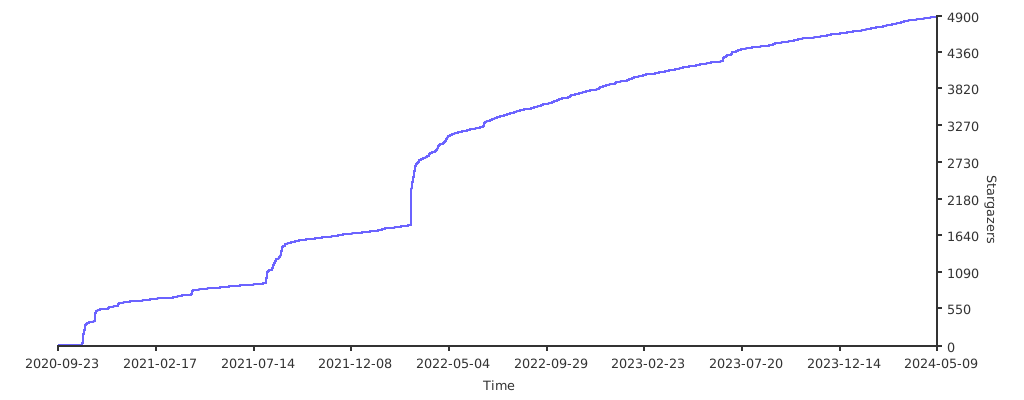
Dasel (short for **Data-Select**) is a command-line tool and library for querying, modifying, and transforming data structures such as JSON, YAML, TOML, XML, CSV, and KDL. The project is written primarily in Go, distributed under the MIT License license, first published in 2020. It has gained significant community traction with 7,976 stars and 167 forks on GitHub. Key topics include: cli, config, configuration, data-processing, data-structures.










Dasel
Dasel (short for Data-Select) is a command-line tool and library for querying, modifying, and transforming data structures such as JSON, YAML, TOML, XML, CSV, and KDL.
It provides a consistent, powerful syntax to traverse and update data — making it useful for developers, DevOps, and data wrangling tasks.
Features
- Multi-format support: JSON, YAML, TOML, XML, CSV, HCL, INI, KDL.
- Unified query syntax: Access data in any format with the same selectors.
- Query & search: Extract values, lists, or structures with intuitive syntax.
- Modify in place: Update, insert, or delete values directly in structured files.
- Convert between formats: Seamlessly transform data from JSON → YAML, TOML → JSON, etc.
- Script-friendly: Simple CLI integration for shell scripts and pipelines.
- Library support: Import and use in Go projects.
Installation
Homebrew (macOS/Linux)
shbrew install dasel
Go Install
shgo install github.com/tomwright/dasel/v3/cmd/dasel@master
Prebuilt Binaries
Prebuilt binaries are available on the Releases page for Linux, macOS, and Windows.
None of the above?
See the installation docs for more options.
Shell Completion
Dasel supports tab-completion for Bash, Zsh, Fish, and PowerShell. Generate and load the completion script for your shell:
sh# Bash source <(dasel completion bash) # Zsh source <(dasel completion zsh) # Fish dasel completion fish | source # PowerShell dasel completion powershell | Out-String | Invoke-Expression
See the shell completion docs for permanent installation instructions.
Man Page
Generate and view the man page:
shdasel man | man -l -
Basic Usage
Selecting Values
By default, Dasel evaluates the final selector and prints the result.
shecho '{"foo": {"bar": "baz"}}' | dasel -i json 'foo.bar' # Output: "baz"
Modifying Values
Update values inline:
shecho '{"foo": {"bar": "baz"}}' | dasel -i json 'foo.bar = "bong"' # Output: "bong"
Use --root to output the full document after modification:
shecho '{"foo": {"bar": "baz"}}' | dasel -i json --root 'foo.bar = "bong"' # Output: { "foo": { "bar": "bong" } }
Update values based on previous value:
shecho '[1,2,3,4,5]' | dasel -i json --root 'each($this = $this*2)' # Output: [ 2, 4, 6, 8, 10 ]
Format Conversion
shcat data.json | dasel -i json -o yaml
Recursive Descent (..)
Searches all nested objects and arrays for a matching key or index.
shecho '{"foo": {"bar": "baz"}}' | dasel -i json '..bar' # Output: [ "baz" ]
Search (search)
Finds all values matching a condition anywhere in the structure.
shecho '{"foo": {"bar": "baz"}}' | dasel -i json 'search(bar == "baz")' # Output: [ { "bar": "baz" } ]
Documentation
Full documentation is available at daseldocs.tomwright.me.
Contributing
Contributions are welcome! Please see the CONTRIBUTING.md for details.
License
MIT License. See LICENSE for details.
Stargazers over time
Contributors
Showing top 12 contributors by commit count.

![dependabot[bot]](https://avatars.githubusercontent.com/in/29110?v=4)


Related Repositories

n8n-io/n8n
Fair-code workflow automation platform with native AI capabilities. Combine visual building with custom code, self-host or cloud, 400+ integrations.

ohmyzsh/ohmyzsh
🙃 A delightful community-driven (with 2,500+ contributors) framework for managing your zsh configuration. Includes 300+ optional plugins (rails, git, macOS, hub, docker, homebrew, node, php, python, etc), 140+ themes to spice up your morning, and an auto-update tool that makes it easy to keep up with the latest updates from the community.

yt-dlp/yt-dlp
A feature-rich command-line audio/video downloader

google-gemini/gemini-cli
An open-source AI agent that brings the power of Gemini directly into your terminal.

sherlock-project/sherlock
Hunt down social media accounts by username across social networks

junegunn/fzf
:cherry_blossom: A command-line fuzzy finder