

LtGt
Lightweight HTML processor
Development of this project is entirely funded by the community. Consider donating to support! The project is written primarily in C#, distributed under the MIT License license, first published in 2019. Key topics include: css-selectors, html, net-core, net-framework, net-standard.
LtGt





Note:
As an alternative, consider using AngleSharp, which is a more performant and feature-complete HTML processing library.
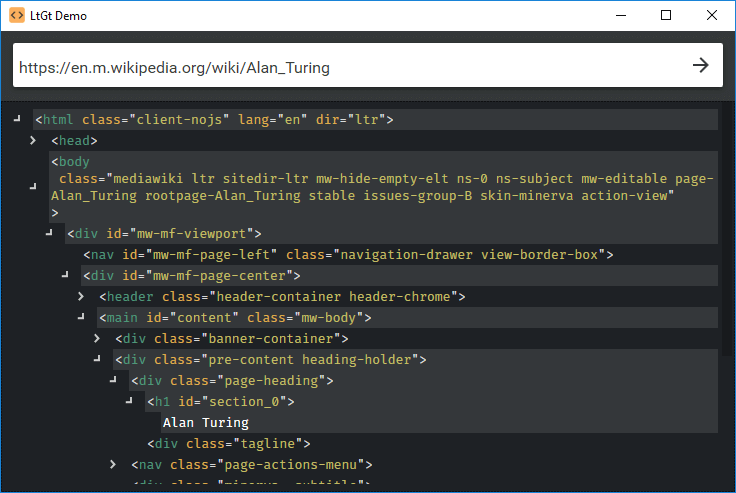
LtGt is a minimalistic library for working with HTML. It can parse any HTML5-compliant code into an object model which you can use to traverse nodes or locate specific elements. The library establishes itself as a foundation that you can build upon, and comes with a lot of extension methods that can help navigate the DOM easily.
Download
- NuGet:
dotnet add package LtGt
Features
- Parse any HTML5-compliant code
- Traverse the DOM using LINQ or Seq
- Use basic element selectors like
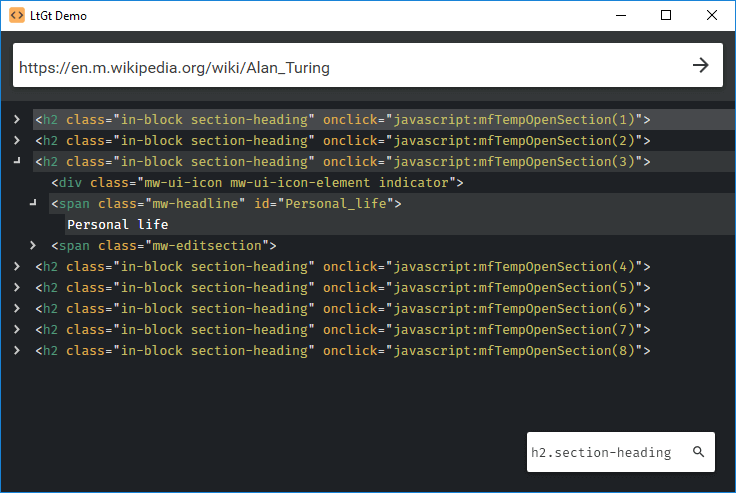
GetElementById(),GetElementsByTagName(), etc - Use CSS selectors via
QueryElements() - Convert any HTML node to its equivalent Linq2Xml representation
- Render any HTML entity to code
- Targets .NET Framework 4.5+ and .NET Standard 1.6+
Screenshots
Usage
LtGt is a library written in F# but it provides two separate idiomatic APIs that you can use from both C# and F#.
Parse a document
C#
cusing LtGt; const string html = @"<!doctype html> <html> <head> <title>Document</title> </head> <body> <div>Content</div> </body> </html>"; // This throws an exception on parse errors var document = Html.ParseDocument(html); // -or- // This returns a wrapped result instead var documentResult = Html.TryParseDocument(html); if (documentResult.IsOk) { // Handle result var document = documentResult.ResultValue; } else { // Handle error var error = documentResult.ErrorValue; }
F#
fopen LtGt let html = "<!doctype html> <html> <head> <title>Document</title> </head> <body> <div>Content</div> </body> </html>" // This throws an exception on parse errors let document = Html.parseDocument html // -or- // This returns a wrapped result instead match Html.tryParseDocument html with | Result.Ok document -> // handle result | Result.Error error -> // handle error
Parse a fragment
C#
cconst string html = "<div id=\"some-element\"><a href=\"https://example.com\">Link</a></div>"; // Parse an element node var element = Html.ParseElement(html); // Parse any node var node = Html.ParseNode(html);
F#
flet html = "<div id=\"some-element\"><a href=\"https://example.com\">Link</a></div>" // Parse an element node let element = Html.parseElement html // Parse any node let node = Html.parseNode html
Find specific element
C#
cvar element1 = document.GetElementById("menu-bar"); var element2 = document.GetElementsByTagName("div").FirstOrDefault(); var element3 = document.GetElementsByClassName("floating-button floating-button--enabled").FirstOrDefault(); var element1Data = element1.GetAttributeValue("data"); var element2Id = element2.GetId(); var element3Text = element3.GetInnerText();
F#
flet element1 = document |> Html.tryElementById "menu-bar" let element2 = document |> Html.elementsByTagName "div" |> Seq.tryHead let element3 = document |> Html.elementsByClassName "floating-button floating-button--enabled" |> Seq.tryHead let element1Data = element1 |> Option.bind (Html.tryAttributeValue "data") let element2Id = element2 |> Option.bind Html.tryId let element3Text = element3 |> Option.map Html.innerText
You can leverage the full power of CSS selectors as well.
C#
cvar element = document.QueryElements("div#main > span.container:empty").FirstOrDefault();
F#
flet element = document |> CssSelector.queryElements "div#main > span.container:empty" |> Seq.tryHead
Check equality
You can compare two HTML entities by value, including their descendants.
C#
cvar element1 = new HtmlElement("span", new HtmlAttribute("id", "foo"), new HtmlText("bar")); var element2 = new HtmlElement("span", new HtmlAttribute("id", "foo"), new HtmlText("bar")); var element3 = new HtmlElement("span", new HtmlAttribute("id", "foo"), new HtmlText("oof")); var firstTwoEqual = HtmlEntityEqualityComparer.Instance.Equals(element1, element2); // true var lastTwoEqual = HtmlEntityEqualityComparer.Instance.Equals(element2, element3); // false
F#
flet element1 = HtmlElement("span", HtmlAttribute("id", "foo"), HtmlText("bar")) let element2 = HtmlElement("span", HtmlAttribute("id", "foo"), HtmlText("bar")) let element3 = HtmlElement("span", HtmlAttribute("id", "foo"), HtmlText("oof")) let firstTwoEqual = Html.equal element1 element2 // true let lastTwoEqual = Html.equal element2 element3 // false
Convert to Linq2Xml
You can convert LtGt's objects to System.Xml.Linq objects (XNode, XElement, etc). This can be useful if you need to convert HTML to XML or if you want to use XPath to select nodes.
C#
cvar htmlDocument = Html.ParseDocument(html); var xmlDocument = (XDocument) htmlDocument.ToXObject(); var elements = xmlDocument.XPathSelectElements("//input[@type=\"submit\"]");
F#
flet htmlDocument = Html.parseDocument html let xmlDocument = htmlDocument |> Html.toXObject :?> XDocument let elements = xmlDocument.XPathSelectElements("//input[@type=\"submit\"]")
Render nodes
You can turn any entity to its equivalent HTML code.
C#
cvar element = new HtmlElement("div", new HtmlAttribute("id", "main"), new HtmlText("Hello world")); var html = element.ToHtml(); // <div id="main">Hello world</div>
F#
flet element = HtmlElement("div", HtmlAttribute("id", "main"), HtmlText("Hello world")) let html = element |> Html.toHtml // <div id="main">Hello world</div>
Benchmarks
This is how LtGt compares to popular HTML libraries when it comes to parsing a document (in this case, a YouTube video watch page).
The results are not in favor of LtGt so if performance is important for your task, you should probably consider using a different parser.
That said, these results are still pretty impressive for a parser built with parser combinators as opposed to a traditional manual approach.
iniBenchmarkDotNet=v0.12.0, OS=Windows 10.0.14393.3384 (1607/AnniversaryUpdate/Redstone1) Intel Core i5-4460 CPU 3.20GHz (Haswell), 1 CPU, 4 logical and 4 physical cores Frequency=3125000 Hz, Resolution=320.0000 ns, Timer=TSC .NET Core SDK=3.1.100 [Host] : .NET Core 3.1.0 (CoreCLR 4.700.19.56402, CoreFX 4.700.19.56404), X64 RyuJIT DEBUG DefaultJob : .NET Core 3.1.0 (CoreCLR 4.700.19.56402, CoreFX 4.700.19.56404), X64 RyuJIT
| Method | Mean | Error | StdDev | Ratio | Rank |
|---|---|---|---|---|---|
| AngleSharp | 11.94 ms | 0.104 ms | 0.097 ms | 0.29 | 1 |
| HtmlAgilityPack | 20.51 ms | 0.140 ms | 0.124 ms | 0.49 | 2 |
| LtGt | 41.59 ms | 0.450 ms | 0.399 ms | 1.00 | 3 |
Contributors
Showing top 1 contributor by commit count.

Related Repositories

psf/requests-html
Pythonic HTML Parsing for Humans™

jhy/jsoup
jsoup: the Java HTML parser, built for HTML editing, cleaning, scraping, and XSS safety.

philss/floki
Floki is a simple HTML parser that enables search for nodes using CSS selectors.

cloudflare/lol-html
Low output latency streaming HTML parser/rewriter with CSS selector-based API

duzun/hQuery.php
An extremely fast web scraper that parses megabytes of invalid HTML in a blink of an eye. PHP5.3+, no dependencies.

JNavith/tailwindcss-theme-variants
Media-query- or JavaScript-based theme variants with fallback for Tailwind CSS