

Markmap.nvim
Visualize your Markdown as mindmaps with markmap
This plugin is based on vim's [coc-markmap](https://github.com/markmap/coc-markmap), which I missed when moving to Neovim. If you wanna know more about mindmap check their [website](https://markmap.js.org/), [docs](https://markmap.js.org/docs/markmap) and GitHub [repository](https://github.com/markmap/markmap/tree/master/packages/markmap-cli). This plugin is compatible with Linux, MacOS, Windows, and Android Termux. The project is written primarily in Lua, distributed under the GNU General Public License v3.0 license, first published in 2023. Key topics include: map, markdown, markmap, md, mental.
Markmap.nvim
Visualize your Markdown as mindmaps with markmap
Motivation
This plugin is based on vim's coc-markmap, which I missed when moving to Neovim. If you wanna know more about mindmap check their website, docs and GitHub repository. This plugin is compatible with Linux, MacOS, Windows, and Android Termux.
Requirements
- yarn
How to install using lazy.nvim
lua-- [markdown markmap] -- https://github.com/Zeioth/markmap.nvim { "Zeioth/markmap.nvim", build = "yarn global add markmap-cli", cmd = { "MarkmapOpen", "MarkmapSave", "MarkmapWatch", "MarkmapWatchStop" }, opts = { html_output = "/tmp/markmap.html", -- (default) Setting a empty string "" here means: [Current buffer path].html hide_toolbar = false, -- (default) grace_period = 3600000 -- (default) Stops markmap watch after 60 minutes. Set it to 0 to disable the grace_period. }, config = function(_, opts) require("markmap").setup(opts) end },
How to use
Markmap.nvim provide the next commands:
| Command | Description |
|---|---|
| :MarkmapOpen | Open markmap |
| :MarkmapSave | Save markmap without opening it |
| :MarkmapWatch | Open markmap and watch for changes |
| :MarkmapWatchStop | The watch server ends automatically after a grace period, or when closing nvim. But it can also be stopped manually with this command. |
Note that all these commands will always generate a .html file in html_output. Take advantage of this if you want to keep the graph.
Troubleshooting
Run :healthcheck markmap. This command will tell you the depencencies you are missing. If the command do not exist, it means you are using an async package manager, so double check the package is beign loaded. These are the most common issues you will find:
- Run
yarn global add markmap-cli
- Now try to run
markmap
If the executable is not found, that means you need to add yarn to your PATH. This is normally done in your .profile, bashrc, or zshrc file like this:
sh# PATH Example export PATH="$HOME/.local/bin:\ $HOME/.cargo/bin:\ $HOME/.npm-global/bin:\ $HOME/.yarn/bin:\ $HOME/.config/yarn/global/node_modules/.bin:\ $HOME/.local/share/gem/ruby/3.0.0/bin:\ $HOME/.cargo/env:\ /root/.local/share/gem/ruby/3.0.0/bin:\ /usr/local/bin:\ /usr/share/nvm/init-nvm.sh:\ $PATH"
If you prefer using npm over yarn, you can, but double check that you have the user space correctly configured as in some systems this is not enabled by default (see here).
If you are on windows, the process is the same. But the place to set PATH may change from one windows version to another.
🌟 Support the project
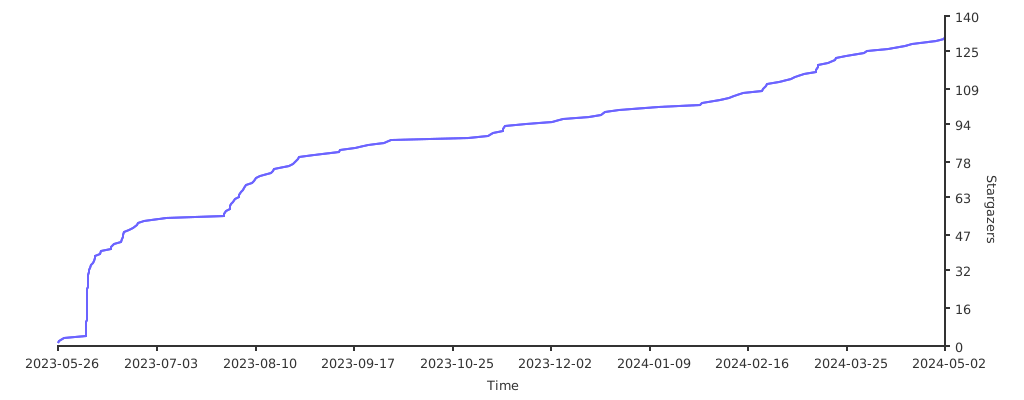
If you want to help me, please star this repository to increase the visibility of the project.
Contributors
Showing top 2 contributors by commit count.


Related Repositories

redisson/redisson
Redisson: Valkey & Redis Java Client and Real-Time Data Platform. Sync/Async/RxJava/Reactive API. Over 50 Valkey and Redis based Java objects and services: Set, Multimap, SortedSet, Map, List, Queue, Deque, Semaphore, Lock, AtomicLong, Map Reduce, Bloom filter, Spring, Tomcat, Scheduler, JCache API, Hibernate, RPC, local cache..

emirpasic/gods
GoDS (Go Data Structures) - Sets, Lists, Stacks, Maps, Trees, Queues, and much more

ZCShou/GoGoGo
一个基于 Android 调试 API + 百度地图实现的虚拟定位工具,并且同时实现了一个可以自由移动的摇杆

rastapasta/mapscii
🗺 MapSCII is a Braille & ASCII world map renderer for your console - enter => telnet mapscii.me <= on Mac (brew install telnet) and Linux, connect with PuTTY on Windows

domlysz/BlenderGIS
Blender addons to make the bridge between Blender and geographic data

visgl/react-map-gl
React friendly API wrapper around MapboxGL JS