

MasterDnsWeb
MasterDnsWeb is a web client for MasterDnsVPN
MasterDnsWeb is a web panel for managing your **[MasterDnsVPN](https://github.com/masterking32/MasterDnsVPN)** instances on a Linux server. You get a clean dashboard where you can create, configure, start, and stop VPN instances — all from your browser. The project is written primarily in Vue, distributed under the MIT License license, first published in 2026. Key topics include: dns, dnstt, masterdns, masterdns-client, masterdnsvpn.
MasterDnsWeb
MasterDnsWeb is a web panel for managing your MasterDnsVPN instances on a Linux server.
You get a clean dashboard where you can create, configure, start, and stop VPN instances — all from your browser.
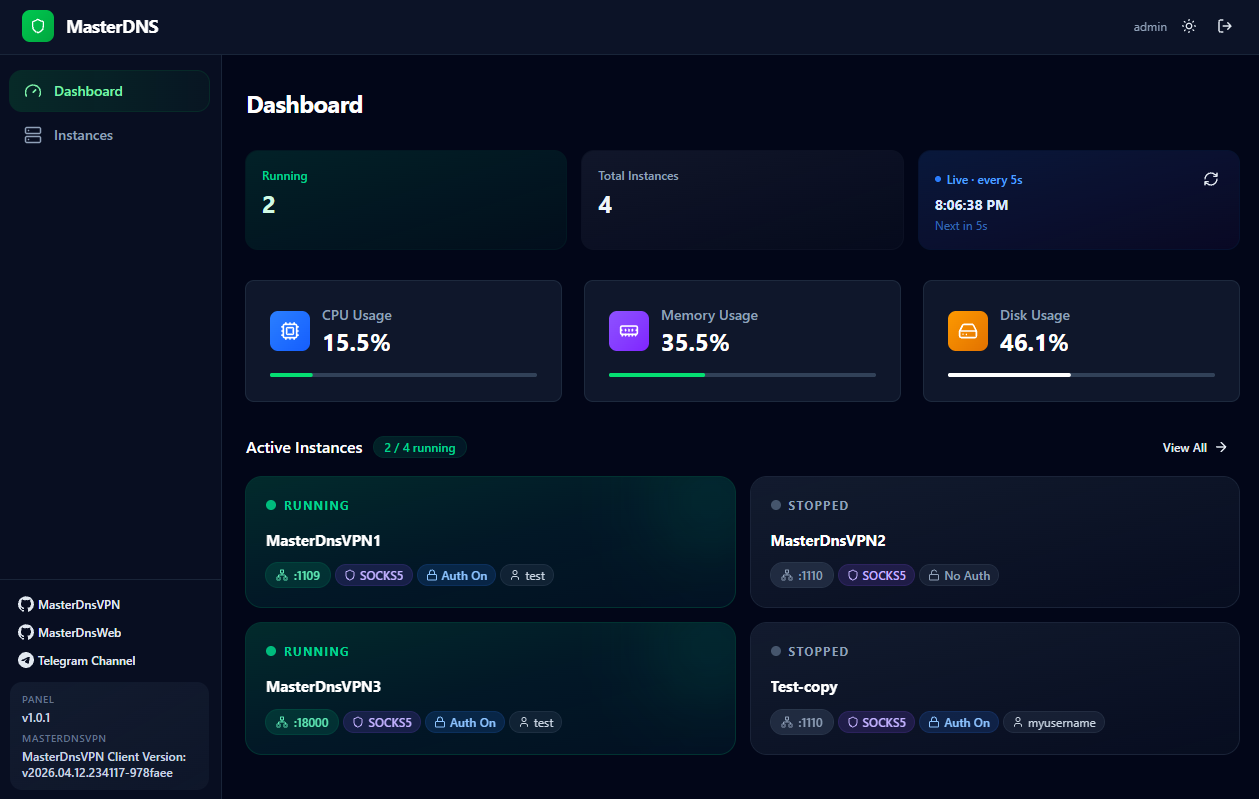
This project is primarily designed for use on Iran-based VPS servers.
Requirements
- Ubuntu 20.04 or newer (other distros are not supported yet)
- The release archive:
MasterDnsWeb-linux-amd64.tar.gz - Root access (required to manage system services)
Installation
1. Extract the archive
bashtar -xzf MasterDnsWeb-linux-amd64.tar.gz cd MasterDnsWeb
You will see this folder:
MasterDnsWeb/
  MasterDnsWeb     ← the web panel (run this)
  MasterDnsVPN     ← the VPN client binary
  .env             ← your settings
2. Edit your settings
Open .env in any text editor:
bashnano .env
The only things you must change before starting:
envADMIN_USERNAME=admin ADMIN_PASSWORD=changeme ← change this to something strong
Everything else already has safe defaults. Save and close.
3. Start the panel
bashsudo ./MasterDnsWeb
Why sudo? The panel needs root access to create and control system services for each VPN instance.
The panel is now running. Open your browser and go to:
http://<your-server-ip>:8000
Log in with the username and password you set in .env.
How to Keep It Running (Optional)
If you want the panel to start automatically when your server reboots, create a system service.
Run this command (replace /root/MasterDnsWeb with your actual folder path):
bashsudo nano /etc/systemd/system/masterdnsweb.service
Paste this inside:
ini[Unit] Description=MasterDnsWeb Panel After=network.target [Service] WorkingDirectory=/root/MasterDnsWeb ExecStart=/root/MasterDnsWeb/MasterDnsWeb Restart=always RestartSec=5 User=root [Install] WantedBy=multi-user.target
Then run:
bashsudo systemctl daemon-reload sudo systemctl enable masterdnsweb sudo systemctl start masterdnsweb
Using the Panel
Creating an instance
- Go to the Instances page
- Click New Instance and give it a name
- Click the instance to open its Configuration page
Configuring an instance
Paste your client_config.toml content into the Configuration text box.
All fields from your config file are accepted — just paste the whole thing.
Add your resolver IPs in the Resolvers box (one per line), then click Apply & Restart.
Starting / stopping
Use the Start, Stop, and Restart buttons on the Instances page.
Each instance runs as a separate system service in the background.
Folder Layout After First Run
The panel creates these folders automatically next to the binary:
MasterDnsWeb/
  MasterDnsWeb           ← web panel binary
  MasterDnsVPN           ← VPN client binary
  .env                   ← your settings
  data/                  ← instance profiles (auto-created)
  runtime/
    my-instance/         ← working files per instance (auto-created)
      client_config.toml
      client_resolvers.txt
      MasterDnsVPN
Settings Reference
All settings live in the .env file next to the binary.
| Setting | Default | Description |
|---|---|---|
ADMIN_USERNAME | admin | Login username |
ADMIN_PASSWORD | changeme | Login password — change this |
SECRET_KEY | (generated at build) | Signs login sessions — do not share |
HOST | 0.0.0.0 | Address the panel listens on |
PORT | 8000 | Port the panel listens on |
COOKIE_SECURE | false | Set to true if using HTTPS |
MASTERVPN_SERVICE_USER | root | System user that runs VPN instances |
MASTERVPN_SERVICE_EXEC_START | (auto) | Full path to MasterDnsVPN — only needed if it is not in the same folder |
How It Works
mermaidflowchart TB U[You — Browser] --> PANEL[MasterDnsWeb\nport 8000] PANEL --> AUTH[Login and Session] PANEL --> CFG[Instance Profiles\nstored in data/] PANEL --> SVC[Service Manager] PANEL --> STATS[Server Stats\nCPU · RAM · Disk] SVC --> RUNTIME[runtime/instance-name/\nclient_config.toml\nclient_resolvers.txt\nMasterDnsVPN] SVC --> SYSTEMD[systemd\nmasterdnsvpn-instance.service] SYSTEMD --> VPN[MasterDnsVPN Process] RUNTIME --> VPN
Troubleshooting
| Problem | What to do |
|---|---|
| Panel won't start | Make sure you run it with sudo. Root access is needed to manage services. |
| Can't open it in the browser | Check your firewall — port 8000 (or your custom PORT) must be open. |
| "MasterDnsVPN binary was not found" | Make sure MasterDnsVPN is in the same folder as MasterDnsWeb. Or set MASTERVPN_SERVICE_EXEC_START in .env to its full path. |
| Instance won't start | Open the instance in the panel and check the logs for details. |
Special Thanks
A special thank you to @shimafallah for writing the backend.
Contributors
Showing top 2 contributors by commit count.


Related Repositories

XTLS/Xray-core
Xray, Penetrates Everything. Also the best v2ray-core. Where the magic happens. An open platform for various uses.

AdguardTeam/AdGuardHome
Network-wide ads & trackers blocking DNS server

ehang-io/nps
一款轻量级、高性能、功能强大的内网穿透代理服务器。支持tcp、udp、socks5、http等几乎所有流量转发,可用来访问内网网站、本地支付接口调试、ssh访问、远程桌面,内网dns解析、内网socks5代理等等……,并带有功能强大的web管理端。a lightweight, high-performance, powerful intranet penetration proxy server, with a powerful web management terminal.

521xueweihan/GitHub520
:kissing_heart: 让你“爱”上 GitHub,解决访问时图裂、加载慢的问题。(无需安装)

hagezi/dns-blocklists
DNS-Blocklists: For a better internet - keep the internet clean!

ginuerzh/gost
GO Simple Tunnel - a simple tunnel written in golang