

Squish
Squish - Batch Browser-based Image Compression
A modern, browser-based image compression tool that leverages WebAssembly for high-performance image optimization. Squish supports multiple formats and provides an intuitive interface for compressing your images without compromising quality. The project is written primarily in TypeScript, distributed under the MIT License license, first published in 2024. It has gained significant community traction with 1,044 stars and 108 forks on GitHub. Key topics include: batch, batch-processing, image-compression, image-processing.
Squish 🎨

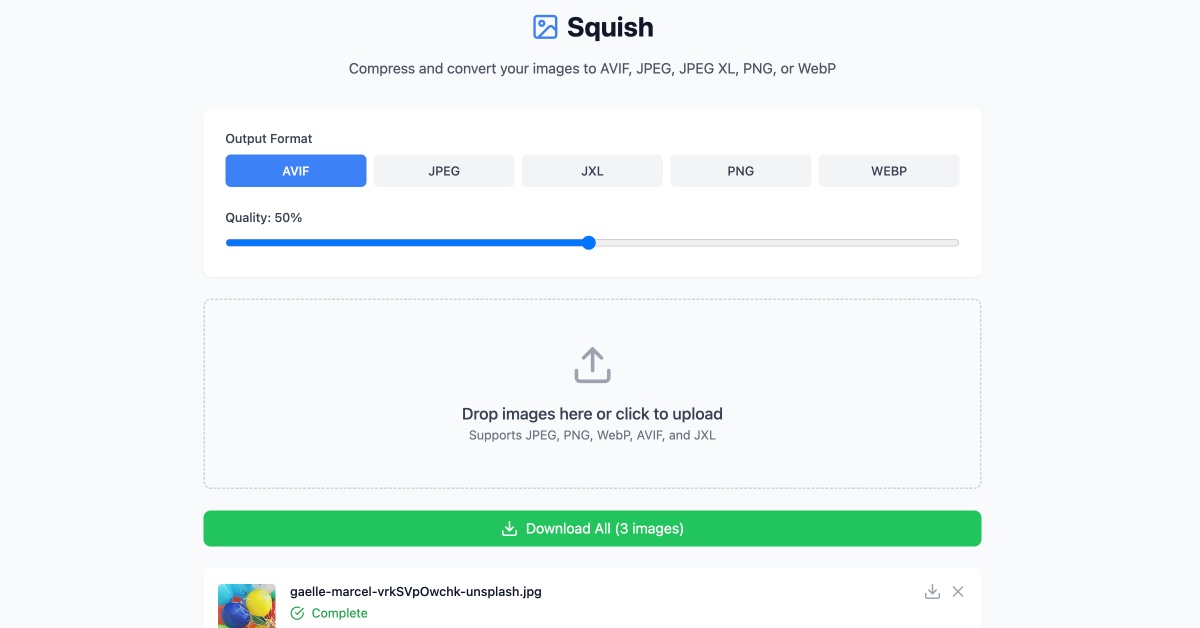
A modern, browser-based image compression tool that leverages WebAssembly for high-performance image optimization. Squish supports multiple formats and provides an intuitive interface for compressing your images without compromising quality.
✨ Features
-
🖼️ Support for multiple image formats:
- AVIF (AV1 Image Format)
- JPEG (using MozJPEG)
- JPEG XL
- PNG (using OxiPNG)
- WebP
-
🚀 Key capabilities:
- Browser-based compression (no server uploads needed)
- Batch processing support
- Format conversion
- Quality adjustment per format
- Real-time preview
- Size reduction statistics
- Drag and drop interface
- Smart queue for compressing large number of files
🛠️ Technology
Squish is built with modern web technologies:
- React + TypeScript for the UI
- Vite for blazing fast development
- WebAssembly for native-speed image processing
- Tailwind CSS for styling
- jSquash for image codec implementations
🚀 Getting Started
Prerequisites
- Node.js 18 or later
- npm 7 or later
Installation
- Clone the repository:
bashgit clone https://github.com/addyosmani/squish.git cd squish
- Install dependencies:
bashnpm install
- Start the development server:
bashnpm run dev
- Build for production:
bashnpm run build
💡 Usage
- Drop or Select Images: Drag and drop images onto the upload area or click to select files
- Choose Output Format: Select your desired output format (AVIF, JPEG, JPEG XL, PNG, or WebP)
- Adjust Quality: Use the quality slider to balance between file size and image quality
- Download: Download individual images or use the "Download All" button for batch downloads
🔧 Default Quality Settings
- AVIF: 50%
- JPEG: 75%
- JPEG XL: 75%
- PNG: Lossless
- WebP: 75%
🤝 Contributing
Contributions are welcome! Please feel free to submit a Pull Request. For major changes, please open an issue first to discuss what you would like to change.
- Fork the repository
- Create your feature branch (
git checkout -b feature/AmazingFeature) - Commit your changes (
git commit -m 'Add some AmazingFeature') - Push to the branch (
git push origin feature/AmazingFeature) - Open a Pull Request
📝 License
This project is licensed under the MIT License - see the LICENSE file for details.
🙏 Acknowledgments
Contributors
Showing top 2 contributors by commit count.


Related Repositories

peass-ng/PEASS-ng
PEASS - Privilege Escalation Awesome Scripts SUITE (with colors)

graphql/dataloader
DataLoader is a generic utility to be used as part of your application's data fetching layer to provide a consistent API over various backends and reduce requests to those backends via batching and caching.

apache/seatunnel
SeaTunnel is a multimodal, high-performance, distributed, massive data integration tool.
apache/beam
Apache Beam is a unified programming model for Batch and Streaming data processing.

MorvanZhou/PyTorch-Tutorial
Build your neural network easy and fast, 莫烦Python中文教学
apache/flink-cdc
Flink CDC is a streaming data integration tool