Albumentations
Fast and flexible image augmentation library. Paper about the library: https://www.mdpi.com/2078-2489/11/2/125
> 📣 **Stay updated!** [Subscribe to our newsletter](https://albumentations.ai/subscribe) for the latest releases, tutorials, and tips directly from the Albumentations team. The project is written primarily in Python, distributed under the MIT License license, first published in 2018. It has gained significant community traction with 15,303 stars and 1,708 forks on GitHub. Key topics include: augmentation, deep-learning, detection, fast-augmentations, image-augmentation.
Albumentations




📣 Stay updated! Subscribe to our newsletter for the latest releases, tutorials, and tips directly from the Albumentations team.


Docs | Discord | Twitter | LinkedIn
⚠️ Important Notice: Albumentations is No Longer Maintained
This repository is no longer actively maintained. The last update was in June 2025, and no further bug fixes, features, or compatibility updates will be provided.
🚀 Introducing AlbumentationsX - The Future of Albumentations
All development has moved to AlbumentationsX, the next-generation successor to Albumentations.
Note: AlbumentationsX uses dual licensing (AGPL-3.0 / Commercial). The AGPL license has strict copyleft requirements - see details below.
Your Options Moving Forward
1. Continue Using Albumentations (MIT License)
- ✅ Forever free for all uses including commercial
- ✅ No licensing fees or restrictions
- ❌ No bug fixes - Even critical bugs won't be addressed
- ❌ No new features - Missing out on performance improvements
- ❌ No support - Issues and questions go unanswered
- ❌ No compatibility updates - May break with new Python/PyTorch versions
Best for: Projects that work fine with the current version and don't need updates
2. Upgrade to AlbumentationsX (Dual Licensed)
- ✅ Drop-in replacement - Same API, just
pip install albumentationsx - ✅ Active development - Regular updates and new features
- ✅ Bug fixes - Issues are actively addressed
- ✅ Performance improvements - Faster execution
- ✅ Community support - Active Discord and issue tracking
- ⚠️ Dual licensed:
- AGPL-3.0: Free ONLY for projects licensed under AGPL-3.0 (not compatible with MIT, Apache, BSD, etc.)
- Commercial License: Required for proprietary use AND permissive open-source projects
Best for: Projects that need ongoing support, updates, and new features
⚠️ AGPL License Warning: The AGPL-3.0 license is NOT compatible with permissive licenses like MIT, Apache 2.0, or BSD. If your project uses any of these licenses, you CANNOT use the AGPL version of AlbumentationsX - you'll need a commercial license.
Migration is Simple
bash# Uninstall original pip uninstall albumentations # Install AlbumentationsX pip install albumentationsx
That's it! Your existing code continues to work without any changes:
pythonimport albumentations as A # Same import! transform = A.Compose([ A.RandomCrop(width=256, height=256), A.HorizontalFlip(p=0.5), A.RandomBrightnessContrast(p=0.2), ])
Learn More
- 📦 AlbumentationsX Repository: https://github.com/albumentations-team/AlbumentationsX
- 💰 Commercial Licensing: https://albumentations.ai/pricing
- 💬 Discord Community: https://discord.gg/AKPrrDYNAt
Original Albumentations README
GitAds Sponsored
Albumentations is a Python library for image augmentation. Image augmentation is used in deep learning and computer vision tasks to increase the quality of trained models. The purpose of image augmentation is to create new training samples from the existing data.
Here is an example of how you can apply some pixel-level augmentations from Albumentations to create new images from the original one:

Why Albumentations
- Complete Computer Vision Support: Works with all major CV tasks including classification, segmentation (semantic & instance), object detection, and pose estimation.
- Simple, Unified API: One consistent interface for all data types - RGB/grayscale/multispectral images, masks, bounding boxes, and keypoints.
- Rich Augmentation Library: 70+ high-quality augmentations to enhance your training data.
- Fast: Consistently benchmarked as the fastest augmentation library, with optimizations for production use.
- Deep Learning Integration: Works with PyTorch, TensorFlow, and other frameworks. Part of the PyTorch ecosystem.
- Created by Experts: Built by developers with deep experience in computer vision and machine learning competitions.
Table of contents
- Albumentations
Authors
Current Maintainer
Vladimir I. Iglovikov | Kaggle Grandmaster
Emeritus Core Team Members
Mikhail Druzhinin | Kaggle Expert
Alexander Buslaev | Kaggle Master
Eugene Khvedchenya | Kaggle Grandmaster
Installation
Albumentations requires Python 3.9 or higher. To install the latest version from PyPI:
bashpip install -U albumentations
Other installation options are described in the documentation.
Documentation
The full documentation is available at https://albumentations.ai/docs/.
A simple example
pythonimport albumentations as A import cv2 # Declare an augmentation pipeline transform = A.Compose([ A.RandomCrop(width=256, height=256), A.HorizontalFlip(p=0.5), A.RandomBrightnessContrast(p=0.2), ]) # Read an image with OpenCV and convert it to the RGB colorspace image = cv2.imread("image.jpg") image = cv2.cvtColor(image, cv2.COLOR_BGR2RGB) # Augment an image transformed = transform(image=image) transformed_image = transformed["image"]
Getting started
I am new to image augmentation
Please start with the introduction articles about why image augmentation is important and how it helps to build better models.
I want to use Albumentations for the specific task such as classification or segmentation
If you want to use Albumentations for a specific task such as classification, segmentation, or object detection, refer to the set of articles that has an in-depth description of this task. We also have a list of examples on applying Albumentations for different use cases.
I want to explore augmentations and see Albumentations in action
Check the online demo of the library. With it, you can apply augmentations to different images and see the result. Also, we have a list of all available augmentations and their targets.
Who is using Albumentations
<a href="https://www.apple.com/" target="_blank"><img src="https://www.albumentations.ai/assets/industry/apple.jpeg" width="100"/></a>
<a href="https://research.google/" target="_blank"><img src="https://www.albumentations.ai/assets/industry/google.png" width="100"/></a>
<a href="https://opensource.fb.com/" target="_blank"><img src="https://www.albumentations.ai/assets/industry/meta_research.png" width="100"/></a>
<a href="https://www.nvidia.com/en-us/research/" target="_blank"><img src="https://www.albumentations.ai/assets/industry/nvidia_research.jpeg" width="100"/></a>
<a href="https://www.amazon.science/" target="_blank"><img src="https://www.albumentations.ai/assets/industry/amazon_science.png" width="100"/></a>
<a href="https://opensource.microsoft.com/" target="_blank"><img src="https://www.albumentations.ai/assets/industry/microsoft.png" width="100"/></a>
<a href="https://engineering.salesforce.com/open-source/" target="_blank"><img src="https://www.albumentations.ai/assets/industry/salesforce_open_source.png" width="100"/></a>
<a href="https://stability.ai/" target="_blank"><img src="https://www.albumentations.ai/assets/industry/stability.png" width="100"/></a>
<a href="https://www.ibm.com/opensource/" target="_blank"><img src="https://www.albumentations.ai/assets/industry/ibm.jpeg" width="100"/></a>
<a href="https://huggingface.co/" target="_blank"><img src="https://www.albumentations.ai/assets/industry/hugging_face.png" width="100"/></a>
<a href="https://www.sony.com/en/" target="_blank"><img src="https://www.albumentations.ai/assets/industry/sony.png" width="100"/></a>
<a href="https://opensource.alibaba.com/" target="_blank"><img src="https://www.albumentations.ai/assets/industry/alibaba.png" width="100"/></a>
<a href="https://opensource.tencent.com/" target="_blank"><img src="https://www.albumentations.ai/assets/industry/tencent.png" width="100"/></a>
<a href="https://h2o.ai/" target="_blank"><img src="https://www.albumentations.ai/assets/industry/h2o_ai.png" width="100"/></a>
See also
List of augmentations
Pixel-level transforms
Pixel-level transforms will change just an input image and will leave any additional targets such as masks, bounding boxes, and keypoints unchanged. For volumetric data (volumes and 3D masks), these transforms are applied independently to each slice along the Z-axis (depth dimension), maintaining consistency across the volume. The list of pixel-level transforms:
- AdditiveNoise
- AdvancedBlur
- AutoContrast
- Blur
- CLAHE
- ChannelDropout
- ChannelShuffle
- ChromaticAberration
- ColorJitter
- Defocus
- Downscale
- Emboss
- Equalize
- FDA
- FancyPCA
- FromFloat
- GaussNoise
- GaussianBlur
- GlassBlur
- HEStain
- HistogramMatching
- HueSaturationValue
- ISONoise
- Illumination
- ImageCompression
- InvertImg
- MedianBlur
- MotionBlur
- MultiplicativeNoise
- Normalize
- PixelDistributionAdaptation
- PlanckianJitter
- PlasmaBrightnessContrast
- PlasmaShadow
- Posterize
- RGBShift
- RandomBrightnessContrast
- RandomFog
- RandomGamma
- RandomGravel
- RandomRain
- RandomShadow
- RandomSnow
- RandomSunFlare
- RandomToneCurve
- RingingOvershoot
- SaltAndPepper
- Sharpen
- ShotNoise
- Solarize
- Spatter
- Superpixels
- TextImage
- ToFloat
- ToGray
- ToRGB
- ToSepia
- UnsharpMask
- ZoomBlur
Spatial-level transforms
Spatial-level transforms will simultaneously change both an input image as well as additional targets such as masks, bounding boxes, and keypoints. For volumetric data (volumes and 3D masks), these transforms are applied independently to each slice along the Z-axis (depth dimension), maintaining consistency across the volume. The following table shows which additional targets are supported by each transform:
- Volume: 3D array of shape (D, H, W) or (D, H, W, C) where D is depth, H is height, W is width, and C is number of channels (optional)
- Mask3D: Binary or multi-class 3D mask of shape (D, H, W) where each slice represents segmentation for the corresponding volume slice
| Transform | Image | Mask | BBoxes | Keypoints | Volume | Mask3D |
|---|---|---|---|---|---|---|
| Affine | ✓ | ✓ | ✓ | ✓ | ✓ | ✓ |
| AtLeastOneBBoxRandomCrop | ✓ | ✓ | ✓ | ✓ | ✓ | ✓ |
| BBoxSafeRandomCrop | ✓ | ✓ | ✓ | ✓ | ✓ | ✓ |
| CenterCrop | ✓ | ✓ | ✓ | ✓ | ✓ | ✓ |
| CoarseDropout | ✓ | ✓ | ✓ | ✓ | ✓ | ✓ |
| ConstrainedCoarseDropout | ✓ | ✓ | ✓ | ✓ | ✓ | ✓ |
| Crop | ✓ | ✓ | ✓ | ✓ | ✓ | ✓ |
| CropAndPad | ✓ | ✓ | ✓ | ✓ | ✓ | ✓ |
| CropNonEmptyMaskIfExists | ✓ | ✓ | ✓ | ✓ | ✓ | ✓ |
| D4 | ✓ | ✓ | ✓ | ✓ | ✓ | ✓ |
| ElasticTransform | ✓ | ✓ | ✓ | ✓ | ✓ | ✓ |
| Erasing | ✓ | ✓ | ✓ | ✓ | ✓ | ✓ |
| FrequencyMasking | ✓ | ✓ | ✓ | ✓ | ✓ | ✓ |
| GridDistortion | ✓ | ✓ | ✓ | ✓ | ✓ | ✓ |
| GridDropout | ✓ | ✓ | ✓ | ✓ | ✓ | ✓ |
| GridElasticDeform | ✓ | ✓ | ✓ | ✓ | ✓ | ✓ |
| HorizontalFlip | ✓ | ✓ | ✓ | ✓ | ✓ | ✓ |
| Lambda | ✓ | ✓ | ✓ | ✓ | ✓ | ✓ |
| LongestMaxSize | ✓ | ✓ | ✓ | ✓ | ✓ | ✓ |
| MaskDropout | ✓ | ✓ | ✓ | ✓ | ✓ | ✓ |
| Morphological | ✓ | ✓ | ✓ | ✓ | ✓ | ✓ |
| Mosaic | ✓ | ✓ | ✓ | ✓ | ||
| NoOp | ✓ | ✓ | ✓ | ✓ | ✓ | ✓ |
| OpticalDistortion | ✓ | ✓ | ✓ | ✓ | ✓ | ✓ |
| OverlayElements | ✓ | ✓ | ||||
| Pad | ✓ | ✓ | ✓ | ✓ | ✓ | ✓ |
| PadIfNeeded | ✓ | ✓ | ✓ | ✓ | ✓ | ✓ |
| Perspective | ✓ | ✓ | ✓ | ✓ | ✓ | ✓ |
| PiecewiseAffine | ✓ | ✓ | ✓ | ✓ | ✓ | ✓ |
| PixelDropout | ✓ | ✓ | ✓ | ✓ | ✓ | ✓ |
| RandomCrop | ✓ | ✓ | ✓ | ✓ | ✓ | ✓ |
| RandomCropFromBorders | ✓ | ✓ | ✓ | ✓ | ✓ | ✓ |
| RandomCropNearBBox | ✓ | ✓ | ✓ | ✓ | ✓ | ✓ |
| RandomGridShuffle | ✓ | ✓ | ✓ | ✓ | ✓ | ✓ |
| RandomResizedCrop | ✓ | ✓ | ✓ | ✓ | ✓ | ✓ |
| RandomRotate90 | ✓ | ✓ | ✓ | ✓ | ✓ | ✓ |
| RandomScale | ✓ | ✓ | ✓ | ✓ | ✓ | ✓ |
| RandomSizedBBoxSafeCrop | ✓ | ✓ | ✓ | ✓ | ✓ | ✓ |
| RandomSizedCrop | ✓ | ✓ | ✓ | ✓ | ✓ | ✓ |
| Resize | ✓ | ✓ | ✓ | ✓ | ✓ | ✓ |
| Rotate | ✓ | ✓ | ✓ | ✓ | ✓ | ✓ |
| SafeRotate | ✓ | ✓ | ✓ | ✓ | ✓ | ✓ |
| ShiftScaleRotate | ✓ | ✓ | ✓ | ✓ | ✓ | ✓ |
| SmallestMaxSize | ✓ | ✓ | ✓ | ✓ | ✓ | ✓ |
| SquareSymmetry | ✓ | ✓ | ✓ | ✓ | ✓ | ✓ |
| ThinPlateSpline | ✓ | ✓ | ✓ | ✓ | ✓ | ✓ |
| TimeMasking | ✓ | ✓ | ✓ | ✓ | ✓ | ✓ |
| TimeReverse | ✓ | ✓ | ✓ | ✓ | ✓ | ✓ |
| Transpose | ✓ | ✓ | ✓ | ✓ | ✓ | ✓ |
| VerticalFlip | ✓ | ✓ | ✓ | ✓ | ✓ | ✓ |
| XYMasking | ✓ | ✓ | ✓ | ✓ | ✓ | ✓ |
3D transforms
3D transforms operate on volumetric data and can modify both the input volume and associated 3D mask.
Where:
- Volume: 3D array of shape (D, H, W) or (D, H, W, C) where D is depth, H is height, W is width, and C is number of channels (optional)
- Mask3D: Binary or multi-class 3D mask of shape (D, H, W) where each slice represents segmentation for the corresponding volume slice
| Transform | Volume | Mask3D | Keypoints |
|---|---|---|---|
| CenterCrop3D | ✓ | ✓ | ✓ |
| CoarseDropout3D | ✓ | ✓ | ✓ |
| CubicSymmetry | ✓ | ✓ | ✓ |
| Pad3D | ✓ | ✓ | ✓ |
| PadIfNeeded3D | ✓ | ✓ | ✓ |
| RandomCrop3D | ✓ | ✓ | ✓ |
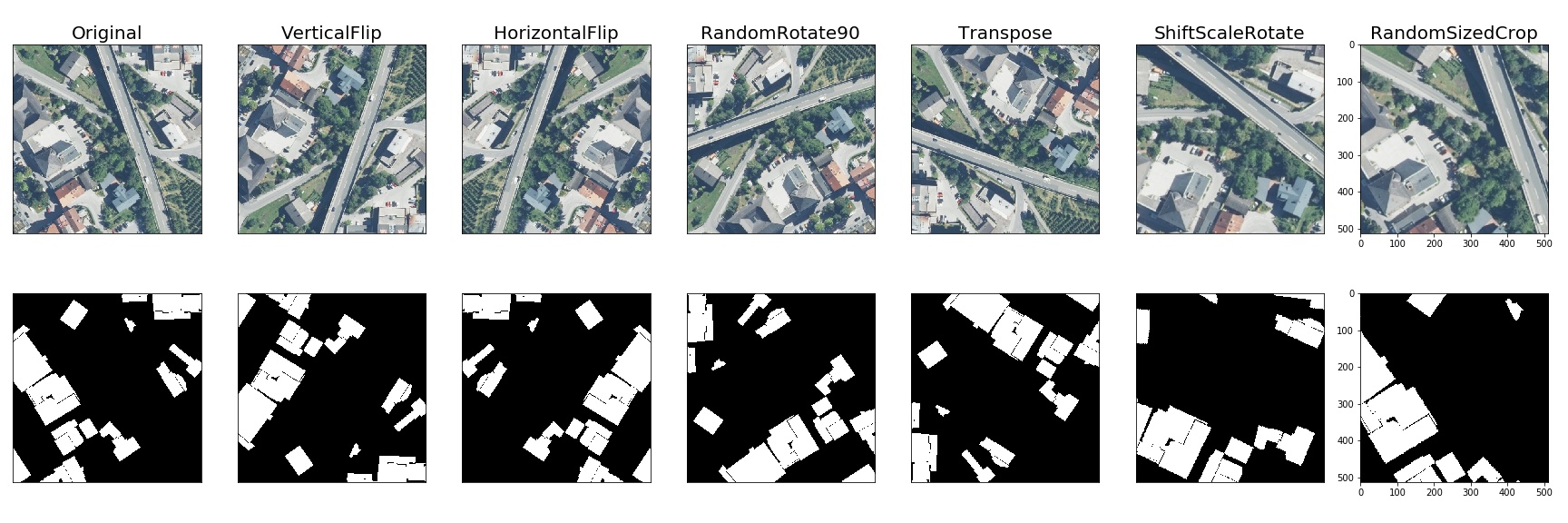
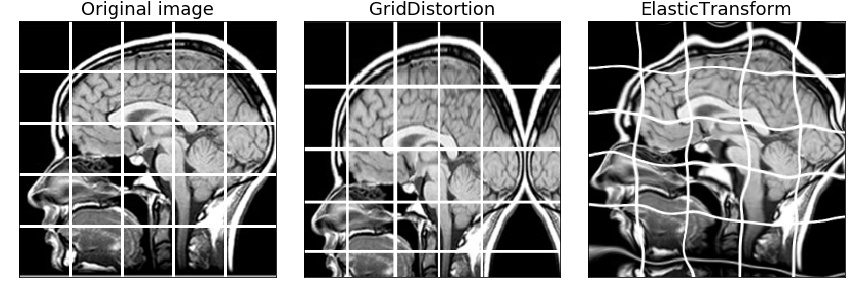
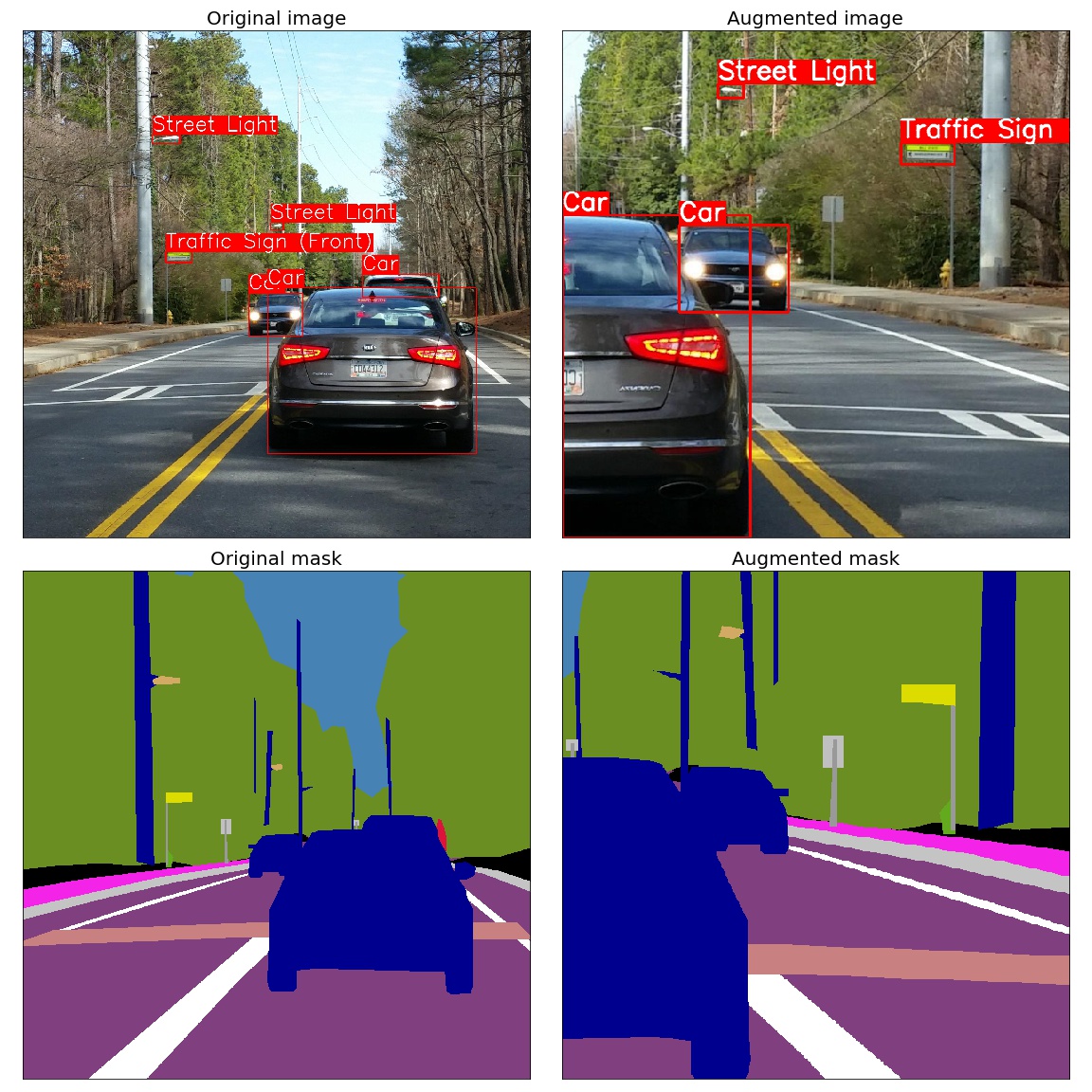
A few more examples of augmentations
Semantic segmentation on the Inria dataset
Medical imaging
Object detection and semantic segmentation on the Mapillary Vistas dataset
Keypoints augmentation
<img src="https://habrastorage.org/webt/e-/6k/z-/e-6kz-fugp2heak3jzns3bc-r8o.jpeg" width=100%>Benchmark Results
Image Benchmark Results
System Information
- Platform: macOS-15.1-arm64-arm-64bit
- Processor: arm
- CPU Count: 16
- Python Version: 3.12.8
Benchmark Parameters
- Number of images: 2000
- Runs per transform: 5
- Max warmup iterations: 1000
Library Versions
- albumentations: 2.0.4
- augly: 1.0.0
- imgaug: 0.4.0
- kornia: 0.8.0
- torchvision: 0.20.1
Performance Comparison
Number shows how many uint8 images per second can be processed on one CPU thread. Larger is better.
The Speedup column shows how many times faster Albumentations is compared to the fastest other
library for each transform.
| Transform | albumentations<br>2.0.4 | augly<br>1.0.0 | imgaug<br>0.4.0 | kornia<br>0.8.0 | torchvision<br>0.20.1 | Speedup<br>(Alb/fastest other) |
|---|---|---|---|---|---|---|
| Affine | 1445 ± 9 | - | 1328 ± 16 | 248 ± 6 | 188 ± 2 | 1.09x |
| AutoContrast | 1657 ± 13 | - | - | 541 ± 8 | 344 ± 1 | 3.06x |
| Blur | 7657 ± 114 | 386 ± 4 | 5381 ± 125 | 265 ± 11 | - | 1.42x |
| Brightness | 11985 ± 455 | 2108 ± 32 | 1076 ± 32 | 1127 ± 27 | 854 ± 13 | 5.68x |
| CLAHE | 647 ± 4 | - | 555 ± 14 | 165 ± 3 | - | 1.17x |
| CenterCrop128 | 119293 ± 2164 | - | - | - | - | N/A |
| ChannelDropout | 11534 ± 306 | - | - | 2283 ± 24 | - | 5.05x |
| ChannelShuffle | 6772 ± 109 | - | 1252 ± 26 | 1328 ± 44 | 4417 ± 234 | 1.53x |
| CoarseDropout | 18962 ± 1346 | - | 1190 ± 22 | - | - | 15.93x |
| ColorJitter | 1020 ± 91 | 418 ± 5 | - | 104 ± 4 | 87 ± 1 | 2.44x |
| Contrast | 12394 ± 363 | 1379 ± 25 | 717 ± 5 | 1109 ± 41 | 602 ± 13 | 8.99x |
| CornerIllumination | 484 ± 7 | - | - | 452 ± 3 | - | 1.07x |
| Elastic | 374 ± 2 | - | 395 ± 14 | 1 ± 0 | 3 ± 0 | 0.95x |
| Equalize | 1236 ± 21 | - | 814 ± 11 | 306 ± 1 | 795 ± 3 | 1.52x |
| Erasing | 27451 ± 2794 | - | - | 1210 ± 27 | 3577 ± 49 | 7.67x |
| GaussianBlur | 2350 ± 118 | 387 ± 4 | 1460 ± 23 | 254 ± 5 | 127 ± 4 | 1.61x |
| GaussianIllumination | 720 ± 7 | - | - | 436 ± 13 | - | 1.65x |
| GaussianNoise | 315 ± 4 | - | 263 ± 9 | 125 ± 1 | - | 1.20x |
| Grayscale | 32284 ± 1130 | 6088 ± 107 | 3100 ± 24 | 1201 ± 52 | 2600 ± 23 | 5.30x |
| HSV | 1197 ± 23 | - | - | - | - | N/A |
| HorizontalFlip | 14460 ± 368 | 8808 ± 1012 | 9599 ± 495 | 1297 ± 13 | 2486 ± 107 | 1.51x |
| Hue | 1944 ± 64 | - | - | 150 ± 1 | - | 12.98x |
| Invert | 27665 ± 3803 | - | 3682 ± 79 | 2881 ± 43 | 4244 ± 30 | 6.52x |
| JpegCompression | 1321 ± 33 | 1202 ± 19 | 687 ± 26 | 120 ± 1 | 889 ± 7 | 1.10x |
| LinearIllumination | 479 ± 5 | - | - | 708 ± 6 | - | 0.68x |
| MedianBlur | 1229 ± 9 | - | 1152 ± 14 | 6 ± 0 | - | 1.07x |
| MotionBlur | 3521 ± 25 | - | 928 ± 37 | 159 ± 1 | - | 3.79x |
| Normalize | 1819 ± 49 | - | - | 1251 ± 14 | 1018 ± 7 | 1.45x |
| OpticalDistortion | 661 ± 7 | - | - | 174 ± 0 | - | 3.80x |
| Pad | 48589 ± 2059 | - | - | - | 4889 ± 183 | 9.94x |
| Perspective | 1206 ± 3 | - | 908 ± 8 | 154 ± 3 | 147 ± 5 | 1.33x |
| PlankianJitter | 3221 ± 63 | - | - | 2150 ± 52 | - | 1.50x |
| PlasmaBrightness | 168 ± 2 | - | - | 85 ± 1 | - | 1.98x |
| PlasmaContrast | 145 ± 3 | - | - | 84 ± 0 | - | 1.71x |
| PlasmaShadow | 183 ± 5 | - | - | 216 ± 5 | - | 0.85x |
| Posterize | 12979 ± 1121 | - | 3111 ± 95 | 836 ± 30 | 4247 ± 26 | 3.06x |
| RGBShift | 3391 ± 104 | - | - | 896 ± 9 | - | 3.79x |
| Rain | 2043 ± 115 | - | - | 1493 ± 9 | - | 1.37x |
| RandomCrop128 | 111859 ± 1374 | 45395 ± 934 | 21408 ± 622 | 2946 ± 42 | 31450 ± 249 | 2.46x |
| RandomGamma | 12444 ± 753 | - | 3504 ± 72 | 230 ± 3 | - | 3.55x |
| RandomResizedCrop | 4347 ± 37 | - | - | 661 ± 16 | 837 ± 37 | 5.19x |
| Resize | 3532 ± 67 | 1083 ± 21 | 2995 ± 70 | 645 ± 13 | 260 ± 9 | 1.18x |
| Rotate | 2912 ± 68 | 1739 ± 105 | 2574 ± 10 | 256 ± 2 | 258 ± 4 | 1.13x |
| SaltAndPepper | 629 ± 6 | - | - | 480 ± 12 | - | 1.31x |
| Saturation | 1596 ± 24 | - | 495 ± 3 | 155 ± 2 | - | 3.22x |
| Sharpen | 2346 ± 10 | - | 1101 ± 30 | 201 ± 2 | 220 ± 3 | 2.13x |
| Shear | 1299 ± 11 | - | 1244 ± 14 | 261 ± 1 | - | 1.04x |
| Snow | 611 ± 9 | - | - | 143 ± 1 | - | 4.28x |
| Solarize | 11756 ± 481 | - | 3843 ± 80 | 263 ± 6 | 1032 ± 14 | 3.06x |
| ThinPlateSpline | 82 ± 1 | - | - | 58 ± 0 | - | 1.41x |
| VerticalFlip | 32386 ± 936 | 16830 ± 1653 | 19935 ± 1708 | 2872 ± 37 | 4696 ± 161 | 1.62x |
Contributing
To create a pull request to the repository, follow the documentation at CONTRIBUTING.md
Community
Citing
If you find this library useful for your research, please consider citing Albumentations: Fast and Flexible Image Augmentations:
bibtex@Article{info11020125, AUTHOR = {Buslaev, Alexander and Iglovikov, Vladimir I. and Khvedchenya, Eugene and Parinov, Alex and Druzhinin, Mikhail and Kalinin, Alexandr A.}, TITLE = {Albumentations: Fast and Flexible Image Augmentations}, JOURNAL = {Information}, VOLUME = {11}, YEAR = {2020}, NUMBER = {2}, ARTICLE-NUMBER = {125}, URL = {https://www.mdpi.com/2078-2489/11/2/125}, ISSN = {2078-2489}, DOI = {10.3390/info11020125} }
📫 Stay Connected
Never miss updates, tutorials, and tips from the Albumentations team! Subscribe to our newsletter.
<!-- GitAds-Verify: ERJY18YZIFA1WZ6CUJNP379R3T3JN418 -->Contributors
Showing top 12 contributors by commit count.


Related Repositories

danielmiessler/Fabric
Fabric is an open-source framework for augmenting humans using AI. It provides a modular system for solving specific problems using a crowdsourced set of AI prompts that can be used anywhere.

aleju/imgaug
Image augmentation for machine learning experiments.
danielmiessler/Personal_AI_Infrastructure
Agentic AI Infrastructure for magnifying HUMAN capabilities.

spotify/pedalboard
🎛 🔊 A Python library for audio.

ashnkumar/sketch-code
Keras model to generate HTML code from hand-drawn website mockups. Implements an image captioning architecture to drawn source images.

mdbloice/Augmentor
Image augmentation library in Python for machine learning.