

Open chat playground
Open Chat Playground (OCP) is a web UI that is able to connect virtually any LLM from any platform.
Open Chat Playground (OCP) is a web UI that is able to connect virtually any LLM from any platform. The project is written primarily in C#, distributed under the MIT License license, first published in 2025. Key topics include: ai, amazon-bedrock, anthropic, azure, azure-ai-foundry.
<img src="./assets/icon-transparent.svg" alt="Icon for OpenChat Playground" width="32" /> Open Chat Playground
Open Chat Playground (OCP) is a web UI that is able to connect virtually any LLM from any platform.
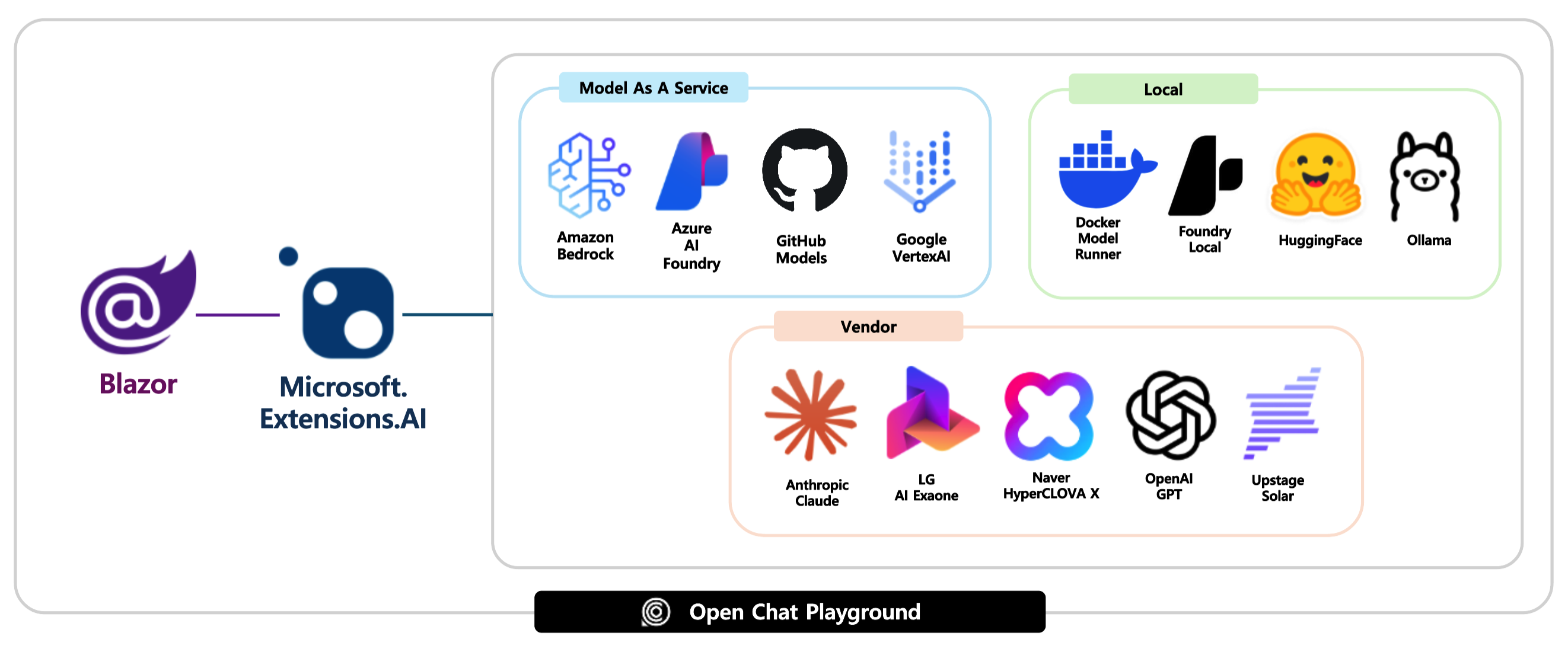
Supported platforms
- Amazon Bedrock
- Azure AI Foundry
- GitHub Models
- Google Vertex AI
- Docker Model Runner
- Foundry Local
- Hugging Face
- Ollama
- Anthropic
-
Naver - LG
- OpenAI
- Upstage
Prerequisites
- Azure Subscription
- .NET SDK 9
- Visual Studio Code + C# DevKit or Visual Studio 2022 v17.14+
- Docker Desktop
- Azure Developer CLI
- GitHub CLI
- PowerShell 7.5+ 👉 Windows only
Getting started
Get the repository ready
-
Login to GitHub.
bashgh auth login -
Check login status.
bashgh auth status -
Fork this repository to your account and clone the forked repository to your local machine.
bashgh repo fork aliencube/open-chat-playground --clone --default-branch-only -
Navigate to the cloned repository.
bashcd open-chat-playground
Run on local machine
- Use Amazon Bedrock
- Use Azure AI Foundry
- Use GitHub Models
- Use Google Vertex AI
- Use Docker Model Runner
- Use Foundry Local
- Use Hugging Face
- Use Ollama
- Use Anthropic
- Use LG
- Use OpenAI
- Use Upstage
Run in local container
- Use Amazon Bedrock
- Use Azure AI Foundry
- Use GitHub Models
- Use Google Vertex AI
- Use Docker Model Runner
Use Foundry Local👉 NOT SUPPORTED- Use Hugging Face
- Use Ollama
- Use Anthropic
- Use LG
Use Naver👉 NOT SUPPORTED- Use OpenAI
- Use Upstage
Run on Azure
- Use Amazon Bedrock
- Use Azure AI Foundry
- Use GitHub Models
- Use Google Vertex AI
Use Docker Model Runner👉 NOT SUPPORTEDUse Foundry Local👉 NOT SUPPORTED- Use Hugging Face
- Use Ollama
- Use Anthropic
- Use LG
Use Naver👉 NOT SUPPORTED- Use OpenAI
- Use Upstage
Run as API
-
Run the app - either locally or remotely.
-
Navigate to
{{APP_URL}}/openapi.jsonto see the OpenAPI doc. NOTE: the OpenAPI doc is only able to see on a local machine, not on a remote instance. -
Send a
POSTrequest to{{APP_URL}}/api/chat/responseswith a request payload like:json[ { "role": "system", "message": "You're a friendly assistant" }, { "role": "user", "message": "Why is the sky blue?" } ] -
Confirm the response payload like:
jsonc[ { "role": "assistant", "message": "Because " }, { "role": "assistant", "message": "It's " }, { "role": "assistant", "message": "... " }, ... { "role": "assistant", "message": "... " } ]
Run tests
Build app
-
Make sure you are at the repository root.
bashcd $REPOSITORY_ROOT -
Build the app.
bashdotnet restore && dotnet build
Unit tests
-
Make sure you are at the repository root.
bashcd $REPOSITORY_ROOT -
Run tests.
bashdotnet test --filter "Category=UnitTest"
Integration tests
-
Make sure you have the Ollama server up and running on your local machine.
bashollama serve ollama run hf.co/Qwen/Qwen3-0.6B-GGUF -
Make sure you are at the repository root.
bashcd $REPOSITORY_ROOT -
Install playwright.
bashpwsh $REPOSITORY_ROOT/test/OpenChat.PlaygroundApp.Tests/bin/Debug/net{YOUR_VERSION}/playwright.ps1 install -
Run the app.
bashdotnet run --project $REPOSITORY_ROOT/src/OpenChat.PlaygroundApp -- --connector-type HuggingFace -
Run tests.
bash# With LLM provider dotnet test --filter "Category=IntegrationTest"bash# Without LLM provider dotnet test --filter "Category=IntegrationTest & Category!=LLMRequired"
Configure GitHub Actions for CI/CD Pipeline
-
Make sure you are at the repository root.
bashcd $REPOSITORY_ROOT -
Make sure you've logged in to Azure.
bashazd auth login --check-status -
Run pipeline config.
bashazd pipeline config -
Answer the question below:
? Select how to authenticate the pipeline to Azure👉Federated Service Principal (SP + OIDC)? Would you like to commit and push your local changes to start the configured CI pipeline?👉No
-
Once the configuration is done, push a new commit to GitHub to run the GitHub Actions workflow.
Contributors
Showing top 12 contributors by commit count.


Related Repositories

openclaw/openclaw
Your own personal AI assistant. Any OS. Any Platform. The lobster way. 🦞

NousResearch/hermes-agent
The agent that grows with you

n8n-io/n8n
Fair-code workflow automation platform with native AI capabilities. Combine visual building with custom code, self-host or cloud, 400+ integrations.

Significant-Gravitas/AutoGPT
AutoGPT is the vision of accessible AI for everyone, to use and to build on. Our mission is to provide the tools, so that you can focus on what matters.

AUTOMATIC1111/stable-diffusion-webui
Stable Diffusion web UI

f/prompts.chat
f.k.a. Awesome ChatGPT Prompts. Share, discover, and collect prompts from the community. Free and open source — self-host for your organization with complete privacy.