

SwiftyPageController
SwiftyPageController will be helpful to use in many pages controller
**SwiftyPageController** will be helpful to use in many pages controller. The project is written primarily in Swift, distributed under the MIT License license, first published in 2017. Key topics include: animation, containerview, containerviewcontroller, controller, customizable.
SwiftyPageController




Description
SwiftyPageController will be helpful to use in many pages controller.
Advantages:
- customizable animation transition;
- customizable selecting buttons (you can implement them by your own)
How to use
- Add Contanier View from storyboard or programmatically
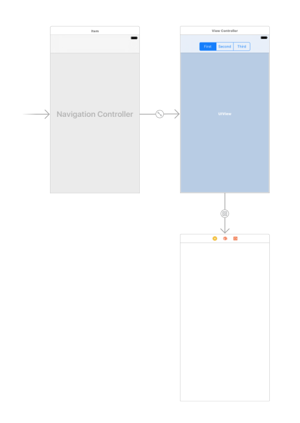
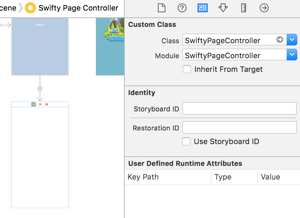
- Choose class for container controller SwiftyPageController
- Setup like example below
swiftclass ViewController: UIViewController { @IBOutlet weak var segmentControl: UISegmentedControl! var containerController: SwiftyPageController! override func viewDidLoad() { super.viewDidLoad() segmentControl.addTarget(self, action: #selector(segmentControlDidChange(_:)), for: .valueChanged) } func segmentControlDidChange(_ sender: UISegmentedControl) { // select needed controller containerController.selectController(atIndex: sender.selectedSegmentIndex, animated: true) } func setupContainerController(_ controller: SwiftyPageController) { // assign variable containerController = controller // set delegate containerController.delegate = self // set animation type containerController.animator = .parallax // set view controllers let firstController = UIStoryboard(name: "Main", bundle: nil).instantiateViewController(withIdentifier: "\(FirstViewController.self)") let secondController = UIStoryboard(name: "Main", bundle: nil).instantiateViewController(withIdentifier: "\(SecondViewController.self)") let thirdController = UIStoryboard(name: "Main", bundle: nil).instantiateViewController(withIdentifier: "\(ThirdViewController.self)") containerController.viewControllers = [firstController, secondController, thirdController] // select needed controller containerController.selectController(atIndex: 0, animated: false) } // MARK: - Navigation override func prepare(for segue: UIStoryboardSegue, sender: Any?) { if let containerController = segue.destination as? SwiftyPageController { setupContainerController(containerController) } } }
- In ViewController where you added container controller implement SwiftyPageControllerDelegate
swiftfunc swiftyPageController(_ controller: SwiftyPageController, alongSideTransitionToController toController: UIViewController) { } func swiftyPageController(_ controller: SwiftyPageController, didMoveToController toController: UIViewController) { segmentControl.selectedSegmentIndex = containerController.viewControllers.index(of: toController)! } func swiftyPageController(_ controller: SwiftyPageController, willMoveToController toController: UIViewController) { }
- For selecting needed tab use method
swiftfunc selectController(atIndex index: Int, animated: Bool)
Animation

To choose animation use property
swiftpublic var animator: AnimatorType
You can use three types of animation:
- default
- parallax
- custom
If you want to create own animation you need to implement SwiftyPageControllerAnimatorProtocol.
swiftpublic protocol SwiftyPageControllerAnimatorProtocol { var animationDuration: TimeInterval { get } var animationProgress: Float { get set } var animationSpeed: Float { get set } func setupAnimation(fromController: UIViewController, toController: UIViewController, panGesture: UIPanGestureRecognizer, animationDirection: SwiftyPageController.AnimationDirection) func didFinishAnimation(fromController: UIViewController, toController: UIViewController) }
And use it like that:
swiftcontainerController.animator = .custom(CustomAnimationController())
Example
To run the example project, clone the repo, and run pod install from the Example directory first.
Requirements
Installation
SwiftyPageController is available through CocoaPods. To install
it, simply add the following line to your Podfile:
rubypod "SwiftyPageController"
Author
alkhokhlov, alkhokhlovv@gmail.com
License
SwiftyPageController is available under the MIT license. See the LICENSE file for more info.
Related Repositories

3b1b/manim
Animation engine for explanatory math videos

animate-css/animate.css
🍿 A cross-browser library of CSS animations. As easy to use as an easy thing.

MisterBooo/LeetCodeAnimation
Demonstrate all the questions on LeetCode in the form of animation.(用动画的形式呈现解LeetCode题目的思路)

juliangarnier/anime
JavaScript animation engine

algorithm-visualizer/algorithm-visualizer
:fireworks:Interactive Online Platform that Visualizes Algorithms from Code

aseprite/aseprite
Animated sprite editor & pixel art tool (Windows, macOS, Linux)