

Flutter social chat
Real-time social chat app with Firebase & GetStream — open-source and feature-rich
A modern, feature-rich social chat application built with Flutter following the MVVM architecture. This app combines social networking features with robust real-time messaging capabilities. The project is written primarily in Dart, distributed under the MIT License license, first published in 2022. Key topics include: chat-app, firebase, flutter, flutter-chat, flutter-open-source.
Flutter Social Chat



A modern, feature-rich social chat application built with Flutter following the MVVM architecture. This app combines social networking features with robust real-time messaging capabilities.
🤝 Sponsored by Stream
<p align="center"> <img src="assets/images/stream_logo.png" alt="Stream Logo" width="250"/> </p>Flutter Social Chat is proudly sponsored by Stream, the leading provider for chat and activity feed APIs.
This marks another exciting collaboration with Stream after our initial release. The powerful Stream Chat SDK enables us to implement robust, scalable, and feature-rich chat functionality with minimal effort.
📖 Official Blog Coverage
- Building a Flutter Social Chat App: MVVM Architecture & Stream Chat (2025)
- Building a Social Chat App with Flutter and Stream (2023)
The latest blog post dives into our architectural decisions, feature set, and how the Stream Chat SDK powers real-time communication in this modern Flutter app.
🚀 Technical Highlights
- ⚡ MVVM Architecture: Clean separation of UI, business logic, and data
- 🔄 BLoC Pattern: Efficient reactive state management with Flutter BLoC
- 🔌 Stream Chat SDK: Powerful real-time messaging capabilities
- 🔐 Firebase Integration: Authentication and data storage with Firebase
- 📱 Responsive Design: Adaptive UI for different device sizes
- 🧩 Modular Structure: Well-organized codebase with clear separation of concerns
- 🌐 Environment Configuration: Secure management of API keys and secrets
- 🔌 Dependency Injection: Flexible service location with GetIt
- 🧪 Functional Programming: Elegant flow with FPDart
💬 Core Features
- 🔑 Phone Authentication: Secure sign-in with SMS verification
- 💬 Real-time Chat: Instant messaging powered by Stream Chat
- 🔍 User Discovery: Find and connect with other users
- 📊 Chat Management: Create, list, and manage conversations
- 🔔 Connectivity Handling: Graceful online/offline state management
📱 App Showcase
App Flow Demo
<img src="https://github.com/user-attachments/assets/097b6421-d9fc-4e26-be65-0cfa16039ee0" alt="App Flow Demo" width="500"/>Demo Video
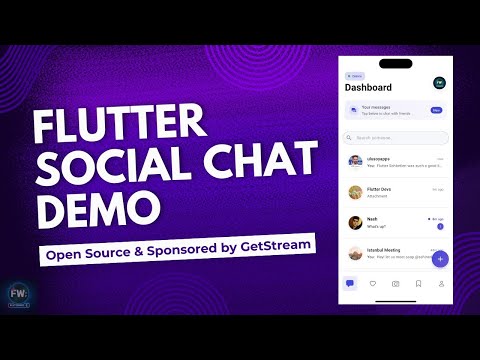
Click the image above to watch the full app demo
Screenshots
Authentication Flow
<table> <tr> <td><b>Landing Page</b><br><img src="https://github.com/user-attachments/assets/263c86d4-0d1e-4bf6-9a97-762f0baf8eb5" width="200"/></td> <td><b>Sign In</b><br><img src="https://github.com/user-attachments/assets/dfbbae03-a31d-414b-839d-adec763febc0" width="200"/></td> <td><b>SMS Verification</b><br><img src="https://github.com/user-attachments/assets/f9abe4f2-e41b-463a-ba0d-f2d6917f70f4" width="200"/></td> <td><b>Onboarding</b><br><img src="https://github.com/user-attachments/assets/b392e820-00fe-4e49-93cf-2fd3534fd883" width="200"/></td> </tr> </table>Main App Features
<table> <tr> <td><b>Dashboard</b><br><img src="https://github.com/user-attachments/assets/c2e6c74c-4a94-4502-936d-295ef333f746" width="200"/></td> <td><b>Search Users</b><br><img src="https://github.com/user-attachments/assets/a4f3a5db-c060-4fcd-ae10-ef28c3ff2f35" width="200"/></td> <td><b>Chat Options</b><br><img src="https://github.com/user-attachments/assets/b52a1363-dbf7-4500-8409-52e403031340" width="200"/></td> </tr> </table>Chat Creation
<table> <tr> <td><b>Create Private Chat</b><br><img src="https://github.com/user-attachments/assets/6a7d8590-4784-4105-ab8f-f0b31c250b4c" width="200"/></td> <td><b>Create Group Chat</b><br><img src="https://github.com/user-attachments/assets/9fc1f1c5-d613-4e98-a06e-e127171a5dbe" width="200"/></td> </tr> </table>Chat Experience
<table> <tr> <td><b>Chat View</b><br><img src="https://github.com/user-attachments/assets/480a9760-07be-4f78-9ded-904e0f7ce7ac" width="200"/></td> <td><b>Message Details</b><br><img src="https://github.com/user-attachments/assets/1dd38298-cf30-410a-a0c1-170a61d730d9" width="200"/></td> <td><b>Message Reactions</b><br><img src="https://github.com/user-attachments/assets/6005b3d5-2faa-495e-b11d-f0f8af38cf20" width="200"/></td> <td><b>Profile View</b><br><img src="https://github.com/user-attachments/assets/56061aff-c75f-4c16-bc01-71c0e6b6820a" width="200"/></td> </tr> </table>🏗️ Architecture
Flutter Social Chat follows the MVVM (Model-View-ViewModel) architecture, with a clean separation of concerns:
lib/
├── core/           # Core functionality, utils, and app-wide services
├── data/           # Data layer with repositories and data sources
├── domain/         # Domain layer with models
├── presentation/   # UI layer with views, blocs, and design system
└── main.dart       # Application entry point
State Management
The app uses BLoC (Business Logic Component) pattern for state management:
- Separation of UI and Business Logic: Clear distinction between presentation and business logic
- Testability: Easy unit testing of business logic
- Reactive Programming: Stream-based approach for handling state changes
- Equatable: All state classes use Equatable for efficient state comparison
🔧 How to Run
Setup Steps
- Clone the repository
bashgit clone https://github.com/yourusername/flutter_social_chat.git cd flutter_social_chat
- Install dependencies
bashflutter pub get
- Firebase Setup
- Create a new Firebase project at Firebase Console
- Add Android and iOS apps to your Firebase project
- Download and add the
google-services.jsonto the Android app directory - Download and add the
GoogleService-Info.plistto the iOS app directory - Enable Phone Authentication in the Firebase Authentication section
- Set up Firestore Database with appropriate security rules
- Stream Chat Setup
- Create an account on Stream
- Create a new app in the Stream dashboard
- Get your API Key and Secret from the app dashboard
- Create a
.envfile in the project root with your Stream credentials:
STREAM_CHAT_API_KEY=your_stream_chat_api_key
STREAM_CHAT_API_SECRET=your_stream_chat_api_secret
- For detailed environment setup instructions, see ENV_SETUP.md
- Run the app
bashflutter run
📄 License
This project is licensed under the MIT License - see the LICENSE file for details.
Contributors
Showing top 2 contributors by commit count.


Related Repositories

GetStream/stream-chat-react-native
💬 React-Native Chat SDK ➜ Stream Chat. Includes a tutorial on building your own chat app experience using React-Native, React-Navigation and Stream

mierau/hotline
A modern remake of Hotline for macOS, iOS, and iPadOS.

developerpaaji/chat_app
A flutter chat app built with firestore. It is clone of messenger.User can create stories,chat and search in real time.

wirechat/wirechat
A Laravel Livewire Chat application package

vineeshvk/chat-app-flutter
It's a fully functioning chat app built using flutter. With both one on one chats and group chats
GetStream/flutter-samples
A collection of sample apps that use Stream