

MewUI
A cross-platform and lightweight, code-first .NET GUI framework aimed at NativeAOT.
**😺 MewUI** is a cross-platform and lightweight, code-first .NET GUI framework aimed at NativeAOT. The project is written primarily in C#, distributed under the MIT License license, first published in 2026. Key topics include: avalonia, cross-platform, dotnet, gui, linux.







😺 MewUI is a cross-platform and lightweight, code-first .NET GUI framework aimed at NativeAOT.
[!NOTE]
The official pronunciation of MewUI is /mjuː aɪ/ (“myoo-eye”).
🧪 Experimental Prototype
[!IMPORTANT]
This project is a proof-of-concept prototype for validating ideas and exploring design directions.
As it evolves toward v1.0, APIs, internal architecture, and runtime behavior may change significantly.
Backward compatibility is not guaranteed at this stage.
🤖 AI-Assisted Development
[!NOTE]
This project was developed using an AI prompt–driven workflow.
Design and implementation were performed through iterative prompting without direct manual code edits,
with each step reviewed and refined by the developer.
🚀 Try It Out
No clone. No download. No project setup.
You can run MewUI immediately with a single command on Windows, Linux or macOS. (.NET 10 SDK required)
[!TIP]
This is the quickest way to try MewUI without going through the usual repository and project setup steps.
bashcurl -sL https://raw.githubusercontent.com/aprillz/MewUI/refs/heads/main/samples/FBASample/fba_gallery.cs -o - | dotnet run -
[!WARNING]
This command downloads and executes code directly from GitHub.
Video
https://github.com/user-attachments/assets/fc2d6ad8-3317-4784-a6e5-a00c68e9ed3b
Screenshots
| Light | Dark |
|---|---|
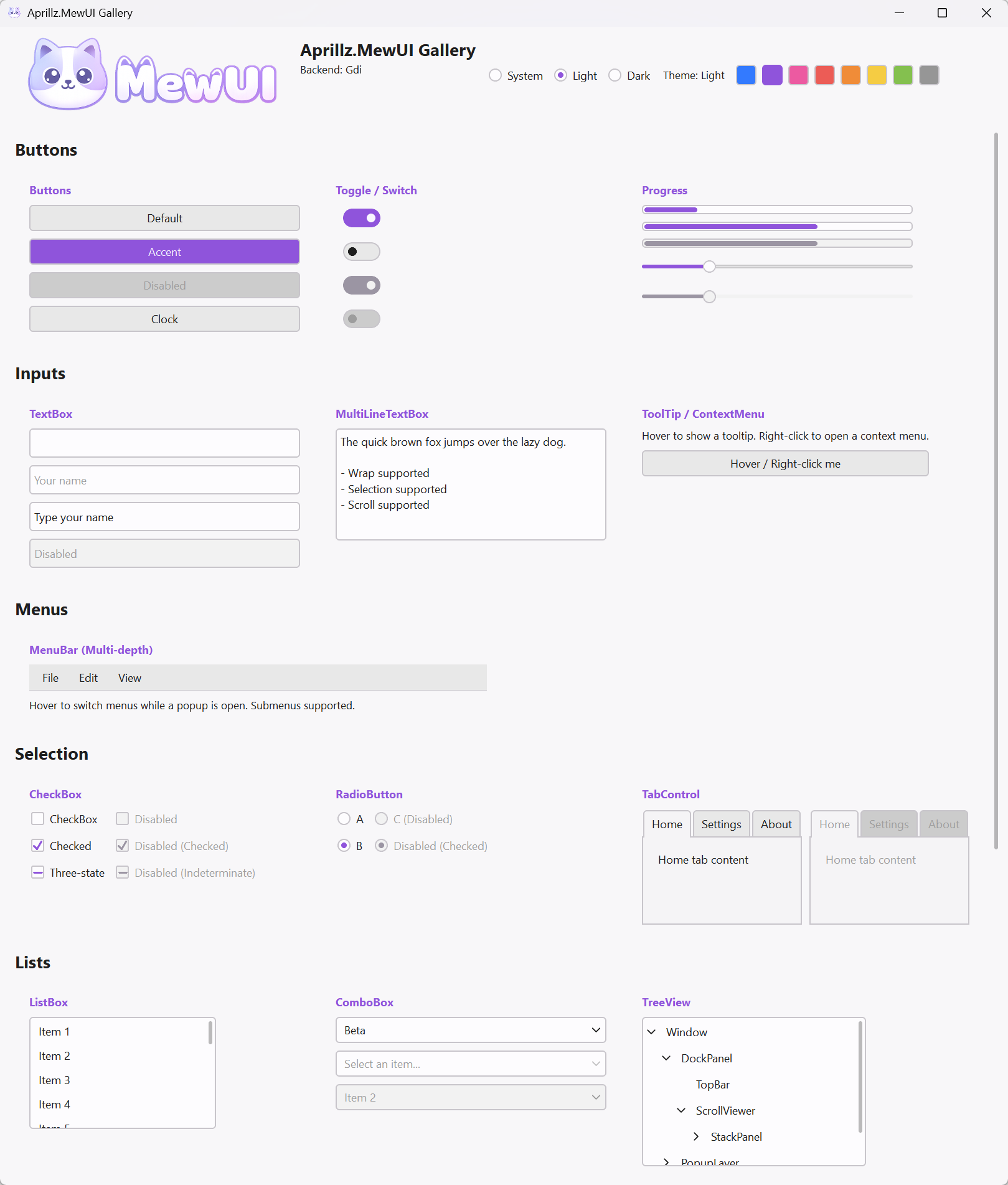 | 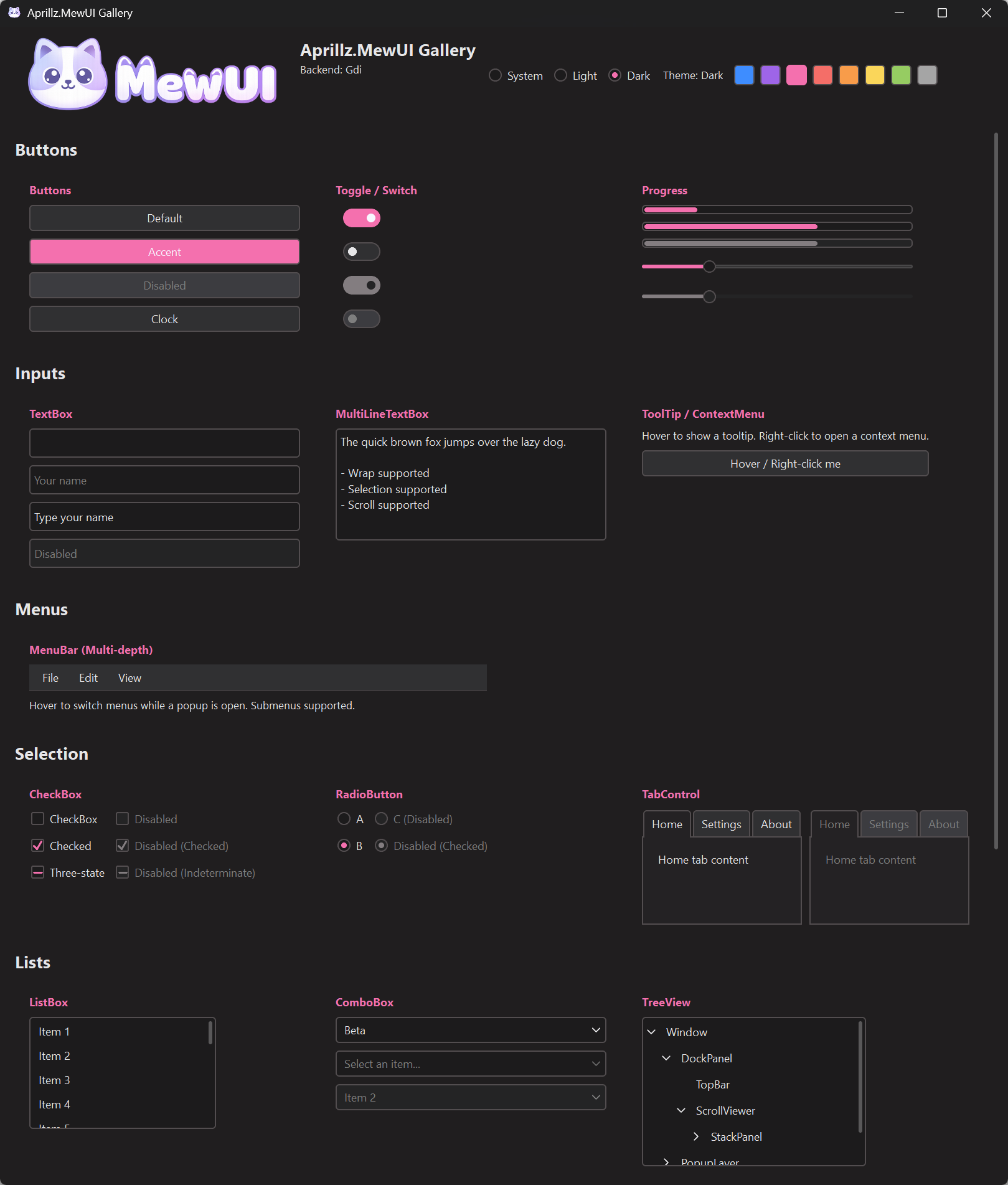 |
✨ Highlights
- 📦 NativeAOT + trimming first
- 🪶 Lightweight by design (small EXE, low memory footprint, fast first frame)
- 🧩 Fluent C# markup (no XAML)
🚀 Quickstart
-
NuGet: https://www.nuget.org/packages/Aprillz.MewUI/
Aprillz.MewUIis a metapackage that bundles Core, all platform hosts, and all rendering backends.- Platform-specific packages are also available:
Aprillz.MewUI.Windows,.Linux,.MacOS - Install:
dotnet add package Aprillz.MewUI - See: Installation & Packages
-
Single-file app (VS Code friendly)
-
Minimal header (without AOT/Trim options):
csharp#:sdk Microsoft.NET.Sdk #:property OutputType=Exe #:property TargetFramework=net10.0 #:package Aprillz.MewUI@0.10.3 // ...
-
Run:
dotnet run your_app.cs
🧪 C# Markup at a Glance
-
Sample source: https://github.com/aprillz/MewUI/blob/main/samples/MewUI.Sample/Program.cs
csharpvar window = new Window() .Title("Hello MewUI") .Size(520, 360) .Padding(12) .Content( new StackPanel() .Spacing(8) .Children( new Label() .Text("Hello, Aprillz.MewUI") .FontSize(18) .Bold(), new Button() .Content("Quit") .OnClick(() => Application.Quit()) ) ); Application.Run(window);
🎯 Concept
MewUI is a code-first GUI framework with four priorities:
- NativeAOT + trimming friendliness
- Small footprint, fast startup, low memory usage
- Fluent C# markup for building UI trees (no XAML)
- AOT-friendly binding
Non-goals (by design):
- WPF-style animations, visual effects, or heavy composition pipelines
- A large, “kitchen-sink” control catalog (keep the surface area small and predictable)
- Complex path-based data binding
- Full XAML/WPF compatibility or designer-first workflows
✂️ NativeAOT / Trim
- The library aims to be trimming-safe by default (explicit code paths, no reflection-based binding).
- Windows interop uses source-generated P/Invoke (
LibraryImport) for NativeAOT compatibility. - On Linux, building with NativeAOT requires the AOT workload in addition to the regular .NET SDK (e.g. install
dotnet-sdk-aot-10.0). - If you introduce new interop or dynamic features, verify with the trimmed publish profile above.
To check output size locally:
- Publish:
dotnet publish .\samples\MewUI.Gallery\MewUI.Gallery.csproj -c Release -p:PublishProfile=win-x64-trimmed - Inspect:
.artifacts\publish\MewUI.Gallery\win-x64-trimmed\
Reference (Aprillz.MewUI.Gallery.exe @v0.10.0)
- win-x64: ~3,545 KB
- osx-arm64: ~2,664 KB
- linux-arm64: ~3939 KB
🔗 State & Binding (AOT-friendly)
Bindings are explicit and delegate-based (no reflection):
csharpusing Aprillz.MewUI.Binding; using Aprillz.MewUI.Controls; var percent = new ObservableValue<double>( initialValue: 0.25, coerce: v => Math.Clamp(v, 0, 1)); var slider = new Slider() .BindValue(percent); var label = new Label() .BindText(percent, v => $"Percent ({v:P0})");
🧱 Controls / Panels
Controls (Implemented):
Button,ToggleButtonLabel,TextBlock,ImageTextBox,MultiLineTextBox,PasswordBoxCheckBox,RadioButton,ToggleSwitchComboBox,ListBox,TreeView,GridViewSlider,ProgressBar,ProgressRing,NumericUpDownTabControl,GroupBox,Expander,BorderColorPicker,DatePicker,CalendarMenuBar,ContextMenu,ToolTip(in-window popups)ScrollViewerWindow,DispatcherTimer
Panels:
Grid(rows/columns withAuto,*, pixel)StackPanel(horizontal/vertical)DockPanel(dock edges + last-child fill)UniformGrid(equal cells)WrapPanel(wrap + item size)Canvas(absolute positioning)SplitPanel(drag splitter)
All panels except
Canvas(absolute) andSplitPanelsupportSpacing.
🧩 Extensions
Optional packages layered on top of the core - reference only what you need.
| Extension | Description | Package |
|---|---|---|
| MewDock | Visual Studio style docking - document/tool tabs, drag rearranging, splits, auto-hide, maximize, popouts | Aprillz.MewUI.MewDock |
| SVG | Pure C# SVG parsing/rendering (no System.Drawing, AOT compatible) | Aprillz.MewUI.Svg |
| Skia | SkiaCanvasView (draw with SkiaSharp) + GPU zero-copy interop | Aprillz.MewUI.Skia |
| MewCharts | Charts (Cartesian/Pie/Polar) via the LiveChartsCore engine, no SkiaSharp dependency | Aprillz.MewUI.MewCharts |
| WebView2 | Win32 WebView2 control (requires the Microsoft Edge WebView2 runtime, Windows only) | Aprillz.MewUI.WebView2.Win32 |
Skia interop - add the zero-copy bridge matching your backend to enable the GPU fast path.
| Backend | Package |
|---|---|
| Direct2D | Aprillz.MewUI.Skia.Interop.Direct2D |
| GDI | Aprillz.MewUI.Skia.Interop.Gdi |
| MewVG / Win32 | Aprillz.MewUI.Skia.Interop.MewVG.Win32 |
| MewVG / X11 | Aprillz.MewUI.Skia.Interop.MewVG.X11 |
| MewVG / macOS | Aprillz.MewUI.Skia.Interop.MewVG.MacOS |
Without an interop package, Skia content still renders via the CPU upload fallback. Skia is also bundled as metapackages
Aprillz.MewUI.Skia.Windows/.Linux/.MacOS/.All.
MewDock is a C# port of FlexLayout (MIT). MewCharts bundles the LiveChartsCore engine (MIT). See
THIRD_PARTY_NOTICES.mdfor license notices.
🎨 Theme
MewUI uses a Theme object (colors + metrics) and ThemeManager to control defaults and runtime changes.
- Configure defaults before
Application.Run(...)viaThemeManager.Default* - Change at runtime via
Application.Current.SetTheme(...)/Application.Current.SetAccent(...)
See: docs/Theme.md
🖌️ Rendering Backends
Rendering is abstracted through:
IGraphicsFactory/IGraphicsContext
Backends:
| Backend | Platform | Package |
|---|---|---|
| Direct2D | Windows | Aprillz.MewUI.Backend.Direct2D |
| GDI | Windows | Aprillz.MewUI.Backend.Gdi |
| MewVG | Windows | Aprillz.MewUI.Backend.MewVG.Win32 |
| MewVG | Linux/X11 | Aprillz.MewUI.Backend.MewVG.X11 |
| MewVG | macOS | Aprillz.MewUI.Backend.MewVG.MacOS |
MewVG is a managed port of NanoVG, using OpenGL on Windows/Linux and Metal on macOS.
Backends are registered by the referenced backend packages (Trim/AOT-friendly). In app code you typically either:
- call
*Backend.Register()beforeApplication.Run(...), or - use the builder chain:
Application.Create().Use...().Run(...)
When using a metapackage (e.g., Aprillz.MewUI.Windows), you can select a single backend at publish time with -p:MewUIBackend=Direct2D. See Installation & Packages for details.
🪟 Platform Abstraction
Windowing and the message loop are abstracted behind a platform layer.
Currently implemented:
- Windows (
Aprillz.MewUI.Platform.Win32) - Linux/X11 (
Aprillz.MewUI.Platform.X11) - macOS (
Aprillz.MewUI.Platform.MacOS)
Linux dialogs dependency
On Linux, MessageBox and file dialogs are currently implemented via external tools:
zenity(GNOME/GTK)kdialog(KDE)
If neither is available in PATH, MewUI throws:
PlatformNotSupportedException: No supported Linux dialog tool found (zenity/kdialog).
📄Docs
- Installation & Packages
- C# Markup
- Binding
- Items and Templates
- Theme
- Application Lifecycle
- Layout
- RenderLoop
- Hot Reload
- Custom Controls
🤝 Community
🧭 Roadmap (TODO)
Platforms
- Linux/Wayland
Tooling
- Hot Reload (experimental)
- Design-time preview
License
MewUI is licensed under the MIT License.
Third-party software notices are available in
THIRD_PARTY_NOTICES.md.
Contributors
Showing top 4 contributors by commit count.





Related Repositories

ShareX/ShareX
ShareX is a free and open-source application that enables users to capture or record any area of their screen with a single keystroke. It also supports uploading images, text, and various file types to a wide range of destinations.

AvaloniaUI/Avalonia
Develop Desktop, Embedded, Mobile and WebAssembly apps with C# and XAML. The future of .NET UI

BeyondDimension/SteamTools
🛠「Watt Toolkit」是一个开源跨平台的多功能 Steam 工具箱。

d2phap/ImageGlass
🏞 A fast, open-source, modern image viewer for 90+ formats – including WEBP, GIF, SVG, AVIF, JXL, HEIC and more – built for smooth browsing across Windows, macOS, and Linux.

YSGStudyHards/DotNetGuide
🌈【C#/.NET/.NET Core学习、工作、面试指南】记录、收集和总结C#/.NET/.NET Core基础知识、学习路线、开发实战、编程技巧练习、学习视频、文章、书籍、项目框架、社区组织、开发必备工具、技术前沿周刊、常见面试题、面试须知、简历模板、人才招聘、以及自己在学习和工作中的一些微薄见解。希望能和大家一起学习,共同进步。如果本知识库能为您提供帮助,别忘了给予支持哦(关注、点赞、分享)💖。

LykosAI/StabilityMatrix
Multi-Platform Package Manager for Stable Diffusion