

Rayforge
A software for laser cutters and engravers
Rayforge is a modern, cross-platform 2D CAD, G-code sender and control software for GRBL, Marlin, Ruida, and Smoothieware-based laser cutters and engravers. Built with Gtk4 and Libadwaita, it provides a clean, native interface for Linux, MacOS and Windows, offering a full suite of tools for both hobbyists and professionals. The project is written primarily in Python, distributed under the MIT License license, first published in 2025. Key topics include: cadcam, engraving, gcode, gcode-generation, gcode-sender.



<a href="https://flathub.org/apps/org.rayforge.rayforge"><img alt="Get it from Flathub" src="website/static/images/flathub-badge.svg" height="55"/></a>
<a href="https://www.patreon.com/c/knipknap"><img src="https://c5.patreon.com/external/logo/become_a_patron_button.png" alt="Become a Patron" height="55"/></a>
Rayforge
Rayforge is a modern, cross-platform 2D CAD, G-code sender and control software for GRBL, Marlin, Ruida, and
Smoothieware-based laser cutters and engravers.
Built with Gtk4 and Libadwaita, it provides a clean, native interface for Linux, MacOS and Windows, offering a full suite of tools
for both hobbyists and professionals.
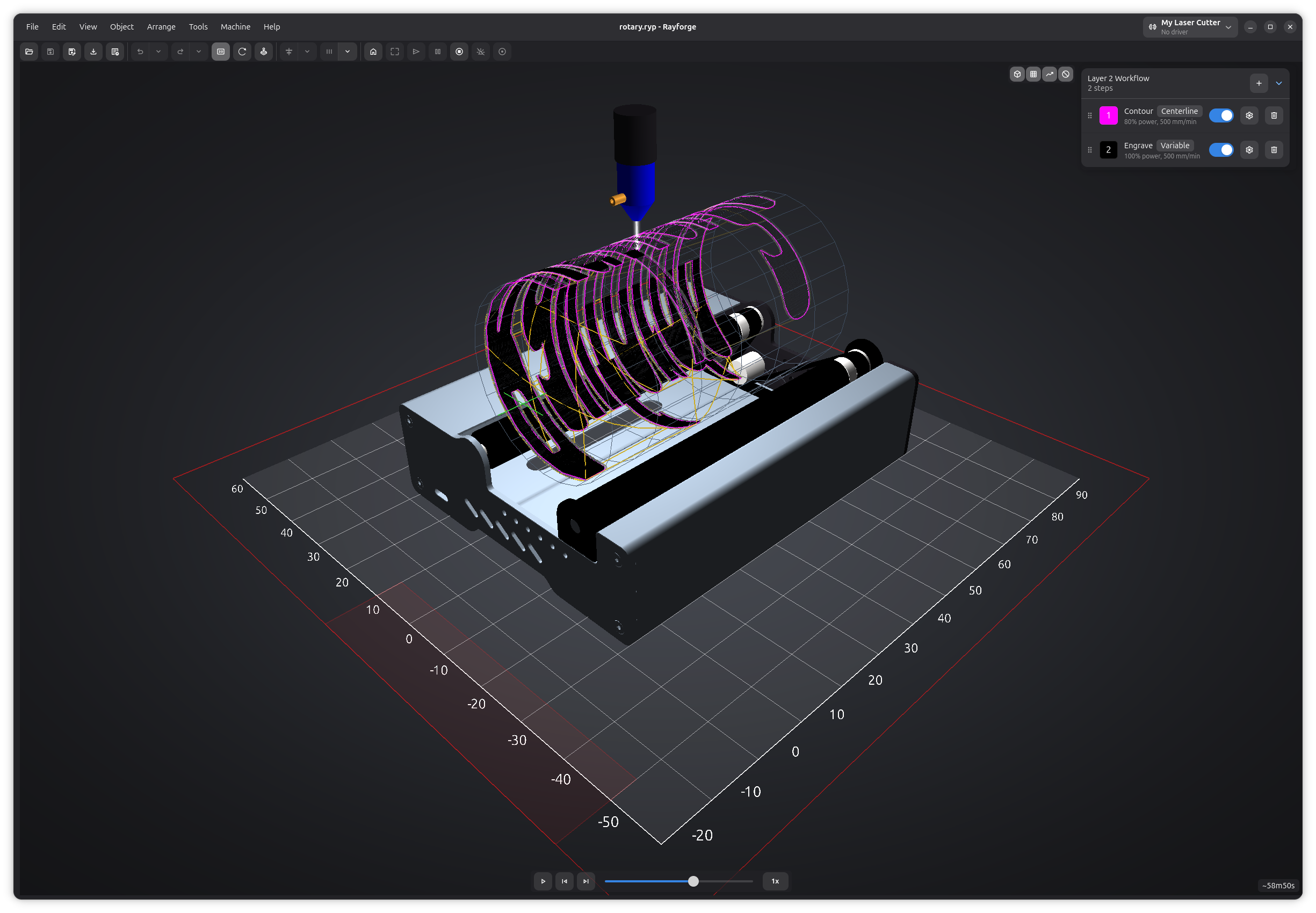
You can also check the official Rayforge homepage.
We also have a Discord.
Key Features
Design & Editing
| Feature | Description |
|---|---|
| Parametric Sketch Editor | Create precise, constraint-based 2D designs with geometric and dimensional constraints. |
| Comprehensive 2D Canvas | Full suite of tools: alignment, transformation, measurement, zoom, pan, and more. |
| Multi-Layer Operations | Assign different operations (e.g., engrave then cut) to layers in your design. |
| Stock Material System | Document-level stock with geometry, thickness, and material assignment. |
| Undo/Redo | Full undo/redo support across all document operations. |
| Broad File Support | Import from SVG, DXF, PDF, JPEG, PNG, BMP, and Ruida (.rd). Export to SVG and DXF. |
| Project Files (.ryp) | Compressed project format preserving all assets, layers, and configurations. |
Operations & Toolpaths
| Feature | Description |
|---|---|
| Versatile Operations | Supports Contour, Raster Engraving (with cross-hatch fill), Shrink Wrap, Depth Engraving, and Frame. |
| 2.5D Cutting | Multi-pass cuts with configurable step-down for thick materials. |
| True 4th Axis Support | Full rotary axis support - as 4th axis, or axis replacement mode for hobby machines. |
| Animated 3D Simulation | Simulate toolpaths in 3D with animated playback, scrubber, and speed control. |
| Holding Tabs | Add tabs to contour cuts. Supports manual and automatic placement. |
| Overscan & Kerf Comp. | Improve engraving quality with overscan; ensure dimensional accuracy with kerf compensation. |
| Dithering Algorithms | Floyd-Steinberg and Bayer ordered dithering for high-quality raster engraving. |
| Post-Processors | Lead-in/lead-out, merge overlapping lines, and crop toolpaths to stock boundary. |
| Advanced Path Generation | Image tracing, travel time optimization, path smoothing, and spot size interpolation. |
Machine Control
| Feature | Description |
|---|---|
| Multi-Machine Profiles | Configure and instantly switch between multiple machine profiles. |
| Device Profiles | Declarative device packages with import/export for sharing configurations. |
| Work Coordinate Systems | 6 WCS (G54-G59) with per-layer assignment for cutting at different offsets. |
| No-Go Zones | Define restricted areas with collision detection before sending G-code. |
| Machine Hours & Maintenance | Track operating hours with configurable maintenance counters and notification thresholds. |
| GRBL Firmware Settings | Read and write firmware parameters ($$) directly from the UI. |
| Arc & Bezier Curves | Native G2/G3 arc and G5 bezier curve support with automatic linearization. |
| Multi-Laser Operations | Choose different lasers for each operation in a job. |
| G-code Dialects | Supports GRBL, Smoothieware, Marlin, LinuxCNC, Mach4, and custom dialects via built-in editor. |
| G-code Macros & Hooks | Run custom G-code snippets before/after jobs. Supports variable substitution. |
| Pre-flight Checks | Validates bounds, work area, and no-go zone collisions before sending a job. |
| G-code Console | Interactive console with syntax highlighting and search. |
Materials & Presets
| Feature | Description |
|---|---|
| Material Library | 60+ built-in materials across categories with search and user-created material libraries. |
| Recipe/Preset System | Auto-matching presets by material, thickness, machine, and laser head with specificity scoring. |
| Material Test Grid | Generate power/speed test grids to find optimal laser settings for a given material. |
Workflow & Automation
| Feature | Description |
|---|---|
| Camera Integration | USB camera for workpiece alignment, positioning, background tracing, and fisheye calibration. |
| AI Workpiece Generation | Generate SVG workpieces from text prompts using OpenAI-compatible AI providers. |
| Print & Cut Alignment | Align cuts to printed material using registration marks with a guided wizard. |
| Headless/CLI Mode | Worker-only mode without UI for batch processing and automation. |
| Projector Mode | Project toolpaths onto your machine bed for alignment. |
Platform & Extensibility
| Feature | Description |
|---|---|
| Modern UI | Polished UI built with Gtk4 and Libadwaita. Supports system, light, and dark themes. |
| Addon System | Built-in addon manager for installing and managing community extensions. |
| Extensible | Open development model makes it easy to add support for new devices. |
| Cross-Platform | Native builds for Linux, Mac and Windows. |
| Multi-Language | Available in English, Portuguese, Spanish, German, French, Ukrainian, and Chinese. |
| Update Checker | Automatic background check for new versions via the GitHub Releases API. |
Device Support
| Device Type | Connection Method | Notes |
|---|---|---|
| GRBL | Serial Port | Supported since version 0.13. The most common connection type. |
| GRBL | Telnet | Supported since version 0.16. |
| GRBL | Network (WiFi/Ethernet) | Connect to any GRBL device on your network. |
| Smoothieware | Telnet | Supported since version 0.15. |
| Marlin | Serial Port | Supported since version 1.7.2. |
| Ruida | Network (UDP) | Connect to Ruida-based controllers via UDP. |
| OctoPrint | Network (HTTP API) | Connect through an OctoPrint server. |
Installation
For installation instructions refer to our homepage.
Development
For detailed information about developing for Rayforge, including setup instructions,
testing, and contribution guidelines, please see the
Developer Documentation.
License
This project is licensed under the MIT License. See the LICENSE file for details.
Contributors
Showing top 12 contributors by commit count.


