

Lovelace multiple entity row
Show multiple entity states and attributes on entity rows in Home Assistant's Lovelace UI
Show multiple entity states, attributes and icons on entity rows in Home Assistant's Lovelace UI The project is written primarily in JavaScript, distributed under the MIT License license, first published in 2019. Key topics include: attribute, card, entity, entity-attribute, entity-rows.
multiple-entity-row
Show multiple entity states, attributes and icons on entity rows in Home Assistant's Lovelace UI




<a href="https://www.buymeacoffee.com/benct"><img src="https://cdn.buymeacoffee.com/buttons/default-yellow.png" height="20"></a>

NOTE: This is not a standalone lovelace card, but a row element for the entities card.
Installation
Manually add multiple-entity-row.js
to your <config>/www/ folder and add the following to the configuration.yaml file:
yamllovelace: resources: - url: /local/multiple-entity-row.js?v=4.5.1 type: module
OR install using HACS and add this (if in YAML mode):
yamllovelace: resources: - url: /hacsfiles/lovelace-multiple-entity-row/multiple-entity-row.js type: module
The above configuration can be managed in the Configuration -> Dashboards -> Resources panel when not using YAML.
Configuration
This card produces an entity-row and must therefore be configured as an entity in an entities card.
| Name | Type | Default | Description |
|---|---|---|---|
| type | string | Required | custom:multiple-entity-row |
| entity | string | Required | Entity ID (domain.my_entity_id) |
| attribute | string | Show an attribute instead of the state value | |
| name | string/bool | friendly_name | Override entity friendly name |
| unit | string/bool | unit_of_measurement | Override entity unit of measurement |
| icon | string | icon | Override entity icon or image |
| image | string | Show an image instead of icon | |
| toggle | bool | false | Display a toggle (if supported) instead of state |
| show_state | bool | true | Set to false to hide the main entity |
| state_header | string | Show header text above the main entity state | |
| state_color | bool | false | Enable colored icon when entity is active |
| column | bool | false | Show entities in a column instead of a row |
| styles | object | Add custom CSS styles to the state element | |
| format | string | Formatting | Format main state/attribute value |
| entities | list | Entity Objects | Additional entity IDs or entity object(s) |
| secondary_info | string/object | Secondary Info | Custom secondary_info entity |
| tap_action | object | Actions | Custom tap action on entity row and state value |
| hold_action | object | Custom hold action on entity row | |
| double_tap_action | object | Custom double tap action on entity row |
Entity Objects
Similarly as the default HA entities card, each entity can be specified by an entity ID string,
or by an object which allows more customization and configuration.
If you define entities as objects, either entity, attribute or icon needs to be specified. entity is only required if you want
to display data from another entity than the main entity specified above. attribute is necessary if you want to display an entity
attribute value instead of the state value. icon lets you display an icon instead of a state or attribute value
(works well together with a custom tap_action).
| Name | Type | Default | Description |
|---|---|---|---|
| entity | string | A valid entity_id (or skip to use main entity) | |
| attribute | string | A valid attribute key for the entity | |
| name | string/bool | friendly_name | Override entity friendly name (or false to hide) |
| unit | string/bool | unit_of_measurement | Override entity unit of measurement (or false to hide) |
| toggle | bool | false | Display a toggle if supported by domain |
| icon | string/bool | false | Display default or custom icon instead of state or attribute value |
| state_color | bool | false | Enable colored icon when entity is active |
| default | string | Display this value if the entity does not exist or should not be shown | |
| hide_unavailable | bool | false | Hide entity if unavailable or not found |
| hide_if | object/any | Hiding | Hide entity if its value matches specified value or criteria |
| styles | object | Add custom CSS styles to the entity element | |
| format | string | Formatting | Format entity value |
| tap_action | object | Actions | Custom entity tap action |
Note that hold_action and double_tap_action are currently not supported on additional entities.
Special attributes
Some special data fields from HA can be displayed by setting the attribute field to the following values:
| Value | Description |
|---|---|
last-changed | Renders the last_changed state of the entity if available |
last-updated | Renders the last_updated state of the entity if available |
Secondary Info
The secondary_info field can either be any string if you just want to display some text,
an object containing configuration options listed below, or any of the default string values from HA
(entity-id, last-changed, last-updated, last-triggered, position, tilt-position, brightness).
| Name | Type | Default | Description |
|---|---|---|---|
| entity | string | A valid entity_id (or skip to use main entity) | |
| attribute | string | A valid attribute key for the entity | |
| name | string/bool | friendly_name | Override entity friendly name (or false to hide) |
| unit | string/bool | unit_of_measurement | Override entity unit of measurement (or false to hide) |
| hide_unavailable | bool | false | Hide secondary info if unavailable or not found |
| hide_if | object/any | Hiding | Hide secondary info if value matches specified criteria |
| format | string | Formatting | Format secondary info value |
Actions
This card supports all the default HA actions. See Lovelace Actions
for more detailed descriptions and examples.
| Name | Type | Default | Description |
|---|---|---|---|
| action | string | Required | more-info, toggle, call-service, url, navigate, fire-dom-event, none |
| entity | string | Override entity-id when action is more-info | |
| service | string | Service to call when action is call-service | |
| service_data | object | Optional data to include when action is call-service | |
| url_path | string | URL to open when action is url | |
| navigation_path | string | Path to navigate to when action is navigate | |
| confirmation | bool/object | false | Enable confirmation dialog |
| haptic | string | none | Haptic feedback (success, warning, failure, light, medium, heavy, selection) |
Formatting
The format option supports the following values:
| Value | Type | Description |
|---|---|---|
| relative | timestamp | Convert value to relative time (5 minutes ago) |
| total | timestamp | Convert value to relative time (5 minutes) |
| date | timestamp | Convert timestamp value to date |
| time | timestamp | Convert timestamp value to time |
| datetime | timestamp | Convert timestamp value to date and time |
| brightness | number | Convert brightness value to percentage |
| duration | number | Convert number of seconds to duration (5:38:50) |
| duration-m | number | Convert number of milliseconds to duration (5:38:50) |
| duration-h | number | Convert number of hours to duration (5:38:50) |
| invert | number | Convert number from positive to negative or vice versa |
| kilo | number | Divide number value by 1000 (ex. 1500 W -> 1.5 kW) |
| position | number | Reverses a position percentage (ex. 70% open -> 30% closed) |
| precision<0-9> | number | Set decimal precision of number value (precision3 -> 18.123) |
| celsius_to_fahrenheit | number | Converts a Celsius temperature to its Fahrenheit equivalent |
| fahrenheit_to_celsius | number | Converts a Fahrenheit temperature to its Celsius equivalent |
Hiding
The hide_if option can be used to hide an entity if its state or attribute value matches the specified criteria.
It can be used directly with a string, number or boolean value (i.e. hide_if: 'off'), as a list with several values,
or as an object with one or more of the options listed below.
| Name | Type | Description |
|---|---|---|
| above | number | Hidden if entity number value is above the specified value |
| below | number | Hidden if entity number value is below the specified value |
| value | list/any | Hidden if value matches specified value or any value in a list |
Examples
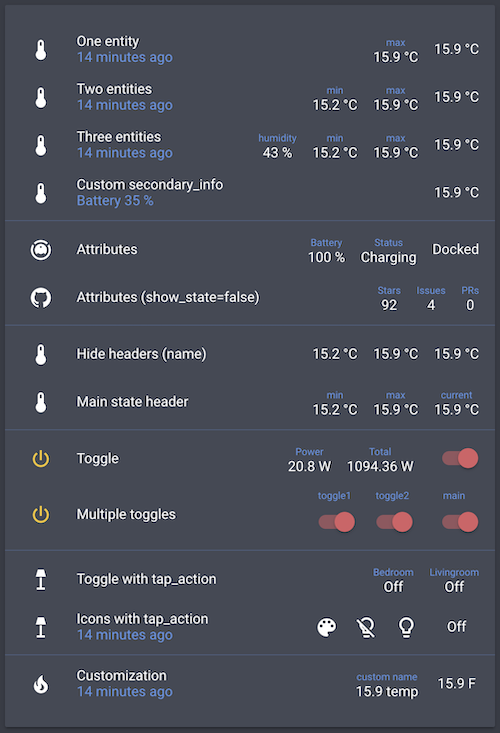
yamltype: entities entities: - entity: sensor.bedroom_temperature type: custom:multiple-entity-row name: One entity secondary_info: last-changed entities: - sensor.bedroom_max_temp - entity: sensor.bedroom_temperature type: custom:multiple-entity-row name: Two entities secondary_info: last-changed entities: - sensor.bedroom_min_temp - sensor.bedroom_max_temp - entity: sensor.bedroom_temperature type: custom:multiple-entity-row name: Three entities secondary_info: last-changed entities: - entity: sensor.bedroom_humidity name: humidity - sensor.bedroom_min_temp - sensor.bedroom_max_temp - entity: sensor.bedroom_temperature type: custom:multiple-entity-row name: Custom secondary_info secondary_info: attribute: battery_level name: Battery unit: '%' - type: section - entity: vacuum.xiaomi_vacuum_cleaner type: custom:multiple-entity-row name: Attributes entities: - attribute: battery_level name: Battery unit: '%' - attribute: status name: Status - entity: sensor.lovelace_multiple_entity_row type: custom:multiple-entity-row name: Attributes (show_state=false) show_state: false entities: - attribute: stargazers name: Stars - attribute: open_issues name: Issues - attribute: open_pull_requests name: PRs - type: section - entity: sensor.bedroom_temperature type: custom:multiple-entity-row name: Hide headers (name) entities: - entity: sensor.bedroom_min_temp name: false - entity: sensor.bedroom_max_temp name: false - entity: sensor.bedroom_temperature type: custom:multiple-entity-row name: Main state header state_header: current entities: - sensor.bedroom_min_temp - sensor.bedroom_max_temp - type: section - entity: switch.livingroom_tv type: custom:multiple-entity-row name: Toggle toggle: true state_color: true entities: - entity: sensor.livingroom_tv_power name: Power - entity: sensor.livingroom_tv_power_total name: Total - entity: switch.livingroom_tv type: custom:multiple-entity-row name: Multiple toggles state_header: main toggle: true state_color: true entities: - entity: switch.livingroom_light name: toggle1 toggle: true - entity: switch.livingroom_light_2 name: toggle2 toggle: true - type: section - entity: light.living_room type: custom:multiple-entity-row name: Toggle with hold_action state_header: Livingroom toggle: false hold_action: action: toggle entities: - entity: light.nightstand name: Bedroom tap_action: action: toggle - entity: light.living_room type: custom:multiple-entity-row name: Icons with tap_action secondary_info: last-changed entities: - entity: light.living_room icon: mdi:palette - icon: mdi:lightbulb-off-outline state_color: true tap_action: action: call-service service: light.turn_off service_data: entity_id: light.living_room - icon: mdi:lightbulb-outline state_color: true tap_action: action: call-service service: light.turn_on service_data: entity_id: light.living_room confirmation: text: 'Are you sure?' - type: section - entity: sensor.bedroom_temperature type: custom:multiple-entity-row name: Customization icon: mdi:fire unit: °F secondary_info: last-changed entities: - entity: sensor.bedroom_max_temp name: custom name unit: temp - type: section - entity: sensor.bedroom_temperature type: custom:multiple-entity-row name: Styles styles: width: 80px text-align: right secondary_info: attribute: battery_level styles: font-weight: bold entities: - entity: sensor.bedroom_max_temp styles: width: 80px text-align: left
My cards
xiaomi-vacuum-card |
multiple-entity-row |
github-entity-row |
battery-entity-row |
attribute-entity-row
Contributors
Showing top 11 contributors by commit count.


Related Repositories

pamidur/aspect-injector
AOP framework for .NET (c#, vb, etc)

wangxiao5791509/Pedestrian-Attribute-Recognition-Paper-List
[Survey@Pattern Recognition] Paper list on Pedestrian Attribute Recognition (PAR) and related tasks (Pattern Recognition 2021)

RocketsChen/CDDStore
高仿国美商城

StefanKovac/flex-layout-attribute
HTML layout helper based on CSS flexbox specification —

samber/slog-multi
🚨 Design workflows of slog handlers: pipeline, middleware, fanout, routing, failover, load balancing...

lyb5834/YBAttributeTextTapAction
一行代码添加文本点击事件/a fast way to implement click event text